YABT
Overview
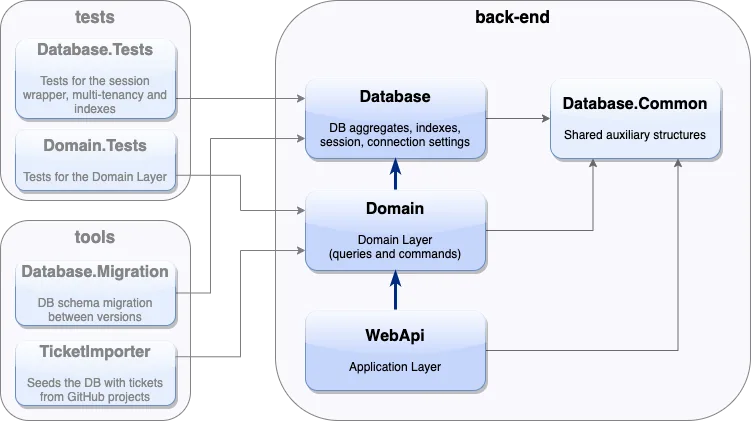
YABT shows how RavenDB fits into a layered .NET business application without forcing database details through every layer. The document store is registered once, domain code works through a database abstraction, tenant rules live in the session wrapper, and the API layer stays focused on application behavior.
For teams evaluating RavenDB in custom line-of-business systems, the sample highlights the pieces that matter in real projects: tenant-aware document access, static indexes for application screens, patch-by-query updates for denormalized references, and tests that run against a real RavenDB database instead of mocked persistence.
Features used
YABT registers IDocumentStore as the application-wide RavenDB entry point and exposes a scoped IAsyncTenantedDocumentSession to the domain layer. The session wrapper centralizes tenant behavior instead of spreading tenant filters across every query handler.
services.AddSingleton<IDocumentStore>(x =>
{
    var config = x.GetRequiredService<DatabaseSettings>();
    return SetupDocumentStore.GetDocumentStore(config, customInit);
});

services.AddScoped<IAsyncTenantedDocumentSession>(x =>
    new AsyncTenantedDocumentSession(docStore, getCurrentTenantIdFunc));
The database project owns the document models and index definitions. Tests create those indexes against RavenDB before exercising domain behavior, so query behavior is verified against the same index model the application uses.
protected override void PreInitialize(IDocumentStore store)
{
    store.PreInitializeDocumentStore();
    store.Conventions.MaxNumberOfRequestsPerSession = 200;
    base.PreInitialize(store);
}

IndexCreation.CreateIndexes(typeof(SetupDocumentStore).Assembly, store);
YABT queues deferred IndexQuery patches and sends them as PatchByQueryOperation after saving the main session changes. That pattern is useful when denormalized document references need to stay consistent without loading every matching document into application code.
while (_deferredPatchQueries.TryDequeue(out var queryIndex))
{
    queryIndex.WaitForNonStaleResults = true;

    await DbSession.Advanced.DocumentStore.Operations.SendAsync(
        new PatchByQueryOperation(queryIndex),
        DbSession.Advanced.SessionInfo,
        token);
}
The test project uses RavenDB's test driver, creates the application's indexes, and opens no-cache sessions with index-waiting settings. The result is fast feedback while still testing real persistence, indexing, tenant filtering, and query behavior.
services.AddScoped(c =>
{
    var docStore = c.GetRequiredService<IDocumentStore>();
    return new AsyncTenantedDocumentSession(
        docStore,
        GetCurrentTenantId,
        TimeSpan.FromSeconds(30),
        true,
        new SessionOptions { NoCaching = true });
});
Technologies
Run locally
- Check out the repository.
- Install the .NET 8 SDK.
- Create a RavenDB database locally, in Docker, or in RavenDB Cloud.
- Import
documentation/exported_data.ravendbdump. - Set the database name and server URL in
back-end/WebApi/appsettings.Development.json. - Run the
WebAPIproject and openhttps://localhost:5001/swagger. - Follow the front-end README to run the Angular UI.
Community & Support
If you spot a bug, have an idea, or want to ask a question, open an issue or pull request in the repository.
License
This project is licensed with the MIT license.
Challenges & Solutions
Tech stack
Category
Enterprise Applications