Getting started: Connecting your database
Achieved so far in Getting Started:
Signing up - your deployment has a name, a license key, and a dashboard API key.
Starting Quill - Quill is running on your machine, and its management dashboard is open.
-
This page covers the third Getting Started step, Connecting your database, walking you through the Add new app wizard's first stages: pointing Quill at your source PostgreSQL, SQL Server, or MySQL database, and settling the tables it may read.
- An app answers its users from Quill's internal database.
- Quill's internal database is a live copy of your source data.
-
Quill's internal database stays current by following the changes your source SQL database records.
Your database needs to be recording those changes. Quill turns change recording on where it can, and reports anything left to set up.
See Prerequisites below for details. -
In this article:
Prerequisites
Quill connects to your source database and reads the tables you select, first in full, and then by following the
changes the source database records, so that Quill's internal database stays current.
This change-tracking technique is known as CDC (Change Data Capture).
Two conditions have to hold before CDC can start:
-
Quill must be able to reach the source database from inside its Docker container.
- Your source database runs outside Quill's container, so the address you give Quill has to lead out of the container to the machine that hosts the database.
- To find the address to use, see the Connect to your source database section below.
-
The source database must be recording its changes.
- On PostgreSQL, a database administrator turns change recording on in the server's configuration. Quill then
creates the objects the change stream needs, as long as the database user whose credentials you provide
holds the
REPLICATIONattribute. - On SQL Server, Quill turns change recording on for you, as long as the database user is a member of the
db_ownerrole. - On MySQL and MariaDB, the change-recording settings are set by a database administrator, and Quill verifies them rather than setting them up.
- The settings and permissions each database requires are given below.
- On PostgreSQL, a database administrator turns change recording on in the server's configuration. Quill then
creates the objects the change stream needs, as long as the database user whose credentials you provide
holds the
PostgreSQL
PostgreSQL streams changes through
logical replication, which records every change
in the PostgreSQL server's write-ahead log in a form a service like Quill can read.
Quill reads this stream as a PostgreSQL user whose credentials you provide.
wal_level:
Must be set to logical.
wal_levelis a configuration parameter, one of the named settings a PostgreSQL server reads from its configuration file,postgresql.conf. A value written there takes effect when the server restarts.wal_leveldecides the level of detail a PostgreSQL server writes to its write-ahead log.- When set to
logical, the write-ahead log carries enough to reconstruct each change. At the other values it does not. - Quill reads
wal_levelwhen it lists your tables, in the Verify your schema stage, and reports an error unless the value islogical.
The REPLICATION attribute:
Must be held by the source database user.
- In PostgreSQL, a role attribute is a permission attached to a database user.
- The
REPLICATIONrole attribute allows two things: reading the stream of changes, and creating the two objects the stream needs.- A publication lists the tables PostgreSQL streams.
- A replication slot records how far Quill has read, so it resumes from the same point after a restart.
- With the
REPLICATIONattribute, Quill creates the publication and the replication slot by itself. - Without the
REPLICATIONattribute, Quill cannot read the stream at all, and reports an error.
The error carries theALTER ROLEstatement that gives the attribute to the PostgreSQL user Quill connects as, which a PostgreSQL superuser can run.
When a row is deleted from a table that has no primary key, PostgreSQL does not report which row it was, so
Quill cannot remove the matching row from its internal database.
Quill will therefore show a warning beside every such table when you
select the tables that your app works with.
SQL Server
SQL Server records changes using its own
Change Data Capture
feature, which copies every change into capture tables.
Quill reads these capture tables as an SQL Server user whose credentials you provide.
Change Data Capture:
Must be enabled on the source database and on each selected table.
- In SQL Server, a database role is a named set of permissions that a database user can be made a member of.
- Enabling CDC changes the source database's configuration, so SQL Server reserves the action for members of the
db_ownerdatabase role. - With
db_ownermembership, Quill enables CDC on the source database and on the tables you select. - Without
db_ownermembership, Quill reports an error.
The error carries theEXEC sys.sp_cdc_enable_db;statement, which a member ofdb_ownercan run on the source database.
The SQL Server Agent service:
Must be running.
- SQL Server does not fill its capture tables as changes happen.
- A scheduled job reads the changes and writes them to the capture tables, and the SQL Server Agent service is what runs the job.
- The Agent service ships with SQL Server, but is not always running. In an SQL Server Docker container the
service is off unless the container was started with
MSSQL_AGENT_ENABLED=true. - While the Agent service is stopped, the capture tables stay empty. Quill connects and lists your tables as
normal, and never receives a change.
Nothing about the connection or the tables is wrong, so Quill reports a stopped Agent service as a warning rather than an error.
The warning appears in the Verify your schema stage, alongside the list of tables. - Azure SQL Database has no Agent service, and needs none: the Azure platform schedules the job itself.
MySQL and MariaDB
Every change made on a MySQL or MariaDB server is recorded in the server's
binary log, the same record these servers send to their
replicas.
Quill reads the binary log as a MySQL or MariaDB user whose credentials you provide, and changes no setting on the
server.
The content of the binary log is controlled by
system variables, the named settings a
MySQL or MariaDB server is configured with.
A MySQL or MariaDB server reads its system variables from its configuration file, my.cnf on Linux or my.ini on
Windows, so a value written there takes effect when the server restarts.
Quill reads the three variables below when it lists your tables, in the
Verify your schema stage, and reports an error for any of the three
that does not hold the required value.
binlog_format:
Must be set to ROW.
- A MySQL or MariaDB server writes to its binary log either the statements it ran, or the rows those statements
changed.
ROWselects the changed rows. - Quill needs
binlog_formatto be set toROWbecause changed rows are what it copies into its internal database. - MariaDB differs here. See On MariaDB at the end of this section.
binlog_row_image:
Must be set to FULL.
- The copy of a changed row that a server writes to its binary log is called a row image, and
binlog_row_imagedecides how much of the row that copy holds. - When set to
FULL, the row image holds every column of the row. When set to other values, the row image holds only some of the columns. - Quill needs
binlog_row_imageto be set toFULLbecause its internal database holds a complete copy of each row.
gtid_mode:
Must be set to ON.
- A GTID (Global Transaction Identifier) is an identifier a MySQL or MariaDB server gives each transaction it commits.
- When
gtid_modeis set toON, every transaction gets a GTID, and the GTID travels with the transaction into the binary log. - Quill needs GTIDs because it keeps the identifier of the last change it read, and resumes from that point after a restart.
enforce_gtid_consistencyhas to be set toONas well, because a MySQL server refuses to turngtid_modeon without it.- MariaDB differs here. See On MariaDB at the end of this section.
Privileges:
Must be held by the source database user: SELECT, REPLICATION SLAVE, and REPLICATION CLIENT.
In MySQL and MariaDB, a privilege is a permission held by a database user, granted by a database administrator
using a GRANT statement.
SELECTallows reading the tables themselves, which serves Quill's first full read of the tables you select.REPLICATION SLAVEallows reading the binary log, which is how Quill follows the changes.REPLICATION CLIENTallows reading the status of the binary log, which tells Quill which log files a server keeps and where the server is writing now.
Quill does not check these privileges.
A missing SELECT privilege surfaces in the Verify your schema
stage, where Quill reads from the tables you select.
A missing REPLICATION SLAVE or REPLICATION CLIENT privilege surfaces only after the app is created, when Quill
starts following the changes.
On MariaDB
- binlog_format - A MariaDB server's default value is
MIXED, so this variable always needs to be set toROW. - gtid_mode - A MariaDB server has no such variable. Transaction identifiers are always on, and Quill reads no value here.
Connecting to your source database
After making your source database reachable and ready to record its changes, Quill needs a name for your app, and the credentials it will use to reach the source database.
Starting the Add new app wizard
Open Quill's management dashboard (as explained in the previous step, Starting Quill).
Then open: My apps > Add app
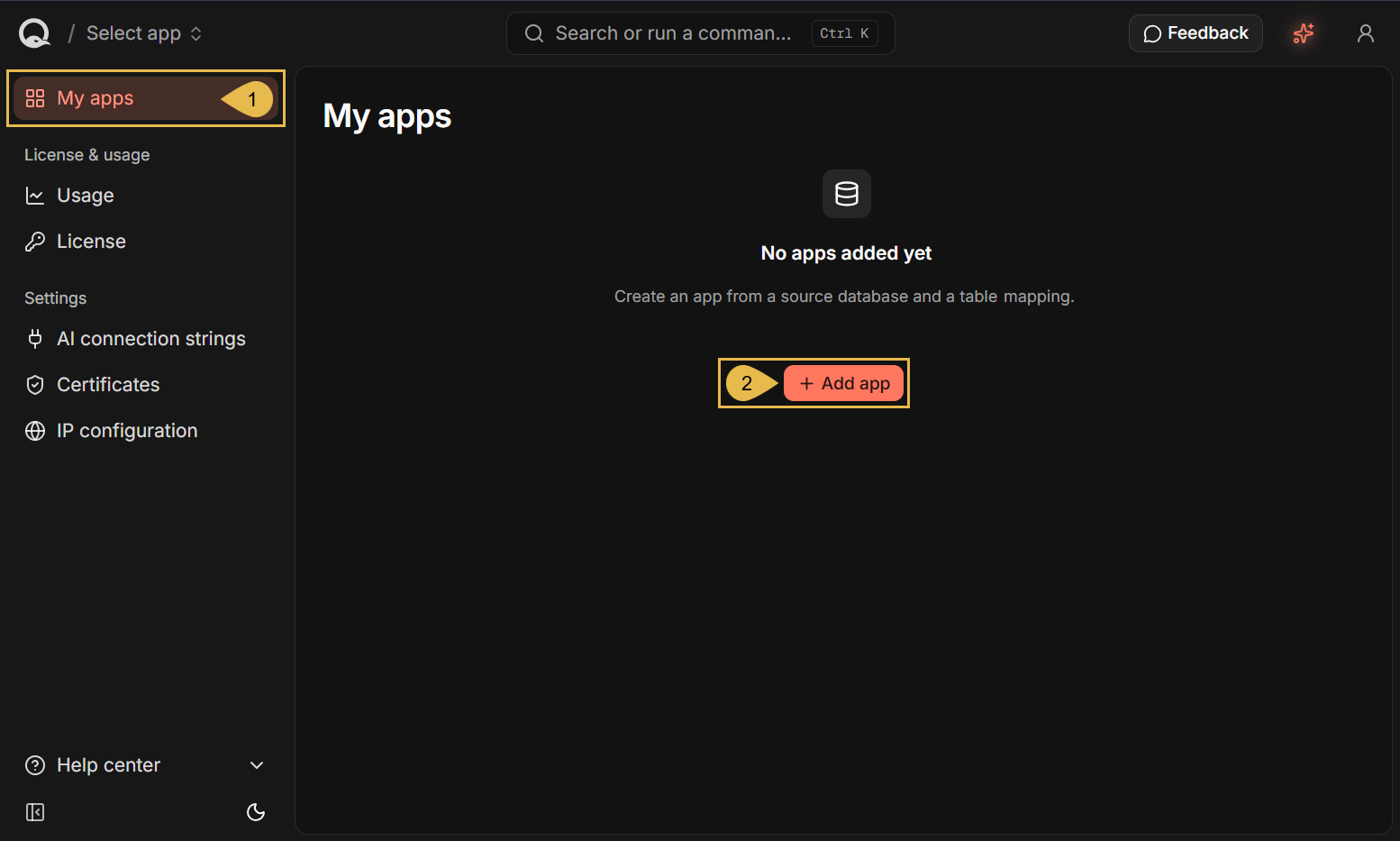
-
My apps
Open the My apps view. -
Add app
Start the Add new app wizard.
Naming your app and entering the connection details
The Add new app wizard opens on its first stage:
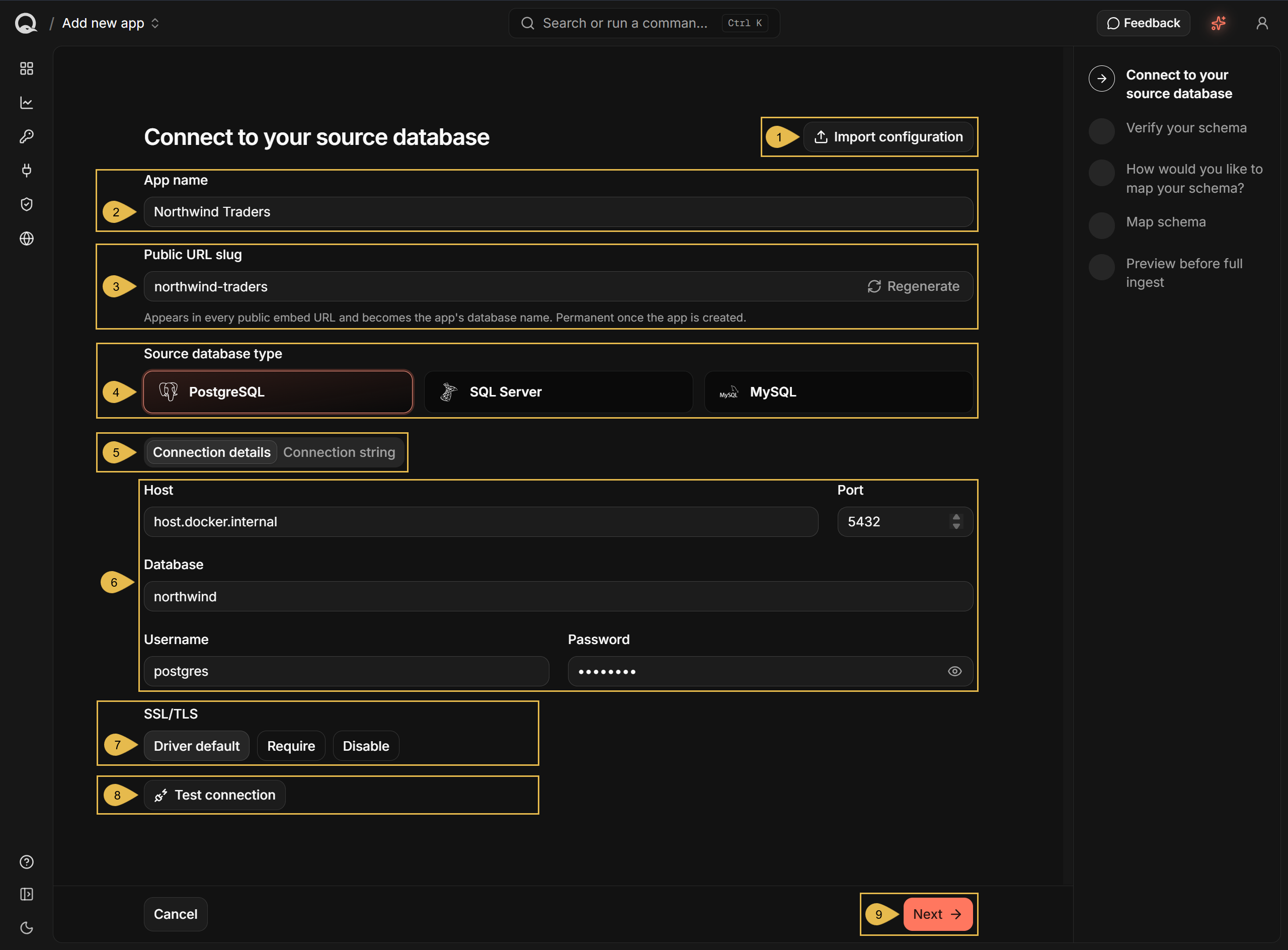
-
Import configuration
An app's configuration can be exported and reused.
Import an exported configuration to fill in its connection and table mapping details.
e.g., to create a second app against the same database without filling the wizard in again. -
App name
Enter a name for your new app.
e.g., Northwind Traders -
Public URL slug
Enter a unique identifier for the app, or click Regenerate to create it automatically.
e.g., Northwind Traders becomesnorthwind-traders
The identifier appears in the public URLs the app is served on, and becomes the name of the app's internal database.Once the app is created, the identifier can no longer be changed.
-
Source database type
Select PostgreSQL, SQL Server, or MySQL.
MySQL is used for both MySQL and MariaDB servers. -
Connection details and Connection string
Choose how to provide the connection: Connection details presents it as separate fields, and Connection string presents the same connection as a single string.
Values entered in either tab are automatically added in the other tab as well. -
The connection fields
Enter the details of your source database:-
Host
Quill runs inside a Docker container. Use the Host field to enter an address that points at the source database's location out of the container.Do not enter
localhostas the Host.
Inside Quill's container,localhostpoints at the container itself, so it never reaches a database running outside the container.- For a source database on the machine that runs Quill, under Docker Desktop, enter:
host.docker.internal - For a source database on the machine that runs Quill, under Docker Engine on Linux, enter the
machine's address on your network.
e.g.,192.168.1.24 - For a source database on another machine, enter the other machine's address.
e.g.,db.example.com
- For a source database on the machine that runs Quill, under Docker Desktop, enter:
-
Port
Enter the port your source database listens on.
The field shows the default port for the database type you selected,5432for PostgreSQL,1433for SQL Server, or3306for MySQL. -
Database
The source database name.
e.g.,northwind -
Username
The database user that Quill will use to connect to the source database.
e.g.,postgres -
Password
The database user's password.
-
-
SSL/TLS
Choose whether the connection to the source database is encrypted:- Driver default
Leaves the choice to the database driver. - Require
Allows only an encrypted connection. - Disable
Turns encryption off.
- Driver default
-
Test connection
Click to test the connection using the provided details.
A working connection is confirmed:

-
Next
Click for the next stage, Verify your schema.
Verifying your schema
The wizard's second stage lists all the tables Quill discovered in your source database, and allows you to select the tables that the app will work with.
- Only the tables you select in this stage are carried into the mapping and into the app's configuration.
- Unselected tables are ignored.
Choosing the tables
Discovered tables are listed for you to select from.
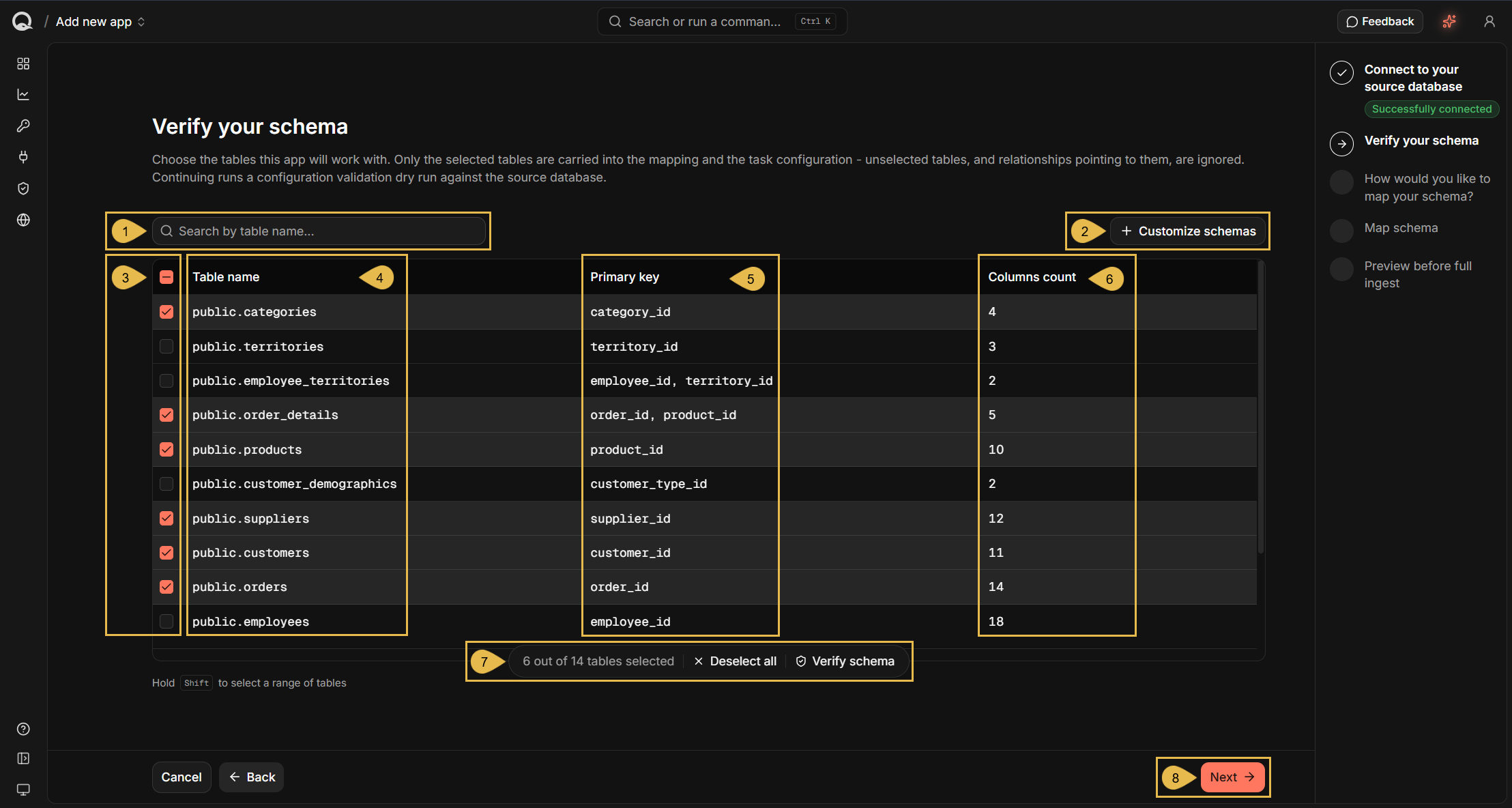
-
Search by table name
Filter the tables by the text you enter. -
Customize schemas
A database groups its tables into schemas. Quill discovers tables from the default schema of the connection you provided,publicon PostgreSQL.
Click to discover tables from other schemas instead.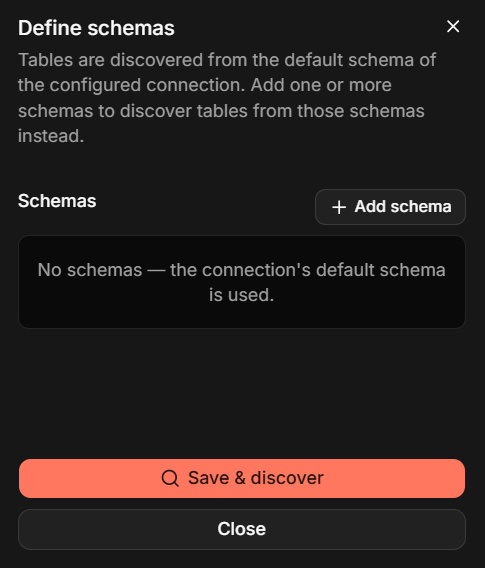
Click Add schema once per schema, and enter the schema's name.
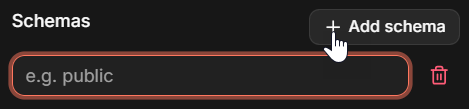
Click Save & discover to list the tables of the schemas you named.
The connection's default schema is discovered only while no other schema is named here. -
The selection column
Select the tables that your app will work with. HoldShiftwhile clicking a checkbox to select a range of tables.
You can select up to 64 tables for a single app. -
Table name
The name of the discovered table, qualified by its schema.
e.g.,public.categoriesOn PostgreSQL, a table is listed with a warning beside its name when its rows cannot be identified in delete events, which happens when the table has no primary key.
Quill cannot carry out these deletions, when the source database informs that a row was deleted, but doesn't specify which row it was. As a result, the deleted row remains in Quill's internal database.
Each warning includes a statement that your database administrator can run on the source database for the table that the warning relates to. After its execution, the source database will start recording whole deleted rows of the table, and Quill will be able to remove the matching rows from its internal database.
e.g.,ALTER TABLE <schema>.<table> REPLICA IDENTITY FULL; -
Primary key
The columns that make up the table's primary key. -
Columns count
The number of columns in the table. -
The selection bar
Appears once a table is selected, to show how many of the discovered tables are selected.-
Click Deselect all to clear the selection.
-
Click Verify schema to check that CDC can run on the selected tables.
The button is replaced by a confirmation when the check passes:

The verification performs the capture setup once, and then undoes it.
Nothing is written into Quill's internal database, and the app is not created yet.- Quill creates the objects needed to capture changes from the selected tables.
- Quill reads one row from each selected table, confirming the tables can be read.
- Quill removes the objects it created, leaving the source database as it found it.
-
-
Next
Click to advance to the mapping stages, covered in Mapping your tables.
Clicking Next runs the same verification as Verify schema, described above, ensuring that CDC can run on the selected tables before advancing to the next stage.
When schema discovery fails
When Quill cannot read your source database's schema, the failure is reported.
The cause for such failures is usually a condition from
Prerequisites that the source database does not meet. In the example
below, the database user lacks the permission Quill needs to set up change recording.
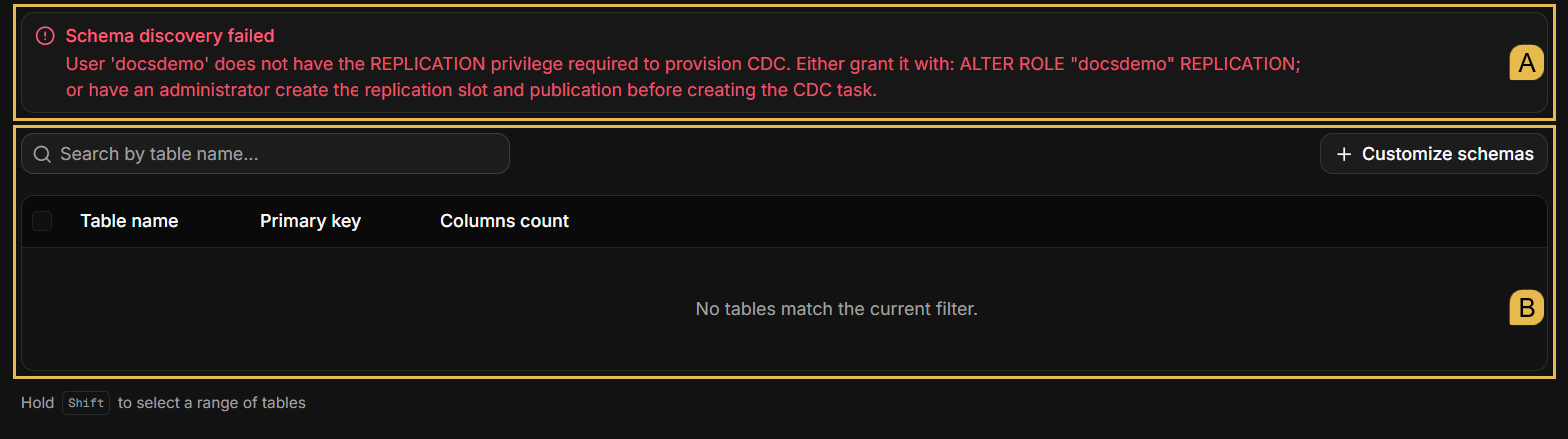
- A. The error message explains what blocked tables discovery, and carries a statement that can be executed by a database administrator to fix it.
- B. The table list remains empty until the problem is resolved.