Access the Mirrored Database with the RavenDB Client API
-
Quill mirrors selected data from your source relational database into a separate RavenDB database for each Quill app.
Quill agents use the mirrored data to compose answers to users' questions. -
Your application can also query the mirrored data directly in RavenDB with the RavenDB Client API.
These queries do not pass through a Quill agent, an LLM, any Quill channel, or the Quill API. -
Direct access uses a client certificate generated on the dashboard's Certificates page.
Give the certificate access only to the app and operations that the application needs. -
In this article:
Connecting to the mirrored database
When to use direct access
Use the RavenDB Client API when your application needs to query or process the mirrored documents directly,
rather than receive an answer composed by a Quill agent.
Typical examples include application search, reporting, scheduled processing, and queries whose exact shape is controlled by your code.
With the RavenDB Client API, your application accesses the mirrored data in RavenDB, not the source relational database:
- The source relational database remains the source of truth.
- Quill's CDC task applies source changes to the mirrored documents asynchronously,
so the mirrored data can lag behind the source. - Querying the mirrored data does not add query load to the source database.
- Changes made directly in RavenDB are not written back to the source database.
The RavenDB Client API connects to RavenDB through https://db.<domain> without passing through the Quill web application.
For details about this connection path and its TLS handling, see Direct database access.
Generate a client certificate
To connect directly to RavenDB, your application must authenticate with a client certificate.
The Dashboard API key authenticates only requests to the Quill API and cannot be used for this connection.
Generate the client certificate in the Quill dashboard:
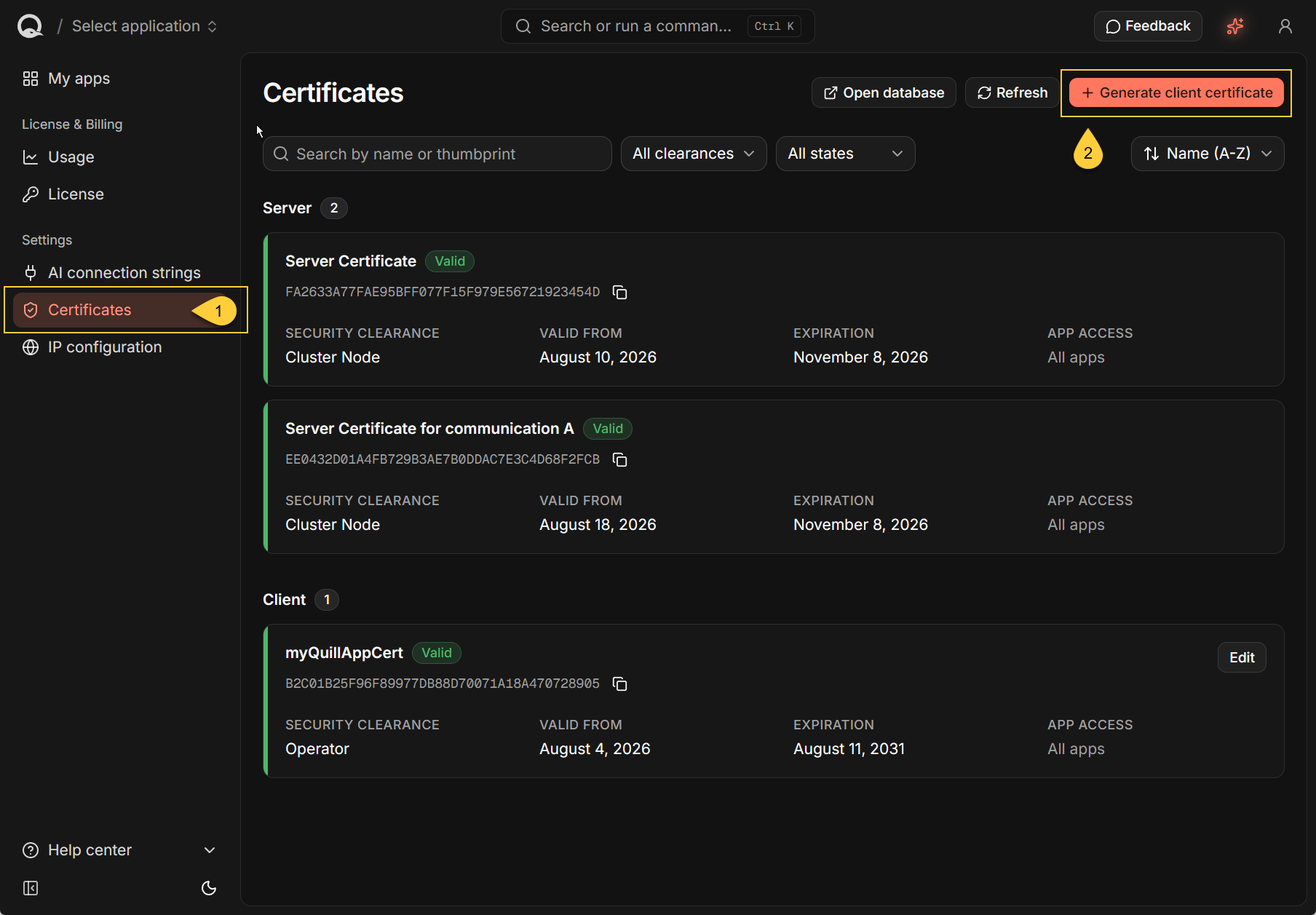
- In the Quill dashboard, open Certificates.
- Select Generate client certificate.
-
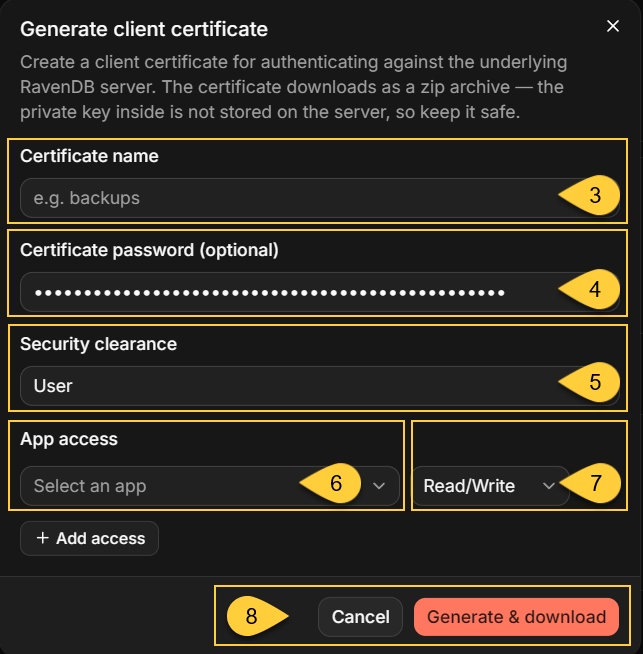
Enter a descriptive Certificate name.
-
Optionally, enter a Certificate password for the
.pfxfile in the downloaded archive. -
Set Security clearance to User.
-
Under App access, select the intended Quill app.
-
Select the least-privileged access level available for the application:
Access The application can Guidance Read/Write Query, store, modify, and delete documents. This is the minimum level available and is used by these examples. Admin Administer the app's RavenDB database. Do not grant to an ordinary application. -
Select Generate & download.
Keep Security clearance set to User for an ordinary application.
An Operator certificate has server-wide authority and is not limited to the selected app.
It can access every app database and Quill's internal configuration database (quill-config by default).
Admin access to an app database can read its database configuration, including the source connection string used by the CDC task. Because that connection string can contain source database credentials, reserve both Admin access and Operator clearance for trusted operators.
Protect the downloaded archive
-
The downloaded archive contains a
.pfx, a.crt, and a.keyfile.
The RavenDB Client API uses the.pfx. -
The optional certificate password encrypts only the
.pfx.
The.keycontains the same private key in unencrypted PEM form, so protect the complete archive as a secret. -
Quill stores the public certificate but does not retain a downloadable copy of the private key.
If the private key is lost, generate a replacement certificate. -
If the certificate or private key is exposed, open Certificates, select Edit, turn Enabled off, and generate a replacement. Disabling the certificate prevents new authentication, but existing connections may remain active until they are closed.
Generated client certificates are valid for five years and cannot be renewed in place.
Before a certificate expires, generate a replacement, update the application to use it, and then disable the old certificate.
For a standard Quill domain, RavenDB presents a publicly trusted wildcard server certificate, so the application needs no additional server-certificate trust configuration. Client certificates are registered separately by thumbprint, so renewing the Quill server certificate does not invalidate them.
Identify the server URL and database
Configure the DocumentStore with both a server URL and an app database name.
They identify different things:
| Property | Set it to | Identifies |
|---|---|---|
Urls | https://db.<domain> | The RavenDB server for your Quill instance. |
Database | The app's RavenDB database name | The database containing that app's mirrored data. |
<domain> is the base domain assigned to your Quill instance.
For example, if your Quill name is acme, the server URL is https://db.acme.myquill.ai.
Quill creates a separate RavenDB database for each app.
For an app created through the current setup flow, the database name is the app slug shown beneath the app name in the dashboard.
For example, the slug northwind-app identifies the RavenDB database named northwind-app.
To retrieve the authoritative database name programmatically, list the Quill apps:
GET https://api.<domain>/api/apps/
X-Api-Key: <dashboard-api-key>
Each app in the response includes both slug and database.
Set DocumentStore.Database to the value of database; do not derive it from the app's display name.
For more information about authenticating this Quill API request, see Operator Authentication.
Connect and run a query
Install the RavenDB client package in your application:
dotnet add package RavenDB.Client
The following .NET 9 or later example loads the .pfx, connects to the app's RavenDB database,
and queries the mapped Products collection:
using System;
using System.Linq;
using System.Security.Cryptography.X509Certificates;
using Raven.Client.Documents;

var certificatePassword =
    Environment.GetEnvironmentVariable("QUILL_CLIENT_CERTIFICATE_PASSWORD");

using var certificate = X509CertificateLoader.LoadPkcs12FromFile(
    @"C:\secrets\quill-client.pfx",
    certificatePassword);

using var store = new DocumentStore
{
    Urls = new[] { "https://db.<domain>" },
    Database = "northwind-app",
    Certificate = certificate
};

store.Initialize();

using var session = store.OpenSession();

var products = session
    .Query<Product>(collectionName: "Products")
    .Take(10)
    .ToList();

foreach (var product in products)
{
    Console.WriteLine(product.Name);
}

public sealed class Product
{
    public string? Name { get; set; }
}
Replace the example values with those for your Quill app:
https://db.<domain>- replace<domain>with the base domain assigned to your Quill instance.northwind-app- replace this with the app'sdatabasevalue returned byGET https://api.<domain>/api/apps/.C:\secrets\quill-client.pfx- the path to the downloaded.pfx.Products- the exact collection name defined by the app's mapping.Productand its properties - a class matching the properties your application reads from the mapped documents.
The example reads the certificate password from an environment variable instead of storing it in source code.
If the .pfx was created without a password, the environment variable can be absent.
Applications targeting .NET 8 or earlier can load the certificate with new X509Certificate2(path, password) instead.
X509CertificateLoader is the recommended API in .NET 9 and later.
The explicit collectionName makes the query target the mapped collection exactly.
Without it, the RavenDB Client API derives the collection name from the .NET type.
For example, Query<Customer>() targets Customers by default.
The collectionName argument applies only to this query.
To override the collection convention throughout the application, configure FindCollectionName before calling Initialize(), which freezes the store conventions.
Topology updates remain enabled in this example, as expected when both db.<domain> and a.<domain> are reachable.
See Topology discovery if the application uses custom DNS or routing.
Working with the mirrored data
Understand the mirrored document structure
The source relational schema is not mirrored one-to-one as a separate RavenDB collection for every table.
The way Quill maps data from the source relational database to RavenDB determines:
- the collection, document, and property names;
- which source tables produce root documents;
- which related rows are embedded as nested objects or arrays;
- which relationships are represented by properties containing other RavenDB document IDs;
- which source columns are stored as RavenDB attachments rather than document properties; and
- how source values are represented in JSON.
Before defining application classes and queries, inspect representative mirrored documents and any attachments they contain.
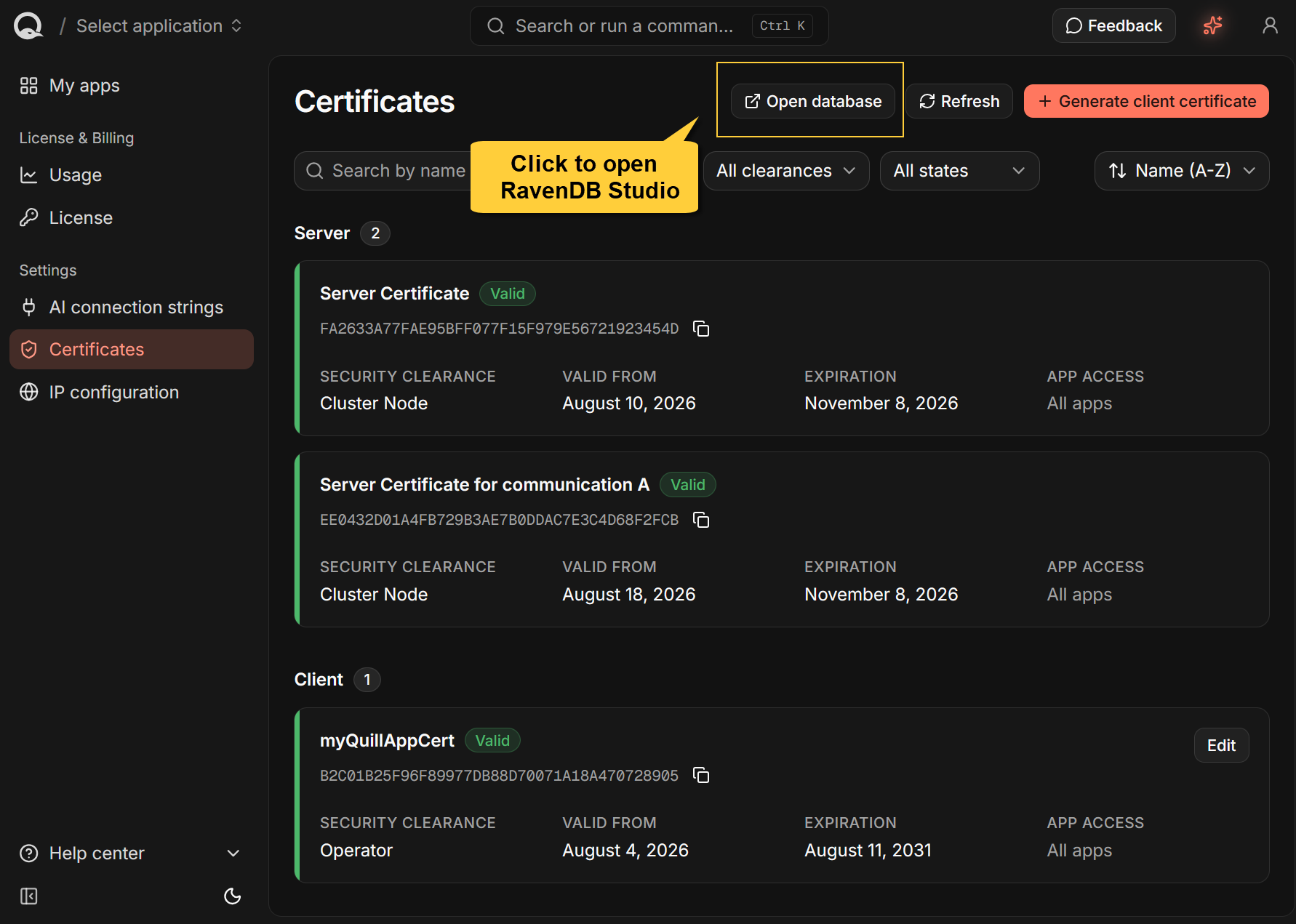
The Open database button on the dashboard's Certificates page opens RavenDB Studio through db.<domain>.
If prompted, select a client certificate that has access to the app database.
You can then inspect the database's collections, documents, and attachments.
For each row from a mapped root table, CDC builds the RavenDB document ID from the mapped collection name and the source primary-key value.
For example, a row with primary key 1 mapped to the Products collection becomes Products/1.
For a composite primary key, each key value contributes another segment to the document ID. Use the collection names, document IDs, and property names found in the app database rather than deriving them from the original table names.
Identify the mapped collections
An app database can contain:
- Mapped collections, which contain data mirrored from the source relational database.
- Internal collections, whose names begin with
@and contain operational data used by Quill or RavenDB.
Examples include@channels,@conversations,@cdc-states, and@widget-theme-defaults. - Application-owned collections, if an application stores its own documents directly in the app database.
Do not use the @-prefixed internal collections as application data.
The following Quill API endpoint lists the collections currently present in the app database whose names do not begin with @:
GET https://api.<domain>/api/apps/{slug}/collections
X-Api-Key: <dashboard-api-key>
The endpoint excludes internal collections, but it does not distinguish CDC-mapped collections from application-owned collections. It may also omit a mapped collection that currently has no documents.
Use the response as a starting point. Then confirm which collections are mirrored from the source relational database by checking the mapping configured for the app's CDC task or by inspecting representative documents in RavenDB Studio.
Inspect the CDC task
Quill creates a CDC Sink task in each app database to keep its mapped documents synchronized with the source relational database.
You can inspect the task and its status:
- In RavenDB Studio, open the app database and go to Ongoing Tasks.
- In client code, use
GetOngoingTaskInfoOperation.
The task name is thecdcTaskNamereturned for the app byGET https://api.<domain>/api/apps/.
using Raven.Client.Documents.Operations.OngoingTasks;

var task = await store.Maintenance.SendAsync(
    new GetOngoingTaskInfoOperation(
        "<cdc-task-name>",
        OngoingTaskType.CdcSink));
A User certificate with Read/Write access can inspect the task.
Admin access is required to edit, enable, disable, or delete it.
Do not modify the CDC task directly
Quill reads the task configuration from the app database.
Changes made in RavenDB Studio or through the RavenDB Client API therefore affect the task used by the Quill app.
| Direct change | Effect |
|---|---|
| Disable the task | Mirroring stops. Existing documents remain available to agents and direct queries, but become stale. |
| Change the source connection or mappings | Changes what CDC reads or writes. This can affect the data used by agents, connected channels, and direct queries. Existing mirrored documents are not automatically removed when mappings change. |
| Rename the task | Quill continues to look for the original task name, so its CDC configuration and monitoring endpoints can no longer find the task. Re-running setup can create another task under the original name. |
| Delete the task | Mirroring stops, but the mirrored documents and the task's @cdc-states progress document remain. Quill does not recreate the task during normal app operation. |
Write only to your application's own documents
For an application that only queries the mirrored data, use a User certificate with the minimum available Read/Write access and keep the application logically read-only.
Quill does not grant new Read permissions, so this access level does not technically prevent writes.
Learn more in: Certificates: Read-only access is not available.
Writes do not update the source database
Changes made through the RavenDB Client API affect only the app's RavenDB database.
They are never written back to the source relational database.
Do not modify mirrored documents or documents used internally by Quill, including the CDC progress documents in the @cdc-states collection.
| Direct change | What can happen |
|---|---|
| Modify mapped properties, nested data, attachments, or metadata | A later applicable source change can overwrite the modification. |
| Delete a mirrored document | A later change to the source row can recreate the document. |
| Create a document at a mirrored ID in the same collection | CDC merges the mapped source properties into the existing document and replaces its metadata. Unmapped top-level properties can remain, producing a mixed document. |
| Create a document at a mirrored ID in another collection | The next CDC write for that row fails, the batch is rolled back, and the checkpoint does not advance until the ID collision is removed. |
Modify or delete a document in @cdc-states | A running task can overwrite the change. If the change remains, it can alter where CDC processing starts the next time the task runs. |
A CDC task can remain configured as Enabled even when an error prevents its mirror from advancing.
Monitor the task's CDC health and errors rather than relying only on its enabled state.
Store application documents separately
-
If an application must store its own documents in the app database,
use collection names and document ID prefixes that cannot overlap with mirrored data or Quill's internal data. -
Document expiration is enabled on every app database and checks for expired documents every 60 seconds. Any application document containing
@expiresmetadata becomes eligible for automatic deletion after that timestamp.
Network behavior and limitations
Topology discovery
Use https://db.<domain> as the initial server URL.
After connecting, the RavenDB Client API reads the server topology.
RavenDB advertises its node as https://a.<domain>, so the client may send subsequent requests through that hostname.
In a standard Quill deployment:
db.<domain>anda.<domain>are public DNS records that resolve to the same Quill host;- the Quill wildcard server certificate covers both hostnames; and
- both hostnames route HTTPS traffic on port
443to RavenDB while preserving client-certificate authentication.
Leave topology updates enabled when the application can resolve and reach both hostnames.
If the application reaches db.<domain> through split-horizon DNS, a hosts-file entry, or a hostname-specific network rule, provide equivalent access to a.<domain>.
If a.<domain> cannot be made reachable, a Quill deployment's single RavenDB node can remain on the configured db.<domain> URL by disabling topology updates.
In the connection example, add the following convention before the existing initialization call:
store.Conventions.DisableTopologyUpdates = true;
For more information, see The a hostname.
Native TCP features are unavailable
Direct RavenDB access through db.<domain> or a.<domain> uses HTTPS on external port 443.
Document loads, queries, and the Changes API require no additional inbound RavenDB port.
The Changes API uses WebSockets through the same HTTPS endpoint.
The Quill container does not expose RavenDB's native TCP listener or publish a corresponding TCP hostname. RavenDB Client API features that require a native TCP connection, such as data subscription workers, are therefore unavailable to applications running outside the Quill container.
Plan for single-node availability
A Quill deployment runs a single RavenDB node.
The topology-discovered a.<domain> hostname provides another route to that same node, not a second node for failover.
If the Quill deployment is unavailable, the RavenDB Client API cannot switch to another RavenDB node.
If the Quill host moves to another IP address, update all Quill DNS records so that db.<domain>, a.<domain>,
and the other Quill hostnames resolve to the new address.
See Moving your Quill to a new IP.
Summary
-
The RavenDB Client API provides a direct path to the mirrored documents and can be used in addition to Quill agents and channels.
-
Generate a User client certificate on the dashboard's Certificates page and grant it access only to the intended app. Grant the minimum available Read/Write access and keep a query-only application logically read-only.
-
Configure the
DocumentStorewithhttps://db.<domain>, the app database name, and the downloaded.pfxcertificate. -
Inspect the mapped collections, document structure, and attachments before defining application classes and queries. Use the exact mapped collection name when it differs from the RavenDB Client API's naming convention.
-
Treat both mirrored documents and documents used internally by Quill as read-only. Direct writes are not sent to the source database and can be overwritten by CDC or prevent the mirror from advancing.
-
Ensure that the application can reach both
db.<domain>and the topology-discovereda.<domain>.
Disable topology updates only whena.<domain>cannot be made reachable. -
Direct access uses HTTPS on port
443. Quill exposes a single RavenDB node and no native TCP listener,
so external clients have no node failover and cannot run data subscription workers.