Writing unit tests with RavenDB Python Test Driver

What you'll learn
- How to give every Python test its own real RavenDB database, with no fixture infrastructure
- Three ways to get a server, two of which need no .NET runtime on the machine
- How to shape each test database with the driver's hooks, and seed it from a database dump
- Why a correct query can still fail an assertion, and how to stop that happening
- What to set on CI so a suite never hangs
Introduction
Mocking a database is commonly used for testing database-driven applications. While mocks offer convenience and a low-effort solution, real database interactions can introduce bugs and unexpected program states. This discrepancy can cause unexpected issues when moving from testing to deployment, ultimately undermining the effectiveness of the testing process.
Your testing process's effectiveness depends heavily on how closely it mirrors real-life production conditions. Testing in an environment similar to production helps detect potential issues early, ensuring a smoother transition to deployment and a more reliable application in users' hands.
We've decided to provide a simple solution that lets developers use the real database instead of mocks with no effort, while working with it in various types of tests. We've created test drivers for exactly that. A test driver starts a real RavenDB server for your test process and hands each test its own database, so your queries run against the same engine that will run them in production rather than against a stand-in. The first call for a store starts that server, and every later call reuses it.
We will run RavenDB in-memory, ensuring each test gets its own separate, isolated database instance. These instances will be automatically disposed of, solving the database-state problem. Provisioning in-memory databases is fast and easy, making the testing seamlessly integrable into CI/CD pipelines. This approach not only simplifies testing but also ensures developers can work with a database environment that closely mimics production conditions, leading to more reliable and accurate test results.
In this article, we'll take a closer look at the Python ravendb-test-driver package. We'll go quickly through the simple setup to focus on the usage. Let's dive into it.
Step-by-Step guide
What we'll use
- Python Tests Framework: We'll utilize the unittest package for writing our test cases. It's not mandatory, pytest or your own favorite framework works the same way.
- RavenDB: We'll integrate the ravendb-test-driver package to interact with RavenDB.
1. Installing RavenDB Test Driver
Begin by installing the ravendb-test-driver package in your project directory using pip:
pip install ravendb-test-driver
Python 3.10 or newer is required. This guide uses ravendb-test-driver 7.2.6 or later: most of the API shown here arrived in 7.2.5.post3, and database dump import in 7.2.6.
The install brings the RavenDB server binaries with it, through the ravendb-embedded package (about 240 MB), along with the ravendb client. The driver requires ravendb 7.2.6.post1 or a later 7.2.x release, so keep your production code on the same client line.
2. Writing your first test
The driver is not meant to be a base class for your test class. Hold an instance instead:
from unittest import TestCase
from ravendb_test_driver import RavenTestDriver

class TestBrewery(TestCase):
    def setUp(self):
        super().setUp()
        self.test_driver = RavenTestDriver()
        self.addCleanup(self.test_driver.close)

    def test_basic_contractor(self):
        with self.test_driver.get_document_store() as store:
            with store.open_session() as session:
                contractor = {"name": "Andy Paulaner"}
                session.store(contractor, "contractors/1")
                session.save_changes()

            with store.open_session() as session:
                loaded = session.load("contractors/1")
                self.assertEqual("Andy Paulaner", loaded["name"])
That is the whole setup. No connection string, no container, no test database to create or clean up.
We could've made the test class inherit from both TestCase and RavenTestDriver, but their constructors don't cooperate. RavenTestDriver.__init__ takes no arguments and doesn't call super().__init__(), so with TestCase listed first the driver never initializes, and with the driver listed first TestCase's methodName argument breaks it. Composition, as used above, avoids the problem. Subclassing the driver itself, to override its hooks, is fine and is shown in step 4. Closing each store (the with block) deletes its database. Registering close as a cleanup catches any store you didn't close, and it runs even when a test raises.
Outside a test class, the driver is also a context manager:
with RavenTestDriver() as driver:
    with driver.get_document_store() as store:
        ...
Each get_document_store() call creates a brand new database, and closing the store deletes it, so two tests writing contractors/1 never see each other's data. There is no truncation step and no ordering constraint to remember.
3. Choosing how your tests get a server
This is the decision that matters most in Python, because it determines what has to be installed on the machines running your tests. There are three options, and the driver defaults to the first unless the RAVENDB_TEST_SERVER_URL environment variable is set (see A server you already run).
Whichever you pick, the call has to happen before the first get_document_store(), and raises if it happens later. A module-level call in your test package's __init__.py, or in conftest.py under pytest, is the usual place.
Bundled server
Nothing to configure. The driver starts a framework-dependent server, which needs a compatible .NET runtime on the machine, because RavenDB's server is a .NET application.
Self-contained server, no .NET required
Ask for a build that carries its own runtime:
from ravendb_test_driver import RavenTestDriver, TestServerOptions

options = TestServerOptions()
options.with_auto_downloaded_server()
RavenTestDriver.configure_server(options)
The download happens right away, when with_auto_downloaded_server() is called, not when the first test runs, so a module-level call in conftest.py downloads while pytest collects your tests. The build is cached per RavenDB release line and platform, by default under ~/.cache/ravendb-embedded/7.2/, and a cached build is never refreshed, so it can be a different 7.2.x release than the bundled server. Operating-system dependencies of RavenDB still apply.
TestServerOptions is the test-side server options class. Its run_in_memory flag defaults to True, so your documents are kept in memory instead of being written to disk. Unless you set data_directory yourself, the driver also redirects the data and log directories to a scratch location instead of the installed package, and removes it when the interpreter exits.
A server you already run, also no .NET required
If CI already has a RavenDB container, or your team shares a development server, the driver can use that instead of starting one. You still get an isolated database per store:
from ravendb_test_driver import RavenTestDriver

RavenTestDriver.configure_external_server("http://localhost:8080")
With HTTPS and certificates:
RavenTestDriver.configure_external_server(
    "https://my-ravendb",
    certificate_pem_path="client.pem",
    trust_store_path="ca.crt",
)
The same thing can come from the environment, which helps in CI where the URL is not known when the test is written:
| Variable | Purpose |
|---|---|
RAVENDB_TEST_SERVER_URL | Use this server instead of starting one |
RAVENDB_TEST_SERVER_CERT | Client certificate in PEM format |
RAVENDB_TEST_SERVER_CA | CA trust store |
This option drops the .NET requirement, but not the download size: the driver imports ravendb-embedded, so pip installs it anyway.
Point it only at a server whose data you are willing to lose. When more than one setting names a server, this is what wins:
configure_external_server()takes precedence overRAVENDB_TEST_SERVER_URL, silently.configure_server()also takes precedence over the variable, and the driver warns that it ignored it.- With neither call, the variable decides. A stray
RAVENDB_TEST_SERVER_URLin the environment silently points the suite at that server, and the driver creates and hard-deletes its test databases there.
Testing against a secured server
If your production code depends on client-certificate authentication, you can exercise it here. The driver passes the client material to every store it creates, so sessions authenticate the way they do in production:
options = TestServerOptions()
options.secured("server.pfx", "client.pem", ca_certificate_path="ca.crt")
RavenTestDriver.configure_server(options)
A secured server configured without a client certificate is rejected before startup, rather than starting a server your tests cannot talk to. See authentication and certificates for how RavenDB uses them.
4. Shaping every test database
Tests in a class usually need the same starting point: the same indexes, the same seed data, the same database configuration. Repeating that in each test is noise, and forgetting it in one test produces a failure that looks like a bug in the code under test.
Subclass the driver and override the hooks. They run in this order:
| Hook | Runs | Use it for |
|---|---|---|
pre_configure_database(database_record) | Before the database is created | Anything in the DatabaseRecord: revisions, expiration, settings |
pre_initialize(document_store) | Before store.initialize() | Conventions, which are frozen once the store initializes |
setup_database(document_store) | After the store is initialized, and after the dump import if you configured one | Deploying indexes, seeding documents, sending maintenance operations |
from ravendb import DocumentStore, ExpirationConfiguration
from ravendb.documents.operations.expiration.operations import ConfigureExpirationOperation
from ravendb.serverwide.database_record import DatabaseRecord
from ravendb_test_driver import RavenTestDriver

class MyRavenTestDriver(RavenTestDriver):
    def pre_configure_database(self, database_record: DatabaseRecord) -> None:
        database_record.settings["Indexing.Static.SearchEngineType"] = "Corax"

    def pre_initialize(self, document_store: DocumentStore) -> None:
        document_store.conventions.max_number_of_requests_per_session = 10

    def setup_database(self, document_store: DocumentStore) -> None:
        expiration_configuration = ExpirationConfiguration(False, 5)
        document_store.maintenance.send(ConfigureExpirationOperation(expiration_configuration))
ExpirationConfiguration(False, 5) means expiration is not disabled, and expired documents are deleted every 5 seconds.
Because the hooks run per store rather than per class, every test gets the same setup applied freshly to its own database.
Seeding a database from a dump
Seeding a large fixture one session.store at a time makes the setup slow and unreadable. Instead, export the data once and let the driver import it into every database it creates, before setup_database() runs:
from ravendb_test_driver import RavenTestDriver

class SeededRavenTestDriver(RavenTestDriver):
    def database_dump_file_path(self) -> str:
        return "tests/fixtures/brewery.ravendbdump"
Override database_dump_file_stream() to return an open binary stream instead. The driver asks for it once, rewinds it for every database it creates when the stream is seekable, and closes it when the driver is closed. A regular file object is seekable. With a stream that isn't, the second get_document_store() call fails with an "Empty stream" error, so return a seekable stream. Produce the file with Export Database in Studio, or with Smuggler. Dump import needs ravendb-test-driver 7.2.6 or later.
For fixture data you generate in code, seed it in setup_database(), and when the volume makes one-at-a-time stores too slow, use bulk insert.
5. Address indexing delays if needed
RavenDB works on indexing in the background. You can find more about it in the RavenDB docs on indexing process and stale indexes. Usually the delay is so small that it can be ignored. In tests it is a common cause of a false negative: you store three documents, query immediately, and get nothing back because the index has not seen them yet.
In the example below we define a test driver that creates the BreweryCustomers/ByShippingAddressLocation spatial index (which can be queried later on) before every test, insert the data, and then instruct the driver to wait for the index to finish processing.
from unittest import TestCase

from ravendb import AbstractIndexCreationTask, DocumentStore
from ravendb_test_driver import RavenTestDriver

class Location:
    def __init__(self, lat: float = None, lng: float = None):
        self.lat = lat
        self.lng = lng

class Customer:
    def __init__(self, name: str = None, shipped_to: Location = None):
        self.name = name
        self.shipped_to = shipped_to

class BreweryCustomers_ByShippingAddressLocation(AbstractIndexCreationTask):
    def __init__(self):
        super().__init__()
        self.map = (
            "docs.Customers.Select(doc => new{\n"
            "    name = doc.name, \n"
            "    shippingLocation = this.CreateSpatialField(doc.shipped_to.lat, doc.shipped_to.lng)\n"
            "})"
        )

class MyRavenTestDriver(RavenTestDriver):
    def setup_database(self, document_store: DocumentStore) -> None:
        BreweryCustomers_ByShippingAddressLocation().execute(document_store)

class TestBasic(TestCase):
    def setUp(self):
        super().setUp()
        self.test_driver = MyRavenTestDriver()
        self.addCleanup(self.test_driver.close)

    def test_brewery_shipping_process(self):
        with self.test_driver.get_document_store() as store:
            with store.open_session() as session:
                customer1 = Customer("Paul Becks", Location(51.509865, -0.118092))
                customer2 = Customer("Arjen Heineken", Location(52.377956, 4.897070))
                customer3 = Customer("Tom Grodziski", Location(52.105124, 20.591883))

                session.store(customer1, "customers/1")
                session.store(customer2, "customers/2")
                session.store(customer3, "customers/3")

                session.save_changes()

            # let's wait for indexes to process the docs before asserting
            self.test_driver.wait_for_indexing(store)

            # assert
The index reads the name and shipped_to fields exactly as the classes define them, and Customer documents go to the Customers collection the map reads from.
Without that call the assertion can fail on a query that is perfectly correct, which is a confusing failure to debug. wait_for_indexing blocks until every index in the database is non-stale, and accounts for side-by-side replacement indexes, so an index being rebuilt cannot let a stale query slip through.
When the indexes and data a test relies on come from setup_database() or a dump, you can also ask for the wait when taking the store. The driver then waits right after setup_database() returns:
from datetime import timedelta
from ravendb_test_driver import GetDocumentStoreOptions

with self.test_driver.get_document_store(
    GetDocumentStoreOptions.with_timeout(timedelta(seconds=30))
) as store:
    ...
This wait happens before your test stores anything, so it doesn't replace the wait_for_indexing(store) call after save_changes().
The full signature is wait_for_indexing(store, database=None, timeout=timedelta(seconds=60)). When the timeout expires it raises a TimeoutException. If an index is in the error state while other indexes are still stale, the wait stops early and the exception message lists the server-side index errors. An errored index that has finished its pass counts as non-stale, though, so the wait can also return normally: if a query still comes back empty after the wait, check the index errors too.
6. Debugging the database
Sometimes an assertion message is not enough and you want to see what is actually stored. Because every test has its own live database on a running server, you can open it.
wait_for_user_to_continue_the_test(store) freezes the test and opens the Raven Studio UI in the background, which lets you investigate the issue and influence the database or server state in the meantime. In the TestBrewery class from step 2:
def test_basic_contractor(self):
    with self.test_driver.get_document_store() as store:
        with store.open_session() as session:
            contractor = {"name": "Andy Paulaner"}
            session.store(contractor, "contractors/1")
            session.save_changes()

        self.test_driver.wait_for_user_to_continue_the_test(store)

        with store.open_session() as session:
            pass
The studio pops out in the browser:
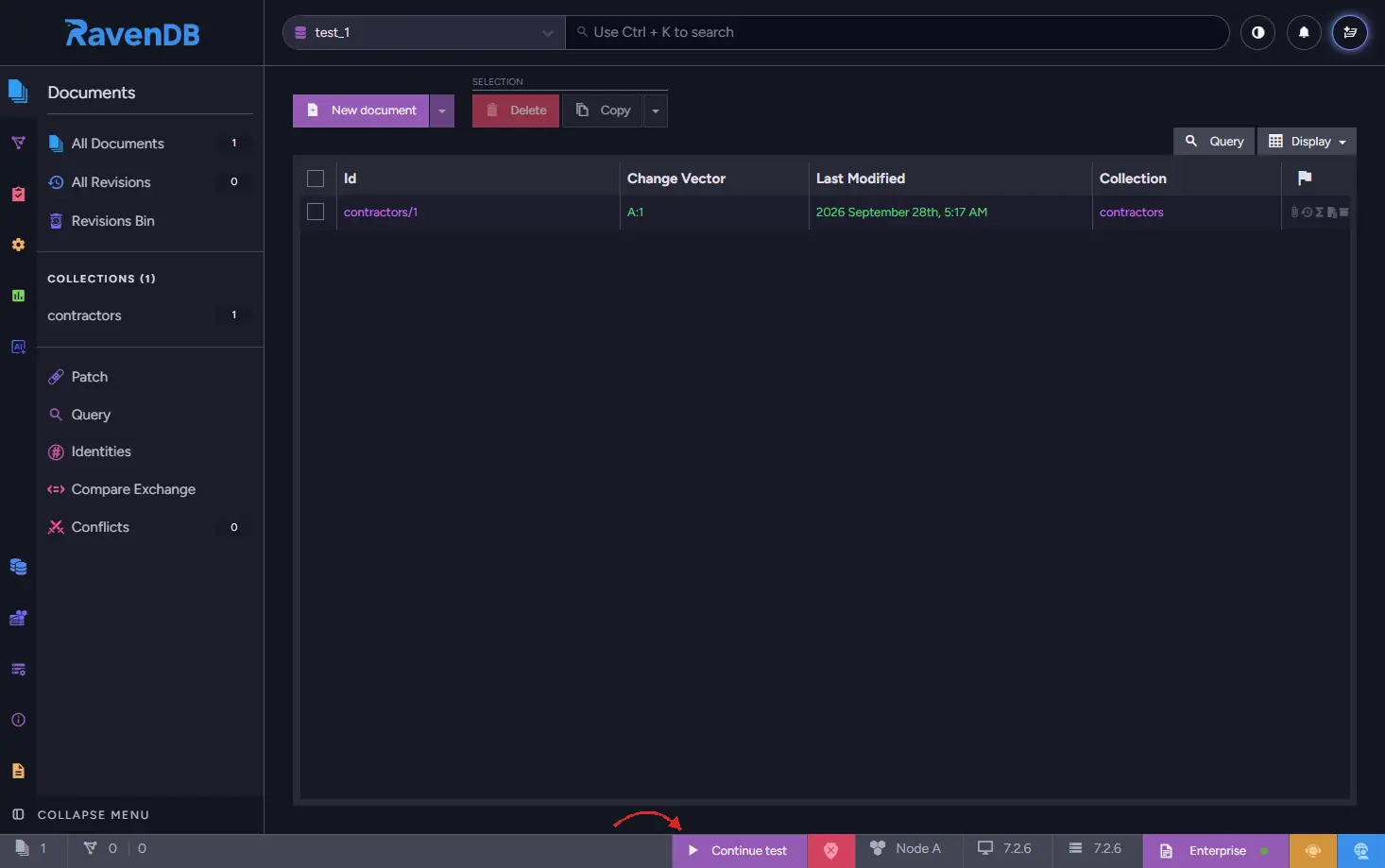
After you're done reviewing your data in a database, click Continue test button located on the bottom UI bar, to continue the execution of a test. That button writes a Debug/Done document, which the driver polls for and then deletes, so a later call cannot return on a stale marker.
The wait is unbounded by default, and on a machine with no browser the driver only prints the Studio URL and keeps waiting, so a forgotten call will hang CI until the job times out. Pass a timeout when you use it, and set RAVENDB_TEST_WAIT_FOR_USER=0 on your CI agents so these waits are skipped there regardless.
from datetime import timedelta

self.test_driver.wait_for_user_to_continue_the_test(store, timeout=timedelta(minutes=15))
open_browser(url) is an ordinary instance method, so override it for a different browser, or for none at all on a headless machine.
7. Running the suite on CI
Three settings are worth knowing before a suite runs unattended.
Name the databases after the tests. By default they are numbered test_1, test_2, and so on, which is unhelpful when you have Studio open and want the one belonging to a particular failing test:
class MyRavenTestDriver(RavenTestDriver):
    use_caller_name_for_database = True
A database created inside test_brewery_shipping_process is then named after that method plus the counter, for example test_brewery_shipping_process_3. Setting RAVENDB_TEST_UNIQUE_DB_NAMES also adds the process id, which matters when several processes share one server, because the counter restarts in each process.
Stop the shared server if the runner needs it. The server outlives any single driver, so usually you can leave it to interpreter exit. If your runner complains about a lingering process, or you don't want to pay for the shutdown at interpreter exit, add this to conftest.py:
from ravendb_test_driver import RavenTestDriver

def pytest_sessionfinish(session, exitstatus):
    RavenTestDriver.stop_test_server()
Expect a useful error on teardown failure. close() raises DriverCloseError if any store failed to close, and its exceptions attribute holds every error collected, so one failing store cannot hide the others.
run_server, default_server_options and cleanup_temp_dirs were never meant to be part of the public surface. They are now _run_server, _default_server_options and _cleanup_temp_dirs, with the old names kept as deprecated aliases. If your test helpers call them, move off the old names.
Registering a license
An unlicensed RavenDB server is limited to 3 CPU cores, so a suite that leans on the database runs on a fraction of the machine. Registering a license raises that limit to what the license allows (up to 9 cores with the free developer license) and unlocks additional features.
The license is set through TestServerOptions, typically from an environment variable so it never lands in source control:
import os
from ravendb_test_driver import RavenTestDriver, TestServerOptions

options = TestServerOptions()
options.licensing.license = os.environ.get("RAVEN_LICENSE")
RavenTestDriver.configure_server(options)
licensing.license_path takes a file instead, if that suits your CI better.
The Python driver does not fail when the license is missing or invalid, so an unlicensed server starts quietly with reduced capabilities. If a test suddenly behaves as though a feature is unavailable, suspect the license before your code. The server log won't help afterwards unless you keep it: it goes to the scratch directory, which the driver deletes when the interpreter exits, so set data_directory (the logs follow it) if you want to read it. See the licensing overview.
To get a free developer license, visit the RavenDB license request page. The request page lists it as suitable for development, CI and QA purposes (not production, staging or UAT) and as not applicable for commercial use, and it must be renewed every 6 months: a license stored in your CI secrets will expire and has to be replaced.
Summary
Using ravendb-test-driver gives your Python tests a real, isolated RavenDB database per test, removing the gap between mocked behavior and production behavior.
- Hold a RavenTestDriver instance rather than inheriting from it in your test class, and register close as a cleanup. The driver's constructor doesn't cooperate with TestCase's, so combining the two in one class breaks initialization.
- Decide how your tests get a server before the first store: bundled by default, with_auto_downloaded_server() when you do not want a .NET runtime installed, or configure_external_server() to use a server you already run. Keep stray RAVENDB_TEST_SERVER_URL values out of environments that don't mean it.
- Subclass the driver for its hooks: pre_configure_database() for the database record, pre_initialize() for conventions, database_dump_file_path() to seed from a dump, and setup_database() for indexes and data generated in code.
- Always call wait_for_indexing() before asserting on query results. RavenDB indexes asynchronously, and even a single document can produce a false negative if the index has not processed it yet.
- The wait_for_user_to_continue_the_test() helper waits forever unless you pass a timeout, so pass one and set RAVENDB_TEST_WAIT_FOR_USER=0 on CI agents.