Writing unit tests with RavenDB Node.js Test Driver

What you'll learn
- How to give every Node.js test its own real RavenDB database, with no fixture infrastructure
- How to configure the shared server exactly once, from any test file
- How to shape each test database with hooks passed as constructor options
- Why a correct query can still fail an assertion, and how to stop that happening
- What vitest, mocha and jest each need, and why they need different things
Introduction
Mocking a database is commonly used for testing database-driven applications. While mocks offer convenience and a low-effort solution, real database interactions can introduce bugs and unexpected program states. This discrepancy can cause unexpected issues when moving from testing to deployment, ultimately undermining the effectiveness of the testing process.
Your testing process's effectiveness depends heavily on how closely it mirrors real-life production conditions. Testing in an environment similar to production helps detect potential issues early, ensuring a smoother transition to deployment and a more reliable application in users' hands.
We've decided to provide a simple solution that lets developers use the real database instead of mocks with no effort, while working with it in various types of tests. We've created test drivers for exactly that. A test driver starts a real RavenDB server for your test process and hands each test its own database, so your queries run against the same engine that will run them in production rather than against a stand-in. The first call for a store starts that server, and every later call reuses it.
We will run RavenDB in-memory, ensuring each test gets its own separate, isolated database instance. These instances will be automatically disposed of, solving the database-state problem. Provisioning in-memory databases is fast and easy, making the testing seamlessly integrable into CI/CD pipelines. This approach not only simplifies testing but also ensures developers can work with a database environment that closely mimics production conditions, leading to more reliable and accurate test results.
In this article we'll take a closer look upon npm ravendb-testdriver package. We'll go quickly through the simple setup, to focus on the usage. Let's dive into it.
Step-by-Step guide
What we'll use
- Node.js Tests Framework: We'll utilize vitest for writing our test cases. It's not mandatory, mocha and jest are covered further down.
- RavenDB: We'll integrate the ravendb-testdriver package to interact with RavenDB.
1. Installing RavenDB Test Driver
Begin by adding the ravendb-testdriver package to your project as a development dependency:
npm install --save-dev ravendb-testdriver
pnpm add -D ravendb-testdriver works the same way. Node.js 22 or newer is required.
The ravendb client, which your production code already uses, is a peer dependency of the driver. npm and pnpm install peer dependencies automatically, Yarn does not, so with yarn add -D ravendb-testdriver make sure ravendb is in your dependencies as well.
The package itself doesn't contain the RavenDB server. The binaries are downloaded the first time a server starts, which requires licensing.eulaAccepted = true (the setup below sets it), and are cached per version and platform: by default in ~/.cache/ravendb-embedded on Linux and macOS, and in %LOCALAPPDATA%\ravendb-embedded on Windows. The download is large, which is why every runner configuration below raises timeouts to 300 seconds, and why caching that directory in CI is worth doing.
2. Configuring the server
The server is shared across the whole test process, so it has to be configured once, before the first store is created. Having every test file guarantee that ordering would be awkward, so the driver provides configureServerOnce: the first registration wins, later calls are no-ops even after the server has started, and the factory runs at most once. That makes it safe to call from the top of every test file, which is what you want when the runner decides file order for you.
// test/serverOptions.ts
import * as fs from "node:fs";
import * as os from "node:os";
import * as path from "node:path";
import { TestServerOptions } from "ravendb-testdriver";

export function createServerOptions(): TestServerOptions {
    const tempDir = fs.mkdtempSync(path.join(os.tmpdir(), "ravendb-test-"));

    const options = new TestServerOptions();
    options.dataDirectory = path.join(tempDir, "data");
    options.logsPath = path.join(tempDir, "logs");
    options.licensing.eulaAccepted = true;
    options.licensing.license = process.env["RAVEN_LICENSE"];

    return options;
}
Then, at the top of each test file:
import { RavenTestDriver } from "ravendb-testdriver";
import { createServerOptions } from "./serverOptions";

RavenTestDriver.configureServerOnce(createServerOptions);
Registering a license
The server needs a license. Without a valid one it doesn't start, and the first getDocumentStore() call fails, so register your license before you write the first test.
The helper above registers it from the RAVEN_LICENSE environment variable, so it never lands in source control. licensing.licensePath takes a file instead, if that suits your CI better. See the licensing overview for details.
To get a free developer license, visit the RavenDB license request page. The request page lists it as suitable for development, CI and QA purposes (not production, staging or UAT) and as not applicable for commercial use, and it must be renewed every 6 months: a license stored in your CI secrets will expire and has to be replaced.
configureServer(options) is the plain version. It throws once the server has started, so call it only from code that runs exactly once per driver module, such as a Mocha --require file. Under Vitest, setupFiles run again before every test file and globalSetup runs in a different process, so use configureServerOnce there. TestServerOptions also carries serverUrl and commandLineArgs, so it is the place to shape the server generally. The server itself runs RavenDB 7.2.5 unless you pin another version with the RAVENDB_EMBEDDED_SERVER_VERSION environment variable.
3. Writing your first test
Create a driver and ask it for a store:
import { afterAll, beforeAll, describe, expect, it } from "vitest";
import type { IDocumentStore } from "ravendb";
import { RavenTestDriver } from "ravendb-testdriver";
import { createServerOptions } from "./serverOptions";

RavenTestDriver.configureServerOnce(createServerOptions);

describe("contractors", () => {
    const driver = new RavenTestDriver();
    let store: IDocumentStore;

    beforeAll(async () => {
        store = await driver.getDocumentStore();
    });

    afterAll(async () => {
        await driver.dispose();
    });

    it("stores and loads a contractor", async () => {
        {
            const session = store.openSession();
            await session.store(
                { name: "Andy Paulaner", "@metadata": { "@collection": "Contractors" } },
                "contractors/1");
            await session.saveChanges();
        }

        {
            const session = store.openSession();
            const contractor = await session.load<{ name: string }>("contractors/1");
            expect(contractor?.name).toBe("Andy Paulaner");
        }
    });
});
The @metadata entry puts the plain object into the Contractors collection. Without it, a plain object whose type the client doesn't know lands in the @empty collection: loading it by ID still works, but collection queries and indexes won't find it.
Each getDocumentStore() call creates a brand new database, named test_1, test_2 and so on, and dispose() deletes the databases of every store the driver handed out. Isolation is per store, not per test: the example above takes one store in beforeAll, so every test in that describe shares one database. When tests must not see each other's writes, call getDocumentStore() inside each test, or in a beforeEach. Pass a name as the second argument, getDocumentStore(options, "orders"), and it is used as the prefix instead of test (orders_N, numbered by the same counter as test_N), which makes a test's database easier to find in Studio.
When a driver serves a single test, you can let the language handle its teardown instead of an afterAll:
it("uses a driver of its own", async () => {
    await using driver = new RavenTestDriver();

    const store = await driver.getDocumentStore();
    // ... the driver and its databases are disposed when the test ends
});
await using needs TypeScript 5.2 or newer. Keep it inside the test body: at the top level of a test file the driver would be disposed as soon as the file finishes loading, before any test runs.
4. Shaping every test database
Tests usually need the same starting point: the same indexes, the same seed data, the same database configuration. Unlike the other RavenDB test drivers, you do not have to subclass anything to arrange that. Pass the hooks straight to the constructor:
const driver = new RavenTestDriver({
    preConfigureDatabase: (databaseRecord) => {
        databaseRecord.settings ??= {};
        databaseRecord.settings["Indexing.Static.SearchEngineType"] = "Corax";
    },
    preInitialize: (store) => {
        store.conventions.maxNumberOfRequestsPerSession = 10;
    },
    setupDatabase: async (store) => {
        const session = store.openSession();
        await session.store(
            { name: "Coffee beans", price: 12.0, "@metadata": { "@collection": "Products" } },
            "products/coffee");
        await session.saveChanges();
    },
});
They run in this order:
| Hook | Runs | Use it for |
|---|---|---|
preConfigureDatabase(databaseRecord) | Before the database is created | Anything in the DatabaseRecord: revisions, expiration, settings |
preInitialize(store) | Before the store is initialized | Conventions, which are frozen once the store initializes |
setupDatabase(store) | After the store is initialized | Deploying indexes, seeding documents, sending maintenance operations |
Subclassing works too, and overriding the same method names does the same thing. A subclass suits a fixture shared by a whole suite, constructor options suit a single file. If a hook throws, the driver deletes the database it had already created before rejecting, so a failed setup leaves nothing behind.
Seeding a database from a dump
Seeding a large fixture one session.store at a time makes the setup slow and unreadable. Instead, export the data once and let the driver import it into every database it creates, before setupDatabase runs:
const driver = new RavenTestDriver({
    databaseDumpFilePath: "test/fixtures/brewery.ravendbdump",
});
Produce the file with Export Database in Studio, or with Smuggler.
databaseDumpFileStream also exists, but a stream can only be read once: the first getDocumentStore() call consumes it, so a second store on the same driver cannot import the dump again. Use databaseDumpFilePath whenever one driver hands out more than one store.
5. Address indexing delays if needed
RavenDB works on indexing in the background. You can find more about it in the RavenDB docs on indexing process and stale indexes. Usually the delay is so small that it can be ignored. In tests, it is a common cause of a false negative: you store documents, query immediately, and get nothing back because the index has not seen them yet.
import { afterAll, describe, expect, it } from "vitest";
import { AbstractJavaScriptIndexCreationTask } from "ravendb";
import { RavenTestDriver } from "ravendb-testdriver";
import { createServerOptions } from "./serverOptions";

RavenTestDriver.configureServerOnce(createServerOptions);

interface Product {
    name: string;
    price: number;
}

class Products_ByName extends AbstractJavaScriptIndexCreationTask<Product> {
    constructor() {
        super();
        this.map("Products", p => ({ name: p.name, price: p.price }));
    }
}

const driver = new RavenTestDriver({
    setupDatabase: async (store) => {
        const session = store.openSession();
        await session.store(
            { name: "Coffee beans", price: 12.0, "@metadata": { "@collection": "Products" } },
            "products/coffee");
        await session.store(
            { name: "Grinder", price: 89.0, "@metadata": { "@collection": "Products" } },
            "products/grinder");
        await session.saveChanges();

        await new Products_ByName().execute(store);
    },
});

afterAll(async () => {
    await driver.dispose();
});

describe("catalog", () => {
    it("finds a product by name", async () => {
        const store = await driver.getDocumentStore();

        await driver.waitForIndexing(store);

        const session = store.openSession();
        const results = await session.query({ indexName: "Products/ByName" })
            .whereEquals("name", "Grinder")
            .all();

        expect(results).toHaveLength(1);
    });
});
The class Products_ByName is deployed as the index Products/ByName, which is the name the query uses.
waitForIndexing blocks until every index in the database is non-stale, with a 60 second default, then throws. If an index is in the error state while other indexes are still stale, the wait stops early and the error message lists the server-side index errors. An errored index that has finished its pass counts as non-stale, though, so the wait can also return normally: if a query still comes back empty after the wait, check the index errors too.
There are two shorthands worth knowing. When the indexes and data come from setupDatabase or a dump, as they do here, ask for the wait when you take the store, and the driver waits right after setupDatabase:
const store = await driver.getDocumentStore({ waitForIndexingTimeout: 60_000 });
This wait happens before your test writes anything, so documents a test stores itself still need waitForIndexing afterwards. Or, when only one query needs it, let the query itself wait for its index:
const results = await session.query({ indexName: "Products/ByName" })
    .waitForNonStaleResults()
    .whereEquals("name", "Grinder")
    .all();
waitForIndexing(store, database, timeout) also takes an explicit database name and a timeout in milliseconds.
6. Debugging the database
Sometimes an assertion message is not enough and you want to see what is actually stored. Because the test's store points at a live database on a running server, you can open it.
waitForUserToContinueTheTest(store) freezes the test and opens the Raven Studio UI in the background, which lets you investigate the issue and influence the database or server state in the meantime.
await driver.waitForUserToContinueTheTest(store);
The studio pops out in the browser:
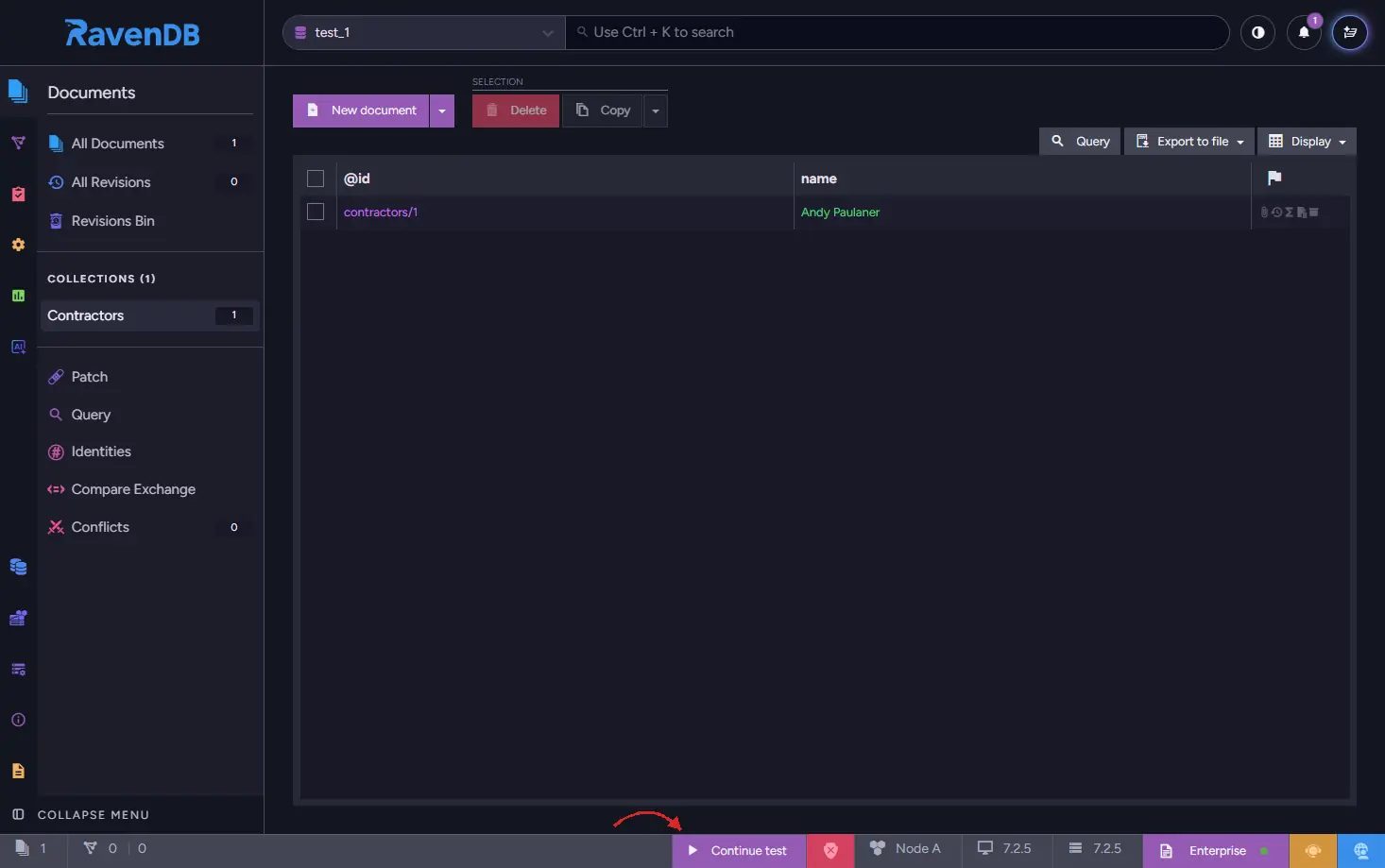
After you're done reviewing your data in a database, click Continue test button located on the bottom UI bar, to continue the execution of a test. That button writes a Debug/Done document, which is what the driver polls for.
The Node.js driver does not check whether a debugger is attached, and the wait has no timeout: it opens a browser and blocks until that document appears. A forgotten call stalls the test until your runner's timeout fails it (300 seconds with the configurations below). On a Linux agent without xdg-open, the browser launch also raises an unhandled spawn xdg-open ENOENT error: Mocha then fails the test at once, while Vitest and Jest report the error and still wait for the timeout. Treat it as a debugging tool you delete rather than something you leave in place.
The browser is launched by the overridable openBrowser(url) method, so override it in a subclass if you want a different browser, or none at all on an agent with no desktop session. The default implementation also prints the Studio URL to the console, so you can open it by hand.
7. Configuring your test runner
The driver keeps its server at module scope, so there is one server per loaded copy of the driver module. In a plain Node process that means one server per process, but test runners that isolate test files load a fresh copy of the module for each file, so each runner needs different settings to get one server per run, where that is possible at all.
Vitest runs every test file in an isolated environment by default, and with the forks pool each file gets its own child process, which would start one server per file. fileParallelism: false runs the files one at a time, and isolate: false runs them all in the same fork with a shared module cache, so one server serves the whole run.
// vitest.config.ts
import { defineConfig } from "vitest/config";

export default defineConfig({
    test: {
        testTimeout: 300_000,
        hookTimeout: 300_000,
        pool: "forks",
        fileParallelism: false,
        isolate: false,
    },
});
With isolation off, test files also share every other module's state, which is exactly what lets them share the server. That is fine as long as your test files don't rely on side effects from each other. Leave out isolate: false and each file starts its own server, even with fileParallelism: false.
Mocha: leave --parallel off. Mocha then runs every file in one process, so the module-level server is shared across files, and a single root-level hook stops it.
// test/root-hooks.test.js
const { RavenTestDriver } = require("ravendb-testdriver");

after(async () => {
    await RavenTestDriver.stopServer();
});
And in .mocharc.json:
{
  "spec": "test/**/*.test.js",
  "timeout": 300000
}
Without that hook the live server process keeps the event loop alive and mocha hangs after an otherwise green run. Root-level after hooks from all files run together at the very end, so keep each file's driver.dispose() in an after hook inside its describe block, where it runs as soon as that block finishes. A dispose() registered at the top level of a file could run after the server is already gone.
Registering the hook as an ordinary spec file is the simplest option. A file loaded through .mocharc.json's require runs before Mocha installs its globals, so a bare after() there fails with after is not defined; that route needs Mocha's root hook plugin format (exports.mochaHooks) instead.
Jest gives each test file its own module registry, so each file starts its own server even under --runInBand, and each file has to stop its own:
const { RavenTestDriver } = require("ravendb-testdriver");

const driver = new RavenTestDriver();

afterAll(async () => {
    await driver.dispose();
    await RavenTestDriver.stopServer();
});
Run it with node --experimental-vm-modules node_modules/jest/bin/jest.js --runInBand and testTimeout: 300000.
A globalTeardown cannot do this job: it runs in yet another module registry where it would see no server and stop nothing. The registry that started a server is the only one that can stop it. Paying for a server per file is inherent to jest rather than something the driver can work around, so if that cost matters, use vitest or mocha instead.
stopServer() stops the shared server and resets its configuration, so a later configureServer takes effect again.
Summary
Using ravendb-testdriver gives your Node.js tests real, isolated RavenDB databases, removing the gap between mocked behavior and production behavior.
- Call configureServerOnce(factory) at the top of every test file. The first registration wins, so ordering between files stops mattering.
- Set licensing.eulaAccepted and register your license, for example from the RAVEN_LICENSE environment variable, or the first getDocumentStore() call fails.
- Create a RavenTestDriver and call getDocumentStore(). Every call creates a fresh database, and dispose() deletes them all. For a driver that serves a single test, await using inside the test handles teardown for you.
- Pass preConfigureDatabase, preInitialize and setupDatabase as constructor options, or override them in a subclass. For large fixtures use databaseDumpFilePath, not the stream, which can only be read once.
- Always call waitForIndexing(store) before asserting on query results, or pass waitForIndexingTimeout to getDocumentStore when the data comes from setupDatabase.
- Match your runner: vitest with pool forks, fileParallelism false and isolate false shares one server across the run, mocha needs one root after hook calling stopServer(), and jest starts a server per file and needs stopServer() in each one.