Writing unit tests with RavenDB .NET Test Driver

There are many advantages of testing with real databases over mocks. You can test real query flow, ensure that your results match what the database engine will do and avoid complicated and often fragile setup. The major disadvantage for wanting to avoid using a real database in tests is speed and complexity. Databases are inherently stateful, while you want to start each test as a new slate.
We assume that you are familiar with both RavenDB and unit testing in .NET in this article. We’ll cover how you can use RavenDB in your tests with ease, without giving up the rapid feedback that fast tests give you.
What you'll learn
- How to avoid shortfalls of mocking the database
- How to integrate RavenDB.TestDriver into your .NET project with no effort
- How to create integration tests that use a real, in-memory database, far more similar to production environment
Introduction
Mocking a database is commonly used for testing database-driven applications. While mocks offer convenience and a low-effort solution, real database interactions can introduce bugs and unexpected program states. This discrepancy can cause unexpected issues when moving from testing to deployment, ultimately undermining the effectiveness of the testing process.
Your testing process's effectiveness depends heavily on how closely it mirrors real-life production conditions. Testing in an environment similar to production helps detect potential issues early, ensuring a smoother transition to deployment and a more reliable application in users' hands.
We've decided to provide a simple solution that lets developers use the real database instead of mocks with no effort, while working with it in various types of tests. We've created test drivers for exactly that. A test driver starts a real RavenDB server for your test process and hands each test its own database, so your queries run against the same engine that will run them in production rather than against a stand-in. The first call for a store starts that server, and every later call reuses it.
We will run RavenDB in-memory, ensuring each test gets its own separate, isolated database instance. These instances will be automatically disposed of, solving the database-state problem. Provisioning in-memory databases is fast and easy, making the testing seamlessly integrable into CI/CD pipelines. This approach not only simplifies testing but also ensures developers can work with a database environment that closely mimics production conditions, leading to more reliable and accurate test results.
In this article we'll take a closer look upon NuGet RavenDB.TestDriver package.
We'll go quickly through the simple setup, to focus on the usage. Let's dive into it.
Step-by-Step guide
What we'll use
- C# Tests Framework: We'll utilize the XUnit package for writing our test cases. It's not mandatory, use your own favorite framework.
- RavenDB: We'll integrate the RavenDB.TestDriver package to interact with RavenDB.
1. Installing RavenDB Test Driver
Begin by including the RavenDB.TestDriver package in your project:
dotnet add package RavenDB.TestDriver
It will install the test driver along with the RavenDB server binaries.
The RavenDB server is a framework-dependent .NET application, so the machine running your tests, including your CI agents, needs both the matching .NET Runtime and ASP.NET Core Runtime installed. The exact version moves with RavenDB releases (RavenDB.TestDriver 7.2.6 asks for 10.0.11 or a later 10.0 patch), and if it is missing the first test fails at startup with a message naming the version it wanted.
Registering a license
The Test Driver's server needs a license. Without a valid one it doesn't start, and your first test fails with "Unable to start the RavenDB Server", so register your license before you write the first test.
The simplest way is the RAVEN_LICENSE environment variable, which the server picks up from the environment it inherits and which keeps the license out of source control. You can also pass it explicitly through TestServerOptions, together with any other server settings you need:
using System;
using System.Runtime.CompilerServices;
using Raven.TestDriver;

public static class TestServerSetup
{
    [ModuleInitializer]
    public static void Init()
    {
        RavenTestDriver.ConfigureServer(new TestServerOptions
        {
            Licensing =
            {
                EulaAccepted = true,
                License = Environment.GetEnvironmentVariable("RAVEN_LICENSE")
            }
        });
    }
}
ConfigureServer has to run before the first GetDocumentStore() call and throws if it runs later, which is why it belongs in a ModuleInitializer: it runs when the test assembly loads, before any test. A static constructor on one test class is not enough, because it only runs when that class is first used, and another test class may start the server before that. TestServerOptions also carries DataDirectory, LogsPath, FrameworkVersion and CommandLineArgs, so it is the place to shape the server generally. Licensing.LicensePath takes a file instead of a string.
To get a free developer license, visit the RavenDB license request page. The request page lists it as suitable for development, CI and QA purposes (not production, staging or UAT) and as not applicable for commercial use, and it must be renewed every 6 months: a license stored in your CI secrets will expire and has to be replaced. See the licensing overview for details.
2. Integrating Test Driver into your tests
Your test class like BasicTest should be inheriting RavenTestDriver from Raven.TestDriver.
Creating a test case equipped with RavenTestDriver
using Raven.TestDriver;
using Xunit;

public class BasicTest : RavenTestDriver
{
    [Fact]
    public void Test()
    {
        // your test code here
    }
}
You can override RavenTestDriver methods to customize its behavior.
- The PreInitialize() method is called right before the DocumentStore is initialized. Pre-configure your
DocumentStorehere, e.g. change the storeDocumentConventions - The PreConfigureDatabase() method is called right before the database is created. Change the
DatabaseRecordhere, e.g. turn on revisions or expiration, or set database-level settings. - The SetupDatabase() method is called after the
DocumentStoreis initialized, and after the database dump is imported if you configured one (see Seeding a database from a dump). Here you can already work with a running server - store new documents, setup and configure features like revisions or expiration, prepare ongoing tasks like ETLs or subscriptions, execute various operations, etc.
Overriding RavenTestDriver PreInitialize() and SetupDatabase() methods
using System;
using Raven.Client.Documents;
using Raven.Client.Documents.Operations.Revisions;
using Raven.TestDriver;
using Xunit;

public class Company
{
    public string Name { get; set; }
}

public class BasicTest : RavenTestDriver
{
    protected override void PreInitialize(IDocumentStore documentStore)
    {
        documentStore.Conventions.FindCollectionName = t =>
        {
            if (t == typeof(Company))
                return "BrewingCompanies";

            return null;
        };
    }

    protected override void SetupDatabase(IDocumentStore documentStore)
    {
        documentStore.Maintenance.Send(new ConfigureRevisionsOperation(new RevisionsConfiguration
        {
            Default = new RevisionsCollectionConfiguration
            {
                Disabled = false,
                PurgeOnDelete = true,
                MinimumRevisionsToKeep = 1,
                MinimumRevisionAgeToKeep = TimeSpan.FromDays(14),
            }
        }));
    }

    [Fact]
    public void Test()
    {
    }
}
Returning null from FindCollectionName falls back to the default collection name, so only Company documents are affected.
3. Using Test Driver to get database instance
Before writing your first test, define the entity class you want to store:
public class Contractor
{
    public string FirstName { get; set; }
    public string LastName { get; set; }
}
Every GetDocumentStore() call creates a brand new database, named after the method that called it plus a counter, for example TestBasicContractor_1. The counter is shared by the whole test run, so the number keeps growing from test to test (TestBasicContractor_1, TestBasicContractor_2, OtherTest_3). If you call GetDocumentStore() from a helper method, the database is named after the helper instead.
Disposing the store deletes its database, even when the test fails, so to look at the data in Studio, pause the test before the store is disposed (see Debugging the database).
Now, you can write new tests or replace mocks in existing tests with real database instances. Your document store IDocumentStore is available by calling the GetDocumentStore() method. It's the one from RavenDB.Client NuGet package, our .NET database client with a powerful API. Interact with the docs and other entities in your database instance, like in the .NET C# client.
Writing your test
using Raven.TestDriver;
using Xunit;

public class BreweryTest : RavenTestDriver
{
    [Fact]
    public void TestBasicContractor()
    {
        using (var store = GetDocumentStore())
        {
            using (var session = store.OpenSession())
            {
                session.Store(new Contractor
                {
                    FirstName = "Andy",
                    LastName = "Paulaner"
                });
                session.SaveChanges();
            }
        }
    }
}
4. Debugging the database
In some cases, you might want to check what's under the hood as the database works. We've provided a WaitForUserToContinueTheTest(store) method, that freezes the test and opens up the Raven Studio UI in the background, which lets you investigate the issues and influence the databases/server state in the meantime. It works only when the debugger is attached, so you don't have to add and remove the method call every time you want to run the code after debugging.
Using 'wait for user to continue the test'
using Raven.TestDriver;
using Xunit;

public class BreweryTest : RavenTestDriver
{
    [Fact]
    public void TestBasicContractor()
    {
        using (var store = GetDocumentStore())
        {
            using (var session = store.OpenSession())
            {
                session.Store(new Contractor
                {
                    FirstName = "Andy",
                    LastName = "Paulaner"
                });
                session.SaveChanges();
            }

            WaitForUserToContinueTheTest(store);

            using (var session = store.OpenSession())
            {
                // Do something else if needed
            }

            // Assert
        }
    }
}
The studio pops out in the browser:
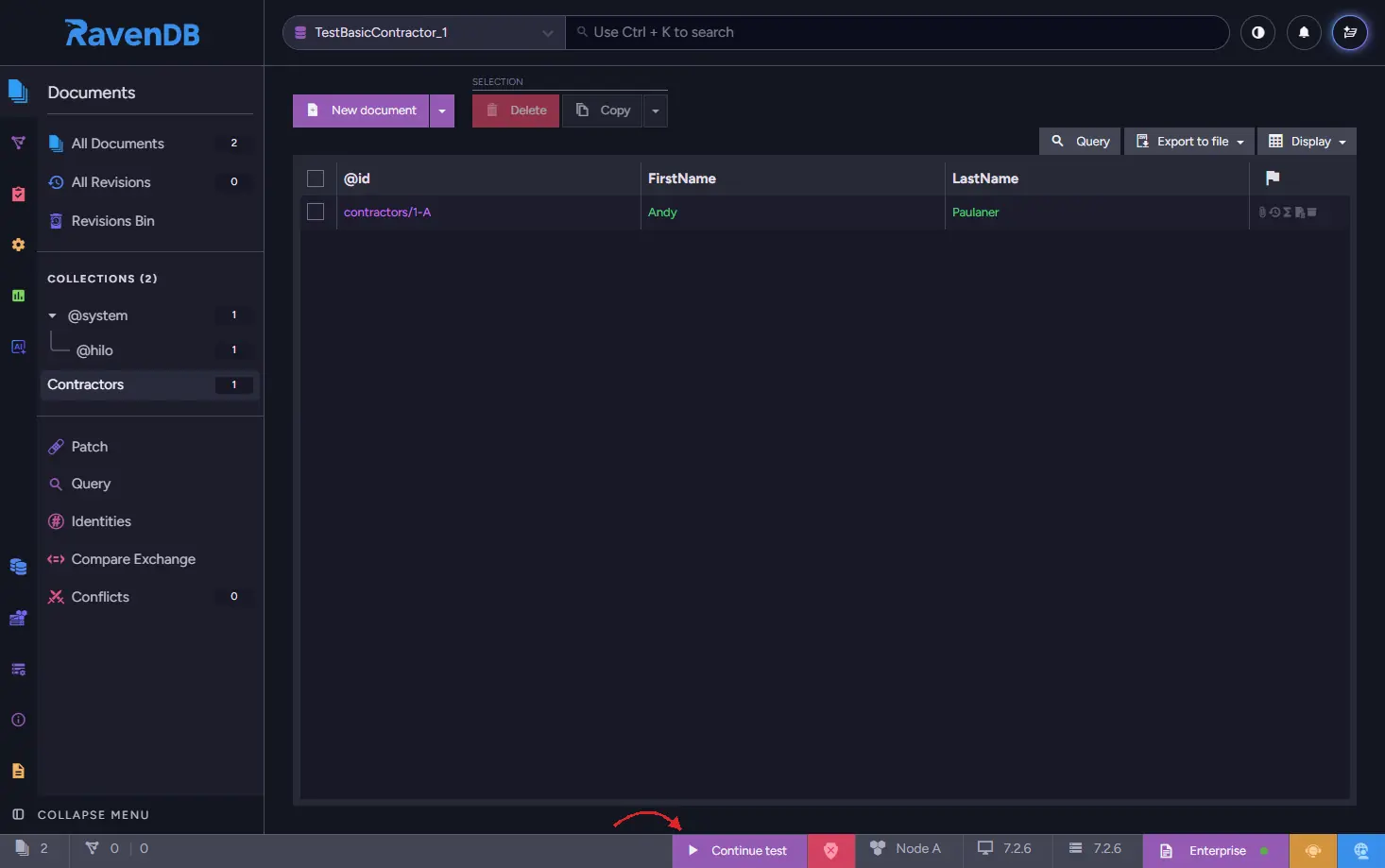
After you're done reviewing your data in a database, click Continue test button located on the bottom UI bar, to continue the execution of a test. The button writes a Debug/Done document, which the driver waits for and then deletes.
The browser is launched by the overridable OpenBrowser(url) method, so override it if you want a different browser, or none at all on a machine with no desktop session. The wait itself has no timeout, so if nothing opens Studio, the test waits until someone creates Debug/Done by hand.
5. Address indexing delays if needed
RavenDB works on indexing in the background. You can find more about it in the RavenDB docs on indexing process and stale indexes. Usually, the delay from indexing is so small that it can be ignored. But it's crucial during the tests.
In real life, programmers should know about this delay and how it can affect results. But here, unlike in real life, we use WaitForIndexing() to ensure our tests won't fail to interact with index which did not process the documents yet. We need to wait for indexes to finish to avoid test failures. Even single or couple of documents can cause a false-negative test result.
In the example below, we're going a little bit further. We define the test driver that creates the BreweryCustomers/ByShippingAddressLocation spatial index (which can be queried later on) before every test using SetupDatabase() override. In the test we'll insert the data, and then we'll instruct the driver to wait for index to finish the processing.
Instructing driver to wait for index to process the new data
using System.Linq;
using Raven.Client.Documents;
using Raven.Client.Documents.Indexes;
using Raven.TestDriver;
using Xunit;

public class Customer
{
    public string Name { get; set; }
    public Location ShippedTo { get; set; }
}

public class Location
{
    public Location(double lat, double lng) { Lat = lat; Lng = lng; }
    public double Lat { get; set; }
    public double Lng { get; set; }
}

public class BreweryCustomers_ByShippingAddressLocation : AbstractIndexCreationTask<Customer>
{
    public BreweryCustomers_ByShippingAddressLocation()
    {
        Map = customers => from c in customers
                           select new
                           {
                               Name = c.Name,
                               ShippingLocation = CreateSpatialField(c.ShippedTo.Lat, c.ShippedTo.Lng)
                           };
    }
}

public class AdvancedBreweryTest : RavenTestDriver
{
    protected override void SetupDatabase(IDocumentStore documentStore)
    {
        new BreweryCustomers_ByShippingAddressLocation().Execute(documentStore);
    }

    [Fact]
    public void TestCustomerDistributionStatistics()
    {
        using (var store = GetDocumentStore())
        {
            using (var session = store.OpenSession())
            {
                Customer customer1 = new Customer();
                customer1.Name = "Paul Becks";
                customer1.ShippedTo = new Location(51.509865, -0.118092);

                Customer customer2 = new Customer();
                customer2.Name = "Arjen Heineken";
                customer2.ShippedTo = new Location(52.377956, 4.897070);

                Customer customer3 = new Customer();
                customer3.Name = "Tom Grodziski";
                customer3.ShippedTo = new Location(52.105124, 20.591883);

                session.Store(customer1, "customers/1");
                session.Store(customer2, "customers/2");
                session.Store(customer3, "customers/3");
                session.SaveChanges();
            }

            // Let's wait for indexes to process the docs before asserting
            WaitForIndexing(store);

            // your code and assert
        }
    }
}
The WaitForIndexing(store) method ensures that the database indexes are up-to-date before proceeding with the test. Stale indexes, which occur when queries are executed before indexing is complete, can lead to incorrect or outdated results in tests.
When the indexes and data a test relies on come from SetupDatabase() or from a dump, you can also ask for the wait when taking the store. The driver then waits right after SetupDatabase() returns:
using (var store = GetDocumentStore(new GetDocumentStoreOptions
{
    WaitForIndexingTimeout = TimeSpan.FromSeconds(30)
}))
{
    // indexes created in SetupDatabase are already non-stale here
}
This wait happens before your test stores anything, so it doesn't replace the WaitForIndexing(store) call after SaveChanges().
WaitForIndexing also accepts an explicit database name and timeout: WaitForIndexing(store, database, timeout). Without a timeout it waits up to a minute, then throws a TimeoutException. If an index is in the error state while other indexes are still stale, the wait stops early and the exception message lists the server-side index errors. An errored index that has finished its pass counts as non-stale, though, so the wait can also return normally: if a query still comes back empty after the wait, check the index errors too.
Seeding a database from a dump
Seeding a large fixture one session.Store at a time makes the setup slow and unreadable. Instead, export the data once and let the driver import it into every database it creates, before SetupDatabase() runs:
using Raven.TestDriver;
using Xunit;

public class SeededBreweryTest : RavenTestDriver
{
    protected override string DatabaseDumpFilePath => "TestData/brewery.ravendbdump";

    [Fact]
    public void QueriesSeededData()
    {
        using (var store = GetDocumentStore())
        {
            // the dump is already imported here
        }
    }
}
The path is resolved from the test process's working directory, which under dotnet test is the build output folder, so mark the dump file with CopyToOutputDirectory (for example PreserveNewest) in your .csproj.
DatabaseDumpFileStream takes a stream instead. The driver reads that property for every database it creates, so it must hand out a stream positioned at the start each time; when a test class takes more than one store, the file path is simpler. Produce the file with Export Database in Studio, or with Smuggler.
Summary
The RavenDB.TestDriver package lets you run tests against a real in-memory RavenDB instance with minimal setup. You get isolated databases per test, automatic cleanup, and the same client API you use in production, so your tests reflect actual database behavior rather than mock assumptions.