Writing unit tests with RavenDB Java Test Driver

What you'll learn
- How to avoid shortfalls of mocking the database
- How to integrate ravendb-test-driver into your Java project with no effort
- How to create integration tests that use a real, in-memory database, far more similar to production environment
Introduction
Mocking a database is commonly used for testing database-driven applications. While mocks offer convenience and a low-effort solution, real database interactions can introduce bugs and unexpected program states. This discrepancy can cause unexpected issues when moving from testing to deployment, ultimately undermining the effectiveness of the testing process.
Your testing process's effectiveness depends heavily on how closely it mirrors real-life production conditions. Testing in an environment similar to production helps detect potential issues early, ensuring a smoother transition to deployment and a more reliable application in users' hands.
We've decided to provide a simple solution that lets developers use the real database instead of mocks with no effort, while working with it in various types of tests. We've created test drivers for exactly that. A test driver starts a real RavenDB server for your test process and hands each test its own database, so your queries run against the same engine that will run them in production rather than against a stand-in. The first call for a store starts that server, and every later call reuses it.
We will run RavenDB in-memory, ensuring each test gets its own separate, isolated database instance. These instances will be automatically disposed of, solving the database-state problem. Provisioning in-memory databases is fast and easy, making the testing seamlessly integrable into CI/CD pipelines. This approach not only simplifies testing but also ensures developers can work with a database environment that closely mimics production conditions, leading to more reliable and accurate test results.
In this article we'll take a closer look upon Maven ravendb-test-driver package.
We'll go quickly through the simple setup, to focus on the usage. Let's dive into it.
Step-by-Step guide
What we'll use
- Java Test Framework: We'll utilize the JUnit 5 package for writing our test cases. It's not mandatory, use your own favorite framework.
- RavenDB: We'll integrate the
ravendb-test-driverpackage to interact with RavenDB.
1. Installing RavenDB Test Driver
Begin by adding the ravendb-test-driver dependency to your pom.xml:
<dependency>
    <groupId>net.ravendb</groupId>
    <artifactId>ravendb-test-driver</artifactId>
    <version>7.2.3</version>
    <scope>test</scope>
</dependency>
Or, with Gradle:
testImplementation 'net.ravendb:ravendb-test-driver:7.2.3'
It will bring the RavenDB server binaries with it, along with the ravendb client your production code already uses. JUnit itself is not included, so add it to your build as usual.
RavenDB's server is a .NET application, so the machine running your tests, including your CI agents, needs the .NET Runtime and the ASP.NET Core Runtime installed alongside the JDK. The exact version moves with RavenDB releases: ravendb-test-driver 7.2.3 looks for .NET 10.0.9 or a later 10.0 patch by default. If it is missing, the first test fails at startup with a message naming the version it wanted.
2. Integrating Test Driver into your tests
Your test class like BasicTest should be extending RavenTestDriver from net.ravendb.test.driver.
Creating a test case equipped with RavenTestDriver
import net.ravendb.test.driver.RavenTestDriver;
import org.junit.jupiter.api.Test;

public class BasicTest extends RavenTestDriver {

    @Test
    public void test() {
        // your test code here
    }
}
You can override RavenTestDriver methods to customize its behavior.
- The preInitialize() method is called right before the DocumentStore is initialized. Pre-configure your
DocumentStorehere, e.g. change the storeDocumentConventions - The setupDatabase() method is called after the
DocumentStoreis initialized, and after the database dump is imported if you configured one (see Seeding a database from a dump). Here you can already work with a running server - store new documents, setup and configure features like revisions or expiration, prepare ongoing tasks like ETLs or subscriptions, execute various operations, etc.
The .NET, Python and Node.js drivers offer a third hook that changes the DatabaseRecord before the database is created. The Java driver does not have it, so configuration that would live in the record goes through a maintenance operation in setupDatabase() instead, exactly as the revisions example below does.
Overriding RavenTestDriver preInitialize() and setupDatabase() methods
import net.ravendb.client.documents.IDocumentStore;
import net.ravendb.client.documents.conventions.DocumentConventions;
import net.ravendb.client.documents.operations.revisions.ConfigureRevisionsOperation;
import net.ravendb.client.documents.operations.revisions.RevisionsCollectionConfiguration;
import net.ravendb.client.documents.operations.revisions.RevisionsConfiguration;
import net.ravendb.test.driver.RavenTestDriver;
import org.junit.jupiter.api.Test;

public class BasicTest extends RavenTestDriver {

    @Override
    protected void preInitialize(IDocumentStore documentStore) {
        documentStore.getConventions().setFindCollectionName(clazz -> "Test" + DocumentConventions.defaultGetCollectionName(clazz));
    }

    @Override
    protected void setupDatabase(IDocumentStore documentStore) {
        RevisionsConfiguration revisionsConfiguration = new RevisionsConfiguration();
        RevisionsCollectionConfiguration defaultCollection = new RevisionsCollectionConfiguration();
        defaultCollection.setPurgeOnDelete(true);
        defaultCollection.setMinimumRevisionsToKeep(123L);

        revisionsConfiguration.setDefaultConfig(defaultCollection);
        ConfigureRevisionsOperation operation = new ConfigureRevisionsOperation(revisionsConfiguration);

        documentStore.maintenance().send(operation);
    }

    @Test
    public void test() {
    }
}
setMinimumRevisionsToKeep takes a Long, so the literal needs the L suffix.
3. Using Test Driver to get database instance
Before writing your first test, define the entity class you want to store:
public class Contractor {
    private String name;

    public String getName() {
        return name;
    }

    public void setName(String name) {
        this.name = name;
    }
}
Every getDocumentStore() call creates a brand new database, named test_1, test_2 and so on. The overloads that take a database name use that name as the prefix instead of test, so getDocumentStore("orders") creates orders_N. One counter numbers every database in the JVM, whatever its prefix, so the numbers keep growing across calls and test classes (for example test_1, then orders_2).
Closing the store is what deletes its database, so keep it inside try-with-resources. RavenTestDriver is AutoCloseable too, and closing the driver closes every store it handed out, which matters when the driver lives in a shared fixture rather than in the test class. Note that close() throws if any store failed to close, with the individual failures joined into the message.
Now, you can write new tests or replace mocks in existing tests with real database instances. Your document store DocumentStore is available by calling the getDocumentStore() method. It's the one from ravendb Maven package, our Java database client with powerful API. Interact with the docs and other entities in your database instance, like in the Java client.
Writing your test
import net.ravendb.client.documents.IDocumentStore;
import net.ravendb.client.documents.session.IDocumentSession;
import net.ravendb.test.driver.RavenTestDriver;
import org.junit.jupiter.api.Test;

import static org.junit.jupiter.api.Assertions.assertEquals;

public class TestBrewery extends RavenTestDriver {

    @Test
    public void testBasicContractor() {
        try (IDocumentStore store = getDocumentStore()) {
            try (IDocumentSession session = store.openSession()) {
                Contractor contractor = new Contractor();
                contractor.setName("Andy Paulaner");

                session.store(contractor, "contractors/1");
                session.saveChanges();
            }

            try (IDocumentSession session = store.openSession()) {
                Contractor loaded = session.load(Contractor.class, "contractors/1");
                assertEquals("Andy Paulaner", loaded.getName());
            }
        }
    }
}
The second session loads the document back from the database. Use a fresh session for this: the first one still tracks the contractor, so loading it there would return the cached object without ever reaching the server.
4. Debugging the database
In some cases, you might want to check what's under the hood, working with the database. We've provided a waitForUserToContinueTheTest(store) method, that freezes the test and opens-up the Raven Studio UI in the background, which lets you investigate the issues and influence the databases/server state in the meantime.
The Java driver does not check whether a debugger is attached, and the wait has no timeout: it opens a browser and blocks until a Debug/Done document appears. On a CI agent, a forgotten call either stalls the build until the job times out or, when the JVM can't run a browser launcher such as xdg-open there, fails the test with an exception. Treat it as a debugging tool you delete rather than something you leave in place.
One more quirk worth knowing: the Java driver does not delete the Debug/Done document afterwards, so a second call against the same database opens Studio again but returns almost at once.
Using 'wait for user to continue the test'
import net.ravendb.client.documents.IDocumentStore;
import net.ravendb.client.documents.session.IDocumentSession;
import net.ravendb.test.driver.RavenTestDriver;
import org.junit.jupiter.api.Test;

public class TestBrewery extends RavenTestDriver {

    @Test
    public void testBasicContractor() {
        try (IDocumentStore store = getDocumentStore()) {
            try (IDocumentSession session = store.openSession()) {
                Contractor contractor = new Contractor();
                contractor.setName("Andy Paulaner");

                session.store(contractor, "contractors/1");
                session.saveChanges();
            }

            waitForUserToContinueTheTest(store);

            try (IDocumentSession session = store.openSession()) {
                // Do something else if needed
            }
            // Assert
        }
    }
}
The studio pops out in the browser:
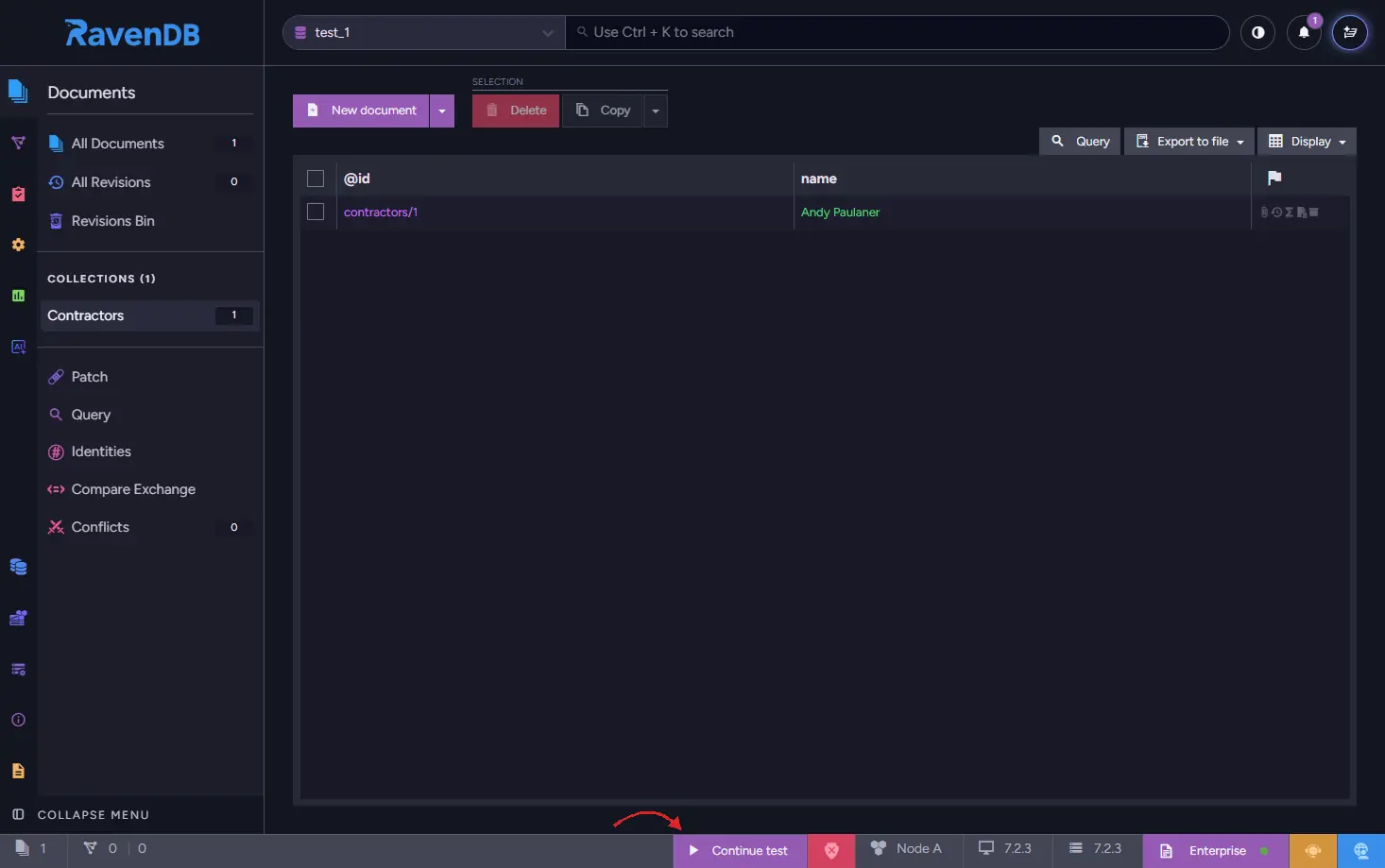
After you're done reviewing your data in a database, click Continue test button located on the bottom UI bar, to continue the execution of a test.
The browser is launched by the overridable openBrowser(url) method, so override it if you want a different browser, or none at all on a machine with no desktop session. The default implementation also prints the Studio URL to standard output, so you can open it by hand; an override that opens nothing should still print url.
5. Address indexing delays if needed
RavenDB works on indexing in the background. You can find more about it in the RavenDB docs on indexing process and stale indexes. Usually, the delay from indexing is so small that it can be ignored. But it's crucial during the tests.
In real life, programmers should know about this delay and how it can affect results. But here, unlike in real life, we use waitForIndexing() to ensure our tests won't fail to interact with index which did not process the documents yet. We need to wait for indexes to finish to avoid test failures. Even single or couple of documents can cause a false-negative test result.
In the example below, we're going a little bit further. We define the test driver that creates the BreweryCustomers/ByShippingAddressLocation spatial index (which can be queried later on) before every test using setupDatabase() override. In the test we'll insert the data, and then we'll instruct the driver to wait for index to finish the processing.
Customer and Location are plain classes with getters and setters: Customer has name and shippedTo, and Location has lat and lng, a Location(double lat, double lng) constructor, and a no-argument constructor so the client can load it back. The index reads those field names, so keep them as they are.
Instructing driver to wait for index to process the new data
import net.ravendb.client.documents.IDocumentStore;
import net.ravendb.client.documents.indexes.AbstractIndexCreationTask;
import net.ravendb.client.documents.session.IDocumentSession;
import net.ravendb.test.driver.RavenTestDriver;
import org.junit.jupiter.api.Test;

class BreweryCustomers_ByShippingAddressLocation extends AbstractIndexCreationTask {
    public BreweryCustomers_ByShippingAddressLocation() {
        map = "docs.Customers.Select(doc => new{\n" +
              "    name = doc.name, \n" +
              "    shippingLocation = this.CreateSpatialField(doc.shippedTo.lat, doc.shippedTo.lng)\n" +
              "})";
    }
}

public class AdvancedBreweryTest extends RavenTestDriver {
    @Override
    protected void setupDatabase(IDocumentStore documentStore) {
        new BreweryCustomers_ByShippingAddressLocation().execute(documentStore);
    }

    @Test
    public void testProvideCustomerDistributionStatistics() {
        try (IDocumentStore store = getDocumentStore()) {
            try (IDocumentSession session = store.openSession()) {
                Customer customer1 = new Customer();
                customer1.setName("Paul Becks");
                customer1.setShippedTo(new Location(51.509865, -0.118092));

                Customer customer2 = new Customer();
                customer2.setName("Arjen Heineken");
                customer2.setShippedTo(new Location(52.377956, 4.897070));

                Customer customer3 = new Customer();
                customer3.setName("Tom Grodziski");
                customer3.setShippedTo(new Location(52.105124, 20.591883));

                session.store(customer1, "customers/1");
                session.store(customer2, "customers/2");
                session.store(customer3, "customers/3");
                session.saveChanges();
            }

            waitForIndexing(store);

            // your code and assert
        }
    }
}
The waitForIndexing(store) method ensures that the database indexes are up-to-date before proceeding with the test. Stale indexes, which occur when queries are executed before indexing is complete, can lead to incorrect or outdated results in tests.
When the indexes and data a test relies on come from setupDatabase() or from a dump, you can also ask for the wait when taking the store. The driver then waits right after setupDatabase() returns:
// GetDocumentStoreOptions is in net.ravendb.test.driver, Duration in java.time
try (IDocumentStore store = getDocumentStore(
        GetDocumentStoreOptions.withTimeout(Duration.ofSeconds(30)))) {
    // indexes created in setupDatabase are already non-stale here
}
This wait happens before your test stores anything, so it doesn't replace the waitForIndexing(store) call after saveChanges().
waitForIndexing is static and has three overloads: waitForIndexing(store), waitForIndexing(store, database) and waitForIndexing(store, database, timeout). Without an explicit timeout it waits up to a minute, then throws a net.ravendb.client.exceptions.TimeoutException. If an index is in the error state while other indexes are still stale, the wait stops early and the exception message lists the server-side index errors. An errored index that has finished its pass counts as non-stale, though, so the wait can also return normally: if a query still comes back empty after the wait, check the index errors too.
Seeding a database from a dump
Seeding a large fixture one session.store at a time makes the setup slow and unreadable. Instead, export the data once and let the driver import it into every database it creates, before setupDatabase() runs:
import net.ravendb.test.driver.RavenTestDriver;

public abstract class SeededBreweryTest extends RavenTestDriver {

    @Override
    protected String getDatabaseDumpFilePath() {
        return "src/test/resources/brewery.ravendbdump";
    }
}
getDatabaseDumpFileStream() returns an InputStream instead. The driver calls it more than once for every database it creates, so return a new stream on every call rather than one shared instance. Produce the file with Export Database in Studio, or with Smuggler.
Configuring the server
Everything above shapes a database. To shape the server itself, call the static configureServer once per JVM, before the first getDocumentStore() call. A static initializer on a shared base class is the natural place, because it runs before any test in a class that extends it; make every test class that uses the driver extend that base:
import net.ravendb.embedded.ServerOptions;
import net.ravendb.test.driver.RavenTestDriver;

import java.util.ArrayList;
import java.util.Arrays;

public abstract class RavenTestBase extends RavenTestDriver {

    static {
        ServerOptions options = new ServerOptions();
        options.setAcceptEula(true);
        options.setDataDirectory(System.getProperty("java.io.tmpdir") + "/ravendb-tests");

        options.setCommandLineArgs(new ArrayList<>(Arrays.asList("--Logs.MinLevel=Debug")));

        RavenTestDriver.configureServer(options);
    }
}
Always pass a mutable list to setCommandLineArgs: the driver adds its own arguments to that list when the server starts, so a fixed-size list such as a bare Arrays.asList(...) fails with an UnsupportedOperationException on the first getDocumentStore() call.
dataDirectory, logsPath, targetServerLocation, commandLineArgs, frameworkVersion, serverUrl and dotNetPath are all available. Calling configureServer after the server has started throws, and says so, which is why it belongs in exactly one place.
If you never call it, the driver creates temporary directories for the server, its data and its logs, and removes them on JVM shutdown. Once you pass your own ServerOptions, those temporary defaults no longer apply: unless you set them yourself, the server is extracted to RavenDBServer and logs to RavenDB/Logs under the working directory, and nothing removes them afterwards.
Registering a license
An unlicensed RavenDB server is limited to 3 CPU cores, so a suite that leans on the database runs on a fraction of the machine. Registering a license raises that limit to what the license allows (up to 9 cores with the free developer license) and unlocks additional features.
The Java ServerOptions has no licensing properties, so the license goes to the server the way any other server setting does. The simplest route is the RAVEN_LICENSE environment variable, which the server picks up from the environment it inherits, and which keeps the license out of source control:
export RAVEN_LICENSE='{"Id":"...","Name":"...","Keys":["..."]}'
mvn test
You can pass a file path as a command line argument instead, if that suits your build better:
options.setCommandLineArgs(new ArrayList<>(Arrays.asList("--License.Path=/path/to/license.json")));
The Java driver does not fail when the license is missing or invalid, so an unlicensed server starts quietly with reduced capabilities. If a test suddenly behaves as though a feature is unavailable, suspect the license before your code. The server log won't help afterwards unless you keep it: with the default setup it lives in a temporary directory that is deleted when the JVM exits, so set logsPath through configureServer if you want to read it. See the licensing overview.
To get a free developer license, visit the RavenDB license request page. The request page lists it as suitable for development, CI and QA purposes (not production, staging or UAT) and as not applicable for commercial use, and it must be renewed every 6 months: a license stored in your CI secrets will expire and has to be replaced.
Summary
Integrating RavenDB into your Java integration tests using the ravendb-test-driver package offers a convenient way to move beyond mocking and interact with a real database instance. By following the steps outlined in this guide, you can seamlessly incorporate RavenDB into your testing workflow, leading to more robust and reliable tests.
The ability to work with real database instances provides a more accurate representation of your application's behavior in a production environment, ultimately improving the quality of your software. Embrace the power of real database testing with ravendb-test-driver and elevate your testing practices to new heights.