Semantic Search with RavenDB, Python, and FastAPI


Introduction
Semantic search is a more intuitive way for your users to find the content they need. They do not need to look for specific keywords but search by meaning. If you want to enhance your users' experience, it will simplify finding the content your users are looking for.
To achieve this, your data needs to be vectorized into AI model embeddings, as they are a digital representation of the meaning of your data within a specific model.
To reduce data logistics and the amount of code to be written and maintained, RavenDB offers automatic embedding generation. If you don't need another custom solution for that and want to ship faster, this is the way. Automatic embedding generation with RavenDB handles your data logistics out of the box, simplifying app development.
In this article, we will create a sample FastAPI application to show you how vector search works. We will implement both manual and automatic embedding generation.
Setup
Application
Using FastAPI, we can quickly build a web AI search endpoint to demonstrate how semantic search works. We'll use a built-in OpenAPI interface to picture that.
See, we query for "Cheese" and we get all kinds of cheese products from our database:
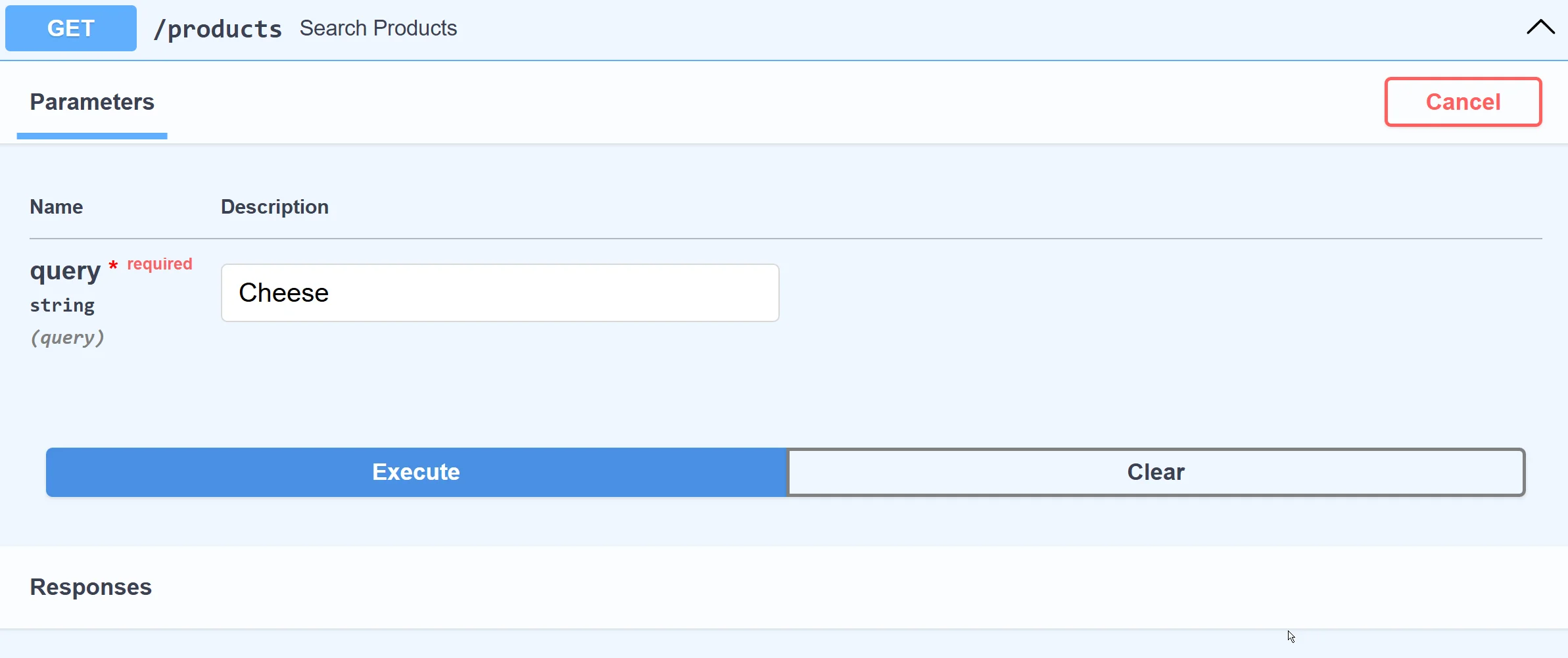
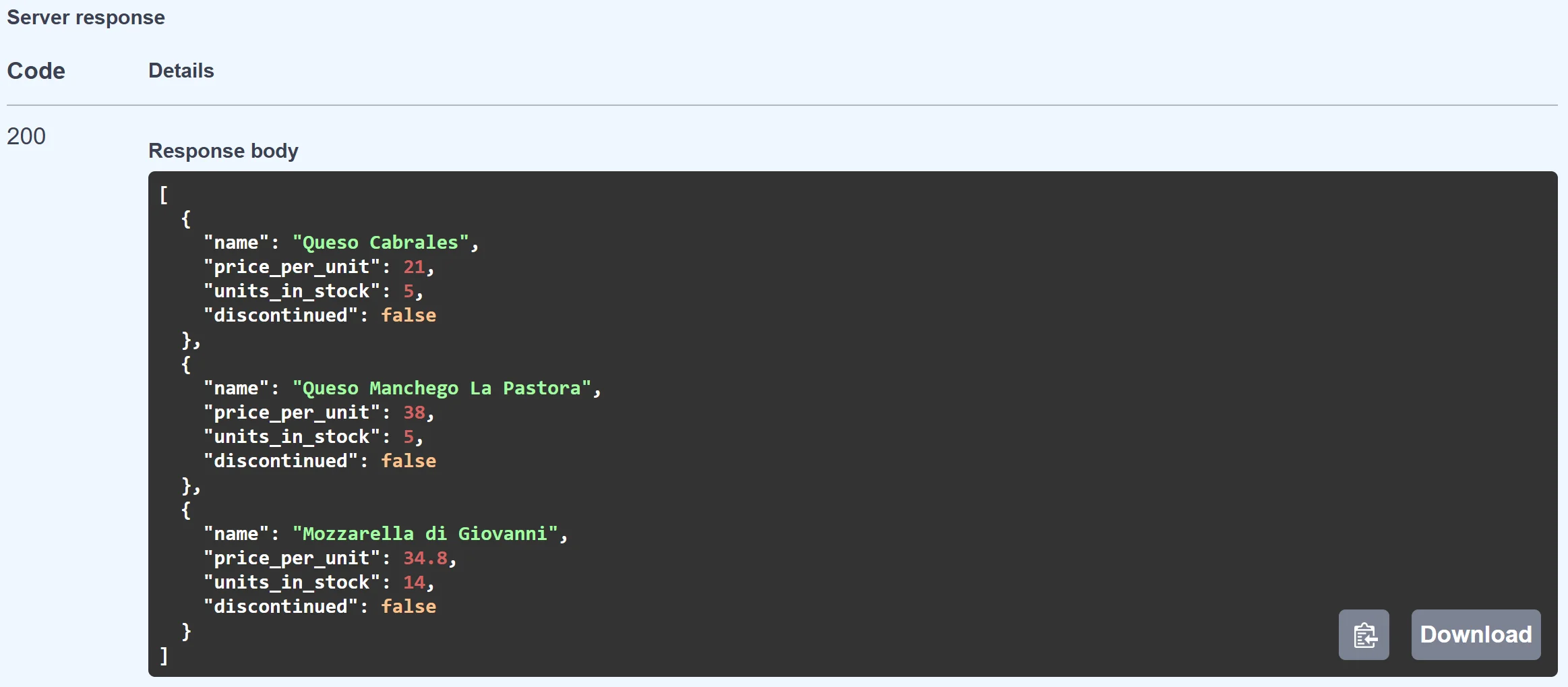
Under the hood, the application translates our query term "Cheese" to an embedding (vector) on the fly and compares other vectors within the database, finding the closest "meanings". Let's show how to build that.
Without the query implementation, our application looks like this:
from fastapi import FastAPI
from pydantic import BaseModel
from ravendb import DocumentStore

app = FastAPI()

# RavenDB setup
document_store = DocumentStore(
    urls=["http://127.0.0.1:8080"],
    database="Northwind"
)
document_store.initialize()

# Northwind Product schema
class Product(BaseModel):
    name: str
    supplier: str
    category: str
    quantity_per_unit: str
    price_per_unit: float
    units_in_stock: int
    units_on_order: int
    discontinued: bool
    reorder_level: int


@app.get("/products")
async def search_products(query: str):
    ...

if __name__ == "__main__":
    import uvicorn
    uvicorn.run("app:app", host="127.0.0.1", port=8000, reload=True)
To make it work, we need a few Python packages:
pip install fastapi
pip install uvicorn
pip install ravendb
- fastapi: framework library
- uvicorn: ASGI web server
- ravendb: Python SDK for RavenDB
This fragment sets up RavenDB. It connects to a database running on our local machine with the Northwind sample data set.
# RavenDB setup
document_store = DocumentStore(
    urls=["http://127.0.0.1:8080"],
    database="Northwind"
)
document_store.initialize()
Then, we create the Product class to represent the JSON document schema for documents in the Products collection of the "Northwind" database. This allows us to work with Product documents as objects.
# Northwind Product schema
class Product(BaseModel):
    name: str
    supplier: str
    category: str
    quantity_per_unit: str
    price_per_unit: float
    units_in_stock: int
    units_on_order: int
    discontinued: bool
    reorder_level: int
Next, we define endpoints to query products. We'll add the detailed query logic once we have embeddings set up.
@app.get("/products")
async def search_products(query: str):
    ...
The last step is to use Uvicorn to launch this app. It handles your web requests, allowing them to reach our application. Uvicorn serves as a simple bridge between the network and your application.
if __name__ == "__main__":
    import uvicorn
    uvicorn.run("app:app", host="127.0.0.1", port=8000, reload=True)
Vector Search with manual embeddings generation
We can generate embeddings manually, but it requires more effort on our part. We need to take care of data logistics and structure, and we may still be missing some more advanced functionalities, for example, caching or chunking. Let's show how to generate embeddings using the popular OpenAI embedding model "text-embedding-3-small".
import openai

def get_embedding(text: str) -> list[float]:
    response = openai.embeddings.create(input=text, model="text-embedding-3-small")
    return response.data[0].embedding

# Example usage
embedding = get_embedding("Example product name")
We need to install and use the openai Python package. This allows us to interact with AI models from OpenAI. Next, we generate embeddings with get_embedding for the entire Products collection. Then we put the vector in the vector_embedding field. We will query all Products, add the field vector_embedding, and then call save_changes.
with document_store.open_session() as session:
    products = list(session.query(object_type=Product))
    for product in products:
        product_name_embedding = get_embedding(product.name)
        product.vector_embedding = product_name_embedding
    session.save_changes()
Note: The Northwind database is relatively small, allowing us to query and update the documents directly. However, for larger datasets, you'd need to explore a more effective strategy. If that's your case, see how to use automatic embeddings generation later in this article.
Products now have an embedding field, allowing us to run RavenDB Vector Search. But to compare vectors, we also need an embedding vector for the query search term. We use the same function to generate embeddings for incoming search terms on the fly using the same method (get_embedding).
query_embedding = get_embedding("search term")

with document_store.open_session() as session:
    results = list(
        session.query(object_type=Product)
        .vector_search("vector_embedding", query_embedding, minimum_similarity=0.75)
        .take(10)
    )

    return [
            {
                "name": p.name,
                "price_per_unit": p.price_per_unit,
                "units_in_stock": p.units_in_stock,
                "discontinued": p.discontinued,
            }
            for p in results
        ]
This gives us results not based on an exact match but on semantic meaning.
This way we need to:
- Vectorize our entire Products dataset with OpenAI manually
- Put vector embeddings in the separate document fields
- Vectorize the query terms manually on the fly
- Compare the search term embedding vector with other vectors from the Products collection using RavenDB Vector Search.
… and we still lack features like caching repetitive search terms and text chunking.
| Aspect | Manual embeddings | Automatic embeddings |
|---|---|---|
| Embedding generation | Your code calls OpenAI directly | RavenDB calls the model via a configured task |
| Initial data vectorization | You loop through documents and save vectors yourself | RavenDB handles the backfill automatically |
| Query-time vectorization | Your code calls get_embedding() on each request | vector_search_text_using_task handles it internally |
| Caching repeated queries | Not included; you build it yourself | Built in |
| Chunking support | Not included; you build it yourself | Built in |
| Switching AI models | Requires code changes and re-vectorization | Change the connection string in Studio |
| Application code size | ~50 lines including OpenAI setup | ~30 lines, no AI client code |
| Best for | Full control over embedding logic | Faster delivery, less maintenance overhead |
Vector search with automatic embeddings
Now, let's try automatic embeddings generation in RavenDB. The code will be the same as starting one, but reduced by manual communication with OpenAI. We just need to add the embeddings generation in RavenDB Studio.
Adding automatic embeddings generation starts in the AI Hub. We will automate the communication with the external AI model. To do so, we need to define which model we want to use.
AI Connection String
Create a new AI connection string in RavenDB Studio:
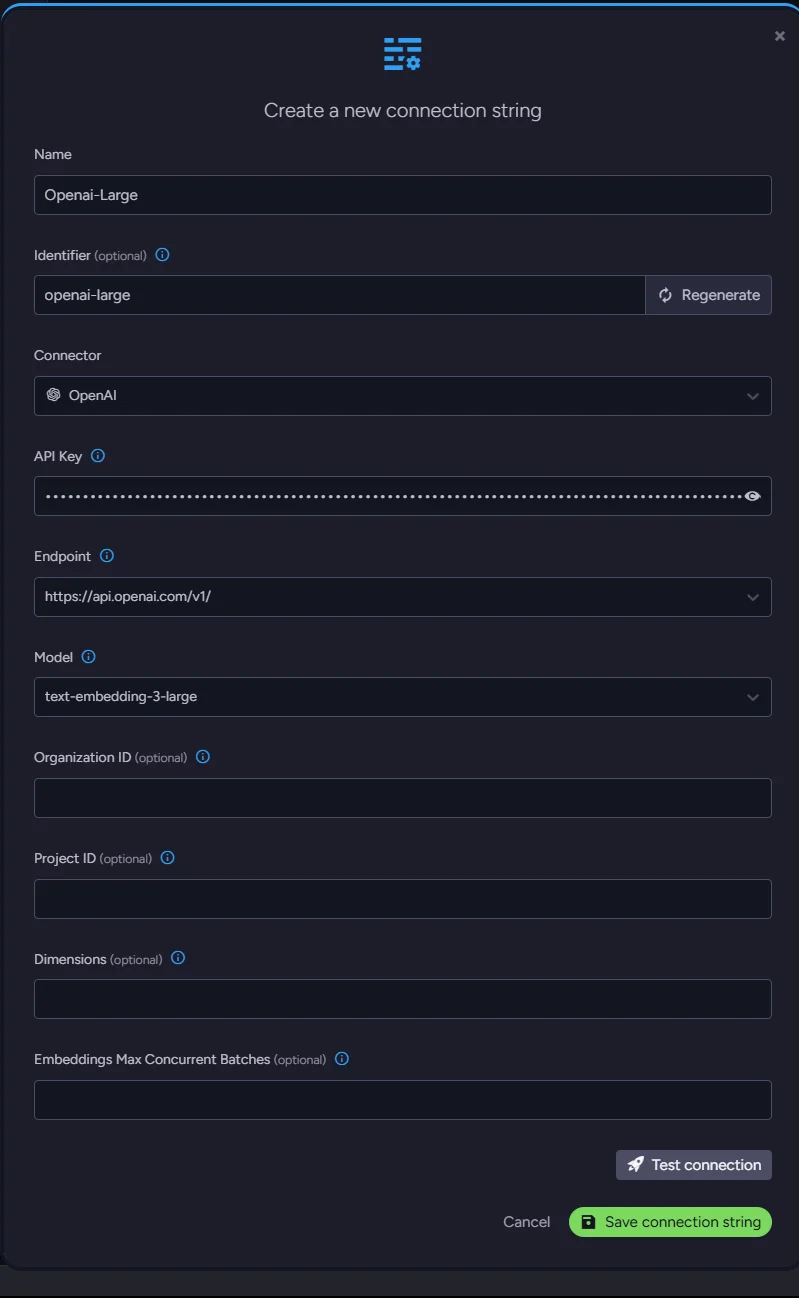
Define your custom name and identifier and pick the service you want to use; we chose OpenAI. Then, in the new fields, select the endpoint & model, and paste your API key. Other fields are optional and not currently relevant to us.
You can test the connection to ensure everything works properly.
AI Task
We can connect to the OpenAI model, but we need to create a task that generates embeddings. Go back to the AI Hub and choose 'AI Tasks'. Create a new embeddings generation task and fill in its name and identifier. Select our new connection string. We select the 'Products' collection and type 'Name' for a path just beneath the collection. Just save it, and it's ready.
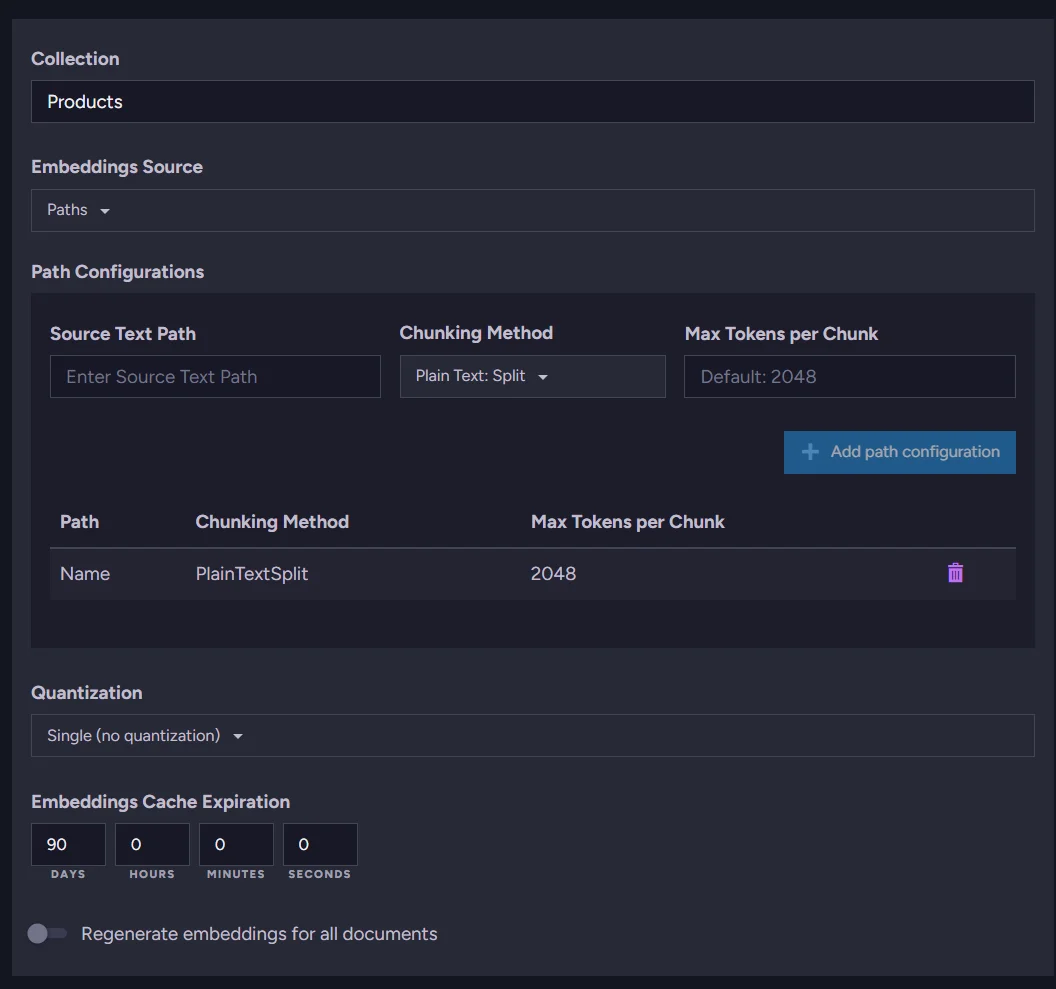
The task configuration is minimal: just a name, a connection string, the target collection, and the field path. RavenDB handles everything else: scheduling, API calls, and storing the resulting vectors.
Application code
All the required parts for your own embeddings generation and adding the field can be removed, making the code smaller.
from fastapi import FastAPI
from pydantic import BaseModel
from ravendb import DocumentStore

# RavenDB setup
document_store = DocumentStore(
    urls=["http://127.0.0.1:8080"],
    database="Northwind"
)
document_store.initialize()

# Northwind Product schema
class Product(BaseModel):
    name: str
    supplier: str
    category: str
    quantity_per_unit: str
    price_per_unit: float
    units_in_stock: int
    units_on_order: int
    discontinued: bool
    reorder_level: int

@app.get("/products")
async def search_products(query: str):
    with document_store.open_session() as session:
        results = list(session.query(object_type=Product).vector_search_text_using_task("Name", query, "my-ai-task", minimum_similarity=0.7))

        return [
            {
                "name": p.name,
                "price_per_unit": p.price_per_unit,
                "units_in_stock": p.units_in_stock,
                "discontinued": p.discontinued,
            }
            for p in results
        ]

if __name__ == "__main__":
    import uvicorn
    uvicorn.run("app:app", host="127.0.0.1", port=8000, reload=True)
Compared to the manual approach, the application code no longer needs to manage an OpenAI client, generate embeddings per document, or store them in a separate field. The vector_search_text_using_task call replaces the full manual pipeline: RavenDB resolves the task, vectorizes the query on the fly, and returns ranked results.
This way we get:
- Out-of-the-box embeddings for your collection
- Out-of-the-box embeddings for query terms
- Caching without the need to write it
- Ability to change the model without the need to rewire the connection
Works perfectly:
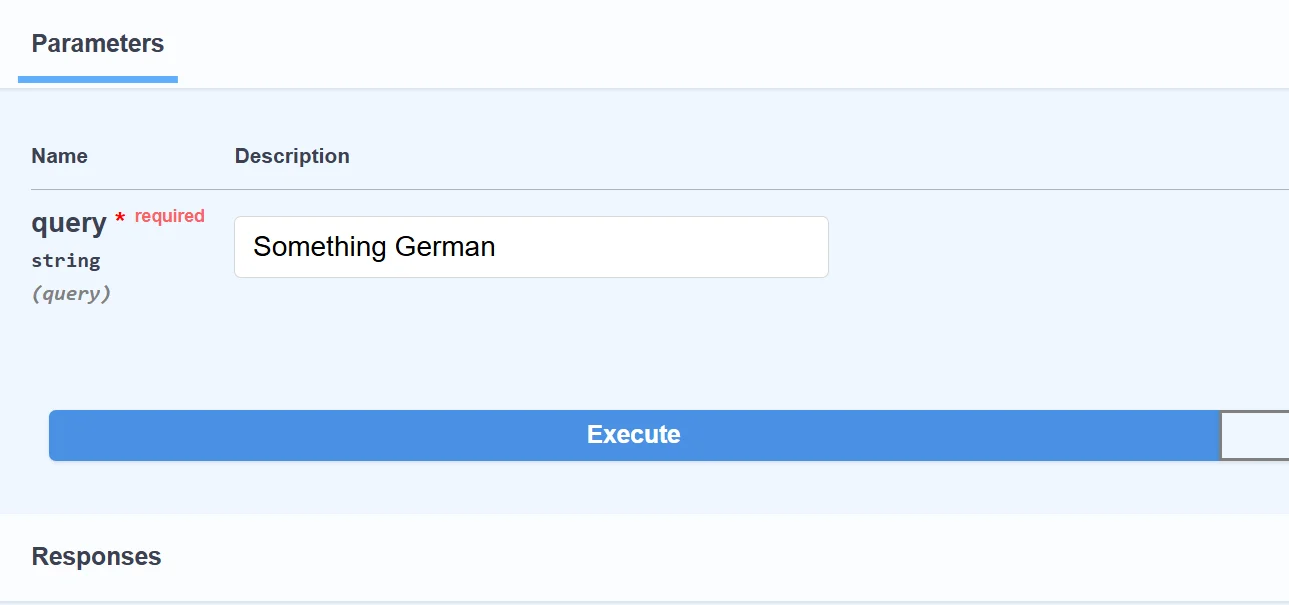
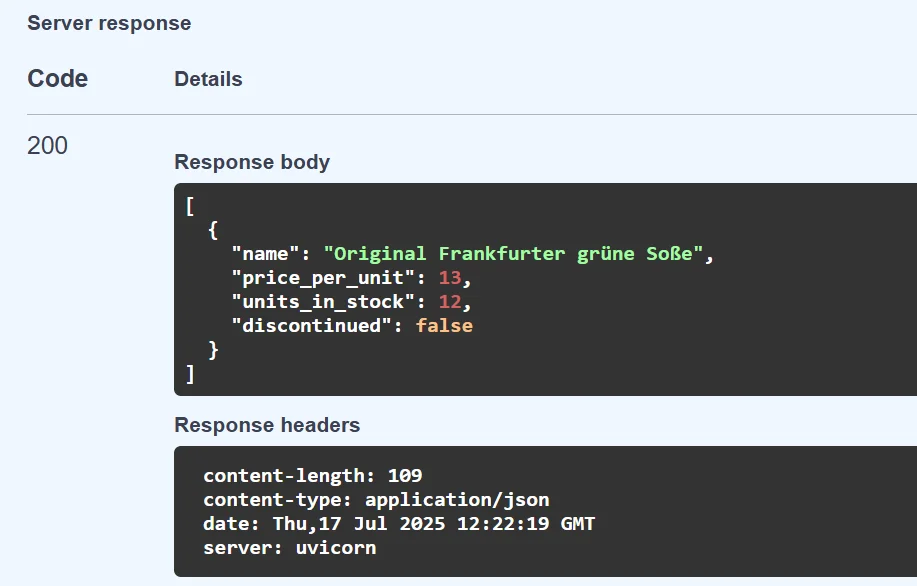
In the studio, RavenDB created a separate collection for embeddings and cached terms:
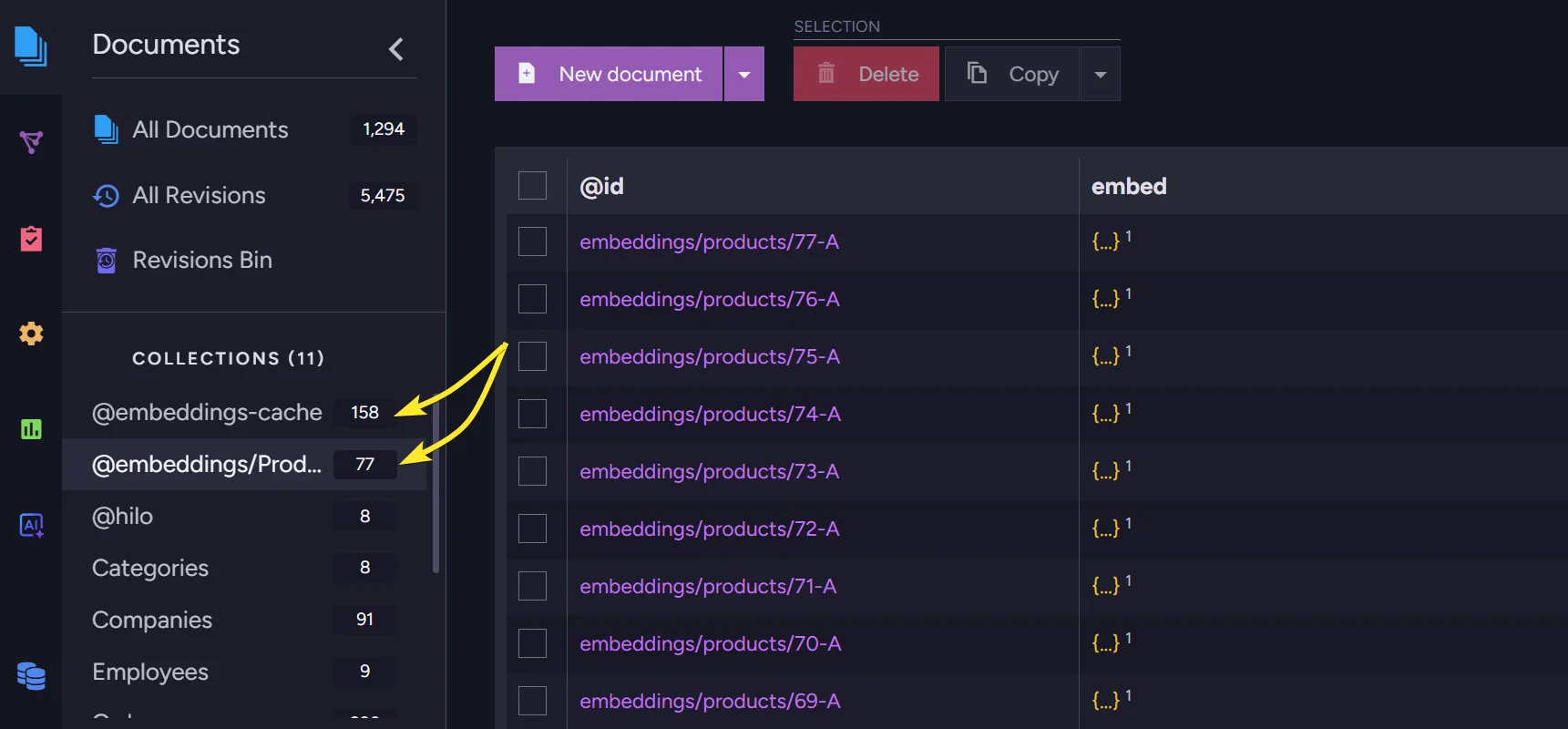
Everything's working on its own, and our semantic search can be delivered much quicker.
Summary
In this article, you built a semantic search endpoint using RavenDB, Python, and FastAPI, twice.
- Manual approach: You vectorized the Products collection yourself using
openai.embeddings.create, stored the vectors in a document field, and queried them withvector_search. This gives you full control but requires managing API calls, data updates, and lacks built-in caching. - Automatic approach: You configured an embeddings generation task in RavenDB Studio and called
vector_search_text_using_taskin a single line. RavenDB handles vectorization, storage, caching, and query-time embedding, with no OpenAI client code needed in the application.
For most projects, the automatic approach is the better starting point: less code, easier to maintain, and caching included out of the box.
Built something with RavenDB? Share it with the community on Discord.