One Chat, Many Agents: RavenDB Multi-Agents

A single agent can take you surprisingly far, until it has to do everything. The moment you start mixing research, decision-making, data access, and execution in one place, the system begins to lose structure. What was once a simple flow turns into a crowded space where too many tools, too much context, and too many responsibilities compete at once.
Now with RavenDB AI Agents, you don’t have to force everything into a single LLM brain. You can break the workflow into specialized agents, each focused on a specific task, equipped only with the tools they need, and powered by the model that best fits the job. A lightweight agent can handle simple interactions, while more advanced ones step in for complex reasoning, analysis, or execution. All of this while they both maintain separate contexts, giving you higher-quality responses.
RavenDB AI Agents are LLM-powered components integrated into your database, designed to act on behalf of users. Instead of navigating UI screens, users describe what they need, and the agent retrieves data or performs actions through tools.
What makes RavenDB’s approach different is that the intrinsic complexity is handled for you. The database server manages conversation state, integrates with LLM providers, and enforces safety through Query and Action tools defined by the developer. This means the agent can only perform operations you explicitly allow, keeping it predictable and controlled. Instead of building infrastructure around agents, you focus on defining capabilities and letting RavenDB handle the rest. If you want to look into AI Agents more, you can check our AI Agents deep dive.
Multiple Agents: Why more can be better
Agents are an awesome way to provide a customizable experience for users with chat instead of a complex UI, and to deliver them, we can set up a single agent. For a few features, it can work well, but stacking functions on functions creates a tower that will sooner or later topple. Whether it is due to a limited context window, too much information for one Agent, or a less capable model forced by costs, it makes the whole agent less capable.
That is where multi-agent design begins to shine. Instead of relying on one agent to manage every conversation, tool call, and growing backlog of context, each sub-agent operates within its own focused area. By dividing responsibilities, each agent handles only the information relevant to its task, which helps maintain response quality that occurs when a single context window becomes too clogged.
The same principle applies to tools. A research agent can focus on web searches, a verification agent can validate outputs, and a document agent can concentrate on writing and editing. Giving each agent only the tools it needs reduces noise, lowers the chance of mistakes, and keeps the overall workflow more efficient.
Multiple AI agents also become useful when a workflow can be divided into steps that do not depend on one another. Instead of forcing a single agent to handle every branch of work sequentially, separate agents can take on independent subtasks in parallel, then pass their results forward once they are done. In larger workflows, this can shorten the overall processing time, reduce bottlenecks, and help the system move more smoothly from one stage to the next.
RavenDB Multi-Agents usage advantages
Let’s start with the most important fact about multi-agents in RavenDB: if you know how to build a single, simple agent, you already know how to build a multi-agent system. There’s no separate concept to learn, no new conception hiding behind the name. Multi-agents aren’t a special kind of agent you create, but rather a way of connecting multiple individual agents into a network that reaches out to each other when needed. For already running RavenDB Agents, it means they get a tool that they immediately understand and can use out of the box.
A useful quality of RavenDB AI Agents is that every conversation is separate and persistent by design. In a multi-agent workflow, each agent keeps its own conversation log, making it much easier to inspect what each agent received, how it responded, and how work moved between agents. Because these conversations are stored directly in RavenDB, message history is automatically persisted and can be reviewed later without relying on external caches or custom session storage.
Multi-agent systems are not the best fit for every scenario. As a rule of thumb, avoid them when your workflow is straightforward. A single, well-defined task that one agent can handle from start to finish doesn't benefit from delegation. Adding subagents just to keep things tidy or to mirror a clean organizational chart is perfectionism.
Good candidates for staying single-agent include: answering a question from a knowledge base, generating a document from a template, or running a linear sequence of steps with no branching. If the work can be described in one sentence, it probably doesn't need multiple agents.
Where multi-agent systems shine is in workflows that are genuinely parallel, require specialized skills, or are too long to fit in a single context window. Outside of those cases, they can generate higher costs and latency than a well-designed single agent, so it is worth testing whether the added effort yields sufficient value.
Demo: HR Manager and its Sub-Agent
Before we begin, if you want to run this demo yourself, you can find the samples-hr repository on GitHub. Instructions for launching it are included.
The demo application is a small HR chatbot where employees can submit expense reports and handle everyday HR tasks through a conversation with an AI agents, rather than filling in forms. You can impersonate any employee from the selector at the top of the chat window, for demo convenience. It connects to RavenDB and uses a set of Query and Action tools to look up employee data and create expense documents on the user's behalf.
Let’s step into Mike Thompson’s role by selecting him at the top of the chat window. After returning from a business trip, we need to report our expenses to HR. Instead of navigating forms and internal systems, we simply open the HR chatbot that handles these everyday requests, reducing manual work for HR and making the whole process faster and more comfortable for employees.
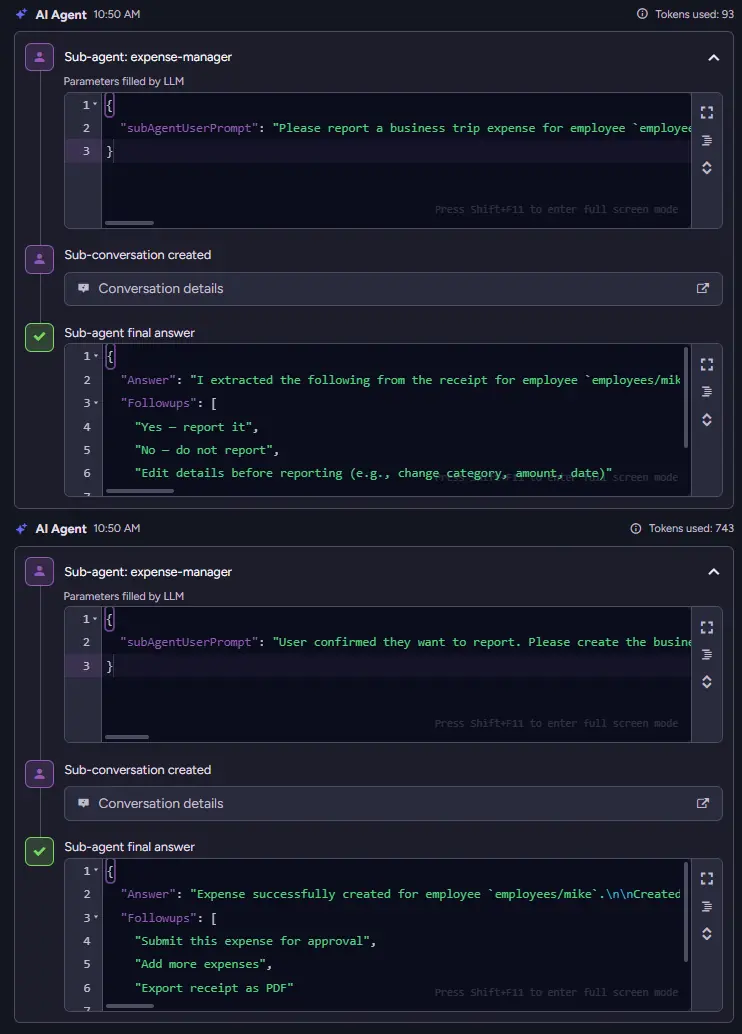
We upload the TechConf 2026 receipt and ask to submit the expense. Once the message is sent, the HR Agent understands the request and decides which specialist should handle it next. It hands the task to the Expense Manager Agent, which focuses solely on expenses and is equipped with the tools needed to create and update records in RavenDB. All of this coordination happens quietly in the background, with no extra steps or complexity exposed to the user. From the employee’s perspective, it feels like a single smooth conversation, while specialized agents handle the work behind the scenes.
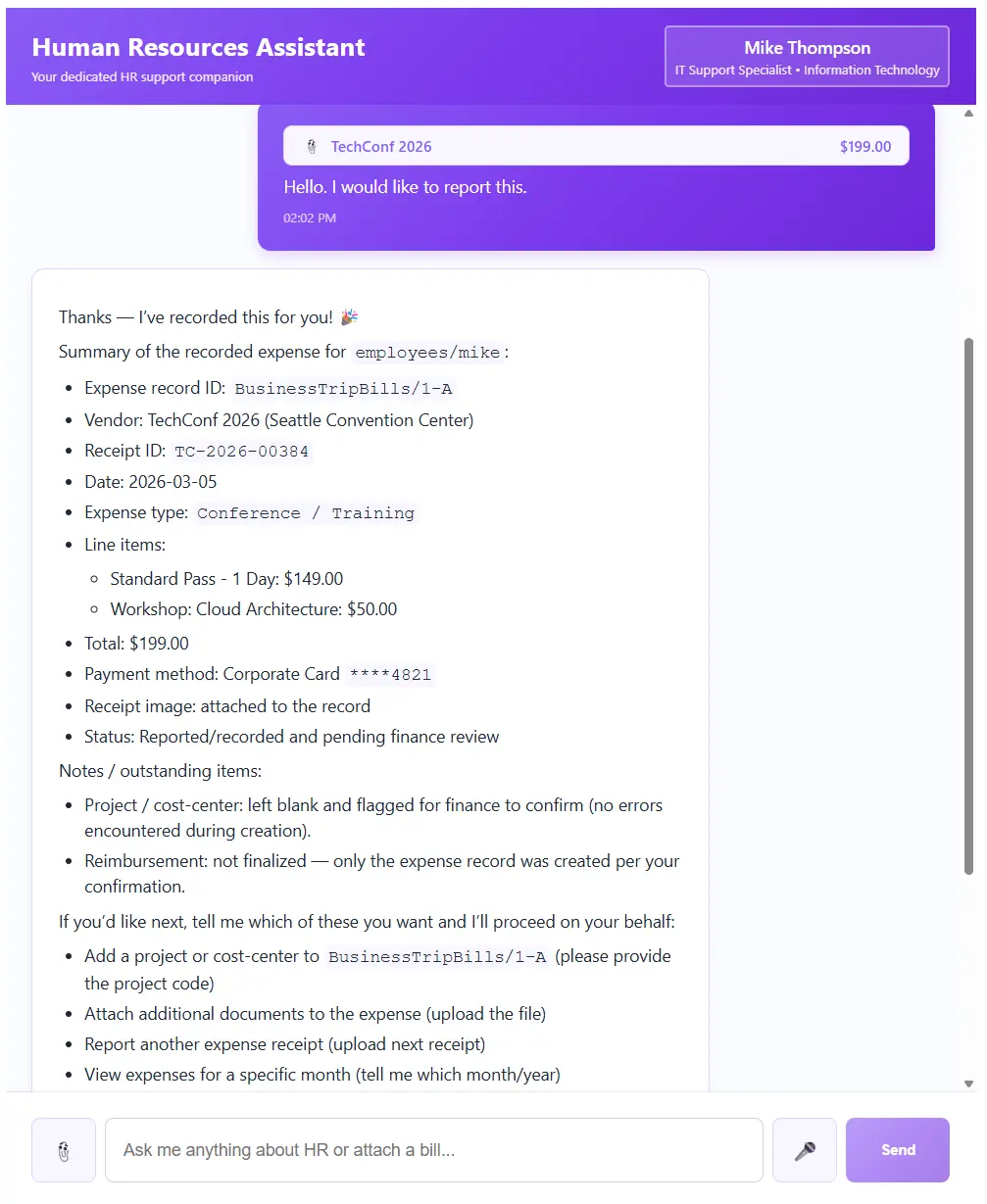
Let’s go to the database and look at how that was handled. As you can see in the conversation, we have two chats saved instead of one.
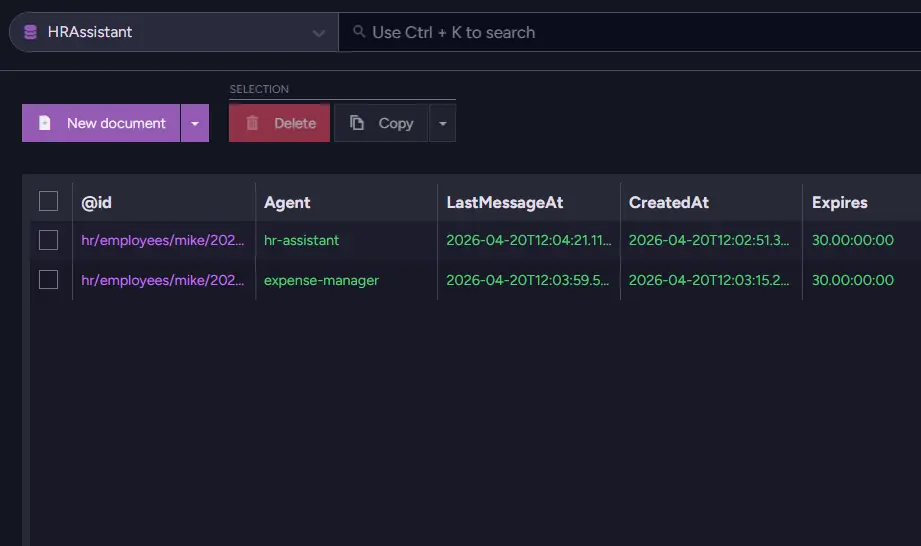
One of those is from the HR Manager, and the other one is from someone called Expense Manager. Agents communicated automatically as the HR manager decided it should contact Expense Manager.
We can go into the business trip bills collection and check if it is saved.
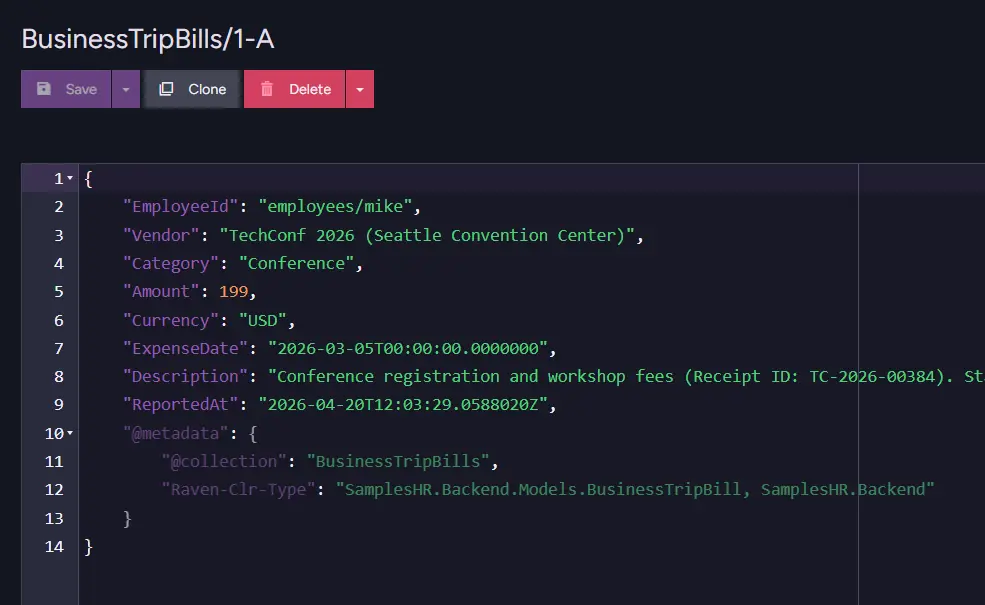
As you can see, our document has been created, and the data has been extracted. But how did the agent decide it needed to use Expense Manager's tools? Let’s look into the agents themselves.
Multi-Agents: Setup
We enter the AI Hub and select the AI Agents section. There we can see our two agents.
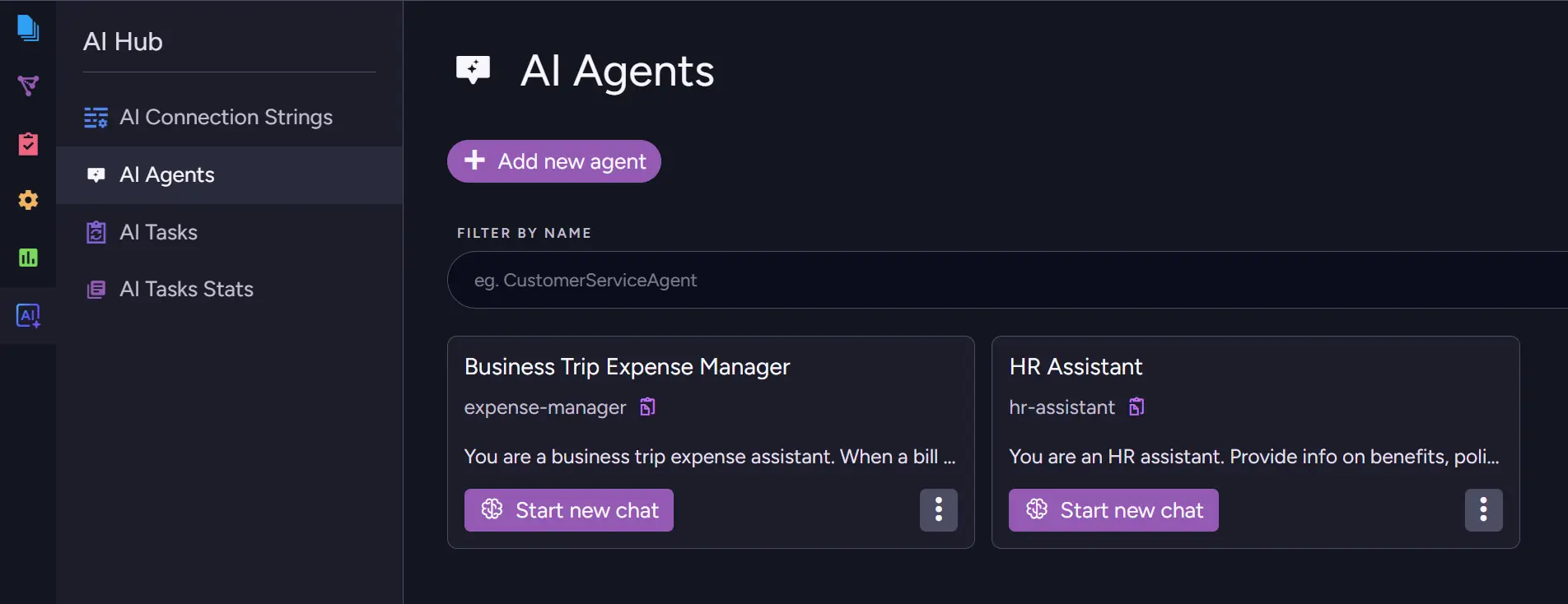
As we mentioned before, they are normal agents that are just connected. Let’s enter one of them and look into how it works. In the HR manager, the part we want to look at is located in the Sub-Agents section, which requires scrolling down.
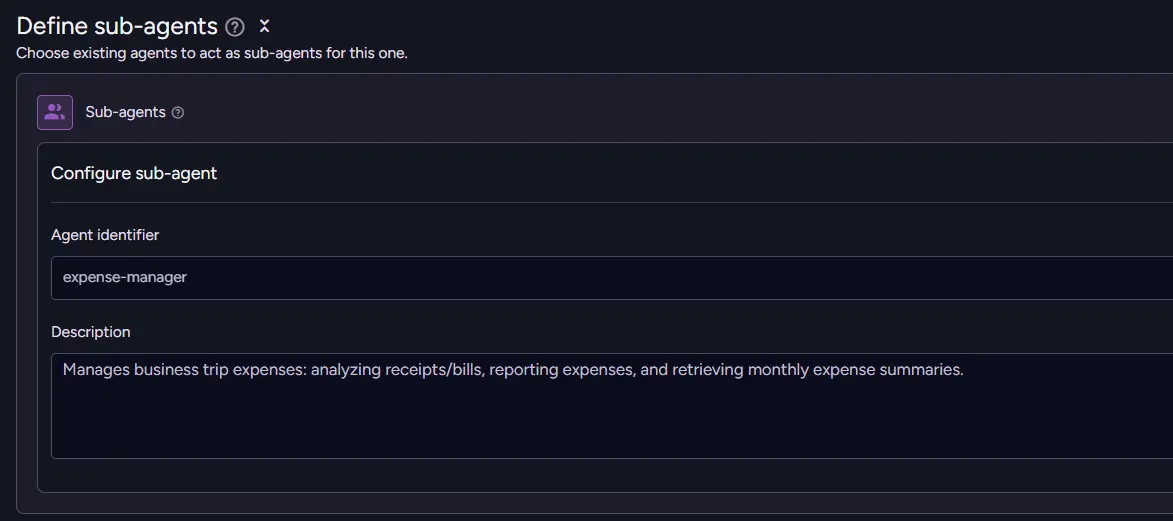
You can see that we have selected the sub-agent's Agent Identifier and description. An identifier is chosen from a list of existing agents, and we must provide a sub-agent description. The description is what the main Agent uses to determine whether to use its sub-agent. With that added, both agents are connected, and the main Agent can call its sub-agent.
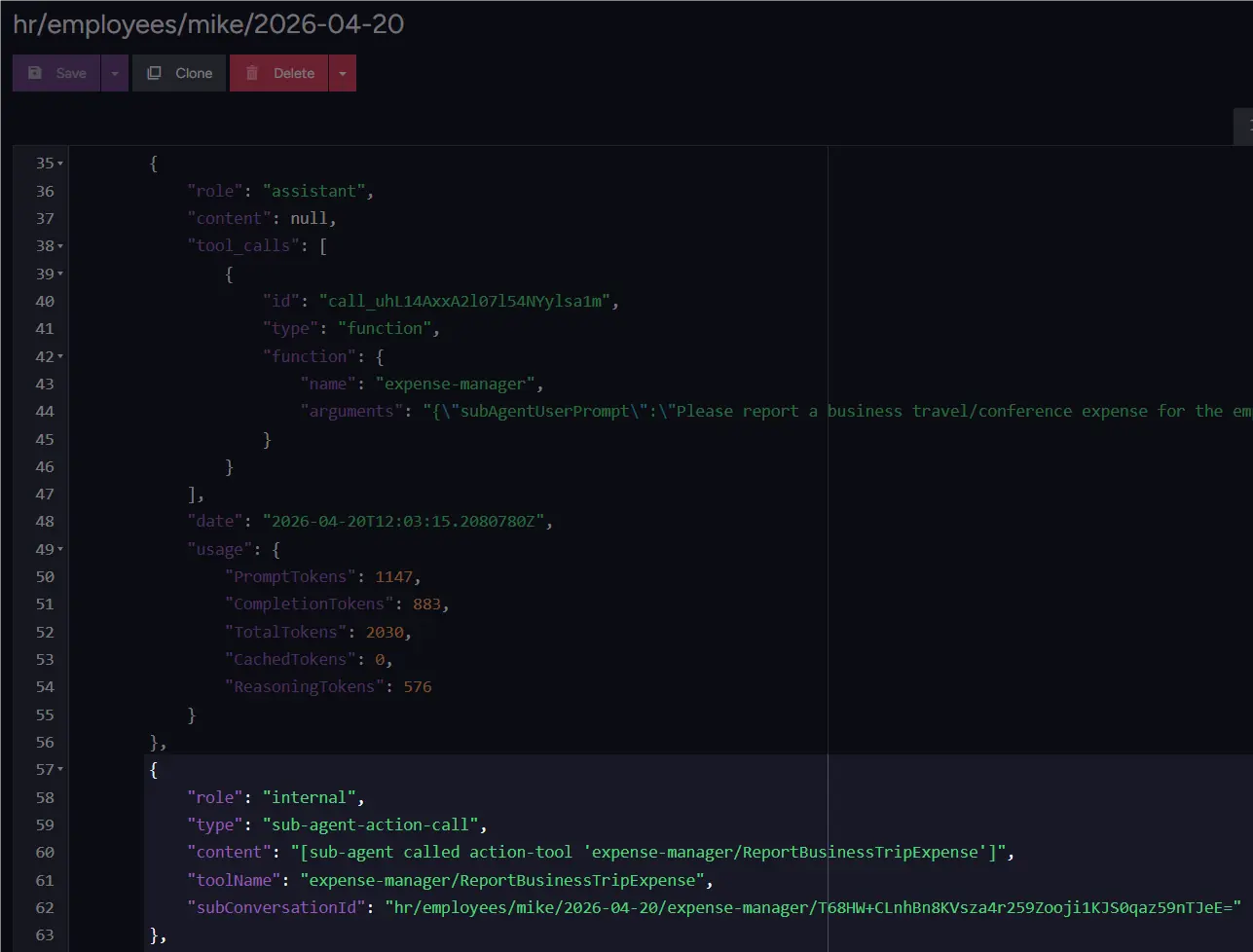
We can notice a sub-agent call from our expense manager, so we configured the sub-agent correctly. Nothing more to do, just add another part of the system.
Seeing it work, you can start to think that in real environments, we rarely configure a single instance by hand. Teams often need the same agent setup across multiple environments, servers, or customer deployments. We can look into how we set this up in code in this demo.
public static Task Create(IDocumentStore store)
{
    return store.AI.CreateAgentAsync(
        new AiAgentConfiguration
        {
            Name = "HR Assistant",
            Identifier = AgentIdentifier,
            ConnectionStringName = ConnectionStringName,
            SystemPrompt = @"You are an HR assistant.
Provide info on benefits, policies, and departments.
Be professional and cheery.

You can answer in markdown format, make sure to use ticks (\`) whenever you discuss identifiers.
Do not suggest actions that are not explicitly allowed by the tools available to you.
Do NOT discuss non-HR topics. Answer only for the current employee.
",

            Parameters = [new AiAgentParameter(EmployeeIdParameter, "Employee ID; answer only for this employee")],
            SampleObject = JsonConvert.SerializeObject(new Reply
            {
                Answer = "Detailed answer to query",
                Followups = ["Likely follow-ups"],
            }),
            SubAgents =
            [
                new AiAgentToolSubAgent
                {
                    Identifier = ExpenseAgentIdentifier,
                    Description = "Manages business trip expenses: analyzing receipts/bills, reporting expenses, and retrieving monthly expense summaries."
                }
            ],
            Queries =
            [
                new AiAgentToolQuery
                {
                    Name = "GetEmployeeInfo",
                    Description = "Retrieve employee details",
                    Query = $"from Employees where id() = \${EmployeeIdParameter}",
                    ParametersSampleObject = "{}"
                },
`}
The two most important elements for us are the Identifier and the sub-agents section. As we mentioned before, identifiers are important as they are basic way RavenDB uses to identify which agent is which.
Those identifiers are used later when we want to add a sub-agent to the main agent. We add the SubAgents and add an identifier and description. Those are enough to assign an agent as a sub-agent. If you want to find this fragment yourself in the demo, please check: SamplesHR.Backend/Infrastructure/RavenDB/HumanResourcesAgentCreator.cs
Upgrading from one Agent to many
When upgrading from one agent to multiple, we need to review your existing agent and split its responsibilities into smaller, focused agents. Of course, you also need to give each of those agents the tools and actions they need to complete their tasks. You can think about what can or should be delegated to subagents, whether that is a task needing a stronger model or work that can run faster in parallel.
A good example would be a real estate agency using one Listing Manager agent to handle everything: advisor conversations, property searches, client records, and responses. As the workflow grows, that same agent can be reorganized into multiple agents. One sub-agent searches listings using RQL and vector search for requests like “2-bedroom flat in Berlin under 500k euro, move-in ready,” while another checks or updates the client profile to improve matches to the client's preferences.
The Listing Manager then becomes the coordinator, combining the results into a single reply. From the advisor’s perspective, nothing becomes more complicated. It still feels like one smooth interaction, while multiple agents work behind the scenes.
Summary
- Multi-agents in RavenDB are simply multiple regular agents connected together, with each one handling different tasks.
- Instead of one agent handling all tasks, each agent maintains its own focused context, tools, and model, which helps keep responses cleaner and more accurate.
- Setup requires no new concepts: add a SubAgents entry with the sub-agent identifier and description, and the main agent decides when to delegate work.
- In the HR demo, one user message reaches the HR Manager, which routes the expense task to the Expense Manager, saves it in RavenDB, and returns a seamless response.
Now that you know how to connect multiple AI Agents, you might like to see how we use new AI Agent Attachments to provide context for our Agents.
Interested in RavenDB? Grab a free developer license for testing, or start with a free RavenDB Cloud database. If you have questions about this feature, or want to hang out and talk with the RavenDB team, join the RavenDB Discord Community Server.