Master RavenDB: Spotting red flags in index definitions


Every database has a way of making data easier & faster to find. This role is often fulfilled by indexes. Without them, every request would be like searching through a stack of papers one by one, hoping to stumble on the right page. With them, your queries can quickly jump over to the relevant results, going through compacted entries with only the data that the query cares about.
Indexes are not just an optimization; they’re fundamental to how RavenDB works. They shape how queries are executed and how well the system performs as your data grows. A well-designed index can make even complex queries return results almost instantly, whereas a poorly designed one can cause performance issues that impact the entire application.
Indexes in RavenDB
At their core, indexes are a method of organizing data to enable quick query responses. In a traditional sense, you can think of an index like the one at the back of a book: instead of reading every single page to find a keyword, you jump straight to the page numbers listed in the index.
In RavenDB, this concept is implemented using an inverted index. In addition to storing documents in their natural order, RavenDB builds a structure that flips the relationship between data and values. In a document, you might see:
ID: WonderlandEntities/1
Name: Alice
In the index, we use the value as a key. Then, we map document IDs to it, so you can see that as:
Name: Alice → appears in the document with ID ["WonderlandEntities/1"].
This reversal makes it efficient to find all documents that match a particular value, no matter how large your dataset grows.
When you create an index in RavenDB, you’re essentially telling the database:
“These are the fields I care about, and I want to be able to query the documents using these fields fast.”
RavenDB then preprocesses your documents, extracts the relevant fields, and stores them in this inverted index. That way, when a query runs, RavenDB doesn’t need to scan every document; it simply checks the prepared tables or creates this table as an auto index. While auto indexes might be sufficient in most situations, static indexes written by hand give you more control over how they work.
However, you can make mistakes while creating your own static indexes and not be aware of them. Those problems can create performance issues, increasing memory/storage consumption, which slows down your RavenDB. Let’s look into those common problems.
Indexing all fields
Let's start with the basics. In our recent article (“Projections & Performance”) we mentioned that you should only include the required fields that you will be searching by.
Some developers tend to put all fields in a single index when it is still in development, without considering which parts are truly necessary for filtering or sorting. After that, the developer should ask an important question: “Do I really need all these fields?” The answer is often ‘No’.
Indexing all fields can bloat the index, increase I/O, and slow down queries. Indexing all fields would allow us to query any combination of field values.
However, this comes with a serious downside: the index must process every field and keep this processed data.
In practice, queries rarely need to filter by every field in the document. Usually, you’ll use one or two, for example:
from order in docs.Orders
where order.UserId = "User/1"
limit 10
If you really need to index all fields for different queries, it’s better to do so with a single index that includes only the required fields, and keep queries simple. A single index will do the work more efficiently and should cost less memory and storage, which differentiates RavenDB from most other DBs.
Indexing fields to retrieve data
The first rule of good indexes is to keep them slim. You don't add all the document fields! The only ones that are needed are the ones you'll query by, so keep this number small.
The cost of indexing is proportional to the number of fields that are being indexed. You don’t need to include any fields in your index just to retrieve them later. If you need just a few fields from the documents retrieved by the query, RavenDB will take care of it using projections. You just specify what fields you need.
Storing too many fields
Storing fields in RavenDB basically means keeping certain data from your indexed fields inside the index itself, so it's available without having to load the entire document when you run queries. Sounds great, right? Faster queries, quick access, maybe even storing transformed values, but there’s a catch. It comes at a cost in bigger indexes, more I/O, and slower index creation.
This is why you don’t just mark every field as “stored” thinking it’ll make everything fast. The more fields you store, the heavier your indexes get, and the less truly fast your queries become. Store only what you really need for quick access or query efficiency. Making all fields ‘fast’ makes none truly fast.
You can find more information about storing fields here: storing data in an index.
Misusing LoadDocument in Indexes
Indexes often need to pull in information from related documents. RavenDB provides a convenient way to do this: the LoadDocument method. It allows one document to reference another and ensures that whenever the referenced document changes, the referencing document is re-indexed with the new data. For example:
from order in docs.Orders
let user = LoadDocument(order.UserId, "Users")
select new
{
    order.Id,
    order.Total,
    UserName = user.Name
}
When LoadDocument causes problems
If only a few documents reference a particular document, an index using LoadDocument in its definition works great. However, problems arise when many documents point to the same document, or a small set of them, and that document is frequently updated.
Every time the referenced document changes, all the documents referencing it must be re-indexed. Suddenly, a single small change can generate a tremendous amount of indexing work.
Consequences include slower index updates, leading to delayed queries that rely on fresh data. Also, all this extra work generates high IO demands, leading to longer request durations and potential system instability.
How to avoid the issue
Sometimes, this situation comes from trying to apply relational database thinking to a document database. It’s advised to understand effective document modeling rather than forcing relational patterns. Rethink your queries or data models.
Missing fanout for nested data
A fanout index is a technique that allows you to query lists stored inside documents without working around them. If you need to filter list elements individually or compute something per item, then most probably you should use fanout. Let’s look at an example to understand it. Consider this example document:
{
  "OrderId": "orders/1-A",
  "Products": [
    { "Name": "Apple", "Price": 3 },
    { "Name": "Orange", "Price": 5 }
  ]
}
Indexing without fanout
This is what an index would look like without using fanout. See example below
from doc in docs.Orders
select new {
OrderId = doc.Id
Name = doc.Products.Name
Price = doc.Products.Price
}
And how would the index ‘see’ it?
OrderId = "orders/1-A",
Name = (Name:"Apple", Name:"Orange")
Price = (Price:3, Price:5)
This is troublesome, you want to query by elements in the list but it is treated as one object. If we use a query to find orders with apples costing more than 4$, it would indicate that the document with ID: “orders/1-A” meets this requirement, because “Apple” is in the product list, and the price list has at least one value greater than 4$.
Using fanout correctly
This problem is easily solved by fanout. Fanout is for indexing a list of entities within a single document. If you are looking for a similar concept from dotnet BCL, SelectMany would be the method to compare with. We can use fanout like this:
from doc in docs.Orders
from product in doc.Products
select new {
OrderId = order.Id
ProductName = product.Name
ProductPrice = product.Price
}
So it will produce this:
{
OrderId = "orders/1-A",
ProductName = "Apple",
ProductPrice = 3
},
{
OrderId = "orders/1-A",
ProductName = "Orange",
ProductPrice = 5
}
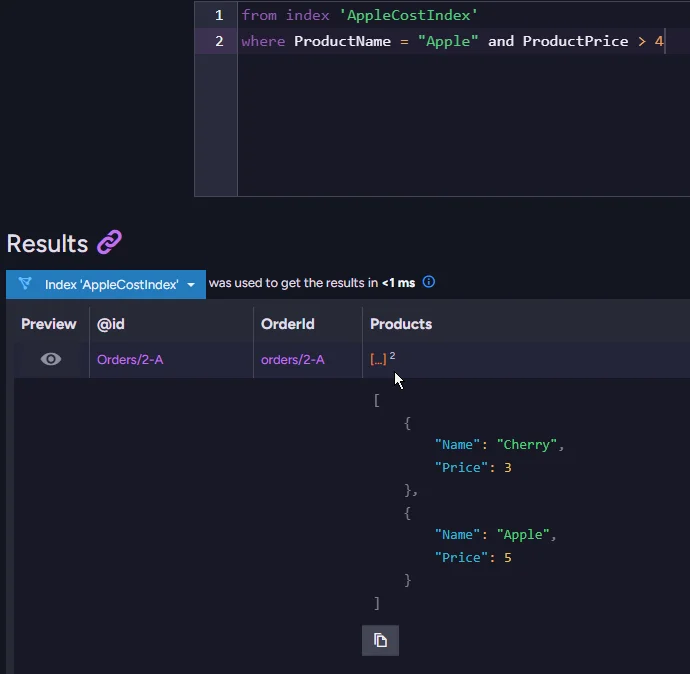
And this one would return a negative response, as it should.
But if we’d have order that matches this query, it works properly:
Map Reduce With Unique Values
Sometimes you want to aggregate your data - e.g. all profit generated from each customer, but you hold each purchase in separate documents. That is where Map-Reduce can help you. It aggregates all the data you want from your query under one key and combines them.
The problem appears when you select the wrong field as a key. If you group your data using values that are unique, then you don’t really aggregate anything, because every document is isolated in its own group. That makes your index work more without actually doing anything.
Grouping by a unique key
Map Reduce with unique values would look like this:
from order in docs.Orders // Map
select new
{
    OrderId = order.Id,
    Company = order.Company,
    Spend = order.Price
}

from result in results // Reduce
group result by result.OrderId
into g
select new {
    OrderId = g.Key,
    Company = g.Select(x => x.Company),
    Spend = g.Sum(x => x.Spend)
}
In this example, you might notice we are using OrderID as a key, which will not be grouped in any way, as each OrderID is unique and never repeats. This just adds extra steps with something that changes nothing for this case.
Grouping by a shared key
To make Map-Reduce effective, always pick a key that multiple documents can share. For example, grouping purchases by Company lets you sum all orders from one company. If instead, you group by OrderId, every document stands alone, and your index wastes resources without providing aggregation. As a rule of thumb, ask yourself: Will more than one document end up in this group? If not, reconsider your key choice.
Good map reduce would look like this:
from order in docs.Orders // Map
select new
{
    Company = order.Company,
    Spend = order.Price
}

from result in results //Reduce
group result by result.Company
into g
select new {

    Company = g.Key,
    Spend = g.Sum(x => x.Spend)
}
In this example we sort using company grouping. We sum prices of Orders per company, and present them.
Too Many let Statements
When you need to process or combine a few fields into one field, you use ‘let’ in your index. This can also cause trouble if you are not careful.
Chaining multiple let statements
When you are still in the development phase, or you just need multiple variables to store something at runtime, you may create indexes with fragments that resemble this:
from doc in docs.Persons
let x = ...
let y = ...
let z = ...
let a = ...
...
let N = ...
This can be highly detrimental to your index and the overall system performance. Each let slows down the entire system for one ‘step’. Sometimes it feels better to merge one or two steps if they are close to each other, and this is the same case here. Each let makes your index heavier and slower. The worst thing is you might not notice it initially as you work on sample data because the problem scales with the number of documents. So this initially small issue grows with your database. That’s why it is advised that if you can use one let to define more variables, for example:
from doc in docs.Persons
let data = new {
    X = ...,
    Y = ...,
    Z = ...,
    A = ...
}
Grouping them into one object
That way, all of this is just one object, and it is treated as only one step.
Of course, using one or two ‘let’ is completely normal, but if you are writing the fifth let in your index, you should stop for a moment and consider grouping them.
Summary
Indexes in RavenDB are a basic but powerful tool. Like any tool, they work best when used correctly. This guide covered common index definition problems like:
- Indexing too many fields bloats the index and increases I/O. Only the fields used for filtering or sorting belong in the index; everything else can be fetched via projections.
- Misusing LoadDocument causes mass re-indexing when a frequently updated document is referenced by many others, resulting in high I/O pressure and stale query results.
- Skipping fanout for nested arrays produces incorrect query results, because without it all list values are merged into a single index entry and cannot be matched individually.
- Choosing a unique key in Map-Reduce means no actual aggregation happens. Every document ends up in its own group, so the reduce step does nothing useful.
Now that you understand them better, you may want to read about queries and performance, or explore vector search in RavenDB.