Troubleshooting ETL with the RavenDB ETL Errors View

RavenDB is a database built to seamlessly integrate with almost every existing system architecture. It provides a wide range of integration tools designed to connect your database with the rest of your system. It doesn't matter if you're ETLing to synchronize between stores, push event data to trigger your microservices, or running AI inference features for intelligent workflows - our focus is always set on making it fast to spin up, flexible to adapt into your environments, and simple to maintain by you or your team.
At the same time, real production systems are never completely problem-free. Even with good tools designed to simplify configuration and maintenance, issues can still appear as a natural part of the system development and maintaining process. When they do, being able to quickly identify, understand, and troubleshoot failures becomes just as important as setting the system up in the first place - often called "Day 2" support.
In this guide, we will go through various practical scenarios that may appear on your production, and show how to leverage ETL Task Errors view in RavenDB to investigate, troubleshoot, and find the root issue fast, using an information-based approach.
Case 1: New ETL errors
Let's showcase the typical workflow by starting with something really simple. Let's say we are responsible for maintaining an application that schedules and sends user notifications across several regions. The system is dependent on RavenDB ETL. Our system has staging and CI environments for integration and end-to-end testing.
One day during one of the pre-deployment routines, when you need to visit the staged RavenDB's Studio, you notice that there is an unread notification that includes an ETL error coming from a task we do not recognize.

Batch after batch fails, making it clear this is not just a temporary hiccup but something actively breaking inside the pipeline. We look at our Ongoing Tasks view.
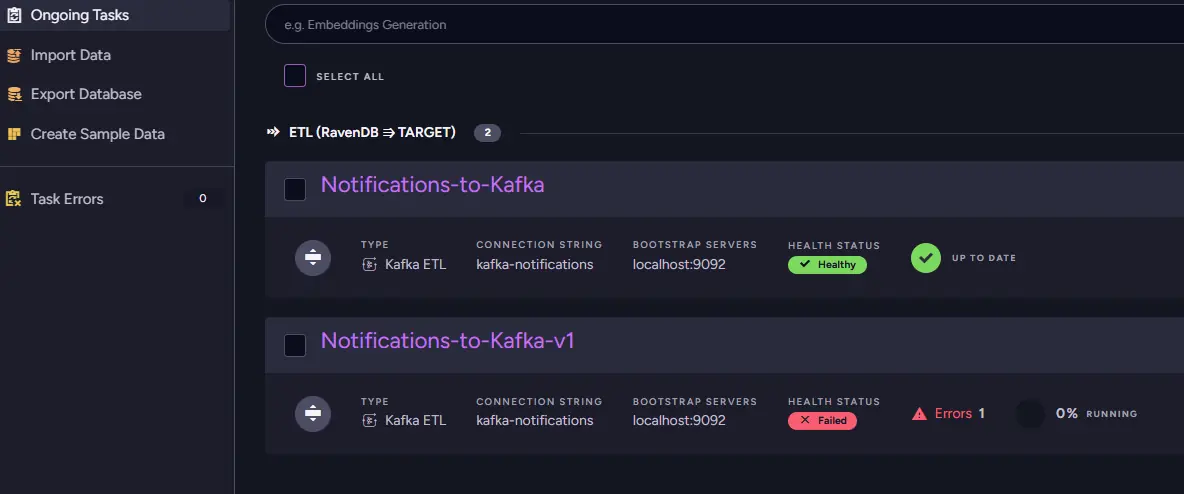
Before touching the configuration, the first step is to determine exactly what is failing and how serious the problem is. We start in the ETL Errors view, where RavenDB gathers all failures related to the task in one place.
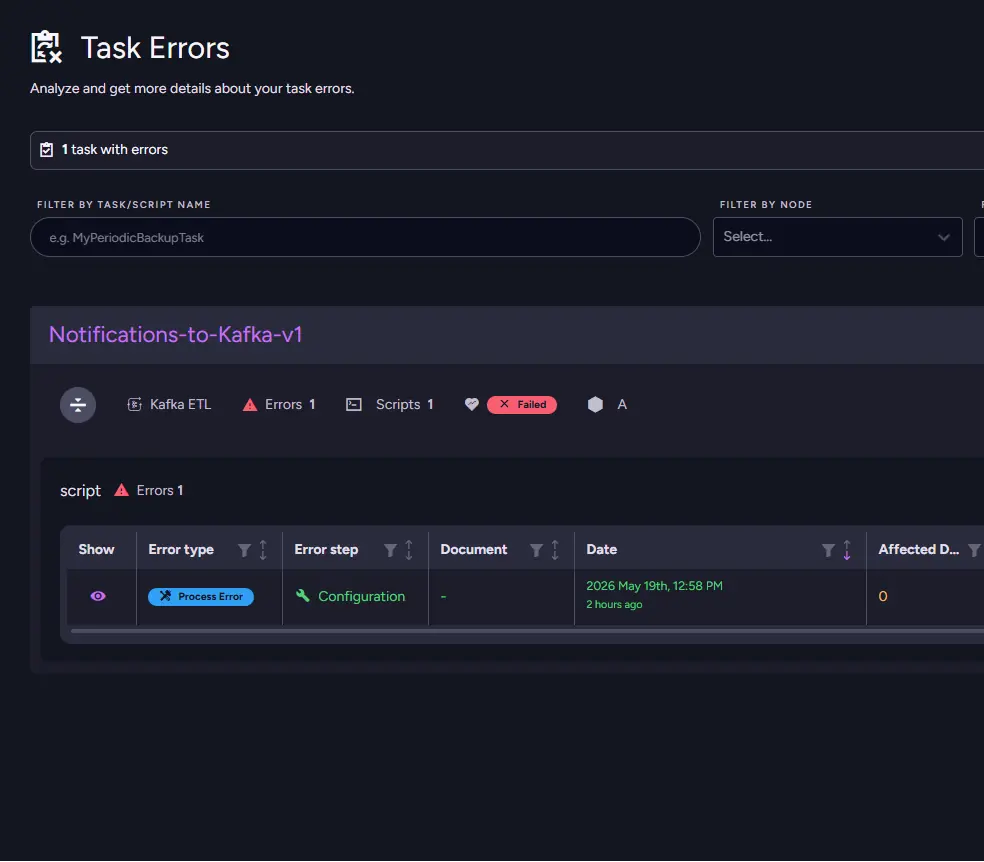
The first thing that catches the eye is the ETL Health status itself. The task is already marked as Failed, which means the ETL task doesn’t work at all. Looking through the table only confirms it. Errors keep appearing on every execution attempt, and the affected document count indicates that entire batches are failing rather than just a few problematic documents.
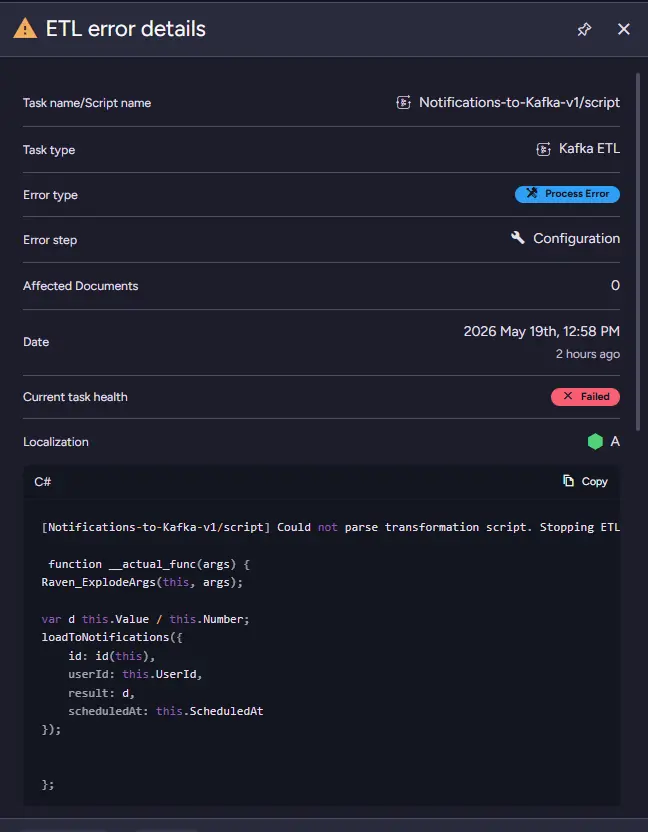
The error type gives us the next clue. Every entry is marked as a Process Error, indicating the issue lies at the ETL document processing level. Error Step is set to Transformation ("T" in the "ETL"). That leads us to the ETL configuration itself to check the transform script.
Looking at the failed process step narrows it down even further: the failure happens during configuration validation. At this point, we know RavenDB is rejecting the ETL before the transformation pipeline can start working properly. Error message confirms what we know, transformation is not being parsed.
Notifications-to-Kafka-v1/script] Could not parse transformation script. Stopping ETL process.: Raven.Client.Exceptions.Documents.Patching.JavaScriptParseException: Failed to parse:

 function __actual_func(args) {
Raven_ExplodeArgs(this, args);

var d this.Value / this.Number;
loadToNotifications({
    id: id(this),
    userId: this.UserId,
    result: d,
    scheduledAt: this.ScheduledAt
});


};

function execute(doc, args){
    __actual_func.call(doc, args);
    return doc;
}
 ---> Jint.ScriptPreparationException: Could not prepare script: Unexpected token 'this' (5:7)
 ...
We can see a very nasty typo - a missing = sign:
var d this.Value / this.Number;
After chatting with fellow devs from your team, it appears that this configuration is a leftover from experiments run on staging. Not a big deal - you agree to clean it up, as the second task is doing the actual job.
So, when you're seeing a Transformation step error, there may be something wrong within the script itself, as in this simplest typo scenario, but you need to be aware it can also fail to work with the loaded data.
Case 2: Missing In-App Notifications
We are staying with the same application. Weeks later, we received a bug report coming from one of our users, even though there are no problems on the system CI. They’re furious, as they have missed an important meeting because our application never sent them a notification, leaving them late while everyone else, after receiving the notification, arrived on time - confused about what happened. At first, the situation seems strange because the Kafka-based notification system is clearly still working for most users, we would have more reports if that were the case. Messages are being delivered normally, but every now and then, somebody gets skipped entirely.
Instead of jumping immediately to the world of exact-once queue processing constraints, we begin in the RavenDB ETL Errors view. The situation looks very different from the previous incident. The Kafka ETL itself is still running and continues processing documents normally. Its health status is set to Impaired.
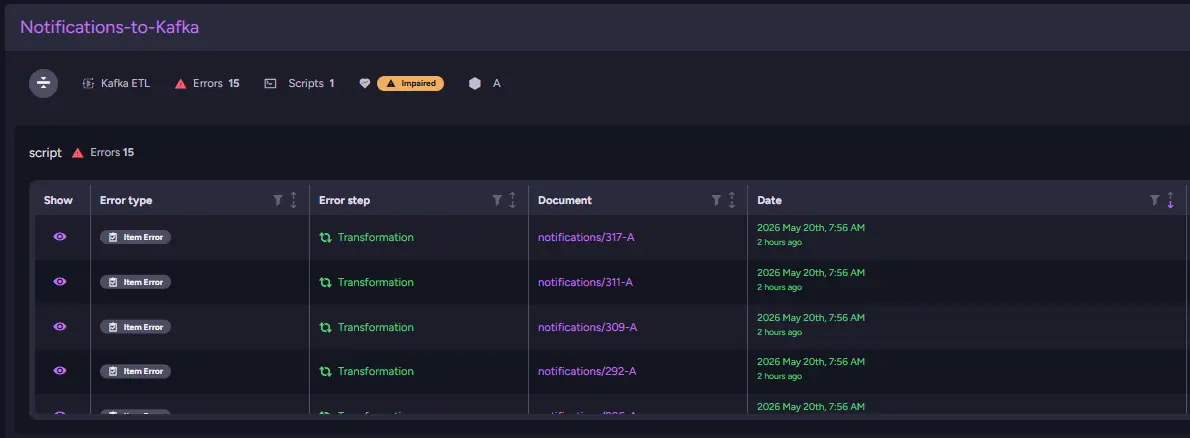
That immediately tells us we are not dealing with a total pipeline failure. Something is going wrong during processing, but only for a subset of documents.
Healthy: Almost all recent ETL processes complete successfully.
Impaired: Failures are becoming recently common; the task is starting to degrade.
Failed: Most ETL processes are recently failing; the ETL is no longer operating reliably.
We look into the table, and the entries are marked as Item Errors at Transformation step. These point away from configuration problems and toward data or the transformation logic itself. The ETL can execute, and batches continue moving through the pipeline, but certain documents fail during transformation. The Document column is useful here because it lets us inspect the exact documents that triggered the failures, while error messages tell us what is wrong.
After taking a closer look at the documents listed in the Errors view, the pattern finally becomes clear. Every problematic notification was created from the same legacy reminder template. In those documents, ReminderCount is set to 0, while the transform assumes it can use that value to calculate how far before the meeting the notification should be scheduled.
The failing part of the script looks innocent at first:
var minutesBeforeMeeting = this.ReminderWindowInMinutes / this.ReminderCount;

var scheduledAt = new Date(
    new Date(this.MeetingStartsAt).getTime() - minutesBeforeMeeting * 60 * 1000
).toISOString();

loadToNotifications({
    id: id(this),
    userId: this.UserId,
    meetingId: this.MeetingId,
    scheduledAt: scheduledAt,
    title: this.Title
});
For regular documents, this works as expected. But when ReminderCount is 0, JavaScript does not throw immediately. The division produces Infinity. The actual failure happens one line later, when the script tries to use that value to build a date. new Date(-Infinity).toISOString() cannot produce a valid timestamp, so only those specific documents fail during the Transformation step. That also explains why the issue appeared only occasionally: the ETL task was healthy enough to process normal notifications, but kept rejecting documents coming from that legacy template.
With the source identified, the fix is straightforward. We update the transform to handle the invalid value explicitly before doing the calculation. In this case, the safest behavior is to fall back to a single reminder instead of letting the notification disappear completely:
var reminderCount = this.ReminderCount;

if (reminderCount <= 0) {
    reminderCount = 1;
}

var minutesBeforeMeeting = this.ReminderWindowInMinutes / reminderCount;

var scheduledAt = new Date(
    new Date(this.MeetingStartsAt).getTime() - minutesBeforeMeeting * 60 * 1000
).toISOString();

loadToNotifications({
    id: id(this),
    userId: this.UserId,
    meetingId: this.MeetingId,
    scheduledAt: scheduledAt,
    title: this.Title,
    reminderCountFallbackApplied: this.ReminderCount <= 0
});
After stopping the immediate problem, we still need to decide whether ReminderCount = 0 should be allowed at all. That is a product and data-contract question rather than only an ETL question, so we add a follow-up task to validate reminder templates earlier in the system. Once the transform is fixed and redeployed, we clear the historical Transformation Errors and confirm that the ETL returns to a healthy state. Kafka notifications start flowing consistently again. We should also update our monitoring to include those new ETL errors so we can notice them faster.
Unlike the previous incident, this issue affected only individual documents, allowing the pipeline to continue operating while still quietly causing problems for specific users. Some would say such quiet failure can be even more dangerous than a normal one. That’s why we introduced the Impaired state: to make sure you notice these trickier problems before they grow into a full outage.
Case 3: Full region outage
Suddenly, notifications stop arriving entirely. Users began reporting missed reminders and undelivered messages, even though our transform scripts and ETL pipeline had already been validated in staging and CI environments and had been working reliably in production for a long time.
We open the ETL Task Errors view and immediately notice that the failures are marked as Load Errors. Unlike transformation errors, this usually means RavenDB successfully prepared the data, but communication with the external notification service failed. The ETL is functioning correctly, yet something outside the database is preventing delivery.
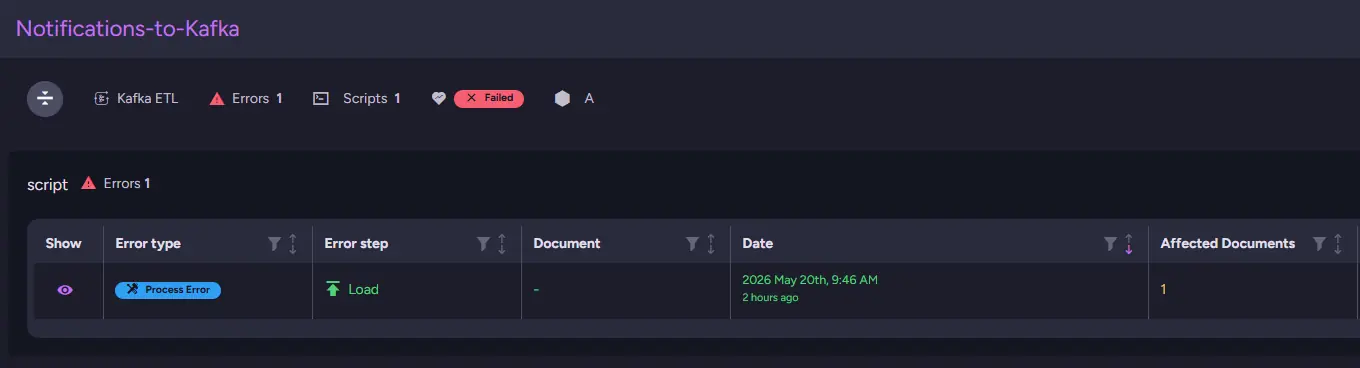
That distinction matters because it tells us RavenDB successfully processed and transformed the documents, but failed while trying to send the data further downstream. In other words, the ETL itself is operational. The failure happens only at the final stage, when the server attempts to communicate with the external notification infrastructure.
At this point, we need to look towards infrastructure and connectivity. Load Errors often mean the destination service is unavailable or unreachable from the current environment. We first verify that our Kafka cloud instance itself is healthy, but since notifications from other regions are still working correctly, it should be fine. That rules out a global outage and narrows the problem down to connectivity from this particular server.
After checking the network path and recent infrastructure changes, we finally discover the real issue. We are bouncing off the firewall.
C:\Users\admin> tracert 10.42.18.55

Tracing route to 10.42.18.55 over a maximum of 30 hops:

  1     1 ms     1 ms    <1 ms  gateway.local [192.168.1.1]
  2     1 ms     1 ms     1 ms  core-sw-01.internal [10.0.0.1]
  3     3 ms     3 ms     3 ms  dist-rtr-02.net [10.10.2.1]
  4     4 ms     4 ms     4 ms  edge-rtr-01.net [10.20.4.1]
  5     6 ms     6 ms     6 ms  fw-region-eu-03 [10.30.8.254]
  6     *        *        *     Request timed out.
  7     *        *        *     Request timed out.
  8     *        *        *     Request timed out.
  9     *        *        *     Request timed out.
 10     *        *        *     Request timed out.
       ...
 30     *        *        *     Request timed out.

Trace complete.
We connect the dots, and it turns out that after we had the last security settings update, it was blocking traffic from this region's server, preventing it from passing through the firewall.
With the source identified, the fix becomes operational rather than code-related. We request to be whitelisted on the required firewall rules. As soon as access is restored, notifications immediately begin flowing normally again for users in that region.
Case 4: No summaries
Next problems come after seemingly everything was fixed. We've introduced a Premium feature: AI summarization. Users were excited (and paid us well), until they started reporting that summaries stopped being generated completely, and it already happened previously, twice. The rest of the platform still works normally. Documents upload correctly, searches continue functioning, and notifications arrive without issues. Only the AI-generated summaries suddenly stop appearing, making paying users frustrated.
As other systems work properly, those immediately suggest the problem is isolated to the AI processing pipeline rather than the application as a whole. Because this is an AI task, we will start the investigation in the AI Task Errors view, where RavenDB collects failures connected to all generative AI features. Monitoring already shows a growing number of errors tied to summary generation, so we begin by checking what type of failures are being reported. Unlike earlier ETL troubleshooting, the task itself is still actively processing requests, but summaries continue to fail for every new document that enters the pipeline.
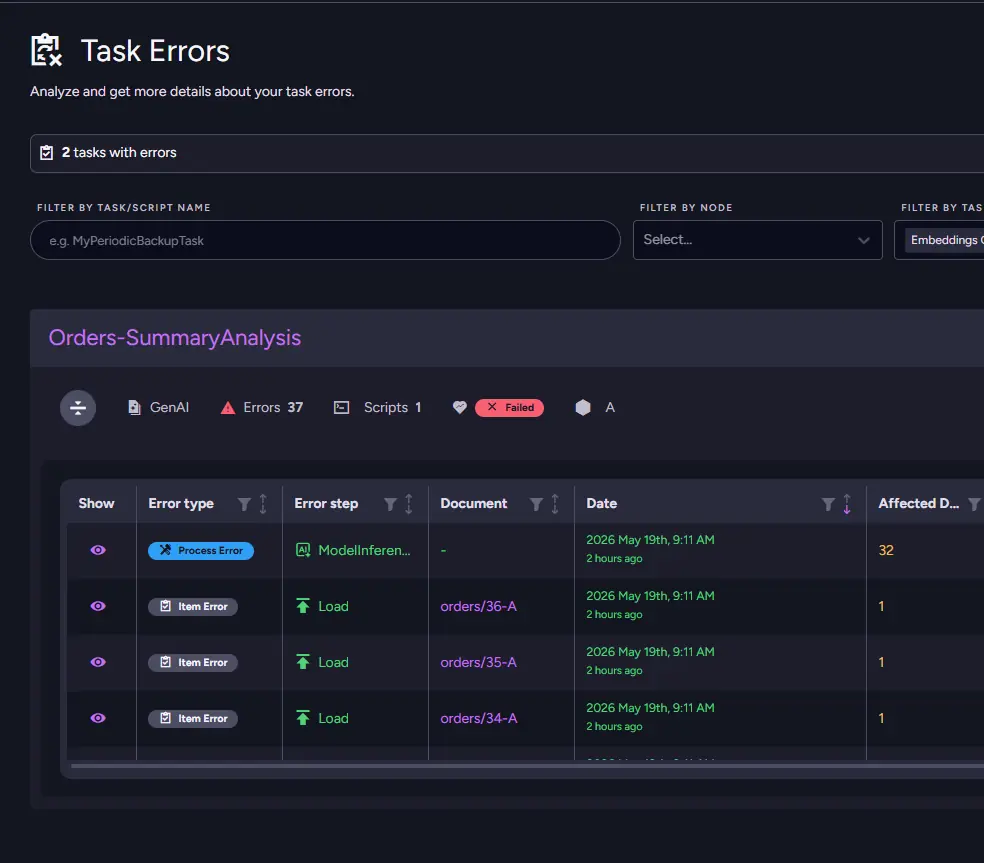
Looking through the table reveals two important error types appearing together: Load Errors and ModelInference Errors. That combination points away from transformation logic or malformed documents and toward communication with the external LLM provider itself. RavenDB is successfully preparing requests and attempting to send them, but the inference stage fails before summaries can be generated. Opening the detailed error message finally makes the situation clear: "You exceeded your current quota, please check your plan and billing details."
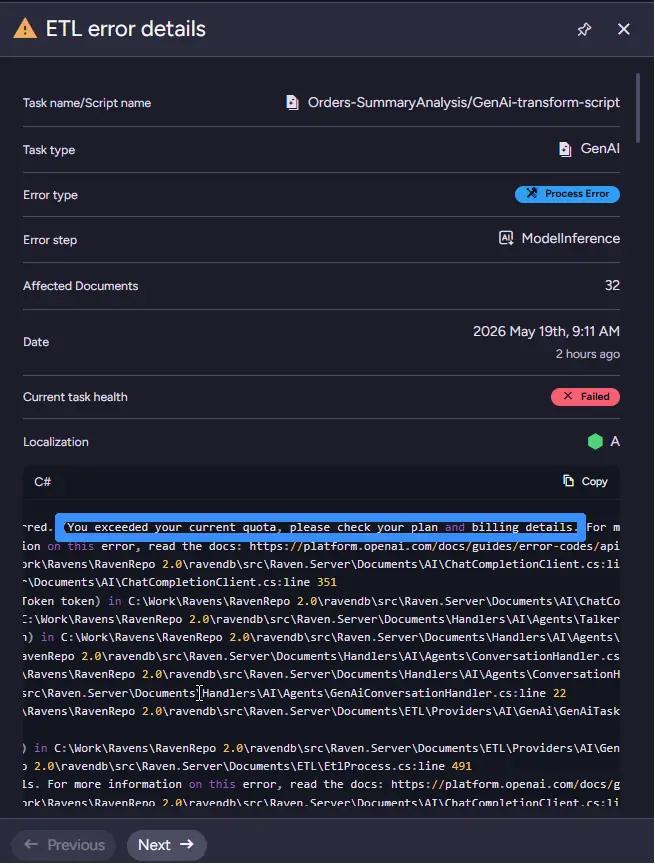
At this point, the issue is no longer a broken transformation, a malformed document, or a networking problem. The RavenDB AI tasks are successfully preparing and sending requests, but the external provider refuses to process them because the API key has exhausted its available quota. Unlike the earlier ETL incidents, no script or infrastructure fix is needed within RavenDB itself. The system is functioning correctly, but the external AI provider account no longer has enough funds or remaining quota to continue generating summaries.
The actual fix is to budget our AI spending correctly to prevent occasional incidents when we're running out of credits.
Bonus - Rare Error Steps
Extraction and Persistence errors are rare and typically signal issues at the infrastructure level rather than with the ETL configuration itself. Extraction occurs when RavenDB cannot read source documents (e.g. a corrupted document), while Persistence occurs when RavenDB fails to save ETL state or progress metadata internally (e.g. a disk write failure).
If you encounter either, it likely indicates a problem with the machine or storage layer running the server. Start by checking for file corruption and verifying file permissions, as ownership can sometimes be altered by a script. If the cause is not apparent, contact support. A common scenario is a cloud disk failing while RavenDB itself remains running, making it unable to persist data. If unsure what to do with errors in those steps contact RavenDB support.
Handy cheatsheets
| Error Scope | What It Affects | Behavior |
|---|---|---|
| Process Error | Entire batch / ETL step | Retries after some time |
| Item Error | Specific document(s) | Skips the item; retries after document changes |
| Status | Description |
|---|---|
| Healthy | Most processes complete successfully; occasional failures only. |
| Impaired | Frequent failures; roughly half of processes failing. |
| Failed | Most processes failing; ETL no longer operates reliably. |
| Error Type | When It Occurs | Example |
|---|---|---|
| Configuration | ETL task is misconfigured before processing begins | Invalid connection string |
| Transformation | Transformation script fails to process a document | JavaScript exception in script |
| Load | Transformed data can't be pushed to the destination | Destination unreachable |
| ModelInference | AI/ML model during transformation fails to produce a result | Exhausted quota |
| Extraction | RavenDB fails to read or pull source documents | Corrupted document |
| Persistence | RavenDB fails to save ETL state or progress metadata | Disk write failure |
Summary
In the end a few simple habits can dramatically speed up ETL troubleshooting.
- Start with two questions: “Process or Item?” and “Which step failed?” Often, that already points directly to the fix.
- Read the raw error message carefully. It usually contains the most important troubleshooting details.
- Check how recent the errors are. Old errors without new activity may already be resolved.
- Focus on active failures first. Recency matters more than historical noise.
If you want to prevent problems like this before they appear, monitoring might help; that's why we also make ETL and AI errors available via the SNMP protocol for your monitoring needs.