From Tables to Documents: Connecting PostgreSQL to RavenDB with CDC Sink

What is CDC Sink?
Sometimes you don't start from a clean slate. There's an older system already running the business, holding years of data, and quietly doing its job. People depend on it, and replacing it isn't something anyone wants to rush. At the same time, you want to build new features, and those are often easier to build from scratch than on the schema you inherited.
That's the situation this guide is written for. You have a SQL-backed application that you don’t want to replace overnight, but you want to start moving parts of your system to RavenDB without disrupting the existing application. Instead of migrating everything in one risky move, RavenDB can clone the database and maintain an up-to-date copy of only the tables you care about. The old system keeps running, your new features can use RavenDB, and over time, you can migrate more functionality while both systems stay in sync automatically.
CDC Sink is a RavenDB ongoing task that watches the change feed of a relational database, such as PostgreSQL, SQL Server, or MySQL, and keeps a live copy of that data in RavenDB as documents. You decide which tables to follow, how their rows should be transformed into documents, and RavenDB keeps everything synchronized as the source database changes.
In this guide, we'll connect RavenDB to PostgreSQL step by step. Along the way, we'll explain not just what to configure, but why each step matters, so you can see how a row in a SQL table eventually becomes a document in RavenDB. By the end of this guide, you'll have data flowing from a relational database into RavenDB as live documents while the original SQL application continues running without knowing anything has changed.
Getting the connection working only takes a few minutes. The more interesting part, and where we'll spend most of our time, is deciding how a handful of normalized SQL tables should become a single, well-shaped document.
The Studio walkthrough and examples in this guide use RavenDB 7.2.5 and PostgreSQL 16.
When to use it?
Before we begin, there are two important points that determine whether CDC Sink is the right tool for your scenario.
First, CDC Sink needs real access to the source database, not just a login. To read its change feed, three things have to be in place:
- logical replication enabled, which is a configuration change that requires a restart,
- a replication slot, which uses disk on the source if the sink falls behind,
- and the privileges to set both up.
All of that touches the database's configuration and its resources, so whoever owns it has to be on board. Throughout this guide, we assume these prerequisites are already in place.
Second, CDC Sink reads changes straight from the database, which is the right approach when you need a complete, continuously updated copy of the data. An application API can usually fetch a record on demand, but it rarely gives you every insert, update, and delete as it happens, in order, including the history already in the tables. If the source already publishes a reliable change stream of its own, prefer that. Otherwise, the database's change feed is the most direct and complete source, and that is what CDC Sink is built on.
The database we're working with
We'll use the classic Northwind database throughout this guide as sample data. It has fourteen tables covering customers, orders, products, suppliers, shipping, employees, and more. Our application, let’s say, we only want the application to display orders together with the customer who placed them and the products they contain, so we'll replicate just four tables: customers, products, orders, and order_details.
Here are the parts of the schema we'll be working with. The real Northwind database contains additional columns, such as shipping addresses and freight information, but we'll leave those aside to keep the examples focused.
CREATE TABLE customers (
    customer_id  VARCHAR(5) PRIMARY KEY,
    company_name VARCHAR(40) NOT NULL,
    contact_name VARCHAR(30),
    country      VARCHAR(15)
);

CREATE TABLE products (
    product_id   SERIAL PRIMARY KEY,
    product_name VARCHAR(40) NOT NULL,
    unit_price   REAL
);

CREATE TABLE orders (
    order_id     SERIAL PRIMARY KEY,
    customer_id  VARCHAR(5) REFERENCES customers(customer_id),
    employee_id  INT,
    order_date   DATE,
    shipped_date DATE,
    freight      REAL
);

CREATE TABLE order_details (
    order_id   INT REFERENCES orders(order_id),
    product_id INT REFERENCES products(product_id),
    unit_price REAL,
    quantity   SMALLINT,
    discount   REAL,
    PRIMARY KEY (order_id, product_id)
);
If you've spent years working with relational databases, this schema probably feels completely natural. An order data is split across multiple tables, each table owns one piece of the data, and every time you need the complete picture, you join everything back together.
RavenDB approaches the problem from the document side. Instead of starting with tables and asking how to join them at read time, you start with the document your application wants to load.
The interesting part is deciding what each document should contain. Should customer information be copied into the order document, or should the order only store a reference to the customer? Should product details be embedded inside the order, or should they remain separate documents? Those are modelling decisions, and they're exactly what we'll work through later. For now lets focus on getting data from relational database to RavenDB.
One small detail is worth pointing out before we move on. Northwind identifies customers using the primary key in a form of short codes like “VINET” or “ALFKI” instead of numeric IDs. CDC Sink preserves those keys, so the resulting document IDs will look like Customers/VINET. In general, CDC Sink builds document IDs from the collection name and the table's primary key, whatever that key happens to be.
If you already have CDC Sink connected and only want the part about shaping documents, jump straight to Designing the mapping.
Getting Postgres ready
Before RavenDB can follow the database, PostgreSQL has to be willing to share its changes. If unsure if your Postgres is ready for CDC task we have error messages that will help you in the task menu in Studio. When you create the task in Studio, a Verify step inspects the source and reports exactly what is missing, so we will let it lead.
Setting wal_level to logical
The first thing it usually flags is the write-ahead log level. PostgreSQL only exposes a detailed change feed when wal_level is set to logical, and out of the box, it usually is not.
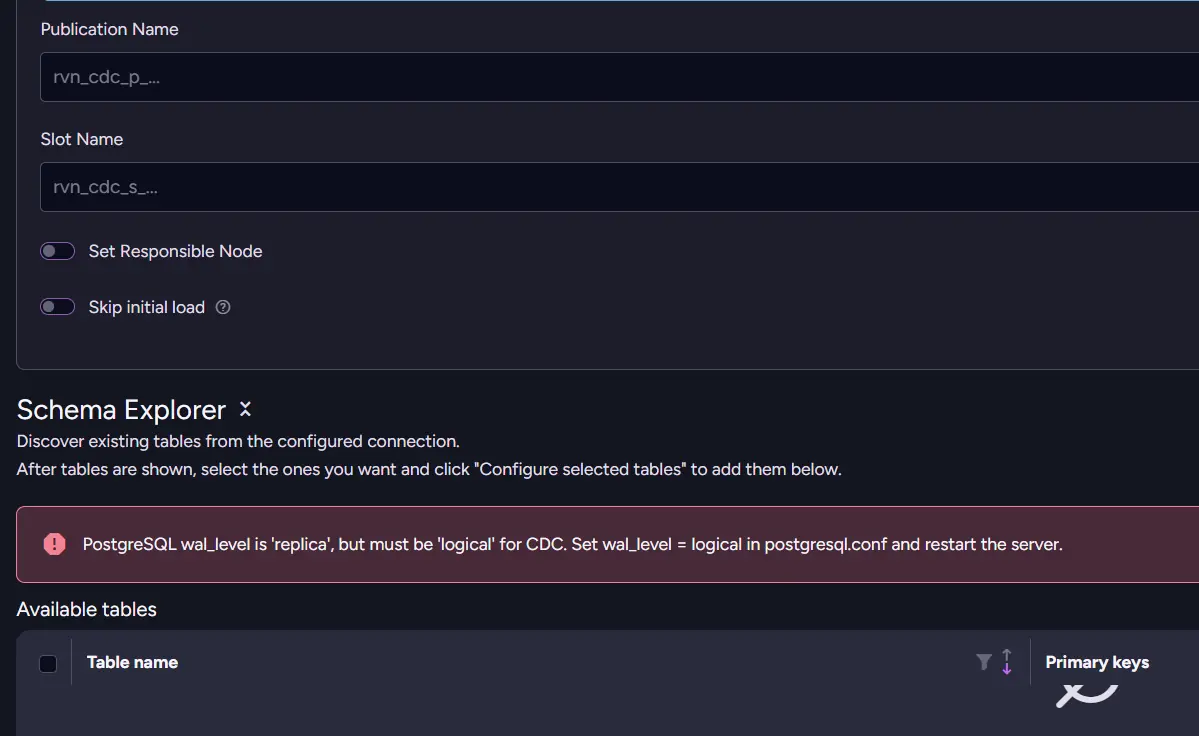
PostgreSQL writes every change to its write-ahead log (WAL), which is used for recovery and replication. The wal_level setting controls how much information PostgreSQL records in that log.
The default value, replica, provides enough information for backups and standby servers, but it does not expose row-level changes in a form that external tools can consume.
Setting wal_level to logical tells PostgreSQL to keep enough detail in its write-ahead log for other systems to read what changed. Instead of CDC Sink inventing its own way to track inserts, updates, and deletes, it builds on PostgreSQL’s built-in change tracking. This is the same foundation used by established tools like Debezium and PostgreSQL’s own logical replication. CDC Sink reads from it rather than reinventing it. CDC Sink builds on that foundation, the same one used by other replication and CDC tools, to detect changes and synchronize data with RavenDB. Without logical, PostgreSQL does not expose the change stream CDC Sink needs.
For more information, see the PostgreSQL documentation on logical decoding and the wal_level parameter.
To adjust it, we need to change it to:
ALTER SYSTEM SET wal_level = logical;
Running this requires superuser rights, or on PostgreSQL 15 and later, a role that has been granted ALTER SYSTEM on wal_level. Changing wal_level doesn't take effect until PostgreSQL is restarted. On a development machine, that's usually no big deal. In production, though, it means scheduling a maintenance window. This is one of the reasons we mentioned earlier that the database team needs to be involved before enabling CDC Sink. Once PostgreSQL is back online, verification should be possible.
Tracking Requirements for Delete
The next thing it will check is related to deletes. By default, when PostgreSQL deletes a row, the change feed carries only that row's primary key. That's enough when RavenDB stores the row as its own document, and it's also enough for an embedded row as long as its primary key is what identifies it inside the parent. It only becomes a problem when an embedded row has to be matched by something other than its primary key.
In that case, RavenDB needs the complete old row to find and remove the embedded data, and Verify will ask you to enable it on that table:
ALTER TABLE order_lines REPLICA IDENTITY FULL;
In our Northwind mapping this never comes up. order_details is the only table we embed, and its primary key (order_id, product_id) already identifies each line inside its order, so the default is enough. Verify only raises this when a table's key doesn't cover its embedded rows, so you apply it only where it asks.
Once Verify reports everything is set up properly, PostgreSQL is ready. The infrastructure is in place, and we can move on to the more interesting part: deciding how those SQL tables should become RavenDB documents.
Creating the CDC Sink task
With PostgreSQL configured, it's time to tell RavenDB which tables to replicate and how to map them to documents. We set it up in the Add CDC Sink dialog in Studio, though everything shown here is also available via the Client API.
Step 1: Create the CDC Sink task
Let’s create a new CDC Sink task from Ongoing Tasks → Add Task → CDC Sink.
First we create a new connection string or use the one we already had. The connection string contains the information RavenDB needs to reach PostgreSQL, including the server address, database, and authentication details. Once it's saved, any CDC Sink task can reference it by name.
After selecting the PostgreSQL connection string, choose which tables to replicate and define how each table maps to RavenDB documents. This is where you decide which columns become document fields, which table provides the document ID, and which collection the documents belong to.
The same configuration can also be created programmatically using AddCdcSinkOperation, making it easy to automate deployments.
Step 2: Configure embedded tables (optional)
If your model embeds child rows inside parent documents, configure those relationships now. For example, instead of creating a separate document for every order_details row, you can embed them inside their corresponding order document:
{
   "OrderDate": "1996-07-04T00:00:00.0000000",
   "Lines": [
# This is a single, transformed order_details row
       {
           "Product": "Products/11",
           "Quantity": 12,
           "UnitPrice": 14.0
       }
   ]
}
CDC Sink keeps these embedded collections synchronized automatically. Inserts add new array elements, updates modify the matching item, and deletes remove it from the parent document. What is left is to save and let RavenDB handle it all.
Designing the mapping
For each related table, you decide how it should appear in the document, and this is more freedom than it sounds. SQL locked your data into a fixed shape and made you reassemble it with joins on every read. CDC Sink flips that around: you choose the shape once, at design time, and it keeps the documents synchronized from then on. The structure you inherited becomes one you get to redesign.
Decision 1: Embed, link, or copy a few fields?
This is the decision you make most often, once for every table related to your root. CDC Sink gives you three ways to bring a related table into a document: fold its rows in, link to it by ID, or copy a few of its fields. Which one fits comes down to a simple question about the related data. Does it belong to the parent, does it stand on its own, or is it just convenient to have nearby?
Embed child rows
Embed a table when its rows belong exclusively to the parent, there are not too many of them, and you almost always read them together. In a normalized relational model, those rows usually live in their own table, and that is the right shape for SQL. In a document model, we can make a different choice when the relationship is owned, bounded, and read as one unit.
order_details is the classic example. An order line only exists because an order exists, you rarely need to query it on its own, and most orders have only a handful of lines. Instead of making every read rebuild the order from separate tables, we can store those lines inside the order document:
// Orders/10248
{
    "OrderDate": "1996-07-04T00:00:00.0000000",
    "Lines": [
        { "Product": "Products/11", "UnitPrice": 14.0, "Quantity": 12 },
        { "Product": "Products/42", "UnitPrice": 9.8, "Quantity": 10 }
    ],
    "@metadata": { "@collection": "Orders" }
}
Instead of joining orders and order_details every time you read an order, RavenDB stores everything together in a single document. Loading the order now loads its lines as well. The document ID, Orders/10248, is simply the collection name followed by the row's primary key. CDC Sink uses this naming convention for every document it creates. This is coherent with RavenDB native way of identifying documents.
Link to related documents
Some data has its own lifecycle and belongs in its own collection. Customers are a good example. A customer can place many orders over time, and you often look them up independently of any particular order.
Instead of embedding the customer into every order, store a reference to the customer document:
"Customer": "Customers/VINET"
This works much like a foreign key, except it points directly to another document. When you load an order and also need its customer, use an Include to fetch both in a single request without an extra round trip. A similar mechanism can be used when designing indexes.
Products follow the same pattern. Each order line references a Products/... document instead of copying the entire product record into every order.
Copy a few fields
Sometimes you don't need an entire related document, but you also don't want to load it just to display a couple of values.
A common example is showing a list of orders. You might want the customer's company name and country without loading every customer document behind the scenes. In that case, copy just the fields you need into the order:
"Customer": {
    "CompanyName": "Vins et alcools Chevalier",
    "Country": "France"
}
Keep these copies small. If you find yourself copying most of a document, it's usually a sign that you should store a reference instead.
One important detail is that these values are not a snapshot. CDC Sink keeps them synchronized with PostgreSQL, so if the customer's company name changes, the copied value changes as well.
If you need to preserve historical values, for example, the customer's name when the order was placed, that history has to come from the source database rather than the CDC Sink mapping.
Decision 2: How deep should you nest?
Once you start embedding data, it's tempting to keep going. If order lines belong inside an order, why not put every order inside the customer document too?
The answer is simple: stop when the data stops being naturally bounded.
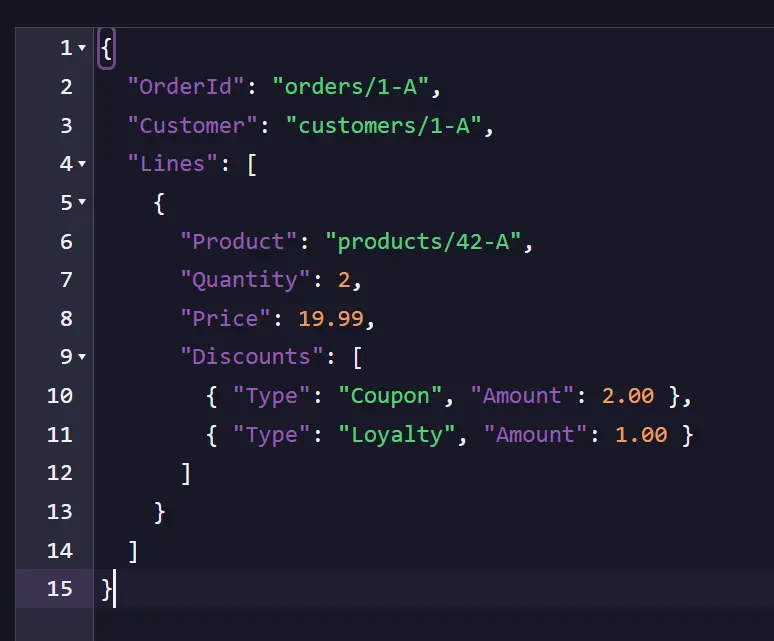
An order usually contains a small number of lines, and you almost always read them together. A customer's orders are different. New ones keep arriving, and you often query them independently. Embedding them would make the customer document grow indefinitely, and RavenDB would have to rewrite the entire document every time another order was placed.
As a rule of thumb:
- Embed data that is small and naturally belongs with its parent.
- Link to data that grows over time or is queried independently.
When you're unsure, prefer linking. Following a reference is usually cheaper than splitting apart a document that has grown too large.
A requirement for embedded tables
Whenever CDC Sink embeds a table, it needs a way to identify the root document that should be updated when a row changes. For order_details, that's easy. Every row already contains an order_id, so CDC Sink knows which order document owns it.
The same rule applies to deeper hierarchies. Every embedded table needs a column that identifies the root document, even if it's nested several levels deep. Without it, CDC Sink wouldn't know which document to update when a row changes.
Decision 3: What happens to join tables?
Relational databases often use join tables to represent many-to-many relationships. Northwind's employee_territories table is a simple example:
CREATE TABLE employee_territories (
    employee_id  INT,
    territory_id VARCHAR(20),
    PRIMARY KEY (employee_id, territory_id)
);
This table doesn't contain any business data. It simply says, "This employee belongs to this territory." Because of that, it doesn't need to become its own collection in RavenDB. Instead, represent the relationship directly by storing a list of references on one side. For example, an employee document can contain an array of territory references:
// Employees/9
{
    "FirstName": "Anne",
    "LastName": "Dodsworth",
    "Territories": [
        { "Territory": "Territories/03049" },
        { "Territory": "Territories/03801" }
    ],
    "@metadata": { "@collection": "Employees" }
}
If a join table contains additional columns, those values become part of each embedded object. order_details, for example, stores the quantity and unit price alongside the product reference, so each entry in the Lines array contains both the relationship and its associated data. A pure join table, on the other hand, becomes nothing more than a list of references. Which side owns that list is up to you. Put it where it makes the most sense for your application.
Decision 4: Columns, types, and what you leave out
So far we've been deciding how tables relate to each other. The last decision is much simpler: which columns should actually become part of your documents? Unlike a relational table, a RavenDB document only contains the fields you choose to map.
Orders table, for example, contains shipping information, address fields, and other columns that our application doesn't need. Instead of copying everything, we simply leave those columns out. They don't appear in the document at all, not as null, not as empty values, just absent.
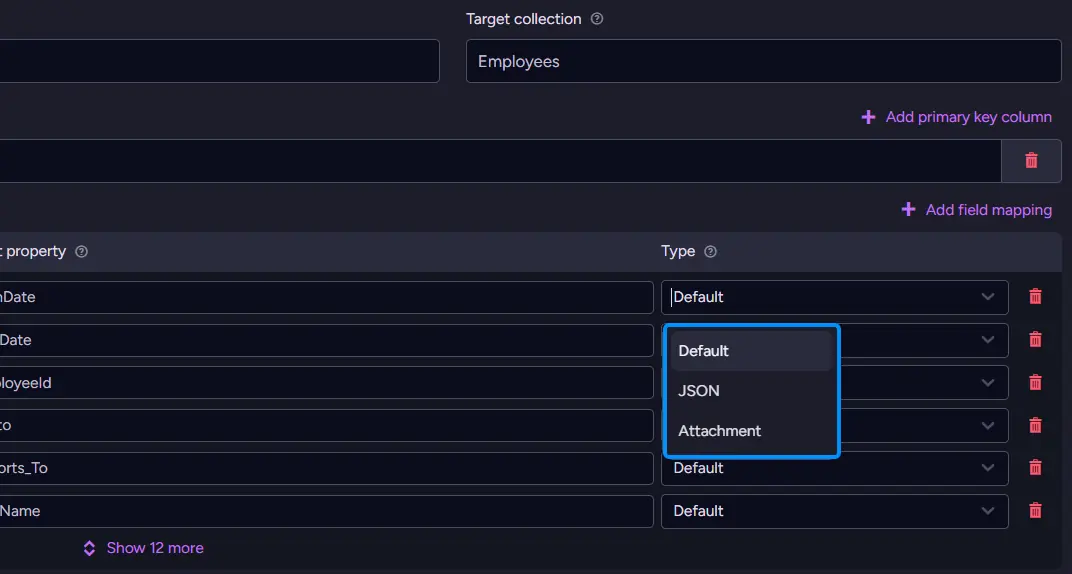
This is one of the biggest advantages of modeling documents. Instead of carrying around every column from a legacy schema, you can shape each document around what your application actually uses.
For the columns you do keep, CDC Sink supports three mapping types:
| Type | What it does | When to reach for it |
|---|---|---|
| Default | Converts the SQL value to its natural JSON form (numbers, text, dates, booleans). | Almost everything. |
| Json | Parses a JSON or JSONB column into a real nested object instead of a string. | A source column that already holds JSON. |
| Attachment | Stores the value as a RavenDB attachment instead of putting it in the document body. | Large or binary values. |
Most columns use Default, so you rarely need to think about it. The photo column is a good example of when another type makes more sense. Employee photos are stored as binary data, so mapping them as an Attachment keeps the document itself small and readable while still storing the image alongside it.
Our database doesn't happen to contain any JSON columns, but many modern databases do. If your source stores JSON or JSONB, for example, application settings or configuration, you can map that column as JSON to turn it into a nested object instead of a plain string.
A little more shaping: computed fields
Sometimes the document you want contains a value that doesn't exist in any single database column. Order total is a good example. It's never stored in the database. Instead, it's calculated by adding up the order's lines. CDC Sink lets you attach a small JavaScript step to a table's mapping, making it easy to compute values like this.
One detail matters here: the script belongs on the order_details mapping, not on orders.
Why? Because the total changes when the order's lines change. A script attached to order_details runs whenever a line is added, updated, or removed, keeping the total up to date. A script attached to orders would only run when the order row itself changed, so the total would quickly become stale. The script has access to the parent document as this, the current source row as $row, and the previous version of that row as $old. Computing the total is just a few lines:
this.Total = this.Lines.reduce(
    (sum, line) => sum + line.UnitPrice * line.Quantity * (1 - line.Discount),
    0
);
Every order document now contains a Total field that stays up to date as its lines change, without storing the value in PostgreSQL.
These scripts are intended for lightweight document shaping. They run whenever mapped data changes, are limited to a fixed number of execution steps, and can't access the network or filesystem.
Good examples include:
- Computing totals or display names.
- Combining several fields into one.
- Setting metadata or flags for your application.
If the logic starts looking like application code, it's usually a sign that it belongs in your application rather than in the mapping.
With the document model complete, the next part of the guide creates the CDC Sink task, watches the first documents appear, and then updates PostgreSQL to see those changes flow into RavenDB.
Watching documents appear
With the mapping defined and the source verified, it's time to start the task. CDC Sink begins with an initial load, reading every row from the mapped tables and creating the corresponding RavenDB documents. Once that's finished, it switches to PostgreSQL's change feed and keeps the documents synchronized as the source database changes.
For a database the size of Northwind, the initial load finishes almost immediately. Open RavenDB Studio and you'll see the Orders, Customers, and Products collections populated. Opening an order document shows the document model we've been building throughout this guide. Instead of an orders row and several matching order_details rows connected by order_id, everything lives together in a single document.
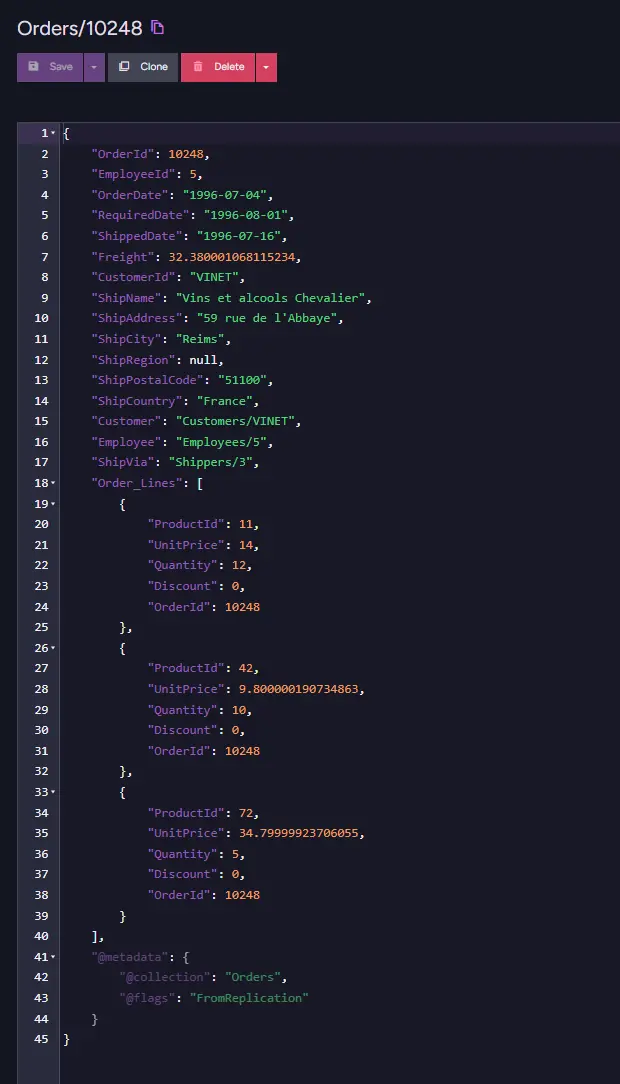
You'll also notice that relationships are now represented as document IDs. Instead of a customer_id containing VINET, the order contains:
"Customer": "Customers/VINET"
That's a reference to another document. In Studio, you can open it directly, and in your application, you can load both the order and its customer in a single request using an Include. At this point, the migration is complete. The initial snapshot has been imported, the document model is in place, and the CDC Sink is now waiting for new changes from PostgreSQL.
It's live
The initial load is only the beginning. The real reason to use CDC Sink instead of a one-time import is that it keeps running. Leave the Orders/10248 document open in Studio, then wait for a change in PostgreSQL. We will use:
INSERT INTO order_details (order_id, product_id, unit_price, quantity, discount)
VALUES (10248, 1, 18.0, 5, 0);
Within a moment of the change reaching PostgreSQL, the document updates automatically. Add a new line and it appears in the Lines array. Set a shipped date, and the ShippedDate field updates. CDC Sink is following PostgreSQL's change feed and applying each change as it arrives.
One behavior is worth pointing out because it's easy to miss. CDC Sink doesn't rebuild the document every time something changes. Instead, it updates only the fields affected by that change.
That means fields that aren't managed by the CDC Sink stay exactly as they are. If your application has added its own flag or metadata to the document, updating the order's freight won't remove it. CDC Sink merges incoming changes into the existing document instead of replacing it wholesale.
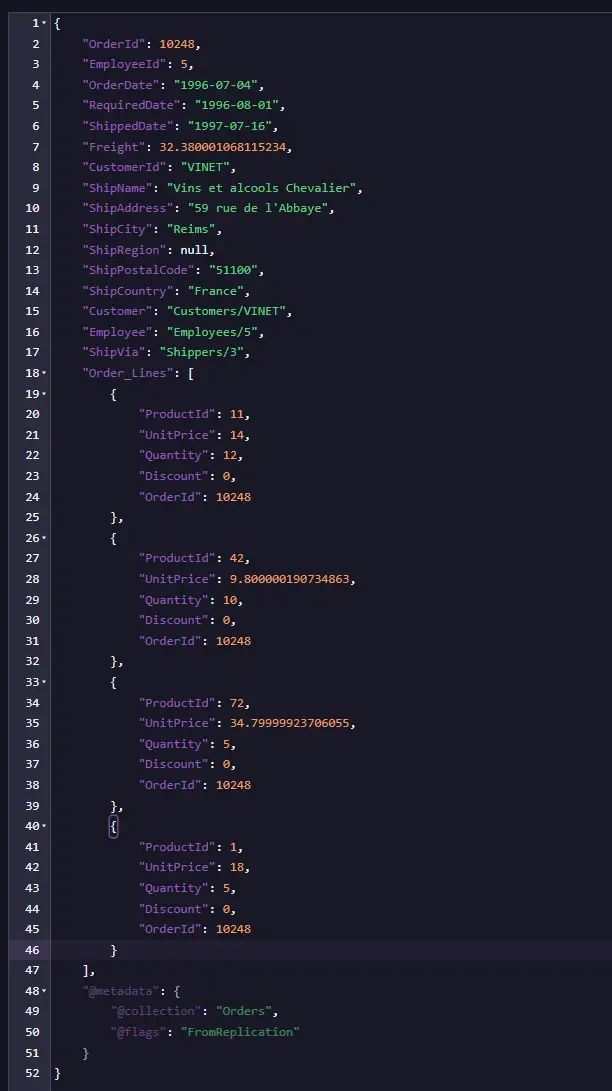
This is the steady state you're aiming for. PostgreSQL remains the system of record, existing applications continue working unchanged, and RavenDB maintains a live, document-shaped view of the data that's always ready to query.
One thing to know before you rely on it
One important detail to keep in mind is that a mapping only applies to changes processed after the task starts. It is not applied retroactively to documents that already exist in RavenDB.
That means if you later add a field, rename a property, or change how a table is mapped, existing documents keep their original shape. Only new documents and documents affected by subsequent changes use the updated mapping. Until every document has been updated, you'll have a mix of old and new document structures. The simplest way to apply the new mapping to every document is to recreate the CDC Sink task. That triggers a new initial load, rebuilding every document using the latest mapping.
For a database the size of Northwind, that's only a matter of a moment. On a much larger database, however, an initial import can take considerably longer. It's worth spending a little extra time refining your mapping before importing millions of rows. Think of the mapping as part of your data model. It's something you design up front and only change deliberately once the system is in production.
Cheatsheet
Embed, link, or copy a few fields?
| Shape | Use it when | Looks like |
|---|---|---|
| Embed (array) | The rows are owned by the parent and there are several of them. | "Lines": [ { ... }, { ... } ] |
| Link by ID | The related thing stands on its own and you want it current. | "Customer": "Customers/VINET" |
| Copy a few fields (Value) | You want a small, current copy on the document for convenience. | "Customer": { "CompanyName": "..." } |
The three column types
| Type | What it does | Reach for it when |
|---|---|---|
| Default | Converts the value to its natural JSON form. | Almost every column. |
| Json | Parses a JSON or JSONB column into a nested object. | The source column already holds JSON. |
| Attachment | Stores the value as an attachment, not in the body. | Large or binary values, like an image. |
SQL shape becomes RavenDB shape
| In PostgreSQL | In RavenDB |
|---|---|
| Table | Collection |
| Row | Document |
| Primary key | The document ID (Orders/10248, Customers/VINET) |
| Foreign key | A link to another document, or a small embedded copy |
| Child rows joined on a key | An embedded array inside the parent |
| Pure join table | A list of links on one side |
| A column you do not map | Absent from the document |
CDC Sink and ETL pull in opposite directions
| CDC Sink | SQL ETL | |
|---|---|---|
| Direction | Reads from a relational database into RavenDB | Writes from RavenDB out to a relational database |
| Source of truth | The relational database | RavenDB |
| Typical use | Build documents from an existing SQL system | Feed SQL systems and reports from RavenDB |
Summary
Connecting a live PostgreSQL database to RavenDB came down to a short sequence and a handful of modelling choices.
The connection steps:
- wal_level = logical
- Map tables in Studio & model relationships
- Start the CDC Sink task
The shaping rules of thumb:
- Embed what's exclusive to the parent and small in number.
- Link what has its own lifecycle or grows unbounded.
- Copy only to avoid extra lookups, but keep it in sync yourself.
- Join tables → arrays of references, not collections.
- Map only the columns you'll actually use.
- Script small JS steps for computed or reshaped fields.
- Mappings apply forward. Only changed mapping = re-run initial load.
Once the initial import completes, PostgreSQL remains the system of record, and RavenDB keeps a live, document-shaped view of the data ready for new applications, APIs, and features.