Automating Connection String Rotation in RavenDB

Rotating a credential in RavenDB comes down to one write: update the server-wide connection string that holds it, and every database in the cluster picks up the new value. This guide hands that write to a small app on a schedule, so your ETL and AI tasks keep up with your secret manager on their own.
Changing service credentials on a schedule is part of good security practice. PCI DSS, the card-payment industry's security standard (don't worry, there's no quiz), asks in requirement 8.6.3 that passwords for application and system accounts be changed periodically. The OWASP Secrets Management Cheat Sheet recommends automating rotation, and secret managers have made it routine. AWS Secrets Manager and HashiCorp Vault can rotate database passwords on a schedule out of the box. For everything else, from Azure Key Vault secrets to third-party API keys, you write a short piece of code that the secret manager runs on schedule, such as an AWS Lambda function or an Azure Function.
Issuing the new value is only half of a rotation. The other half is getting it to every system that uses the credential, and RavenDB is one of them, including its ETL and AI tasks that require connection strings to work. Since RavenDB 7.2.5, server-wide connection strings let you manage each credential in one place for the whole cluster, and RavenDB propagates it to every database that uses it. They're available with Professional and Enterprise licenses, and the free developer license includes them too, so you can try everything here. Delivering a new secret becomes a single write.
The rotation that shouldn't need a human
Without rotation, a connection string is set-and-forget. You enter the warehouse password once, when you set up the SQL ETL task, and it stays valid for as long as the task runs. Turning rotation on changes that. The secret manager now issues a new password on its own schedule, and the copy in RavenDB's connection string is out of date as soon as it does.
Something has to carry each new value into RavenDB. Without automation, that something is a person: after every rotation, someone opens RavenDB Studio, finds the connection string, pastes in the new value and saves it, and they have to do it before the secret manager retires the old one. Take a cluster that uses three credentials: the warehouse password, the S3 keys for the data lake, and the OpenAI API key for embeddings. Rotated monthly, that's 36 manual updates a year, each one timed to a secret manager that doesn't wait for anyone. Miss the window, and the tasks can't access needed resources until someone catches up.
So the secret manager's side of rotation is one setting, while the RavenDB side becomes a recurring task with a deadline. That task is what this guide hands over to a small app on a schedule.
What this covers
The rotation app works with connection strings. Change that value, and the tasks using the string authenticate with the new one. This guide covers three of them, one per kind of task:
| Connection string | Used by | Where the credential lives |
|---|---|---|
| SQL | SQL ETL to the warehouse | The password inside the provider's connection string |
| OLAP with S3 settings | OLAP ETL to the data lake | The access key and secret key in the S3 settings |
| AI with OpenAI settings | Embeddings generation | The API key in the OpenAI settings |
SQL ETL and embeddings generation pick up the new value on their own. OLAP needs one extra step, a restart of its tasks, which the app takes care of.
Everything in this guide was tested on a three-node RavenDB 7.2.6 cluster with six production databases and one staging database. Each production database sends orders to Postgres through SQL ETL, to a local S3-compatible store through OLAP ETL, and to a local OpenAI-compatible stand-in through embeddings generation. The numbers you'll see in this guide come from that setup.
One-time setup: one connection string for the whole cluster
The rotation app updates a server-wide connection string, so that's where the credential needs to live. If your tasks already use one, skip ahead to The rotation app. If each database still has its own per-database connection string, there's a one-time setup first.
It comes down to three steps: create the server-wide connection string, point the tasks at it, and remove the old copies. We'll walk through the warehouse string from our example; the S3 and OpenAI strings work the same way.
Create the server-wide connection string
var warehouse = new ServerWideConnectionString
{
    ConnectionString = new SqlConnectionString
    {
        Name = "warehouse-sql",
        FactoryName = "Npgsql",
        ConnectionString = "Host=postgres;Port=5432;Database=warehouse;Username=raven_etl_a;Password=..."
    },
    ExcludedDatabases = new[] { "staging" }
};

store.Maintenance.Server.Send(new PutServerWideConnectionStringOperation(warehouse));
ExcludedDatabases is where you tell the cluster that the database named "staging" should never get this credential, and it's the only place you'll ever need to say it. Every database that isn't on the list gets the string, including the ones you create later. It's worth getting the list right now: RavenDB won't exclude a database while its tasks use the string, so excluding it later means pointing those tasks somewhere else first.
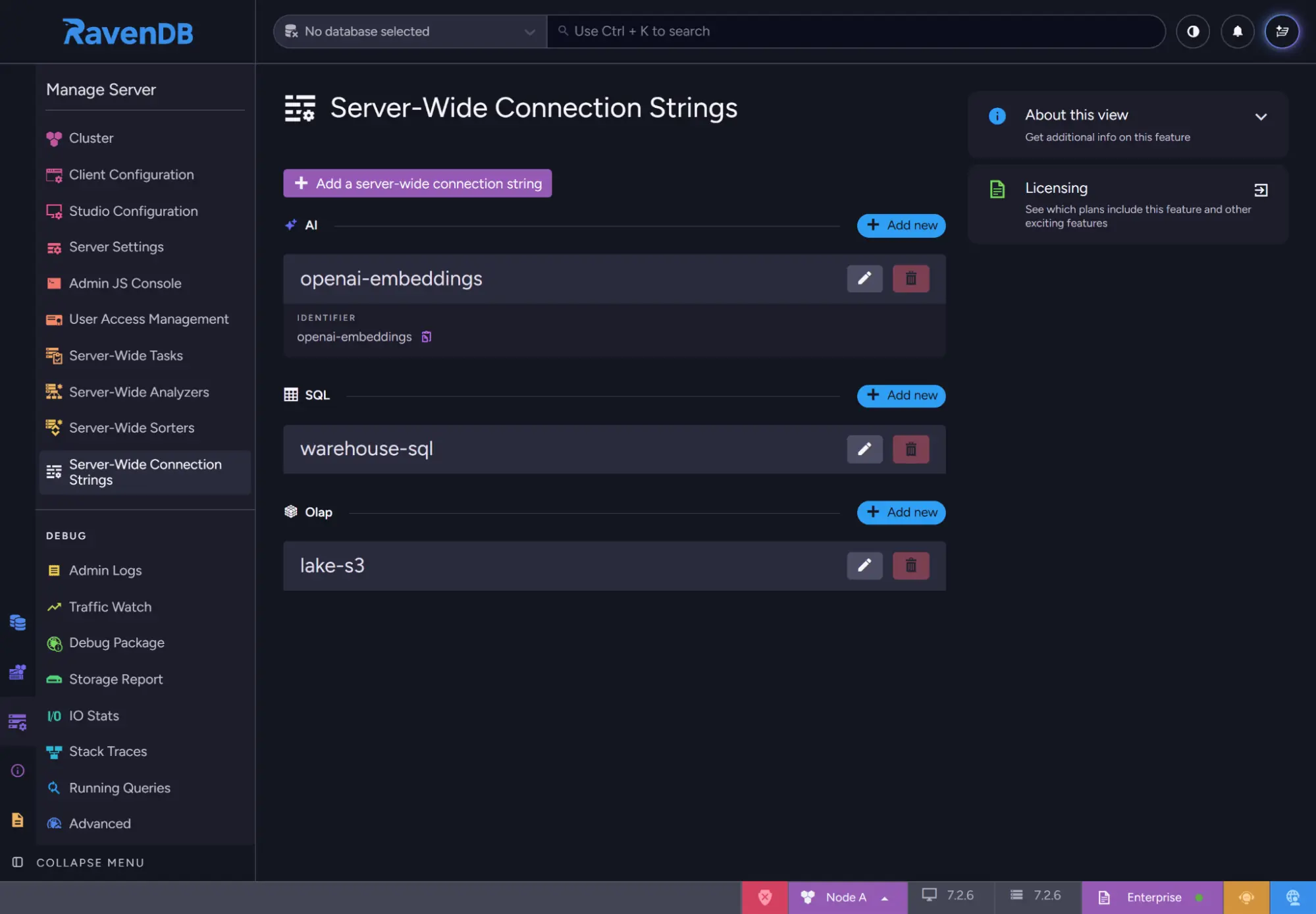
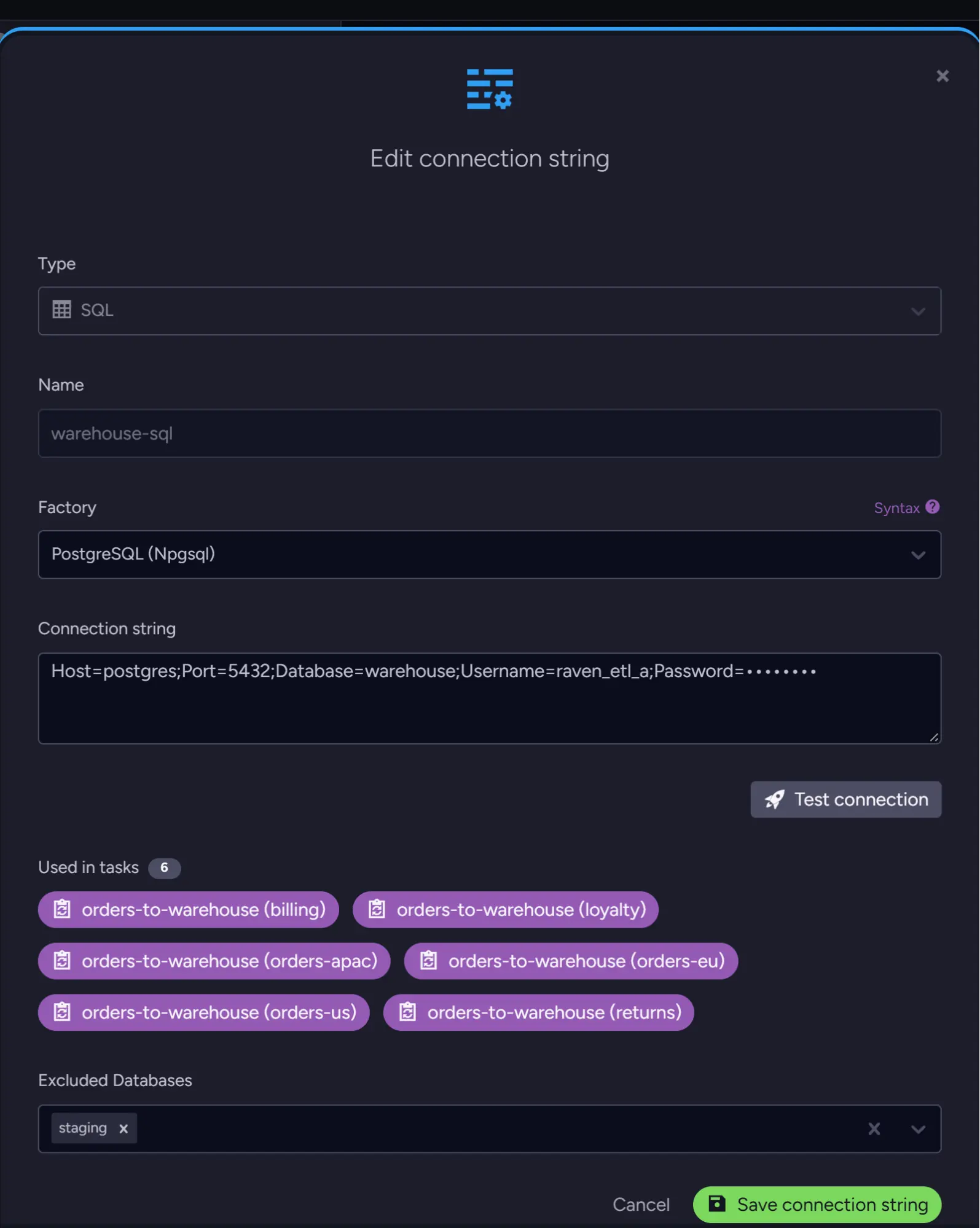
If you'd rather click than code, the same form lives in Studio under Manage Server > Server-Wide Connection Strings. Here's the list with our three strings, followed by the edit form for warehouse-sql, which shows the six tasks that use it and staging under Excluded Databases:
Point the tasks at it
Inside each database, the new string shows up under a reserved name: Server Wide Connection String, warehouse-sql. Tasks find their connection string by name, so each task that used the local copy needs that new name:
foreach (var db in productionDatabases)
{
    var record = store.Maintenance.Server.Send(new GetDatabaseRecordOperation(db));

    foreach (var etl in record.SqlEtls.Where(e => e.ConnectionStringName == "warehouse-sql"))
    {
        etl.ConnectionStringName = "Server Wide Connection String, warehouse-sql";
        store.Maintenance.ForDatabase(db)
            .Send(new UpdateEtlOperation<SqlConnectionString>(etl.TaskId, etl));
    }
}
OLAP ETL tasks get the same treatment with UpdateEtlOperation<OlapConnectionString>, and embeddings generation tasks with UpdateEmbeddingsGenerationOperation. Switching an embedding task to a new connection string keeps the embeddings it already made: in our tests, no document was embedded again. Like any change to the task, though, the switch restarts it, and so does a new API key later on. A batch that's in flight at that moment goes to OpenAI a second time. We swapped the key ten times while 2,000 orders were waiting to be embedded, with the OpenAI stand-in answering at full speed, and four of the swaps sent one batch of 128 orders twice. Nothing is stored twice (the second result replaces the first), but those calls are billed twice: at most one batch per embeddings task per change, and only when the task was busy at that moment.
OLAP is the one task where timing matters. SQL ETL and embeddings work through changes as they happen, but an OLAP task runs on a schedule (its RunFrequency) and uploads a batch of Parquet files each time. Change its configuration in the middle of an upload, and that one batch can land a second time. No document is missed, and the task carries on from its saved progress. To avoid the repeat, update OLAP tasks between runs, right after one finishes. Step 4 explains why it happens and shows the check the rotation app uses, which works just as well when you repoint tasks.
Remove the old copies
Once no task uses a database's own copy, remove it. That leaves exactly one place to update when the credential changes:
store.Maintenance.ForDatabase(db).Send(
    new RemoveConnectionStringOperation<SqlConnectionString>(
        new SqlConnectionString { Name = "warehouse-sql" }));
That's the setup. Open the string in Studio and you'll see how many tasks use it, as in the edit view above: six in our example, one per production database.
For a longer walkthrough of moving to server-wide connection strings, see Bringing Connection Strings Together in RavenDB.
The rotation app
The app takes one argument, the name of a server-wide connection string. It reads the definition the cluster holds now, replaces the field that carries the secret, and writes the whole definition back. Reading first matters, because the writes override the entire definition, not just the field we changed. If the app sent a fresh definition with only the new password, everything it left out would be gone, including ExcludedDatabases, and staging would get the production password right away. Starting from what the cluster already holds keeps all of that in place. RavenDB's connection string operations work on whole definitions: you read one, write one, or delete one, so reading first is both the only way and the safe way.
The app uses the synchronous client API throughout to keep the code short. It runs once an hour and does one thing at a time, so async wouldn't buy it anything. In a service, you'd use the async versions, such as SendAsync. Here's the whole flow. It fits on one screen:
var name = args[0];

using var store = new DocumentStore
{
    Urls = Required("RAVEN_URLS").Split(',', StringSplitOptions.TrimEntries),
    Certificate = LoadCertificate()
}.Initialize();

// 1. Read the definition as the cluster holds it now.
var current = store.Maintenance.Server
    .Send(new GetServerWideConnectionStringsOperation())
    .Results
    .SingleOrDefault(cs => cs.Name == name);

if (current == null)
{
    Console.Error.WriteLine($"There is no server-wide connection string named '{name}'.");
    return 1;
}

// 2. Replace only the field that carries the secret.
var changed = current.ConnectionString switch
{
    SqlConnectionString sql =>
        SetSqlCredentials(sql, Optional("SQL_USERNAME"), Required("SQL_PASSWORD")),

    OlapConnectionString { S3Settings: not null } olap =>
        SetS3Keys(olap.S3Settings, Required("S3_ACCESS_KEY"), Required("S3_SECRET_KEY")),

    AiConnectionString { OpenAiSettings: not null } ai =>
        SetOpenAiKey(ai.OpenAiSettings, Required("OPENAI_API_KEY")),

    var other => throw new NotSupportedException(
        $"'{name}' is a {other.Type} connection string. This app handles SQL, OLAP to S3, and OpenAI.")
};

if (changed == false)
{
    Console.WriteLine($"{name}: already current, nothing to write.");
    return 0;
}

// 3. Write the whole definition back.
var result = store.Maintenance.Server.Send(new PutServerWideConnectionStringOperation(current));
Console.WriteLine($"{name}: credential updated (Raft index {result.RaftCommandIndex}).");

// 4. OLAP tasks pick up new keys when they start, so restart them.
if (current.ConnectionString is OlapConnectionString)
    RestartOlapEtlTasks(store, name);

return 0;
Let's go through it step by step.
Step 1: Read what the cluster holds
The read uses GetServerWideConnectionStringsOperation, which returns the definitions exactly as the cluster stores them, exclusions included. There's a similar-looking GetConnectionStringsOperation, but that one works per database and returns the copy a database received, under its Server Wide Connection String, <name> name. Writing that copy back would create a second server-wide string with the long name and no exclusions, which isn't what we want.
Step 2: Swap only the credential
The switch picks a small helper for each type of connection string. Each helper changes the one field that holds the secret and returns whether anything actually changed.
For SQL, the credentials live inside the provider's connection string, so we let DbConnectionStringBuilder take it apart, set the new values, and put it back together. Every other key, like host, port and database, stays as it was:
static bool SetSqlCredentials(SqlConnectionString sql, string? username, string password)
{
    var builder = new DbConnectionStringBuilder { ConnectionString = sql.ConnectionString };
    var changed = Set(builder, ["Password", "Pwd"], password);
    if (username != null)
        changed |= Set(builder, ["Username", "User ID", "User", "UID"], username);

    if (changed)
        sql.ConnectionString = builder.ConnectionString;
    return changed;

    static bool Set(DbConnectionStringBuilder builder, string[] names, string value)
    {
        var key = builder.Keys.Cast<string>()
            .FirstOrDefault(k => names.Contains(k, StringComparer.OrdinalIgnoreCase)) ?? names[0];
        if (builder.TryGetValue(key, out var old) && old as string == value)
            return false;

        builder[key] = value;
        return true;
    }
}
The username is optional. Our Postgres rotation switches between two logins (more on that in How a rotation runs), so the secret manager hands over the username along with the password. One small thing you'll notice in Studio after the first run: the builder writes key names in lowercase, so Host= becomes host=. Postgres doesn't mind.
S3 and OpenAI are simpler, because the secret is a field of its own:
static bool SetS3Keys(S3Settings s3, string accessKey, string secretKey)
{
    if (s3.AwsAccessKey == accessKey && s3.AwsSecretKey == secretKey)
        return false;

    s3.AwsAccessKey = accessKey;
    s3.AwsSecretKey = secretKey;
    return true;
}

static bool SetOpenAiKey(OpenAiSettings openAi, string apiKey)
{
    if (openAi.ApiKey == apiKey)
        return false;

    openAi.ApiKey = apiKey;
    return true;
}
Bucket, region, endpoint, model and dimensions all stay exactly as they were.
Step 3: Write it back, but only when something changed
If the secret manager still holds the same value as the cluster, the app stops with "already current, nothing to write." That check is there for a reason: writing an unchanged definition still costs a cluster command, and it rewrites the record of every database that receives the string. Skipping it is what lets the app run every hour without touching anything between rotations.
When there is a new value, PutServerWideConnectionStringOperation sends the whole definition back. In our demo, the write took 48 to 80 ms per connection string. The app prints the Raft index of the change, its position in the cluster's command log, so you can match each rotation to the log later.
Step 4: Restart the OLAP tasks
SQL ETL and embeddings generation notice the new credential and switch to it on their own (embeddings by restarting the task, as covered in Point the tasks at it). A running OLAP task holds on to the S3 settings it started with when only the keys change, so the app finishes the rotation by restarting those tasks. A task that starts fresh reads its settings from scratch and picks up the new keys. The restart is a disable followed by an enable, with a wait before each step:
static void RestartOlapEtlTasks(IDocumentStore store, string name)
{
    // Inside each database, the server-wide string is stored under this name.
    var propagatedName = $"Server Wide Connection String, {name}";

    var tasks = (
        from db in store.Maintenance.Server.Send(new GetDatabaseNamesOperation(0, int.MaxValue))
        from etl in store.Maintenance.Server.Send(new GetDatabaseRecordOperation(db)).OlapEtls
        where etl.ConnectionStringName == propagatedName && etl.Disabled == false
        select (db, etl)).ToList();

    var disabled = new List<(string db, OlapEtlConfiguration etl)>();
    try
    {
        foreach (var (db, etl) in tasks)
        {
            // Never stop a task in the middle of an upload: the old process finishes
            // it in the background while the new one starts, and both send the batch.
            WaitUntilBetweenRuns(store, db, etl);
            store.Maintenance.ForDatabase(db).Send(
                new ToggleOngoingTaskStateOperation(etl.TaskId, OngoingTaskType.OlapEtl, disable: true));
            disabled.Add((db, etl));
        }

        // Enable only once the node has applied the disable.
        foreach (var (db, etl) in disabled)
            WaitUntilDisabledOnNode(store, db, etl.TaskId);
    }
    finally
    {
        // Even if something failed above, never leave a task switched off.
        foreach (var (db, etl) in disabled)
            store.Maintenance.ForDatabase(db).Send(
                new ToggleOngoingTaskStateOperation(etl.TaskId, OngoingTaskType.OlapEtl, disable: false));
    }
}

static void WaitUntilBetweenRuns(IDocumentStore store, string db, OlapEtlConfiguration etl)
{
    // The node running the task lists its batches; one that is still running has
    // no Completed time yet.
    var maintenance = store.Maintenance.ForDatabase(db);
    var deadline = DateTime.UtcNow.AddMinutes(10);
    while (true)
    {
        var node = maintenance.Send(new GetOngoingTaskInfoOperation(etl.TaskId, OngoingTaskType.OlapEtl)).ResponsibleNode?.NodeTag;
        if (node == null || maintenance.ForNode(node).Send(new IsEtlBatchRunningOperation(etl.Name)) == false)
            return;

        if (DateTime.UtcNow > deadline)
            throw new TimeoutException($"OLAP task '{etl.Name}' in '{db}' was still uploading after 10 minutes.");
        Thread.Sleep(250);
    }
}

static void WaitUntilDisabledOnNode(IDocumentStore store, string db, long taskId)
{
    // The node responsible for the task reports NotActive once it has applied
    // the disable and taken the task's process off its list.
    var maintenance = store.Maintenance.ForDatabase(db);
    var deadline = DateTime.UtcNow.AddMinutes(1);
    while (true)
    {
        var node = maintenance.Send(new GetOngoingTaskInfoOperation(taskId, OngoingTaskType.OlapEtl)).ResponsibleNode?.NodeTag;
        if (node != null)
        {
            var status = maintenance.ForNode(node).Send(new GetOngoingTaskInfoOperation(taskId, OngoingTaskType.OlapEtl)).TaskConnectionStatus;
            if (status == OngoingTaskConnectionStatus.NotActive)
                return;
        }

        if (DateTime.UtcNow > deadline)
            throw new TimeoutException($"OLAP task {taskId} in '{db}' didn't stop within a minute.");
        Thread.Sleep(250);
    }
}

sealed class IsEtlBatchRunningOperation(string taskName) : IMaintenanceOperation<bool>
{
    public RavenCommand<bool> GetCommand(DocumentConventions conventions, JsonOperationContext context) => new Command(taskName);

    sealed class Command(string taskName) : RavenCommand<bool>
    {
        public override bool IsReadRequest => true;

        public override HttpRequestMessage CreateRequest(JsonOperationContext ctx, ServerNode node, out string url)
        {
            url = $"{node.Url}/databases/{node.Database}/etl/performance?name={Uri.EscapeDataString(taskName)}";
            return new HttpRequestMessage(HttpMethod.Get, url);
        }

        public override void SetResponse(JsonOperationContext context, BlittableJsonReaderObject response, bool fromCache)
        {
            response.TryGet("Results", out BlittableJsonReaderArray tasks);
            Result = tasks != null && (
                from BlittableJsonReaderObject task in tasks
                from BlittableJsonReaderObject transformation in (BlittableJsonReaderArray)task["Stats"]
                from BlittableJsonReaderObject batch in (BlittableJsonReaderArray)transformation["Performance"]
                select batch).Any(batch => batch.TryGet("Completed", out DateTime? completed) == false || completed == null);
        }
    }
}
Studio shows which tasks use a server-wide string. From the C# client, the simplest way to find them is the documented name each database gives the string, and that's how the app finds the OLAP tasks. Tasks that are already disabled are left alone, and if anything goes wrong mid-restart, the app still re-enables every task it disabled, so a failed run can't leave OLAP switched off.
The first wait, WaitUntilBetweenRuns, is about uploads. RavenDB's ETL saves a task's progress only once a batch has been fully uploaded, so no document is ever missed. When a task is disabled or reconfigured in the middle of an upload, RavenDB lets the old process finish that upload in the background. An enable that arrives in the meantime starts a new process from the last saved progress, and both send the same batch. So before disabling a task, the app asks the node running it whether a batch is in progress, and waits until it's done. IsEtlBatchRunningOperation is a small custom operation, because the client has no ready-made "is this task uploading right now?" call. It asks the node running the task for its recent batches through /databases/<database>/etl/performance, the same endpoint behind Studio's ETL performance view, and reports whether one of them hasn't finished yet.
The second wait, WaitUntilDisabledOnNode, is about the node. If a node sees "disabled" and "enabled" as one change, it decides nothing happened and keeps the task running with its old keys. When we tried enabling straight after disabling, that happened to two of six tasks. So the app enables a task only once the node running it reports NotActive, which it does as soon as it has applied the disable. NotActive alone isn't enough, though: the node reports it while the old process may still be uploading, which is why the app waits for the upload first.
The restart keeps the task's progress and is safe for your data: the task carries on from where it left off, and the whole database is sent again only if you reset the task on purpose. To test it where it matters most, we slowed S3 down so that every restart landed in the middle of an upload. With both waits in place, nothing was uploaded twice and every document arrived. With only the second wait, about two restarts in five sent a batch twice, and so did every configuration change made mid-upload. At normal upload speed, nothing was sent twice either way: a batch can only go out twice while it's being uploaded, so the longer your uploads take, the more the first wait matters. Mid-upload, the app waited up to about ten seconds for the batch to finish. In the demo, where nothing was uploading at that moment, restarting all six tasks took about half a second.
What the app needs
Everything comes in through environment variables, so whatever runs the app only has to set them:
| Variable | What it holds |
|---|---|
RAVEN_URLS | The cluster's node URLs, comma-separated |
RAVEN_CERT_PATH, RAVEN_CERT_PASSWORD | The app's client certificate |
SQL_PASSWORD, SQL_USERNAME | For SQL connection strings (the username is optional) |
S3_ACCESS_KEY, S3_SECRET_KEY | For OLAP connection strings that use S3 |
OPENAI_API_KEY | For AI connection strings that use OpenAI |
The app only reads the variables for the connection string it's updating, so a run for warehouse-sql doesn't need the S3 or OpenAI values. These are the three small helpers the main flow calls:
static string Required(string variable) =>
    Environment.GetEnvironmentVariable(variable) is { Length: > 0 } value
        ? value
        : throw new InvalidOperationException($"Environment variable {variable} is not set.");

static string? Optional(string variable) =>
    Environment.GetEnvironmentVariable(variable) is { Length: > 0 } value ? value : null;

static X509Certificate2? LoadCertificate() =>
    Environment.GetEnvironmentVariable("RAVEN_CERT_PATH") is { Length: > 0 } path
        ? new X509Certificate2(path, Environment.GetEnvironmentVariable("RAVEN_CERT_PASSWORD"))
        : null;
A missing required value stops the run before it connects to anything, so a half-configured job never writes an empty password.
Running it on a schedule
The obvious design is to react: the secret manager fires a "rotated" event and something pushes the new value into RavenDB. We went the other way. The app runs every hour, pulls whatever the secret manager says is current, and writes only when that differs from what the cluster holds. It doesn't need to know when or why a secret changed, and a missed run is covered by the next one.
How a rotation runs
A rotation has three steps, and the app takes care of the one in the middle:
- The secret manager issues a new credential. The old one keeps working.
- The app's next run delivers the new credential to RavenDB.
- The secret manager retires the old credential.
By the time the old credential stops working, RavenDB is already using the new one, so the tasks never notice the change.
"Both keep working for a while" looks a little different for each target. Postgres can't hold two passwords for one login, so the secret manager switches between two logins, raven_etl_a and raven_etl_b (AWS Secrets Manager calls this the alternating users strategy). S3 lets a user have two active access keys at once, and OpenAI lets a project have more than one API key. RavenDB doesn't need to know about any of this. It always holds one value per connection string, and the app swaps it.
That leaves one rule for the schedule: run the app more often than the old credential stays valid. If your rotation function deletes the old S3 key a day after issuing the new one, an hourly run gets 24 chances to deliver it.
The schedule itself
On Linux, the whole schedule is one crontab line:
17 * * * * flock -n /var/lock/ravendb-creds.lock /opt/ravendb-creds/run.sh
run.sh asks your secret manager's CLI for the current values, puts them into environment variables, and runs the app once for each connection string: warehouse-sql, lake-s3 and openai-embeddings. The secrets only ever live in the environment of that one run, so nothing ends up in the crontab or on disk. flock -n skips a run if the previous one is still going, so two runs never write at the same time.
Why 17 minutes past the hour? OLAP tasks run on their own schedule, often at the top of the hour. The app waits for an upload in progress before it restarts a task, so any minute is safe, but a minute well away from the schedule means it rarely has to wait. Whatever your OLAP RunFrequency is, pick a minute in the gap.
Using a different scheduler
Cron is just one option. Any scheduler works, as long as it does these four things:
- Runs inside the network that can reach the cluster. The app talks to RavenDB directly.
- Fetches the secrets when the run starts, not when the schedule is set up.
- Never starts a second run while one is still going. In a Kubernetes CronJob that's
concurrencyPolicy: Forbid, in Windows Task Scheduler it's "Do not start a new instance", and a systemd timer won't start its service again while it's still running. - Keeps the app's certificate private, which we cover in Setting it up securely.
What happens in the cluster
A server-wide connection string is in a cluster state, so the app's write becomes a single Raft command. Once it commits, every node applies it to every included database, in the same order as every other change to the cluster. The whole cluster ends up with exactly one value.
Here's what that looked like in the demo. While a full rotation of all three credentials ran, a small writer added an order every 250 ms, 328 orders in total.
Every node holds the same credential
After the rotation, we read the database record straight from each node. All three nodes held the identical new credentials in all six production databases, and staging held none of the three connection strings. The app never mentions staging. The exclusion you set up once is all it takes.
Nobody noticed: tasks, searches and writes kept working
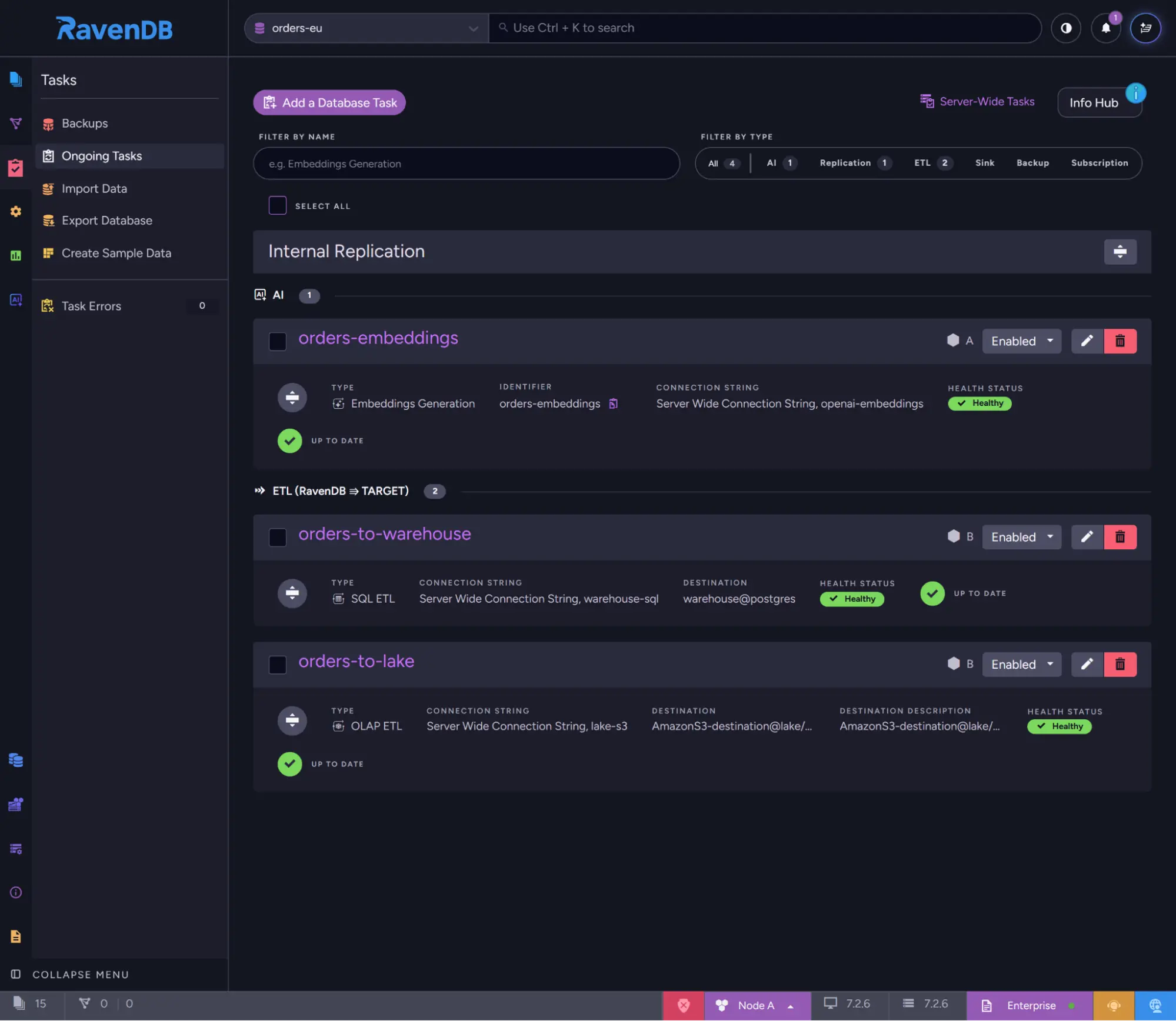
Every task stayed healthy during the rotation. Postgres accepted every login and OpenAI every call, before and after the old credentials were retired. Postgres and the embeddings were up to date 1.6 seconds after the last order was written, and S3 followed 5.2 seconds later, on the OLAP task's next scheduled run. The Ongoing Tasks view of the orders-eu database, taken after the rotation, shows all three tasks healthy, up to date, and using the server-wide connection strings:
Searches kept working too. A vector search uses the same AI connection string to turn the search text into a vector, so we ran a separate test with someone searching every half second while the key changed and OpenAI was busy. All 19 searches succeeded, with no change in response time.
Your application doesn't notice a rotation either. It writes to RavenDB, not to the targets, and all 328 writes during the rotation went through.
Every order arrived, once: no gaps, no duplicates
At the end, we took every order id in RavenDB and looked it up in each target. All 498 orders, the ones from the rotation plus everything written before it, were in Postgres, in the Parquet files on S3, and in the embeddings. Each one is there exactly once: no order appears twice in Postgres or in the Parquet files, and none has a second set of embeddings, because a batch that goes to OpenAI twice replaces its earlier result instead of adding to it.
Setting it up securely
Automated rotation is good security on its own: credentials change on schedule, and no person handles them along the way. A few choices make sure the rest of the setup meets the same bar. They cover who can read the credential inside RavenDB, which databases receive it, and how the app's own certificate is protected.
Inside RavenDB
Keep each credential's permissions narrow. Connection strings are visible to admins. Anyone with Operator clearance can read a server-wide string, and Studio's edit view shows the full value. A database admin can read it too, through any database that receives the string. Since a server-wide string reaches every database that isn't excluded, the best protection sits at the target. There, you can make each credential useless for anything except its task: a SQL user that can only write the ETL tables, an IAM user whose policy limits it to one bucket prefix, an OpenAI Restricted key that can only make model requests. It's also worth a look at who holds database admin rights.
Keep production credentials away from non-production databases. New databases get the string by default, so the cleanest setup puts non-production databases on a separate cluster. If they have to share one, make "add it to ExcludedDatabases" part of creating a non-production database.
Watch the tasks, not just the app. The app can tell you it wrote a value, but only the tasks can tell you the value works. If the secret manager ever hands over a wrong value, every task using the string fails together, so set up alerts on ETL and embeddings errors. RavenDB reports ETL errors in Studio's notification center and its ETL Errors view, and the health of every ETL and embeddings task is available from the database's ETL stats endpoint (/databases/<database>/etl/stats), which is easy to check from your monitoring tools. ETL basics in the RavenDB docs explains how a failing task retries. If you want to go a step further, test the new credential against the target before writing it.
Protecting the rotation app
Give the app its own certificate. The server-wide endpoints need Operator clearance, and that covers more than the app needs: Operator can also create and delete databases, manage ongoing tasks, and issue Operator and User certificates, though it can't change cluster membership or Cluster Admin certificates. A certificate that only the app holds can be revoked without touching anything else. You can generate one in Studio, and RavenDB Client Certificates with Vault-Backed Key Reuse shows how to renew it automatically without registering it again. Keep its expiry short, and make the file readable only by the account the app runs as.
Protect the app's files like the certificate. Whoever can change run.sh, the crontab or the app's binary can act with that certificate. All three belong to the app's account, and nobody else can write to them.
Use HTTPS. Point RAVEN_URLS at the https:// addresses of a secured cluster. The credential then travels encrypted, to an endpoint that checks the app's certificate before it accepts anything.
Keep secrets out of the app's output. The app's console output, and whatever your scheduler keeps of it (cron mail, journald, Kubernetes pod logs), shows names, timings and the Raft index, never a secret. The secrets themselves live only in the environment of a single run.
Summary
Rotating a credential in RavenDB comes down to one write to one server-wide connection string, and a small app on a schedule can make that write for you.
- Setup: one server-wide connection string per credential, with staging in
ExcludedDatabases. - The rotation app: read the server-wide definition, swap only the credential field, write it back if it changed, and restart OLAP tasks between uploads.
- The schedule: the secret manager issues the new credential, the app's hourly run delivers it, and the old one is retired after that.
- The guardrails: least-privilege credentials at the target, non-production databases kept out, and a dedicated, short-lived Operator certificate that only the app can read.
The complete rotation app, with its project file, is in this gist.