Beyond Text: Adding File Attachments to RavenDB AI Agents

Building an agent-based application is relatively simple at first glance, at least as long as everything stays in text. You define the workflow, connect an LLM, and let it handle user input, but that simplicity quickly breaks down when you need to handle binary payloads. As the application evolves, supporting real user scenarios means adding more tools, more logic, and more moving parts to keep under control.
Even though handling binary payloads adds complexity, it remains a valuable capability. Files such as PDFs or JPEGs often contain context that can be key to the whole conversation flow. Not all data can be passed as text in practice, and asking users to extract and rewrite that information by hand, when it might prove even harder, is not a realistic solution.
Handling that on your own means more than just accepting a file upload. You need to inject that data into the model’s context, process it, manipulate it usefully, and ensure the entire flow can scale when many users rely on it simultaneously. You also need to remember that tokens are not free, not an unlimited resource, so minimization of token spending is also important. That adds complexity, more code to maintain, and another moving part you need to keep an eye on.
Because we noticed it’s a common use case, we made it easier. RavenDB 7.2 AI Agents can work with file attachments directly, so instead of building and maintaining that pipeline yourself, you can rely on a tested feature that comes built into the Agent. Attaching data to a conversation is reduced to using a single method within the RavenDB AI Agents API.
RavenDB AI Agents are LLM-powered components integrated into your database, designed to act on behalf of users. Instead of navigating UI screens, users describe what they need, and the agent retrieves data or performs actions through tools.
What makes RavenDB’s approach different is that the intrinsic complexity is handled for you. The database server manages conversation state, integrates with LLM providers, and enforces safety through Query and Action tools defined by the developer. This means the agent can only perform operations you explicitly allow, keeping it predictable and controlled. Instead of building infrastructure around agents, you focus on defining capabilities and letting RavenDB handle the rest. If you want to look into AI Agents more, you can check our AI Agents deep dive.
Attaching files to a conversation
Attaching a file is as simple as calling AddAttachment on the conversation and passing the file. The first file is attached to the conversation, granting your Agent access to it. LLM then provides a summary of the payload's content, which is included in the chat context (the context window is how much of the conversation the LLM can remember at once before older parts are dropped), and the LLM can reuse this summary later. This process makes the Agent reduce the usage of tokens burnt for each file.
var imagePath = Path.Combine(
AppContext.BaseDirectory, "Resources", "Bills", bill.ImageResourceName);

if (System.IO.File.Exists(imagePath))
{
var imageStream = System.IO.File.OpenRead(imagePath);
conversation.AddAttachment(bill.ImageResourceName, imageStream, "image/png");
}
Of course, this is a simplified version to illustrate the idea, as we already have specific files locally, but you can use it with any binary stream provided by the user. If we wanted to support this without RavenDB’s built-in method, we’d have to rely on a few tools or design our own file-handling mechanism. In practice, that means adding extra components solely to handle file uploads, processing, and retrieval. Compared to a method that works out of the box, the difference is immediately visible.
Storage and token efficiency
This is not only about allowing you to upload a file into chat. When you add a file to the conversation with the Agent, it is added as a RavenDB document Attachment.
RavenDB lets you store files like images, PDFs, or any other file as attachments linked directly to your RavenDB documents. Each attachment belongs to a specific document, has its own name and optional content type, and multiple attachments can be associated with a single document and tracked in its metadata. Internally, attachments are stored as binary data and handled as streams, which keeps uploads and retrieval efficient. If you want to read more, you can check the documentation.
Since the file isn’t re-sent with every request, we don’t keep spending a significant number of tokens on the same data, which helps us spend less money. Instead, RavenDB stores it as an attachment for the entire conversation and can reference it whenever needed, even after it falls out of the LLM’s context window. The file itself is stored as a binary stream during upload, just like a standard attachment. If this original file is needed again Agent can use a tool to access it again.
If you want to reuse an attachment that already exists in another document, you can use the following method:
void CopyAttachmentFrom(string sourceDocumentId, string fileName);
This method tells RavenDB which document to copy the attachment from and specifies the attachment by its name. It allows you to reference existing files without re-uploading them, as long as the user has access to the source document through agent. Your application no longer acts as a proxy transporting data. You delegate the copying to the database itself.
But how does it look in practice? Let’s look at the demo.
Demo: HR Chatbot
Before we begin, if you want to run this demo yourself, you can find the samples-hr repository on GitHub. Instructions for launching it are included.
The demo application is a small HR chatbot where employees can submit expense reports and handle everyday HR tasks through a conversation with an AI agent, rather than filling in forms. You can impersonate any employee from the selector at the top of the chat window, for demo convenience. It connects to RavenDB and uses a set of Query and Action tools to look up employee data and create expense documents on the user's behalf.
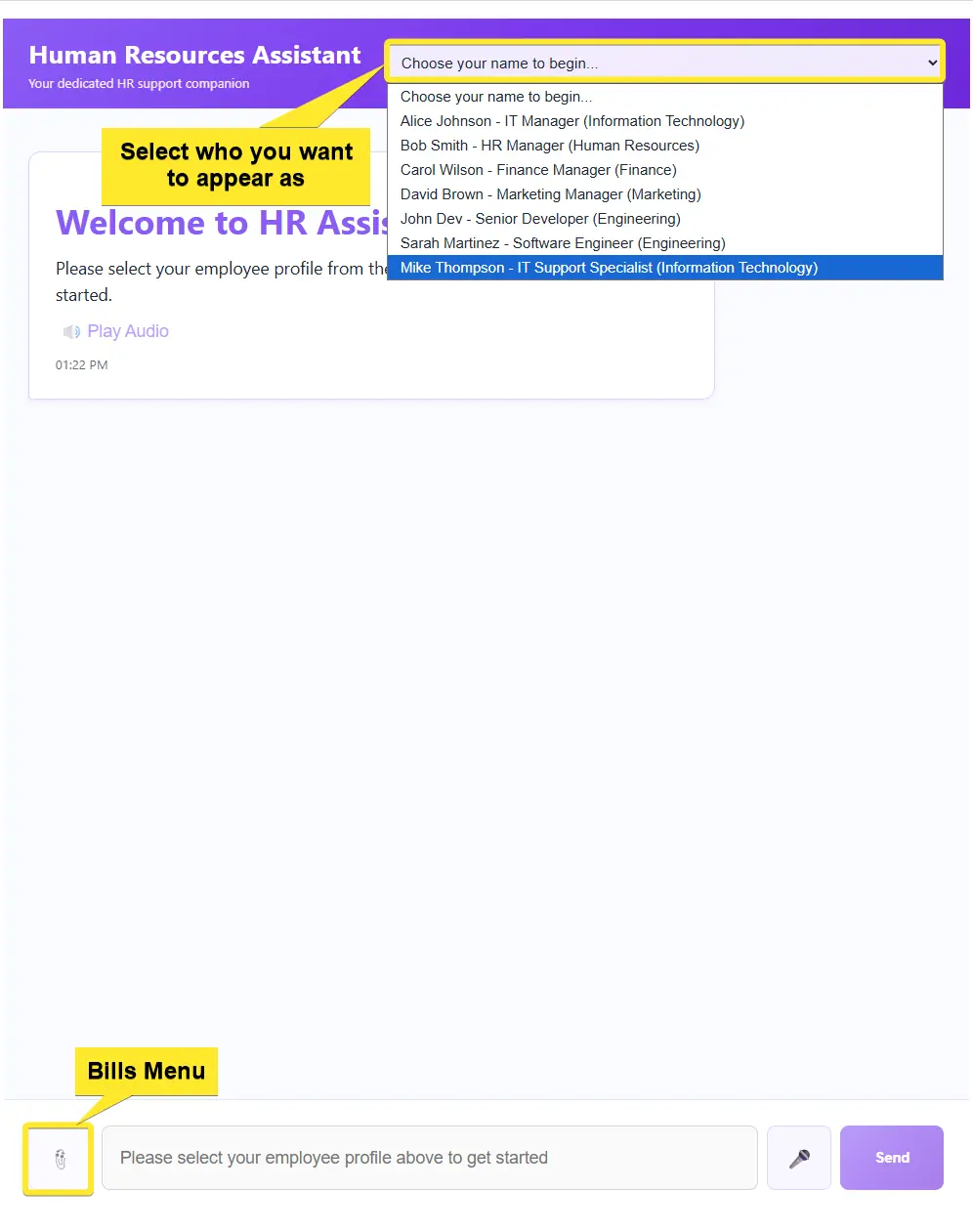
The bills menu hidden under the left-side button is there for demo convenience only. In a real app files would come from any binary stream the user provides.
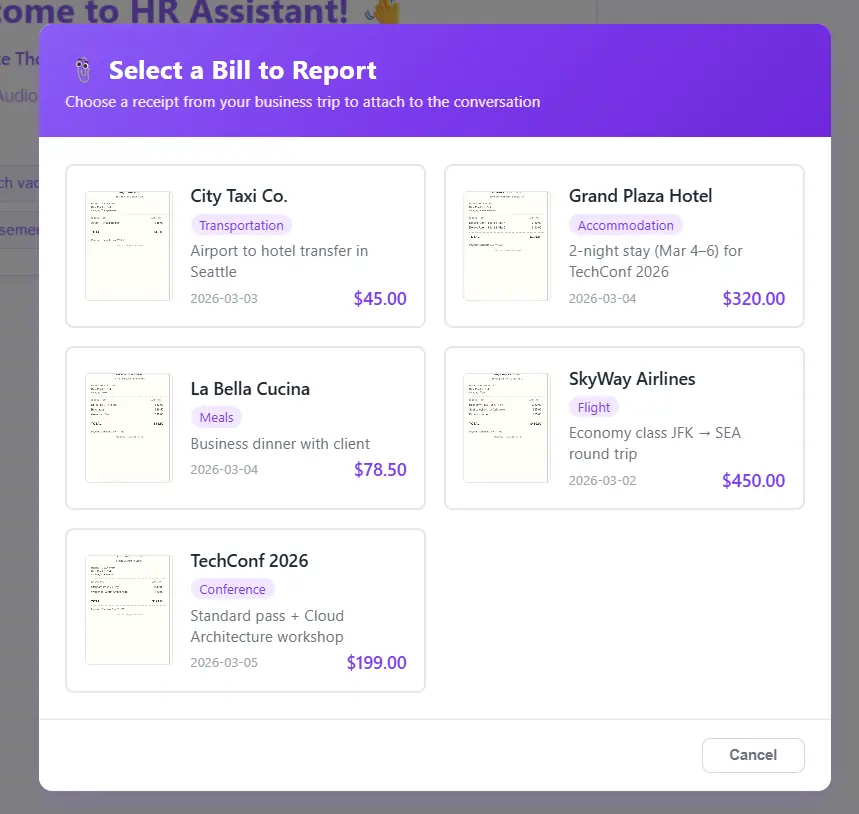
Let’s step into Mike Thompson’s role by selecting him at the top of the chat window. After returning from a business trip, we want to report our expenses to HR. Instead of filling out forms, we simply open the HR chatbot that handles these everyday tasks, reducing the time HR needs to process routine requests and making the whole experience quicker and more comfortable for users.
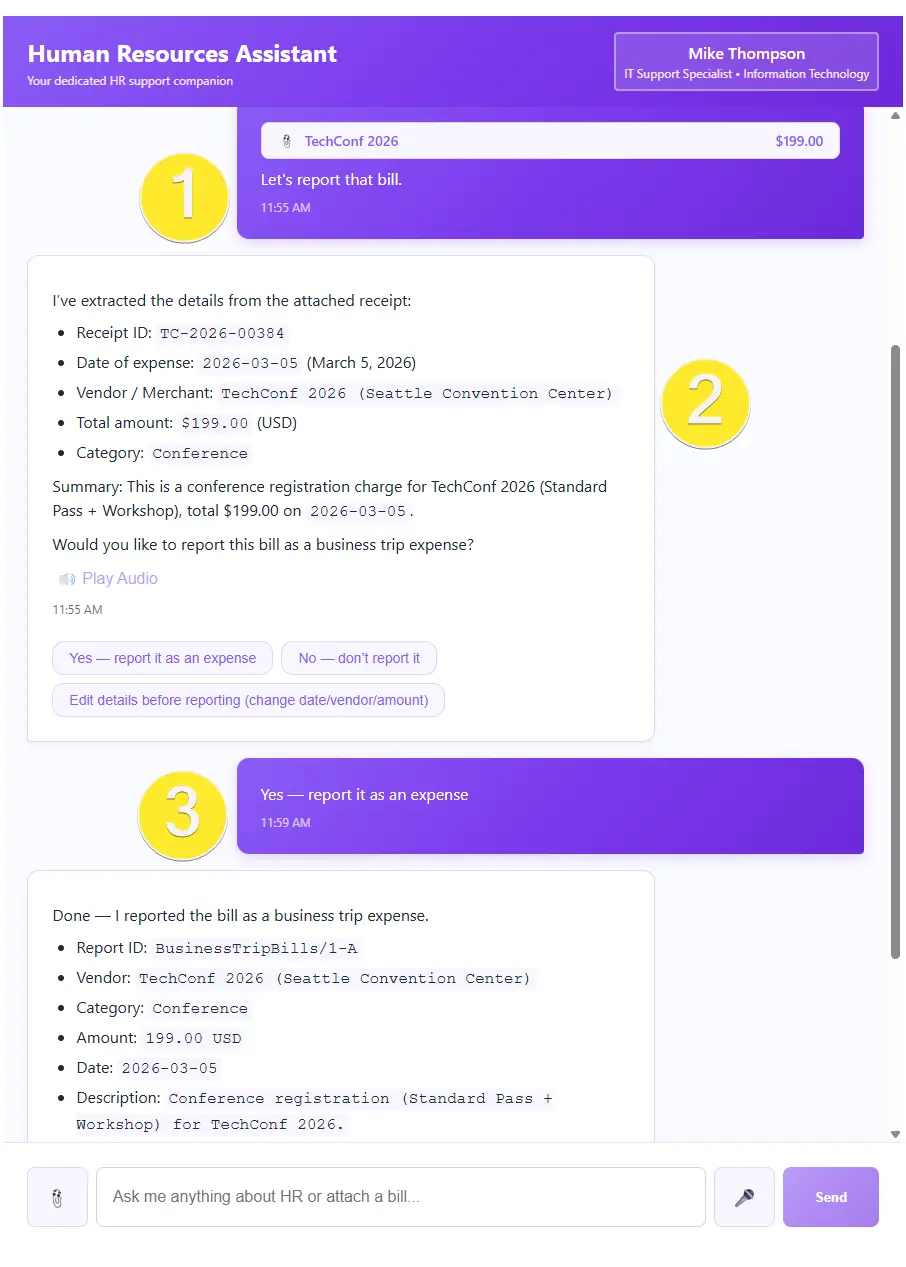
From the bills menu on the left of chat (added here just for presentation, since files can be any binary stream), we attach the TechConf 2026 receipt and tell the chatbot we’d like to report it (1). Once we send the message, the LLM processes the request (2). After a quick confirmation that everything looks correct (3), the AI Agent uses its tools to create a new document in RavenDB on our behalf. Like that, we are done with this task and can wait for HR’s response.
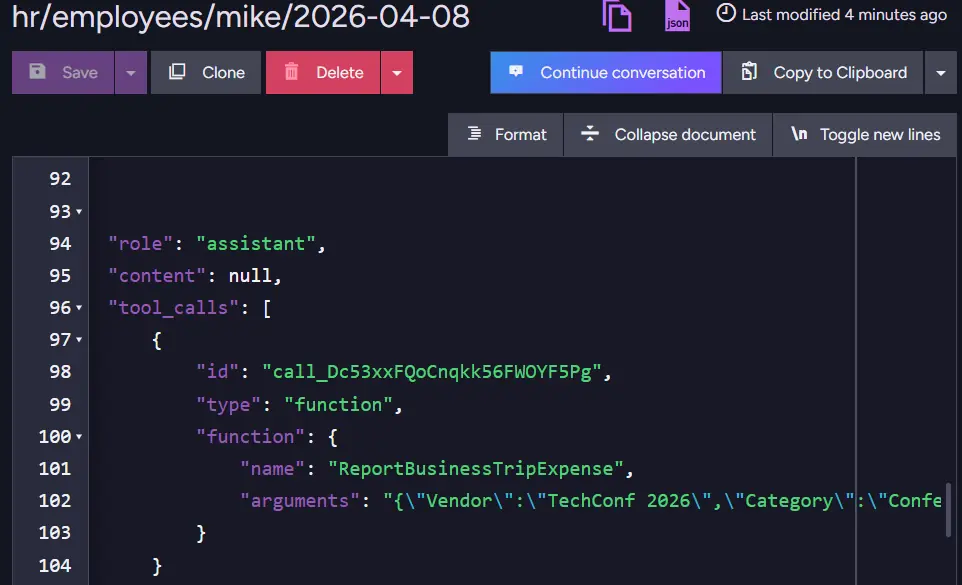
Now that our agent has accepted the file, we can enter RavenDB and take a look at the conversation collection to check how RavenDB handled things in the background. We can notice that RavenDB stored the file as a RavenDB document attachment to the conversation.
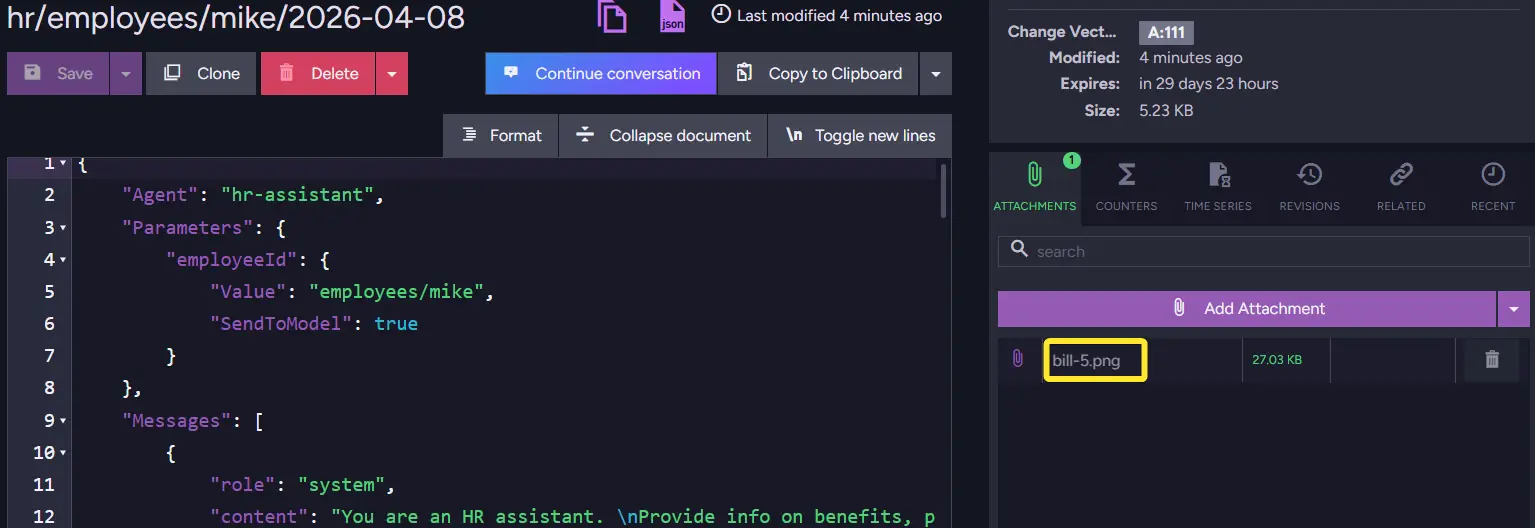
Until the conversation expires (the default expiration for this demo is 30 days), RavenDB can revisit this file and provide context to the Agent. Thanks to another tool, RavenDB also stores data from files and creates new documents, making data easier to access.
Summary
- RavenDB AI Agents support file attachments natively, no custom file-handling pipeline required.
- Use
AddAttachmentto attach any binary stream (PDF, image, etc.) to a conversation in a single call. - The LLM receives a summary of the file rather than the raw binary, keeping token usage low across the conversation.
- Use
CopyAttachmentFromto reference a file that already exists in another document, avoiding re-uploads. - Attachments are stored as standard RavenDB document attachments and remain accessible for the lifetime of the conversation.
Now that you know how to make your files easily accessible for AI Agents in RavenDB and how to stop your Agents from burning precious tokens, you might want to check out how to add vector search so you can search by meaning in the documents of your database.
Interested in RavenDB? Grab a free developer license for testing, or start with a free RavenDB Cloud database. If you have questions about this feature, or want to hang out and talk with the RavenDB team, join the RavenDB Discord Community Server.