Cloud Portal
Logging into your account takes you to your account's Portal, which gives you access to all the different aspects of your cloud account.
- In this page:
Cloud Portal overview
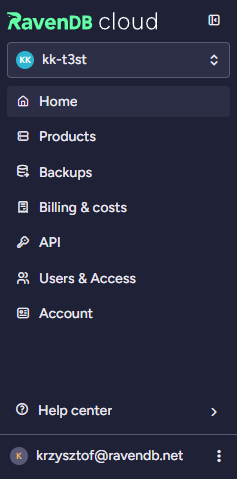
You navigate the Portal from the sidebar on the left. It can be collapsed to icons only, using the control next to the logo, to give the current view more room.
At the top of the sidebar, the account switcher lets you move between the cloud accounts you have access to. Each account is identified by its domain name. See Multi-account configuration.
Sidebar views
-
Home
Manage your account and assigned roles, and view useful resources. -
Products
Provision new products and manage existing ones, including their metrics, cluster health and alerts. -
Backups
View and restore mandatory database backups that your instances have created for you. -
Billing & costs
View your billing history, expected payments and a breakdown of your costs. -
API
Explore the RavenDB Cloud API and manage your API keys. -
Users & Access
Invite account members and manage their account roles and per-product permissions. -
Account
View and edit your invoices and credit card information.
Which views you see depends on your access — for example, Billing & costs requires the Billing account role, and Users & Access requires Account with User Management. Views you have no role for are not shown.
Products is gated differently: it appears if you hold the Products Creation account role, or if you have per-product permissions on at least one product. The Account Owner always sees it.
Help center
The Help center entry at the bottom of the sidebar opens a menu with:
- Support — contact Support regarding general issues, product-specific issues and special requests. This entry requires the Support account role; the other three are always available.
- Documentation — this documentation.
- Community — the RavenDB community resources.
- Service status — the status of our system, with active and archived incidents.
Profile
The profile entry, also at the bottom of the sidebar, shows your user name and gives you access to your profile settings — including Multi-Factor Authentication — and to Log out.