The Embeddings Generation Task
-
In RavenDB, you can define AI tasks to automatically generate embeddings from your document content.
These embeddings are then stored in dedicated collections within the database,
enabling Vector search on your documents. -
This article explains how to configure such a task.
It is recommended to first refer to this Overview to understand the embeddings generation process flow. -
In this article:
Configuring an embeddings generation task - from the Studio
-
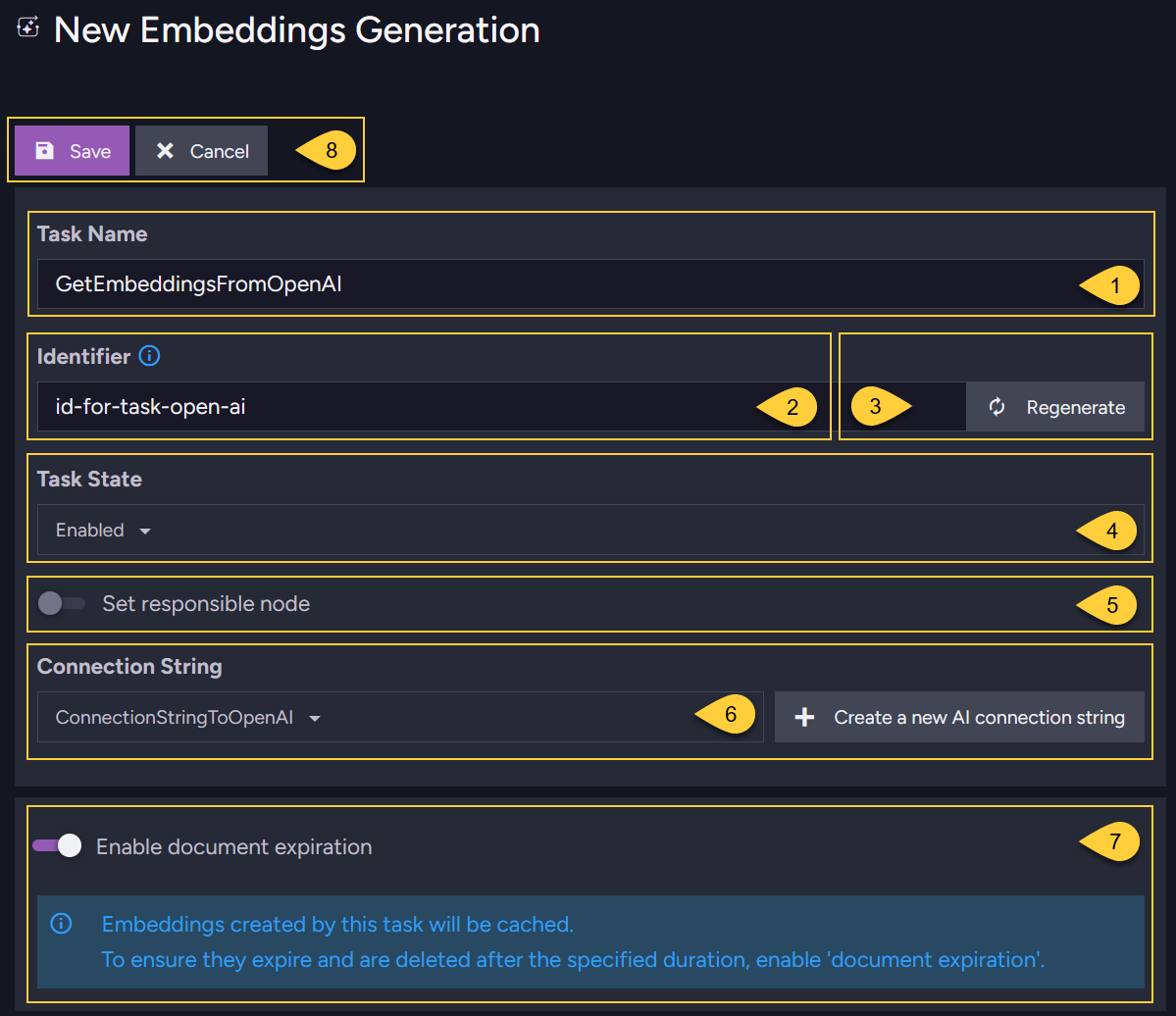
Define the general task settings:
-
Name
Enter a name for the task. -
Identifier
Enter a unique identifier for the task.
Each AI task in the database must have a distinct identifier.If not specified, or when clicking the "Regenerate" button,
RavenDB automatically generates the identifier based on the task name. For example:- If the task name is: "Generate embeddings from OpenAI"
- The generated identifier will be: "generate-embeddings-from-openai"
Allowed characters: only lowercase letters (a-z), numbers (0-9), and hyphens (-).
This identifier is used:
- When querying embeddings generated by the task via a dynamic query.
An example is available in Querying pre-made embeddings. - When indexing the embeddings generated by the task.
An example is available in Indexing pre-made text-embeddings. - In documents in the Embeddings collection,
where the task identifier is used to identify the origin of each embedding.
See how this identifier is used in the Embeddings collection documents that reference the generated embeddings.
-
Regenerate
Click "Regenerate" to automatically create an identifier based on the task name. -
Task state
Enable/Disable the task. -
Responsible node
Select a node from the Database group to be the responsible node for this task. -
Connection string
Select a previously defined AI connection string or create a new one. -
Enable document expiration
This toggle appears only if the Document expiration feature is Not enabled in the database. Enabling document expiration ensures that embeddings in the@embeddings-cachecollection are automatically deleted when they expire. -
Save
Click Save to store the task definition or Cancel.
-
-
Define the embeddings source - using PATHS:
-
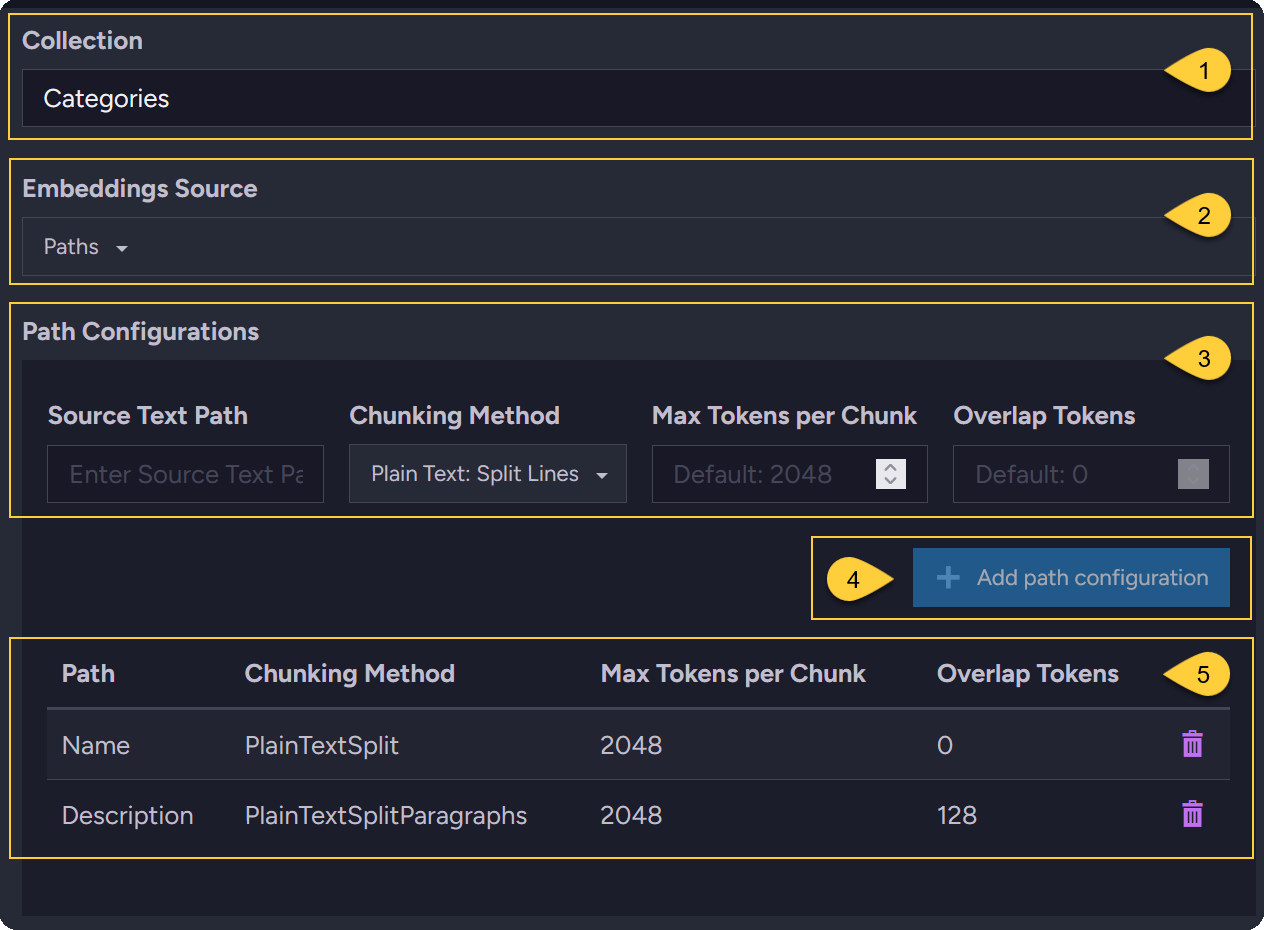
Collection
Enter or select the source document collection from the dropdown. -
Embeddings source
SelectPathsto define the source content by document properties. -
Path configuration
Specify which document properties to extract text from, and how the text should be chunked into embeddings.- Source text path
Enter the property name from the document that contains the text for embedding generation. - Chunking method
Select the method for splitting the source text into chunks.
Learn more in Chunking methods and tokens. - Max tokens per chunk
Enter the maximum number of tokens allowed per chunk (this depends on the service provider). - Overlap tokens
Enter the number of tokens to repeat at the start of each chunk from the end of the previous one.
This helps preserve context between chunks by carrying over some tokens from one to the next.
Applies only to the "Plain Text: Split Paragraphs" and "Markdown: Split Paragraphs" chunking methods.
- Source text path
-
Add path configuration
Click to add the specified to the list. -
List of paths
This table displays the document properties you added for embedding generation.
-
-
Define the embeddings source - using SCRIPT:
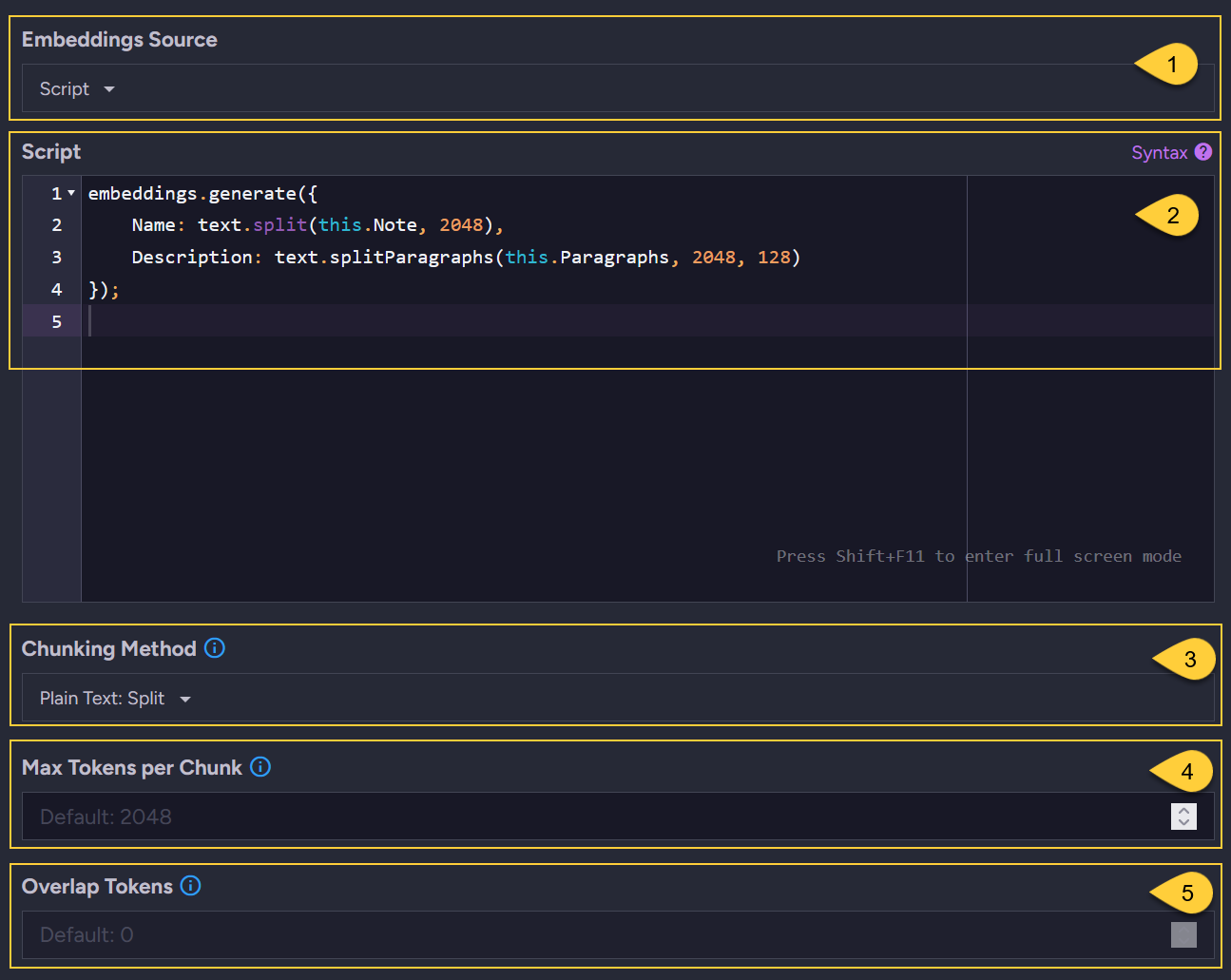
- Embeddings source
SelectScriptto define the source content and chunking methods using a JavaScript script. - Script
Refer to section Chunking methods and tokens for available JavaScript methods. - Default chunking method
The selected chunking method will be used by default when no method is specified in the script.
e.g., when the script contains:Name: this.Name. - Default max tokens per chunk:
Enter the default value to use when no specific value is set for the chunking method in the script.
This is the maximum number of tokens allowed per chunk (depends on the service provider). - Default overlap tokens
Enter the default value to use when no specific value is set for the chunking method in the script.
This is the number of tokens to repeat at the start of each chunk from the end of the previous one.
Applies only to the "Plain Text: Split Paragraphs" and "Markdown: Split Paragraphs" chunking methods.
- Embeddings source
-
Define quantization and expiration -
for the generated embeddings from the source documents: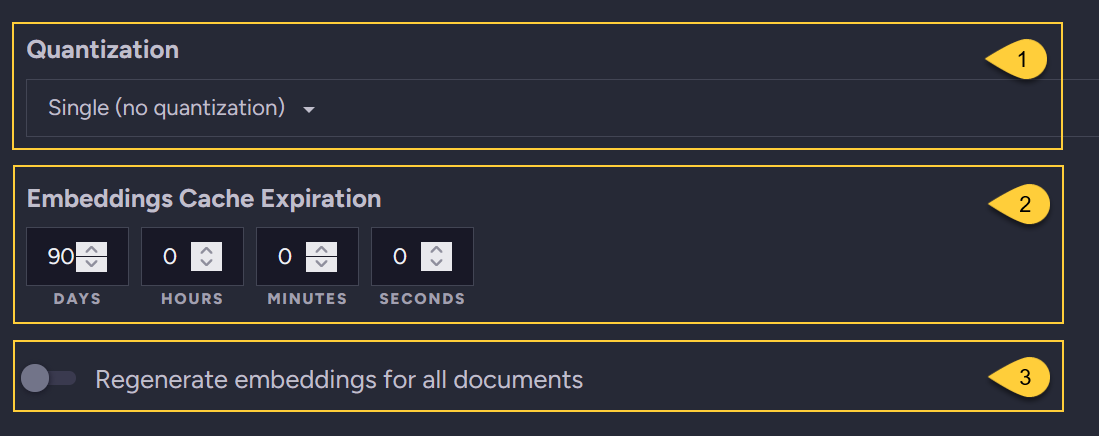
- Quantization
Select the quantization method that RavenDB will apply to embeddings received from the service provider.
Available options:- Single (no quantization)
- Int8
- Binary
- Embeddings cache expiration
Set the expiration period for documents stored in the@embeddings-cachecollection.
These documents contain embeddings generated from the source documents, serving as a cache for these embeddings.
The default initial period is90days. This period may be extended when the source documents change.
Learn more in The embeddings cache collection. - Regenerate embeddings
This toggle is visible only when editing an existing task.
Toggle ON to regenerate embeddings for all documents in the collection, as specified by the Paths or Script.
- Quantization
-
Define chunking method & expiration -
for the embedding generated from a search term in a vector search query: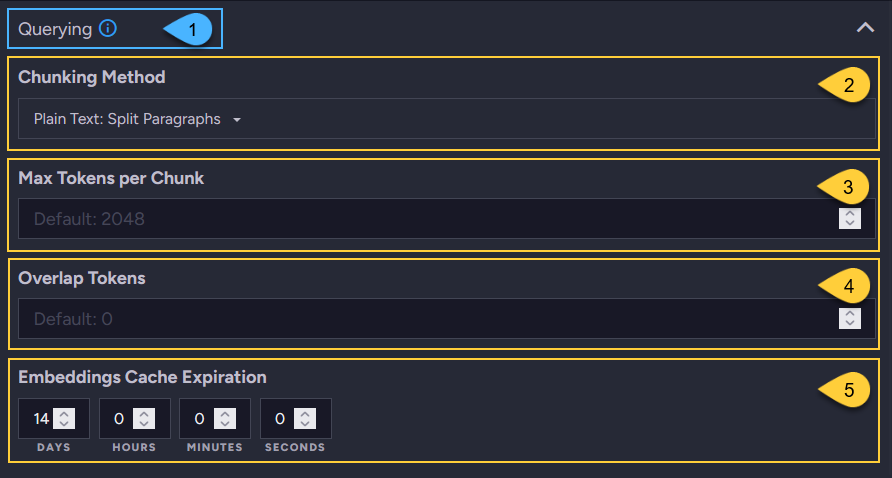
- Querying
This label indicates that this section configures parameters only for embeddings
generated by the task for search terms in vector search queries. - Chunking method
Select the method for splitting the search term into chunks.
Learn more in Chunking methods and tokens. - Max tokens per chunk
Enter the maximum number of tokens allowed per chunk (this depends on the service provider). - Overlap tokens
Enter the number of tokens to repeat at the start of each chunk from the end of the previous one.
This helps preserve context between chunks by carrying over some tokens from one to the next.
Applies only to the "Plain Text: Split Paragraphs" and "Markdown: Split Paragraphs" chunking methods. - Embeddings cache expiration
Set the expiration period for documents stored in the@embeddings-cachecollection.
These documents contain embeddings generated from the search terms, serving as a cache for these embeddings.
The default period is14days. Learn more in The embeddings cache collection.
- Querying
Configuring an embeddings generation task - from the Client API
Configure an embeddings generation task - define source using PATHS:
// Define a connection string that will be used in the task definition:
// ====================================================================

var connectionString = new AiConnectionString
{
    // Connection string name & identifier
    Name = "ConnectionStringToOpenAI",
    Identifier = "id-for-open-ai-connection-string",

    // OpenAI connection settings
    OpenAiSettings = new OpenAiSettings(
        apiKey: "your-api-key",
        endpoint: "https://api.openai.com/v1",
        model: "text-embedding-3-small")
};

// Deploy the connection string to the server:
// ===========================================
var putConnectionStringOp =
    new PutConnectionStringOperation<AiConnectionString>(connectionString);
var putConnectionStringResult = store.Maintenance.Send(putConnectionStringOp);

// Define the embeddings generation task:
// ======================================
var embeddingsTaskConfiguration = new EmbeddingsGenerationConfiguration
{
    // General info:
    Name = "GetEmbeddingsFromOpenAI",
    Identifier = "id-for-task-open-ai",
    ConnectionStringName = "ConnectionStringToOpenAI",
    Disabled = false,

    // Embeddings source & chunking methods - using PATHS configuration:
    Collection = "Categories",
    EmbeddingsPathConfigurations = [
        new EmbeddingPathConfiguration() {
            Path = "Name",
            ChunkingOptions = new()
            {
                ChunkingMethod = ChunkingMethod.PlainTextSplit,
                MaxTokensPerChunk = 2048
            }
        },
        new EmbeddingPathConfiguration()
        {
            Path = "Description",
            ChunkingOptions = new()
            {
                ChunkingMethod = ChunkingMethod.PlainTextSplitParagraphs,
                MaxTokensPerChunk = 2048,

                // 'OverlapTokens' is only applicable when ChunkingMethod is
                // 'PlainTextSplitParagraphs' or 'MarkDownSplitParagraphs'
                OverlapTokens = 128
            }
        },
    ],

    // Quantization & expiration -
    // for embeddings generated from source documents:
    Quantization = VectorEmbeddingType.Single,
    EmbeddingsCacheExpiration = TimeSpan.FromDays(90),

    // Chunking method and expiration -
    // for the embeddings generated from search term in vector search query:
    ChunkingOptionsForQuerying = new()
    {
        ChunkingMethod = ChunkingMethod.PlainTextSplit,
        MaxTokensPerChunk = 2048
    },

    EmbeddingsCacheForQueryingExpiration = TimeSpan.FromDays(14)
};

// Deploy the embeddings generation task to the server:
// ====================================================
var addEmbeddingsGenerationTaskOp =
    new AddEmbeddingsGenerationOperation(embeddingsTaskConfiguration);
var addAiIntegrationTaskResult = store.Maintenance.Send(addEmbeddingsGenerationTaskOp);
Configure an embeddings generation task - define source using SCRIPT:
-
To configure the source content using a script -
use theEmbeddingsTransformationobject instead of theEmbeddingsPathConfigurationsobject. -
The rest of the configuration properties are the same as in the example above.
-
Call
embeddings.generate(object)within the script and apply the appropriate text-splitting methods to each field inside the object. Each KEY in the object represents a document field, and the VALUE is a text-splitting function that processes the field's content before generating embeddings. -
These methods ensure that the text chunks derived from document fields stay within the token limits required by the provider, preventing request rejection. Learn more in Chunking methods and tokens.
-
For example:
// Source collection:
Collection = "Categories",

// Use 'EmbeddingsTransformation':
EmbeddingsTransformation = new EmbeddingsTransformation()
{
    // Define the script:
    Script =
        @"embeddings.generate({

            // Process the document 'Name' field using method text.split().
            // The text content will be split into chunks of up to 2048 tokens.
            Name: text.split(this.Name, 2048),

            // Process the document 'Description' field using method text.splitParagraphs().
            // The text content will be split into chunks of up to 2048 tokens.
            // 128 overlapping tokens will be repeated at the start of each chunk
            // from the end of the previous one.
            Description: text.splitParagraphs(this.Description, 2048, 128)
        });"
},
- If no chunking method is provided in the script, you can set default values as follows:
Collection = "Categories",
EmbeddingsTransformation = new EmbeddingsTransformation()
{
    Script =
        @"embeddings.generate({

            // No chunking method is specified here
            Name: this.Name,
            Description: this.Description
        });",

    // Specify the default chunking options to use in the script
    ChunkingOptions = new ChunkingOptions()
    {
        ChunkingMethod = ChunkingMethod.PlainTextSplit,
        MaxTokensPerChunk = 2048
    }
},
Chunking methods and tokens
Tokens and processing limits:
- A token is the fundamental unit that Large Language Models (LLMs) use to process text.
AI service providers that generate embeddings from text enforce token limits for each processed text part.
If a text exceeds the provider’s limit, it may be truncated or rejected.
Using chunking methods:
-
To handle lengthy text, you can define chunking strategies in the task definition and specify the desired number of tokens per chunk. Chunking splits large input texts into smaller, manageable chunks, each containing no more than the specified maximum number of tokens.
-
The maximum number of tokens per chunk depends on the AI service provider and the specific model defined in the connection string. While RavenDB does not tokenize text, it estimates the number of tokens for chunking purposes by dividing the text length by 4.
-
The AI provider generates a single embedding for each chunk.
Depending on the maximum tokens per chunk setting, a single input text may result in multiple embeddings.
Available chunking methods:
RavenDB offers several chunking methods that can be applied per source type.
These methods determine how input text is split before being sent to the provider.
-
PlainText: Split
Splits a plain text string into multiple chunks based on the specified maximum token count.
Estimates token lengths based on an average of 4 characters per token and applies a 0.75 ratio to determine chunk sizes. Ensures that words are not split mid-way when forming chunks.Applies to:
Fields containing plain text strings.
Return Value:
A list of text chunks (strings), where each chunk approximates the specified maximum token count without breaking words. -
PlainText: Split Lines
Uses the Semantic Kernel SplitPlainTextLines method.
Splits a plain text string into individual lines based on line breaks and whitespace while ensuring that each line does not exceed the specified maximum token limit.Applies to:
Fields containing an array of plain text strings.
Return value:
A list of text segments (lines) derived from the original input, preserving line structure while ensuring token constraints. -
PlainText: Split Paragraphs
Uses the Semantic Kernel SplitPlainTextParagraphs method.
Combines consecutive lines to form paragraphs while ensuring each paragraph is as complete as possible without exceeding the specified token limit.
Optionally, set an overlap between chunks using the overlapTokens parameter, which repeats the last n tokens from one chunk at the start of the next. This helps preserve context continuity across paragraph boundaries.Applies to:
Fields containing an array of plain text strings.
Return value:
A list of paragraphs, where each paragraph consists of grouped lines that preserve readability without exceeding the token limit. -
Markdown: Split Lines
Uses the Semantic Kernel SplitMarkDownLines method.
Splits markdown content into individual lines at line breaks while ensuring that each line remains within the specified token limit. Preserves markdown syntax, ensuring each line remains an independent, valid segment.Applies to:
Fields containing strings with markdown content.
Return value:
A list of markdown lines, each respecting the token limit while maintaining the original formatting. -
Markdown: Split Paragraphs
Uses the Semantic Kernel SplitMarkdownParagraphs method.
Groups lines into coherent paragraphs at designated paragraph breaks while ensuring each paragraph remains within the specified token limit. Markdown formatting is preserved.
Optionally, set an overlap between chunks using the overlapTokens parameter, which repeats the last n tokens from one chunk at the start of the next. This helps preserve context continuity across paragraph boundaries.Applies to:
Fields containing an array of strings with markdown content.
Return value:
A list of markdown paragraphs, each respecting the token limit and maintaining structural integrity. -
HTML: Strip
Removes HTML tags from the content and splits the resulting plain text into chunks based on a specified token limit.Applies to:
Fields containing strings with HTML.
Return value:
A list of text chunks derived from the stripped content, ensuring each chunk remains within the token limit.
Chunking method syntax for the JavaScript scripts:
// Available text-splitting methods:
// =================================

// Plain text methods:
text.split(text | [text], maxTokensPerLine);
text.splitLines(text | [text], maxTokensPerLine);
text.splitParagraphs(line | [line], maxTokensPerLine, overlapTokens?);

// Markdown methods:
markdown.splitLines(text | [text], maxTokensPerLine);
markdown.splitParagraphs(line | [line], maxTokensPerLine, overlapTokens?);

// HTML processing:
html.strip(htmlText | [htmlText], maxTokensPerChunk);

// Optional: prepend context before embedding:
<chunking-method>(...).withContextPrefix(contextPrefix);
<string | [string]>.withContextPrefix(contextPrefix);
embeddings.generate({ ... }).withContextPrefix(contextPrefix);
| Parameter | Type | Description |
|---|---|---|
| text | string | A plain text or markdown string to split. |
| line | string | A single line or paragraph of text. |
| [text] / [line] | string[] | An array of text or lines to split into chunks. |
| htmlText | string | A string containing HTML content to process. |
| maxTokensPerChunk / maxTokensPerLine | number | The maximum number of tokens allowed per chunk. Default is 512. |
| overlapTokens | number (optional) | The number of tokens to overlap between consecutive chunks. Helps preserve context continuity across chunks (e.g., between paragraphs). Default is 0. |
| contextPrefix | string | Text that is prepended to chunks before they are sent to the embedding model. Required when withContextPrefix(...) is used. Cannot be empty or whitespace-only.Learn more in Adding a context prefix to chunks. |
Adding a context prefix to chunks
Use withContextPrefix(contextPrefix) in a SCRIPT-based
embeddings task to prepend context to the text sent to the embedding model.
This is useful when individual chunks omit identifying document information, such as a title, category, or company name.
In a script, contextPrefix can be a string literal, a document field such as this.Title, or any string expression produced by the script.
RavenDB trims trailing whitespace from the prefix and inserts a single space between the prefix and the chunk content.
You can apply the prefix in a script at three levels:
-
Per chunked field:
ChainwithContextPrefix(...)onto any chunking method result to prepend the prefix to every chunk generated from that field. -
Per non-chunked field:
ChainwithContextPrefix(...)directly onto a raw string or string array.
The string, or each string in the array, is emitted without chunking and with the prefix prepended. -
For all generated fields:
ChainwithContextPrefix(...)onto theembeddings.generate({...})call to apply the same prefix to every generated field. A field-level prefix takes priority and is not overwritten by this object-wide prefix.
embeddings.generate({

    // Per field - on a chunked value:
    // Prepend the document's category to every chunk generated from the Content field.
    Content: text.splitParagraphs(this.Content, 512).withContextPrefix(this.Category),

    // No field-level prefix is defined here,
    // so the object-wide prefix below will apply to this field.
    Summary: text.splitParagraphs(this.Summary, 512),

    // Per field - on a non-chunked value:
    // Emit the Title field without chunking, with a literal prefix prepended.
    Title: this.Title.withContextPrefix('Article title:')

}).withContextPrefix(this.Title); // Object-wide prefix
SCRIPT vs PATHS context prefixes
Use the SCRIPT option
with withContextPrefix(...) when the prefix must be computed per document,
for example from this.Title or this.Category.
For source paths configured through the PATHS option in the Client API,
you can set a constant prefix with the ChunkingOptions.ContextPrefix property in the relevant EmbeddingPathConfiguration.
Unlike the SCRIPT option, the PATHS option applies the same prefix text to every document for that path.
It cannot use values from the document being processed, such as the document's own title or category.
For dynamic, per-document prefixes, use the SCRIPT option.
This property is currently not exposed in the Studio for path configurations. You can set it through the Client API.
For example:
new EmbeddingPathConfiguration()
{
    Path = "Description",
    ChunkingOptions = new()
    {
        ChunkingMethod = ChunkingMethod.PlainTextSplitParagraphs,
        MaxTokensPerChunk = 2048,
        OverlapTokens = 128,

        // Prepended to every chunk produced from this path.
        // In PATHS, this is the same constant text for every processed document.
        // Its tokens count against 'MaxTokensPerChunk'.
        ContextPrefix = "Category description:"
    }
}
Context prefix and the token budget
When a context prefix is applied to chunked input, its tokens count against the configured Max tokens per chunk. RavenDB also accounts for the separating space inserted between the prefix and the chunk content.
This means the effective token budget available for the original chunk content is reduced by the prefix.
Keep the prefix short and focused on the missing context, such as a title, category, or company name.
If the prefix leaves no room for chunk content, the task fails with an error. The task also fails if Overlap tokens is greater than or equal to the remaining effective chunk budget after the prefix is accounted for.
This token-budget reduction does not apply when withContextPrefix(...) is used in a script on a non-chunked raw string or string array.
In that case, the string, or each string in the array, is emitted without chunking and with the prefix prepended.
When to use a context prefix
Use a context prefix when important document-level information may be absent from individual chunks.
Common examples are a title, category, company name, product name, or other identifier that appears once in the document but is needed to interpret later chunks.
A context prefix is especially useful for specific queries that include, or depend on, that identifying context.
For example, if users search for information about a particular company, adding the company name to each chunk can make matching more precise and help the relevant document rank higher.
There is a trade-off. Because the prefix becomes part of the embedding input, it can make search results more focused, but it can also push borderline-relevant chunks lower. For broad category-level queries where users expect an exhaustive set of relevant results, this may reduce recall.
Keep the prefix short and focused on the missing context.
Do not use it to summarize the whole document.
For chunked input, the prefix consumes part of the token budget and may increase the number of generated chunks.
If you are unsure whether to use a prefix, test it on a small sample of your own data.
Create two otherwise identical embeddings generation tasks, one with a context prefix and one without,
then compare precision, recall, or other relevant metrics for the queries your users actually issue.
Syntax
The embeddings generation task configuration:
// The 'EmbeddingsGenerationConfiguration' class inherits from 'EtlConfiguration'
// and provides the following specialized configurations for the embeddings generation task:
// =========================================================================================

public class EmbeddingsGenerationConfiguration : EtlConfiguration<AiConnectionString>
{
    public string Identifier { get; set; }
    public string Collection { get; set; }
    public List<EmbeddingPathConfiguration> EmbeddingsPathConfigurations { get; set; }
    public EmbeddingsTransformation EmbeddingsTransformation { get; set; }
    public VectorEmbeddingType Quantization { get; set; }
    public ChunkingOptions ChunkingOptionsForQuerying { get; set; }
    public TimeSpan EmbeddingsCacheExpiration { get; set; } = TimeSpan.FromDays(90);
    public TimeSpan EmbeddingsCacheForQueryingExpiration { get; set; } = TimeSpan.FromDays(14);
}
| Parameter | Type | Description |
|---|---|---|
| Identifier | string | The identifier of the embeddings generation task. |
| Collection | string | The name of the source collection from which documents are processed for embeddings generation. |
| EmbeddingsPathConfigurations | List<EmbeddingPathConfiguration> | A list of properties inside documents that contain text to be embedded, along with their chunking settings. |
| EmbeddingsTransformation | EmbeddingsTransformation | An object that contains a script defining the transformations and processing applied to the source text before generating embeddings. |
| Quantization | VectorEmbeddingType | The quantization type for the generated embeddings. |
| ChunkingOptionsForQuerying | ChunkingOptions | The chunking method, maximum token limit, and overlap tokens used when processing search terms in vector search queries. |
| EmbeddingsCacheExpiration | TimeSpan | The expiration period for documents in the Embedding cache collection that contain embeddings generated from source documents. |
| EmbeddingsCacheForQueryingExpiration | TimeSpan | The expiration period for documents in the embedding cache collection that contain embeddings generated from search terms in vector search queries. |
public class EmbeddingPathConfiguration
{
    public string Path { get; set; }
    public ChunkingOptions ChunkingOptions { get; set; }
}

public class ChunkingOptions
{
    public ChunkingMethod ChunkingMethod { get; set; } // Default is PlainTextSplit
    public int MaxTokensPerChunk { get; set; } = 512;

    // 'OverlapTokens' is only applicable when ChunkingMethod is
    // 'PlainTextSplitParagraphs' or 'MarkDownSplitParagraphs'
    public int OverlapTokens { get; set; } = 0;

    // Text prepended to each produced chunk before it is sent
    // to the embedding model.
    // Leave null to generate embeddings without a context prefix.
    // Its tokens count against 'MaxTokensPerChunk'.
    public string ContextPrefix { get; set; }
}

public enum ChunkingMethod
{
    PlainTextSplit,
    PlainTextSplitLines,
    PlainTextSplitParagraphs,
    MarkDownSplitLines,
    MarkDownSplitParagraphs,
    HtmlStrip
}

public class EmbeddingsTransformation
{
    public string Script { get; set; }
    public ChunkingOptions ChunkingOptions {get; set;}
}

public enum VectorEmbeddingType
{
    Single,
    Int8,
    Binary,
    Text
}
Deploying the embeddings generation task:
public AddEmbeddingsGenerationOperation(EmbeddingsGenerationConfiguration configuration);