Admin JS Console
-
The Admin JS Console lets you run JavaScript code on the server or on a specific database,
with low-level access and context objects. -
This page contains a partial list of available methods that can be executed using the console.
-
Do not use the JS console unless you are sure of what you are doing.
Incorrect usage may crash the server, corrupt data, or cause irreversible changes.
- In this article:
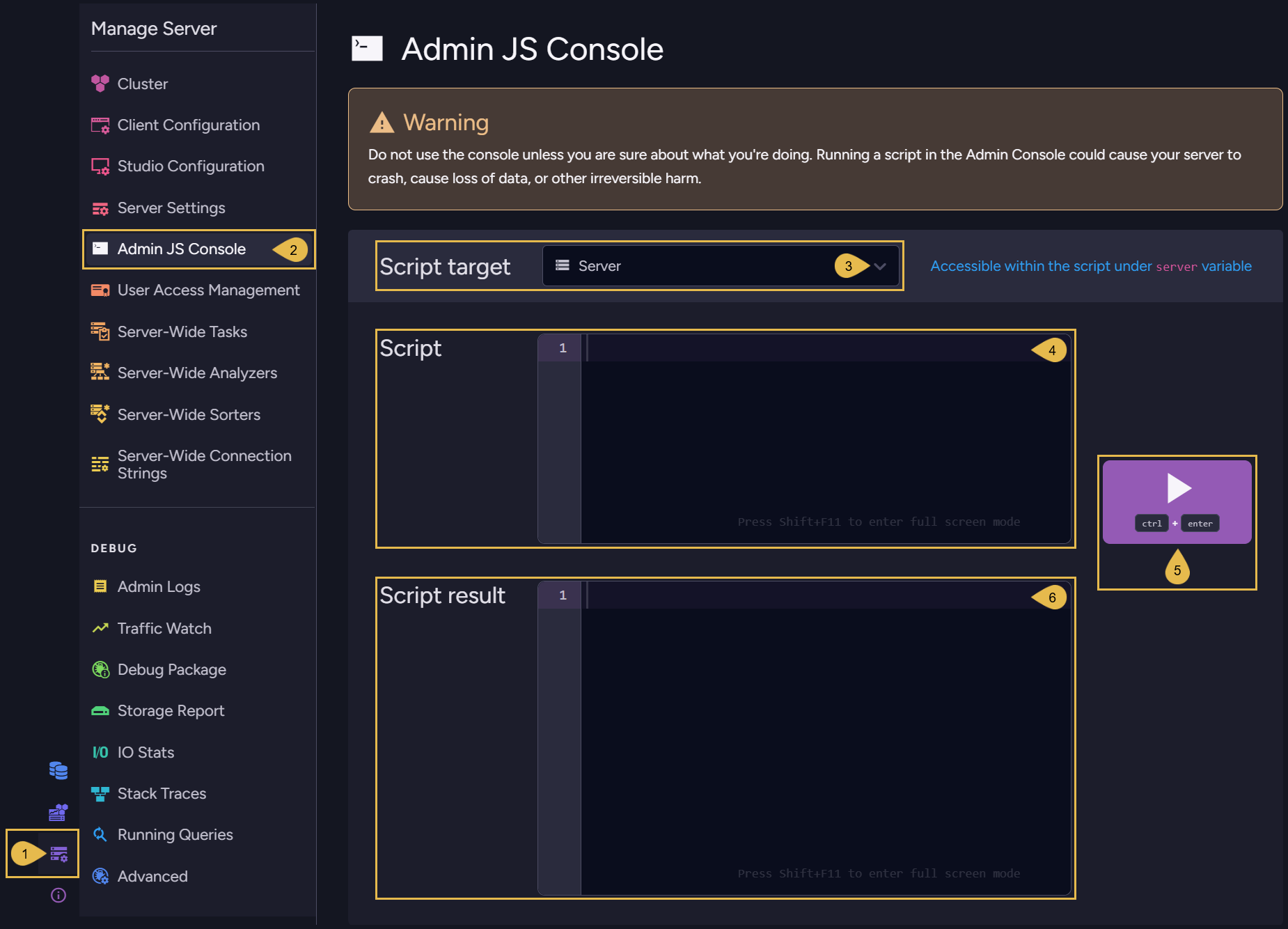
Admin JS Console view
Manage Server > Admin JS Console
-
Manage Server
Open the Manage Server menu. -
Admin JS Console
Select Admin JS Console. -
Script target
Select the target for the script:
Select Server to run a script against the server,
or select a database from the dropdown list to run the script in the context of the selected database. -
Script
Write your JavaScript code in the editor:- If you selected the server as the target, use the
servervariable.
This object in your script is a direct reference to the live C#RavenServerinstance in the RavenDB backend.
Any method you call on it will be executed on the actual server object. - If you selected a database as the target, use the
databasevariable.
This object in your script is a direct reference to the live C#DocumentDatabaseinstance in the RavenDB backend. Any method you call on it will be executed on the actual database object.
- If you selected the server as the target, use the
-
Run
Run the script. -
Script result
The script's output is displayed in this panel.
Context objects in scripts
-
In addition to the server and database objects, the Admin JS Console provides access to three context variables:
serverCtx,databaseCtx, andclusterCtx. -
If your script calls a method that requires one of these contexts, you can use the corresponding variable.
They are created for you and disposed automatically after the script runs. -
Before using a context,
you must open a transaction on the context usingOpenReadTransaction()orOpenWriteTransaction().
Context Variables
| Variable | Type | Scope |
|---|---|---|
| databaseCtx | DocumentsOperationContext | Specific database |
| serverCtx | TransactionOperationContext | Single RavenDB node |
| clusterCtx | ClusterOperationContext | Entire cluster |
Script example
// Get number of documents in the selected database
databaseCtx.OpenReadTransaction();
return database.DocumentsStorage.GetNumberOfDocuments(databaseCtx);

// Get the current server node tag
clusterCtx.OpenReadTransaction();
return server.ServerStore.Engine.ReadNodeTag(clusterCtx);

// Get the name of a server-wide backup task by ID
serverCtx.OpenReadTransaction();
return server.ServerStore.Cluster.GetServerWideTaskNameByTaskId(serverCtx,
    'server-wide/backup/configurations', 1);
Console methods
This is a partial list of methods that can be invoked on the server object from the Admin JS Console.
Methods under server.ServerStore.Engine
server.ServerStore.Engine.*
Methods
| Method | Parameters | Description |
|---|---|---|
HardResetToPassive() | Cluster Topology ID | Force this server to leave its cluster and change state to passive. The server will not be able to perform ongoing tasks while it is in passive state. This method takes a cluster topology ID. If null is passed, the node will retain its current cluster topology ID. If you want to later add this server to an existing cluster, its cluster topology ID needs to match that cluster's ID. |
HardResetToNewCluster() | Cluster node tag | Force this server to leave its cluster and bootstrap a new cluster (in which it is the only node and is in state leader). A new cluster topology ID is generated, and the method returns this ID. This method takes a node tag, but the parameter is currently not applied: the server keeps its current node tag. |
FoundAboutHigherTerm() | long; string | Set the term number of this server to the first parameter, a number of type long. A cluster's term number is incremented each time an election occurs. If you pass a number greater than the current term, the server updates its term number and propagates the new term to the rest of the cluster. This can be used to break an election that does not end on its own, i.e. when the cluster is stuck in "voting in progress": a candidate that encounters the higher term aborts the stuck election round. Note: This does not trigger an election, the leader node remains leader. If you pass a number smaller than or equal to the current term, the method does nothing: the server and cluster retain their current term number. The second parameter is a string that will be printed to the log of the term update: it records the reason for the change in the term. It can be set to null. |
Variables
| Variable | Type | Description |
|---|---|---|
RequestSnapshot | boolean | Indicates whether this server has a pending request for a snapshot of the cluster state from the leader node of its cluster. While the request is pending, the server does not run for leadership, and it resynchronizes from the received snapshot. This value can be read from the console but cannot currently be set by a script. |