Ongoing Task Stats: OLAP ETL Stats
-
Studio's Ongoing Task Stats view draws an activity track for each active ongoing task of the currently selected database, and populates the track with operation bars that report individual task operations.
Learn more about this view in the Ongoing Task Stats article. -
See below how to read the activity track drawn for an OLAP ETL task.
-
OLAP ETL (OnLine Analytical Processing) is a process that reads data from a RavenDB database, transforms it, and stores it in the Parquet format.
-
In this article:
The collapsed track

-
Task Type
Click the track label or bar to expand the track and display additional operation bars.
When expanded, collapse the track by clicking its label or arrow indicator. -
Task Name
The name given to the ETL task. -
Transform Script
The name of the transformation script.
Click the eye icon to display the script. -
Task Bar
- Hovering over the bar displays the details of the ETL batch.
- Dragging the bar slides the graph along the time axis.
- Rolling the mouse wheel zooms in or out.
The expanded track
Expanding an OLAP ETL track reveals the operations included in each batch, and the files each batch produced.
Hover above an operation bar of an expanded track to see the bar's properties as depicted below.
The batch operations
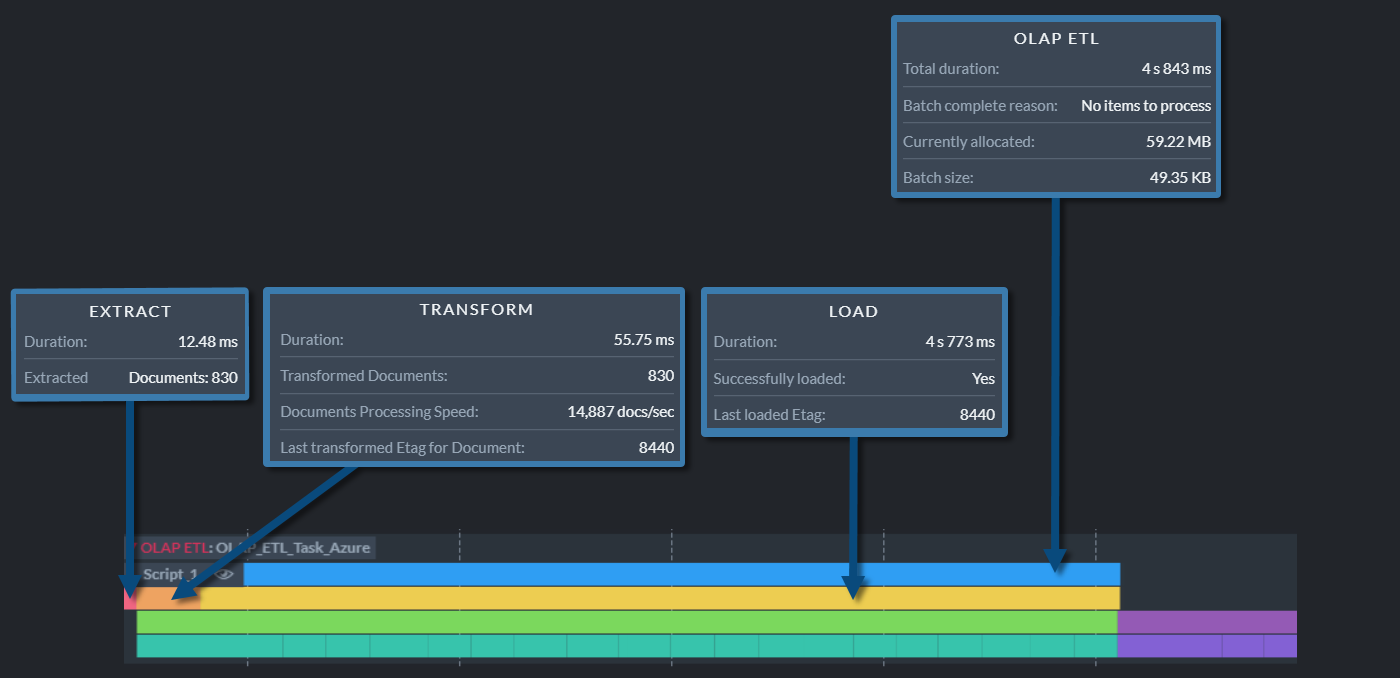
-
OLAP ETL bar.
The topmost bar, reporting properties measured over the whole batch:- Total duration
The duration of the whole batch, covering the extract, transform, and load operations. - Batch complete reason
The reason the batch ended, e.g., "No items to process" or "Stopping the batch because maximum batch size limit was reached". - Currently allocated
The amount of memory the server allocated to handle the task. - Batch size
The size of the data the batch carried. - ETL task has Transform errors or ETL task has Load errors
Potential error notices, reported only when the transformation script failed on at least one item or when the batch's load did not succeed, pointing to the notification center for further details.
- Total duration
-
Extract bar.
Properties measured while extracting the items from the source database:- Duration
The time it took to extract the items. - A count for each item type the batch carried, so the number of lines varies from batch to
batch. The image above shows Extracted Documents.
The item types are documents and counter groups. - Last filtered out Etag for Document
The etag of the last item the transformation script filtered out, reported per item type.
- Duration
-
Transform bar.
Properties measured while running the transformation script over the extracted items:- Duration
The time it took to run the script. - Transformed Documents
The number of items the script processed, reported per item type. - Documents Processing Speed
The average number of items the script processed per second, reported per item type. - Transformed Documents tombstones
The number of tombstones the script processed, reported per item type. - Transformation error count
The number of items the script failed on. - Last transformed Etag for Document
The etag of the last item the script processed, reported per item type.
- Duration
-
Load bar.
Properties measured while writing the transformed items to the Parquet files and sending the files to their destinations:- Duration
The time it took to write and send the files. - Successfully loaded
Yeswhen the files reached their destination,Nowhen the load failed. - Last loaded Etag
The etag of the last item loaded.
- Duration
The file operations
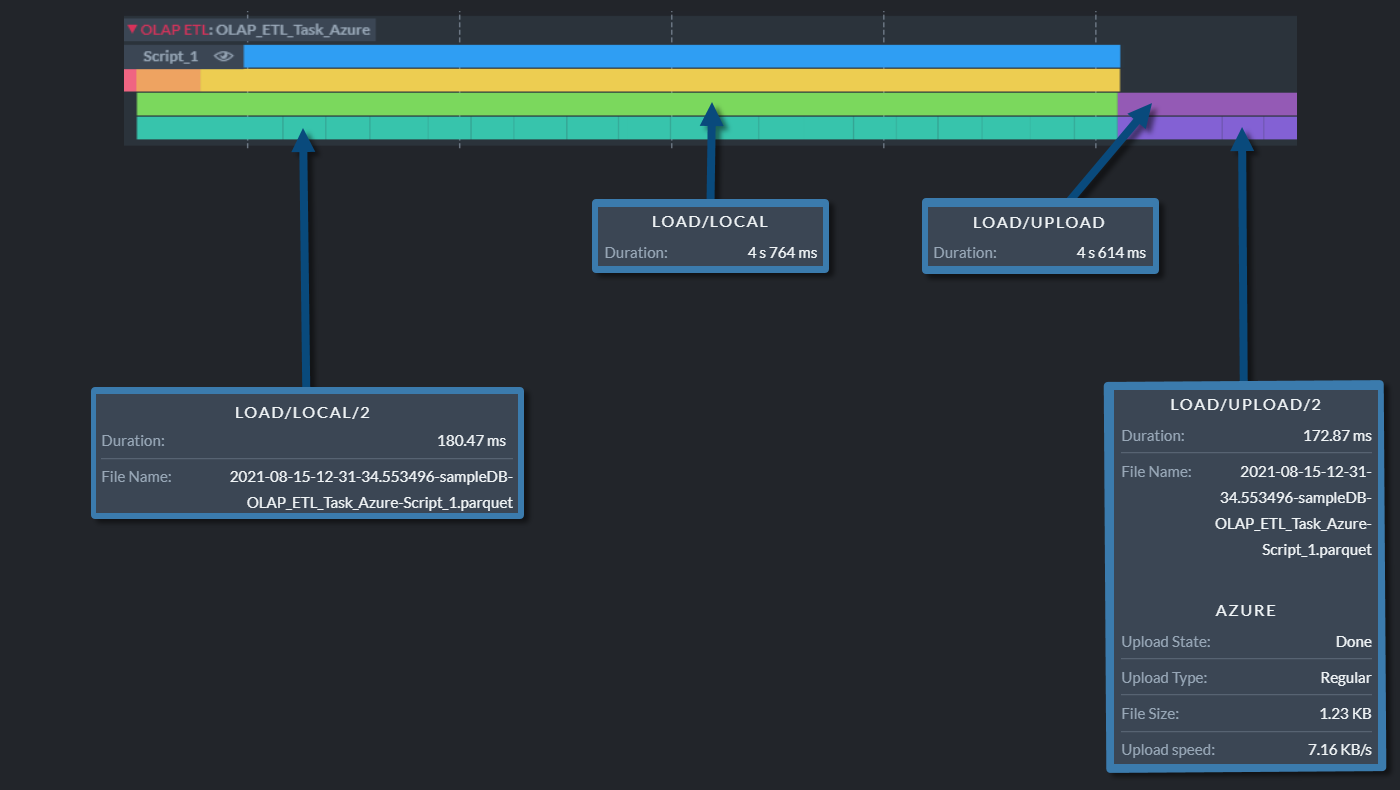
The Load operation includes two further operations, depicted as two bars on the row beneath the
Load bar, one after the other in time: the first measures the time it took to write all files
to local storage, and the second measures the time it took to upload them to their destinations.
The next row holds one bar per file, measuring the time it took to write each file to local storage
and to upload each file to its destination.
-
Load/Local bar.
Properties measured while writing all the batch's files to local storage, which always precedes their upload to a remote destination:- Duration
The time it took to write the files.
- Duration
-
Load/Local/
<file number>bars.
One bar per file, numbered by the file's order within the batch.
Properties measured while writing a single file to local storage:- Duration
The time it took to write the file. - File Name
The name of the Parquet file, built from the upload date and time, the database name, the OLAP ETL task name, and the script name.
- Duration
-
Load/Upload bar.
Properties measured while uploading all the batch's files to their remote destinations:- Duration
The time it took to upload the files.
The upload bars are absent when the task writes to local storage only.
- Duration
-
Load/Upload/
<file number>bars.
One bar per file, numbered by the file's order within the batch.
Properties measured while uploading a single file:- Duration
The time it took to upload the file. - File Name
The name of the Parquet file. - A block per destination the task uploads to, headed S3, Azure, Google Cloud,
Glacier, or FTP.
Each block reports the Upload State and the Upload Type, then either the File Size and the Upload speed once the upload is done, or the Progress so far and the current Upload speed while it runs.
- Duration