Ongoing Task Stats: External Replication Stats
-
Studio's Ongoing Task Stats view draws an activity track for each active ongoing task of the currently selected database, and populates the track with operation bars that report individual task operations.
Learn more about this view in the Ongoing Task Stats article. -
See below how to read the activity track drawn for an external replication task.
-
An external replication task replicates data from one RavenDB database to another.
On this view, replication tracks are labeledOutgoing External Replicationwhen the source database is selected andIncoming External Replicationwhen the destination database is selected. -
In this article:
The collapsed track

-
Task Type
Click the track label or bar to expand the track and display additional operation bars.
When expanded, collapse the track by clicking its label or arrow indicator. -
Replication URL
- On a source database: the server URL and database name to which documents are replicated.
- On a target database: the server URL and database name of the source database.
-
Task Bar
- Hovering over the bar displays the details of the replication batch.
- Dragging the bar slides the graph along the time axis.
- Rolling the mouse wheel zooms in or out.
The expanded track
Expanding an external replication track reveals the operations included in each batch.
On a source database, the view depicts an outgoing track.
On a destination database, the view depicts an incoming track.
Hover above an operation bar of an expanded track to see the bar's properties as depicted below.
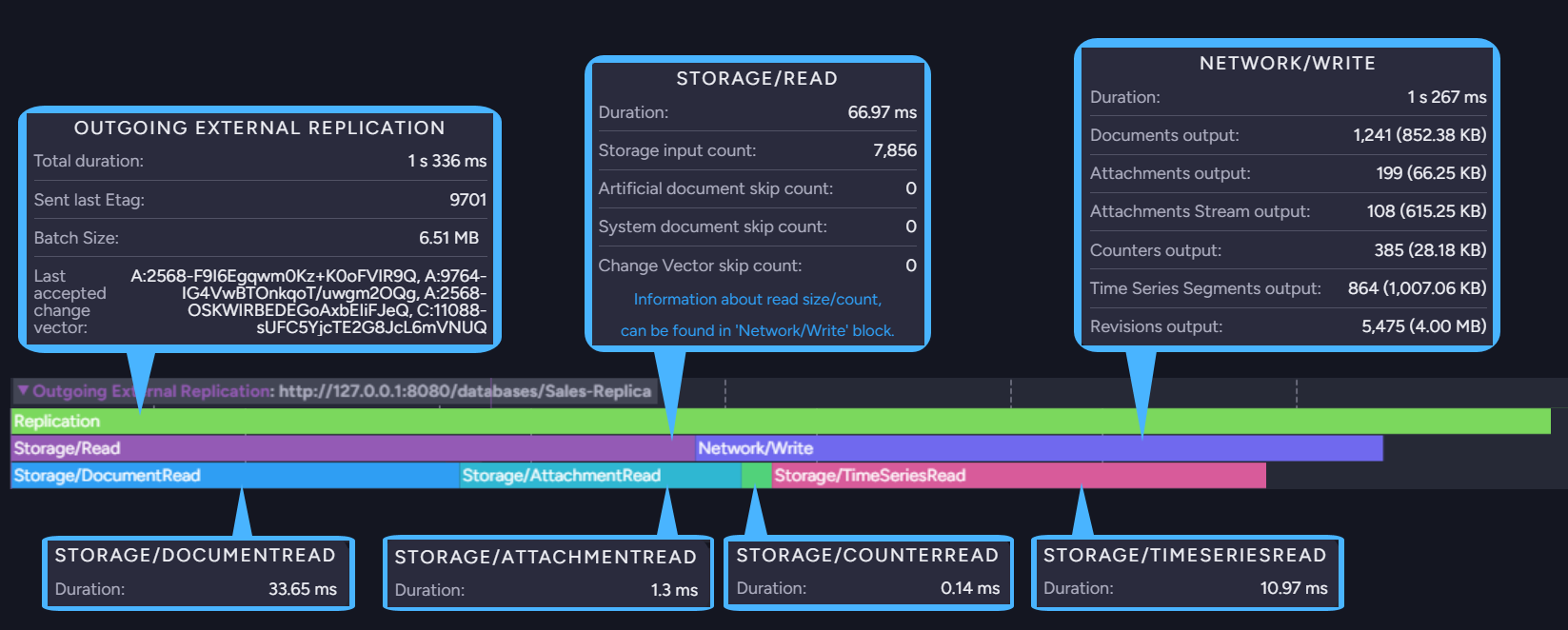
Outgoing replication
-
Outgoing External Replication bar.
The topmost bar, reporting properties measured over the whole batch:- Total duration
The duration of the whole batch. - Sent last Etag
The etag of the last item sent in the batch. - Batch Size
The size of the data sent in the batch. - Last accepted change vector
The change vector the destination database last acknowledged.
- Total duration
-
Storage/Read bar.
Properties measured while reading the items to be replicated from the source database's storage:- Duration
The time it took to read the items. - Storage input count
The number of items read from storage. - Artificial document skip count
The number of skipped artificial items, such as the documents a map-reduce index outputs, which are not replicated. - System document skip count
The number of skipped system documents. - Change Vector skip count
The number of items skipped because the destination database already has them.
The counts and sizes of the read items are reported under the Network/Write bar.
- Duration
-
Network/Write bar.
Properties measured while transmitting the read items to the destination database:- Duration
The time it took to transmit the items. - A count and a size for each item type the batch carried, so the number of lines varies from
batch to batch. The image above shows six of them.
The possible lines are Documents output, Documents Tombstone output, Attachments output, Attachments Stream output, Attachments Tombstone output, Counters output, Time Series Segments output, Time Series Deleted Ranges output, Revisions output, and Revisions Tombstone output.
- Duration
-
Storage/DocumentRead, Storage/AttachmentRead, Storage/CounterRead, Storage/TimeSeriesRead, and Storage/TombstoneRead bars.
Properties measured while reading each item type included in the Storage/Read operation:- Duration
The time it took to read the items of the bar's type.
- Duration
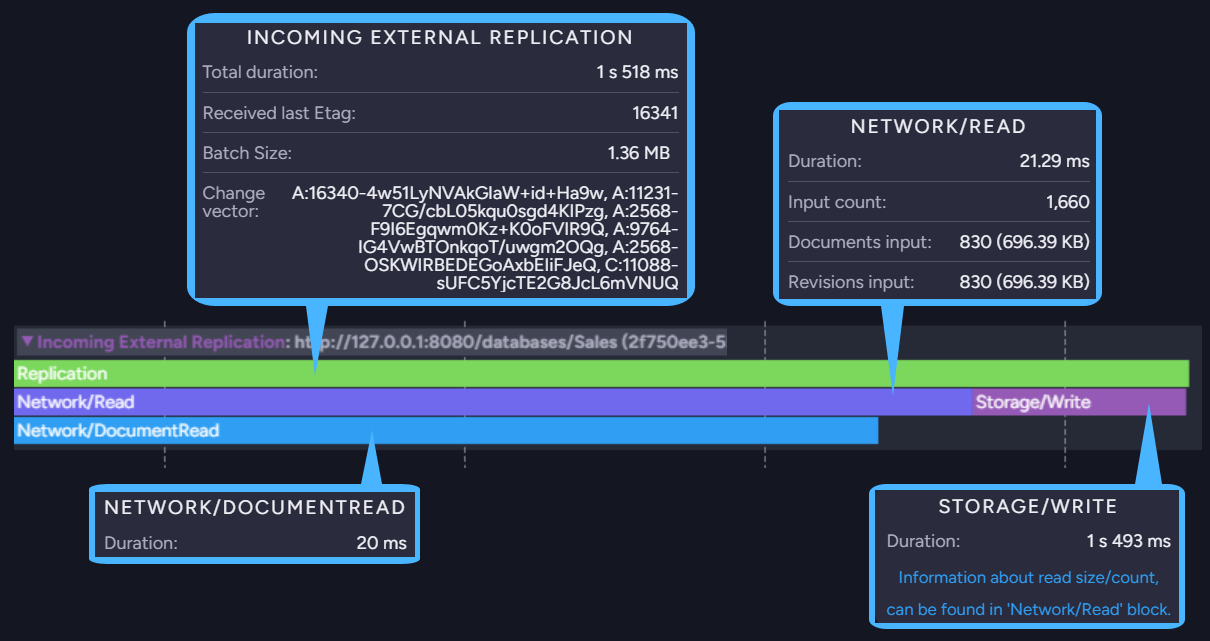
Incoming replication
-
Incoming External Replication bar.
The topmost bar, reporting properties measured over the whole batch:- Total duration
The duration of the whole batch. - Received last Etag
The etag of the last item received in the batch. - Batch Size
The size of the data received in the batch. - Change vector
The change vector of the receiving database.
- Total duration
-
Network/Read bar.
Properties measured while receiving the replicated items over the network:- Duration
The time it took to receive the items. - Input count
The overall number of items received. - A count and a size for each item type the batch carried, so the number of lines varies from
batch to batch. The image above shows Documents input and Revisions input.
The possible lines are Documents input, Documents Tombstone input, Attachments input, Attachments Stream input, Attachments Tombstone input, Counters input, Time Series Segments input, Time Series Deleted Ranges input, Revisions input, and Revisions Tombstone input.
- Duration
-
Storage/Write bar.
Properties measured while writing the received items to the destination database's storage:- Duration
The time it took to write the items.
The counts and sizes of the written items are reported under the Network/Read bar.
- Duration
-
Network/DocumentRead, Network/AttachmentRead, Network/CounterRead, Network/TimeSeriesRead, Network/TimeSeriesDeletedRangeRead, and Network/TombstoneRead bars.
Properties measured while receiving each item type included in the Network/Read operation:- Duration
The time it took to receive the items of the bar's type.
- Duration