Document Expiration
- Use this view to configure the Document Expiration feature.
- Documents can be scheduled for deletion by an
@expiresproperty in their@metadata. - When the document expiration feature is enabled, it routinely checks for documents that
include the
@expiresproperty and deletes them on the scheduled time. - Learn more about this option here.
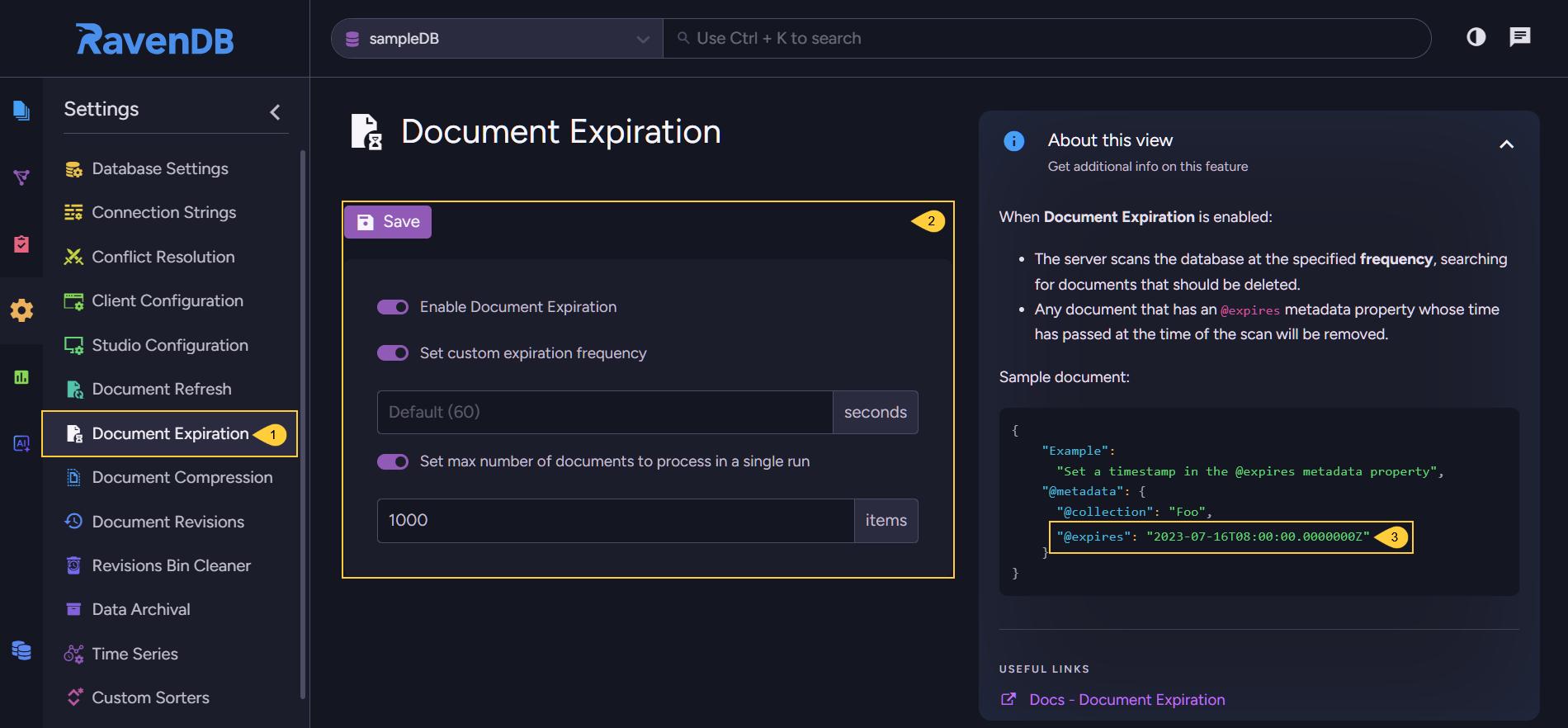
Document Expiration View
-
Document Expiration
Click to configure document expiration. -
Enable document expiration
Toggle this option to enable or disable the expiration feature for the selected database.- Set custom expiration frequency
Set the frequency at which the server looks for expired documents and deletes them.
Default value: 60 seconds - Set max number of documents to process in a single run
Set the maximal number of documents the feature is allowed to delete in one run. - Save
Changes in the configuration will apply only after saving them.
- Set custom expiration frequency
-
Set the
@expiresproperty inside the document that should be deleted- Add the
@metadataof each document whose expiration you want to schedule, an@expiresproperty. - Set the expiration time in UTC format, e.g. -
"@expires": "2025-04-22T08:00:00.0000000Z" - Deletion will occure automatically, if the 'Enable document expiration' option is checked.
- Add the