Kubernetes Operator
-
This article serves as an overview for the operator workflow: it explains what the Kubernetes RavenDB Operator is, how the operator-managed deployment works, and how to use the running cluster afterward.
-
This article follows the RavenDB Kubernetes Operator 2.x deployment model: install the operator chart once, then install the
ravendb-clusterchart for each RavenDB cluster. -
For the full end-to-end walkthrough, including the detailed setup, configuration, and bootstrap steps, see:
The RavenDB Kubernetes Operator way -
In this article:
What the operator is
A Kubernetes Operator is a component dedicated to managing a specific application.
In Kubernetes terms, the operator is a controller: a component that reads a declared configuration and carries out the work needed to make the actual deployment match it.
The Kubernetes RavenDB Operator applies this pattern to a secure RavenDB cluster.
The configuration you declare is rendered as a RavenDBCluster custom resource, which defines the RavenDB cluster you want Kubernetes to run.
When the cluster chart installs that resource, the operator creates and maintains the Kubernetes resources needed for the cluster deployment.
Why use an operator
Running RavenDB on Kubernetes involves more than starting Pods. Each RavenDB node stores durable data, so the deployment must provide persistent storage that remains attached correctly even when Pods restart or are rescheduled. The cluster also depends on certificates, networking, Secrets, Jobs, and other Kubernetes resources that need to match the declared cluster configuration. The operator is the component that takes responsibility for coordinating that work inside Kubernetes.
What the operator manages
In practice, the operator manages work such as:
- Creating and maintaining the Kubernetes resources the cluster depends on
- Bootstrapping the initial cluster
- Wiring certificates and TLS
- Configuring external access
- Provisioning persistent storage
- Reporting health and status
- Carrying out rolling upgrades
The following diagram shows the main components of an operator-managed RavenDB deployment, where they are located, and how they relate to each other.
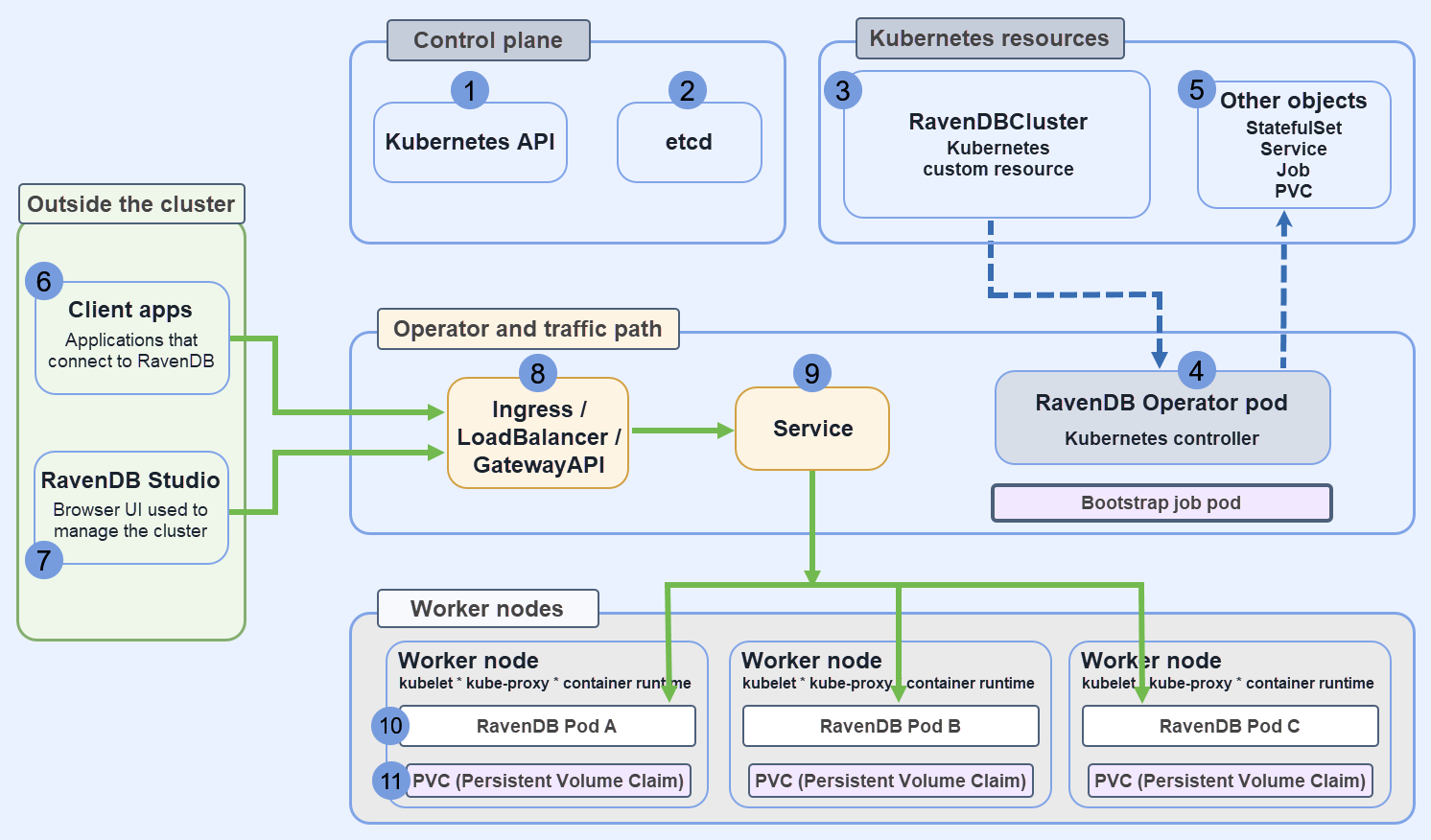 RavenDBCluster is stored in etcd and exposed via the Kubernetes API server; The RavenDB Operator watches this custom resource and reconciles it by creating and managing the required Kubernetes objects; RavenDB itself runs in Pod-assigned containers on worker nodes.
-
Kubernetes API
The control-plane component that accepts and serves Kubernetes objects. -
etcd
The datastore that stores the Kubernetes cluster state. -
RavenDBCluster resource
A Kubernetes custom resource that defines the RavenDB cluster configuration. -
RavenDB Operator Pod
A Kubernetes controller that reads theRavenDBClusterresource and manages the Kubernetes objects needed for the deployment. -
Managed Kubernetes objects
Objects such as a StatefulSet, Service, Job, and PVCs that the operator creates or updates. -
Client apps
Applications that connect to RavenDB. -
RavenDB Studio
The browser UI used to manage the running RavenDB cluster. -
Ingress / LoadBalancer
The network entry point used by traffic coming from outside the cluster. -
Service
Routes requests to a RavenDB Pod. -
RavenDB Pods
The actual RavenDB server processes. RavenDB itself runs here, on worker nodes. -
Persistent storage
Storage attached to each RavenDB Pod for RavenDB data.
Before you start
Before setting up the operator, make sure the Kubernetes environment can support a secure RavenDB cluster and that the required materials are ready.
-
To deploy a RavenDB cluster using the operator, you need the license and certificates from the generated setup package.
-
Kubernetes environment
- You need a running Kubernetes cluster,
kubectl, Helm, andcert-manager. - The operator uses admission webhooks to validate and mutate resources during creation and updates; these webhooks require TLS certificates managed by
cert-manager.
cert-manageris used to issue and manage those certificates.
- You need a running Kubernetes cluster,
-
For the full environment setup,
cert-manager, and operator installation, see Part 1: Setup & Operator Installation.
Install the operator
The recommended installation method is Helm.
helm repo add ravendb-operator https://ravendb.github.io/ravendb-operator/helm
helm repo update

helm install ravendb-operator ravendb-operator/ravendb-operator \
  -n ravendb-operator-system \
  --create-namespace
This installs the operator itself in the ravendb-operator-system namespace,
it does not create a RavenDB cluster yet.
The operator starts managing RavenDB only after you install the separate ravendb-cluster chart. That chart renders the RavenDBCluster resource and creates or references the Secrets it needs.
For the full installation flow, including Helm, make deploy, and OLM, see Part 1: Setup & Operator Installation.
Prepare cluster inputs
After the operator is installed, prepare the cluster values and the setup-package files that the ravendb-cluster chart will use.
The namespace can be created by Helm with --create-namespace. The license and certificate material can be passed to the chart with --set-file, or you can point the chart at Secrets your organization already manages.
Learn more about the chart values in the operator readme file.
At a minimum, you need:
- A RavenDB license file
- An admin client certificate file
- Server certificate files for the RavenDB nodes
Each input has a different role.
- The license file makes the RavenDB license available to the cluster.
- The client certificate contains the
ClusterAdmincertificate used by the bootstrap job when it calls RavenDB management APIs during the initial cluster formation. - The server certificates contain the certificates used by the RavenDB nodes themselves.
A minimal setup names the standard Secret slots:
secrets:
  license:
    name: ravendb-license
  clientCert:
    name: ravendb-client-cert
  nodeCerts:
    namePrefix: ravendb-certs
If these Secrets already exist, keep the name values and omit the matching --set-file values during install.
The exact certificate files depend on the TLS mode you choose.
- In Let’s Encrypt mode, the operator workflow uses the certificate files generated earlier by the secure RavenDB setup flow and stored in the RavenDB setup package.
- In self-signed mode, you provide the certificate files yourself.
In this case, the CA certificate is also needed, because it tells RavenDB and its clients which certificate authority issued the server certificates.
For the detailed certificate flows and the exact prerequisites they produce, see Part 4: TLS.
The full chart install sequence is shown in Part 6: Bringing the Cluster to Life.
Define cluster values
RavenDBCluster is the custom resource that defines the intended RavenDB deployment.
In the Helm workflow, you normally describe that intent in my-values.yaml, and the ravendb-cluster chart renders the RavenDBCluster resource for you.
Instead of applying and maintaining a StatefulSet, Service, Job, and PVCs separately, you describe the cluster here and let the operator manage these resources.
A typical definition includes:
- The RavenDB nodes and their public URLs
- The image to run
- The TLS mode
- The Secrets for the license and certificates
- The storage configuration
- The external access configuration
The example below shows the general shape of an operator-managed cluster values file:
secrets:
  license:
    name: ravendb-license
  clientCert:
    name: ravendb-client-cert
  nodeCerts:
    namePrefix: ravendb-certs
spec:
  nodes:
    - tag: a
      publicServerUrl: https://a.example.development.run:443
      publicServerUrlTcp: tcp://a-tcp.example.development.run:443
    - tag: b
      publicServerUrl: https://b.example.development.run:443
      publicServerUrlTcp: tcp://b-tcp.example.development.run:443
    - tag: c
      publicServerUrl: https://c.example.development.run:443
      publicServerUrlTcp: tcp://c-tcp.example.development.run:443

  storage:
    data:
      size: 10Gi
      storageClassName: local-path

  externalAccessConfiguration:
    type: ingress-controller
    ingressControllerContext:
      ingressClassName: nginx

  image: ravendb/ravendb:latest
  imagePullPolicy: IfNotPresent

  mode: LetsEncrypt
  email: user@example.com
  domain: example.development.run
Fields that matter most
A few fields deserve special attention:
nodesdefines the RavenDB nodes that make up the cluster.publicServerUrlandpublicServerUrlTcpare the addresses RavenDB advertises to clients and other nodes.secrets.license,secrets.clientCert, andsecrets.nodeCertstell the chart which Secret names to create or reference.externalAccessConfigurationdefines how Kubernetes exposes the nodes.storagedefines the persistent storage RavenDB will use.
The externalAccessConfiguration block is the part that changes most from one environment to another.
Ingress-based deployments, cloud load balancers, and node-specific public IP mappings all use different configurations, but the role of this block is always the same: tell the operator what networking resources it needs to create and manage so the declared RavenDB URLs are actually reachable.
For the structure of the custom resource itself, see Part 2: RavenDBCluster CRD.
For the networking side of the spec, see Part 3: External Access - How Clients Reach the Cluster.
For the TLS and storage parts of the spec, see Part 4: TLS and Part 5: Storage.
Install the cluster chart
Once my-values.yaml is ready, install the cluster chart and pass the setup-package files:
helm install my-cluster ravendb-operator/ravendb-cluster \
  -n ravendb --create-namespace \
  -f my-values.yaml \
  --set-file secrets.license.file=/setup/license.json \
  --set-file secrets.clientCert.file=/setup/admin.client.certificate.example.pfx \
  --set-file secrets.nodeCerts.files.a=/setup/A/cluster.server.certificate.example.pfx \
  --set-file secrets.nodeCerts.files.b=/setup/B/cluster.server.certificate.example.pfx \
  --set-file secrets.nodeCerts.files.c=/setup/C/cluster.server.certificate.example.pfx
Then watch what Kubernetes creates:
kubectl get pods -n ravendb
kubectl get jobs -n ravendb
During the initial deployment, the operator creates the RavenDB Pods and a short-lived bootstrap Job.
That Job waits for the Pods to run, checks HTTPS reachability, registers the admin client certificate, and forms the initial cluster.
This is part of the operator's role in forming the cluster, not just starting Pods.
You can inspect the bootstrap Job logs directly:
kubectl logs job/ravendb-cluster-init -n ravendb
A successful bootstrap run will show readiness checks, client certificate registration, and the nodes joining the cluster.
When the bootstrap Job later reaches Completed, that is expected.
It means the initialization work finished and the RavenDB nodes are left running.
For the full install sequence, including the complete values file and the bootstrap flow, see Part 6: Bringing the Cluster to Life.
Use the cluster
After bootstrap completes, open one of the node HTTPS URLs you declared in spec.nodes.publicServerUrl.
That URL is the public address the operator deployment is built around, and it is the address RavenDB advertises to clients.
When external access is configured correctly, browsing to that address opens RavenDB Studio for that node.
Authenticate with the client certificate prepared earlier.
What this means in practice
In a local or lab environment, the hostnames used in the node public URLs may not be resolvable yet from the machine where you open the browser.
If so, add local DNS or host-file entries so these hostnames resolve correctly.
To open Studio, use one of the node HTTPS URLs declared in spec.nodes.publicServerUrl.
Do not use an internal Pod address. Open that URL in the browser and authenticate with the client certificate.
From this point on, use the cluster like any other secure RavenDB cluster.
You can open Studio, inspect the cluster, create databases, and connect client applications through the declared public URLs.
The operator changes how the cluster is deployed, upgraded, and observed on Kubernetes.
It does not change the normal RavenDB workflows in Studio or the client API.
For the full walkthrough that ends with opening the running cluster in the browser, see Part 6: Bringing the Cluster to Life.
For certificate-based access, see Client certificate usage.
Observe and troubleshoot
When a deployment does not become ready, start with the custom resource, RavenDBCluster .
Because the operator is the component responsible for carrying out the deployment, the custom resource is usually the best place to see what it is waiting for and why.
kubectl describe ravendbclusters ravendbcluster-sample -n ravendb
kubectl get pods -n ravendb
kubectl get pvc -n ravendb
kubectl logs job/ravendb-cluster-init -n ravendb
These commands answer different questions:
kubectl describe ravendbclusters ...
shows the operator's view of the deployment: phase, conditions, and recent Events.kubectl get pods
shows whether RavenDB Pods or the bootstrap Job arePending,Running,CrashLoopBackOff, orCompleted.kubectl get pvc
helps verify that storage claims were created and bound.kubectl logs job/ravendb-cluster-init ...
shows what happened during the initial cluster formation.
Typical failure patterns
-
Pods remain
Pending
This usually points to storage, scheduling, or node-capacity problems. -
Pods are
Running, but the cluster is not formed
This usually points to reachability or certificate issues. -
The cluster resource reports licensing or certificate failures
This usually means a Secret is missing, referenced under the wrong name, or contains the wrong material for the selected TLS mode.
For the full troubleshooting flow, including Events and logs, see Part 7: Events and Logging.
Upgrade the cluster
To upgrade RavenDB, change the image tag in the release values and run helm upgrade.
spec:
  image: ravendb/ravendb:7.2.1
helm upgrade my-cluster ravendb-operator/ravendb-cluster \
  -n ravendb \
  --reuse-values \
  --set spec.image=ravendb/ravendb:7.2.1
The operator performs a rolling upgrade node by node and stops if a health gate is not satisfied.
For the detailed upgrade flow and the operator's safety gates, see Part 8: Rolling Upgrades.
Current limitation: topology changes after bootstrap
The operator bootstraps the initial topology from spec.nodes, but it does not yet treat later edits to that list as live topology changes.
This matters because the operator does manage much of the deployment lifecycle, but a change to spec.nodes after bootstrap is not currently interpreted as an instruction to reshape the running RavenDB cluster.
For example, once a three-node cluster is already running, the following changes to spec.nodes do not automatically resize or re-form the live RavenDB cluster:
- Adding a new node d
- Removing node c
- Changing the intended member layout
Plan the initial topology before the first bootstrap.
For RavenDB clustering background, see Clustering Overview.