CDC Sink: Update Task
-
Update an existing CDC Sink task to change its column mappings, add or remove tables, adjust patch scripts,
or modify other configuration settings. -
This article shows how to update a CDC Sink task using the Client API, Studio, or the REST API.
-
In this article:
Update a CDC Sink task via Client API
Use UpdateCdcSinkOperation to modify an existing task.
Start from the existing task configuration, apply your changes, and send the complete updated CdcSinkConfiguration.
The update operation replaces the saved task configuration, so include any unchanged settings you want to keep.
The task to update is selected by the taskId passed to UpdateCdcSinkOperation.
- Sync
- Async
// config contains the existing task configuration with the changes applied.

config.Tables.Add(new CdcSinkTableConfig
{
    CollectionName = "Customers",
    SourceTableName = "customers",
    PrimaryKeyColumns = new List<string> { "id" },
    Columns =
    [
        new CdcColumnMapping() { Column = "id",    Name = "Id" },
        new CdcColumnMapping() { Column = "name",  Name = "Name" },
        new CdcColumnMapping() { Column = "email", Name = "Email" },
    ]
});

// Execute the operation by passing it to Maintenance.Send
store.Maintenance.Send(new UpdateCdcSinkOperation(taskId, config));
// config contains the existing task configuration with the changes applied.

config.Tables.Add(new CdcSinkTableConfig
{
    CollectionName = "Customers",
    SourceTableName = "customers",
    PrimaryKeyColumns = new List<string> { "id" },
    Columns =
    [
        new CdcColumnMapping() { Column = "id",    Name = "Id" },
        new CdcColumnMapping() { Column = "name",  Name = "Name" },
        new CdcColumnMapping() { Column = "email", Name = "Email" },
    ]
});

// Execute the operation by passing it to Maintenance.SendAsync
await store.Maintenance.SendAsync(new UpdateCdcSinkOperation(taskId, config));
For PostgreSQL tasks, adding or removing tables can require updating the PostgreSQL publication.
See PostgreSQL - Cleanup and Maintenance for details.
Update a CDC Sink task via Studio
To edit a CDC Sink task in the Studio:
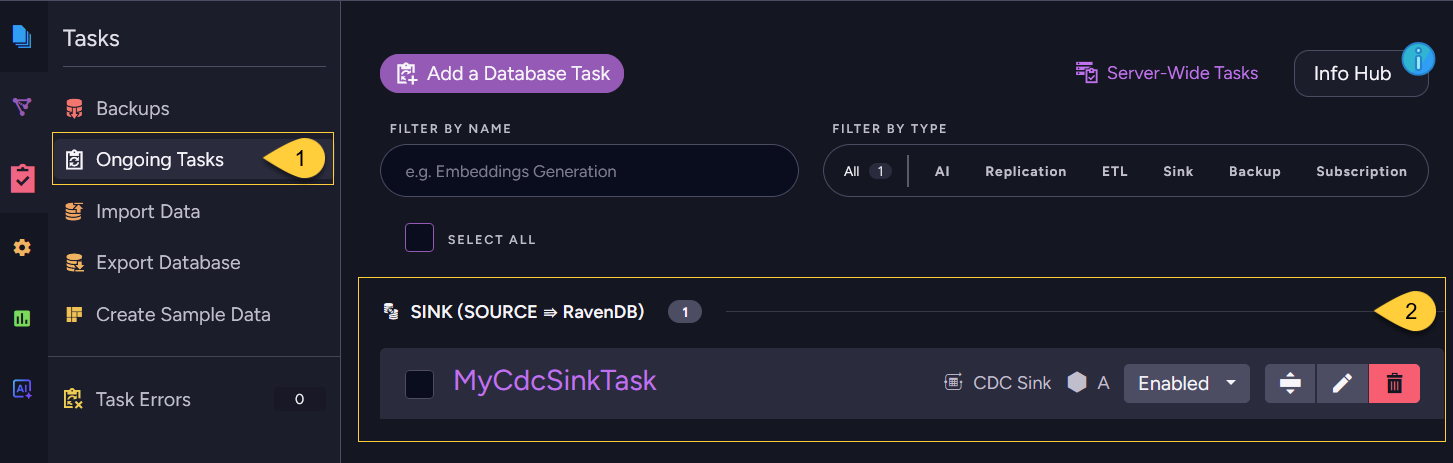
- Navigate to Databases → your database → Tasks → Ongoing Tasks.
- Under the SINK (SOURCE ⇒ RavenDB) group,
click the task's name (or the edit icon) to open the same configuration form used for creation, now in edit mode. - Modify the connection string, tables, column mappings, or patches as needed.
- Optionally, click Verify tables to check the updated configuration against the source database.
Verification does not stop or disconnect the running task.
See Verify tables. - Click Save task configuration.
If you changed the connection string selection, the PostgreSQL publication or slot name, or the table configuration,
Studio verifies the updated configuration before saving, unless a verification result is already available for it.
Changes to other settings, such as the task name, task state, or responsible node, do not trigger a new verification.
If the current verification result includes warnings or an error, click Save anyway to save the changes, see Save the task configuration.
Update a CDC Sink task via REST API
To update a CDC Sink task through REST, send a PUT request to the same endpoint used to create a task,
with the task ID in the id query string parameter.
The request body must contain the complete updated JSON CdcSinkConfiguration.
If id is omitted, the same endpoint creates a new CDC Sink task.
| Method | Endpoint | Auth |
|---|---|---|
PUT | /databases/{databaseName}/admin/cdc-sink?id={taskId} | DatabaseAdmin |
To verify the updated configuration against the source database before sending it, see Verify the configuration.