CDC Sink: Get Task Info
-
Retrieve information about a CDC Sink task, including its configuration, task state, connection status, responsible node, and last reported error.
-
This article shows how to get CDC Sink task info using the Client API, Studio, or REST API.
-
In this article:
Get CDC Sink task info via Client API
Use GetOngoingTaskInfoOperation with OngoingTaskType.CdcSink
to retrieve information about a specific CDC Sink task.
Get task info by task ID
Pass the numeric taskId together with OngoingTaskType.CdcSink.
- Sync
- Async
var taskInfo = (OngoingTaskCdcSink)store.Maintenance.Send(
    new GetOngoingTaskInfoOperation(taskId, OngoingTaskType.CdcSink));
var taskInfo = (OngoingTaskCdcSink)await store.Maintenance.SendAsync(
    new GetOngoingTaskInfoOperation(taskId, OngoingTaskType.CdcSink));
Get task info by task name
Pass the task name together with OngoingTaskType.CdcSink.
- Sync
- Async
var taskInfo = (OngoingTaskCdcSink)store.Maintenance.Send(
    new GetOngoingTaskInfoOperation("MyCdcSinkTaskName", OngoingTaskType.CdcSink));
var taskInfo = (OngoingTaskCdcSink)await store.Maintenance.SendAsync(
    new GetOngoingTaskInfoOperation("MyCdcSinkTaskName", OngoingTaskType.CdcSink));
The returned OngoingTaskCdcSink object exposes the task's identity, configuration, connection details,
and runtime status, including:
Identity
| Field | Description |
|---|---|
TaskId / TaskName | Task identity |
State & status
| Field | Description |
|---|---|
TaskState | Enabled, Disabled, or PartiallyEnabled |
TaskConnectionStatus | Active, NotActive, Reconnect, or NotOnThisNode |
ResponsibleNode | The cluster node currently running the task. |
Error | The last error reported by the task, if any. |
HealthIssue | null when healthy; a diagnostic message when the task detects a problem(fallback mode, stale connection, etc.) |
Connection & configuration
| Field | Description |
|---|---|
ConnectionStringName | Name of the connection string the task uses. |
FactoryName | The source provider (PostgreSQL, SQL Server, or MySQL/MariaDB). |
Configuration | The full CdcSinkConfiguration (tables, column mappings, and other saved settings). |
Runtime & lag
| Field | Description |
|---|---|
LastBatchTime | UTC time of the last successfully completed batch.null if no batch has completed yet. |
LastCheckpoint | The last successfully persisted checkpoint (LSN/GTID). |
SecondsSinceLastBatch | Seconds since the last successful batch. Provides a simple lag indicator.null if no batch has completed yet. |
LastActivityTime | UTC time of the last activity from the source (poll iteration, replication message, or binlog event). null before the first activity. |
SecondsSinceLastActivity | Seconds since the last source activity. A large value may indicate a dead connection. |
For performance and progress metrics (per-table statistics, initial-load progress), see Monitoring.
Get CDC Sink task info via Studio
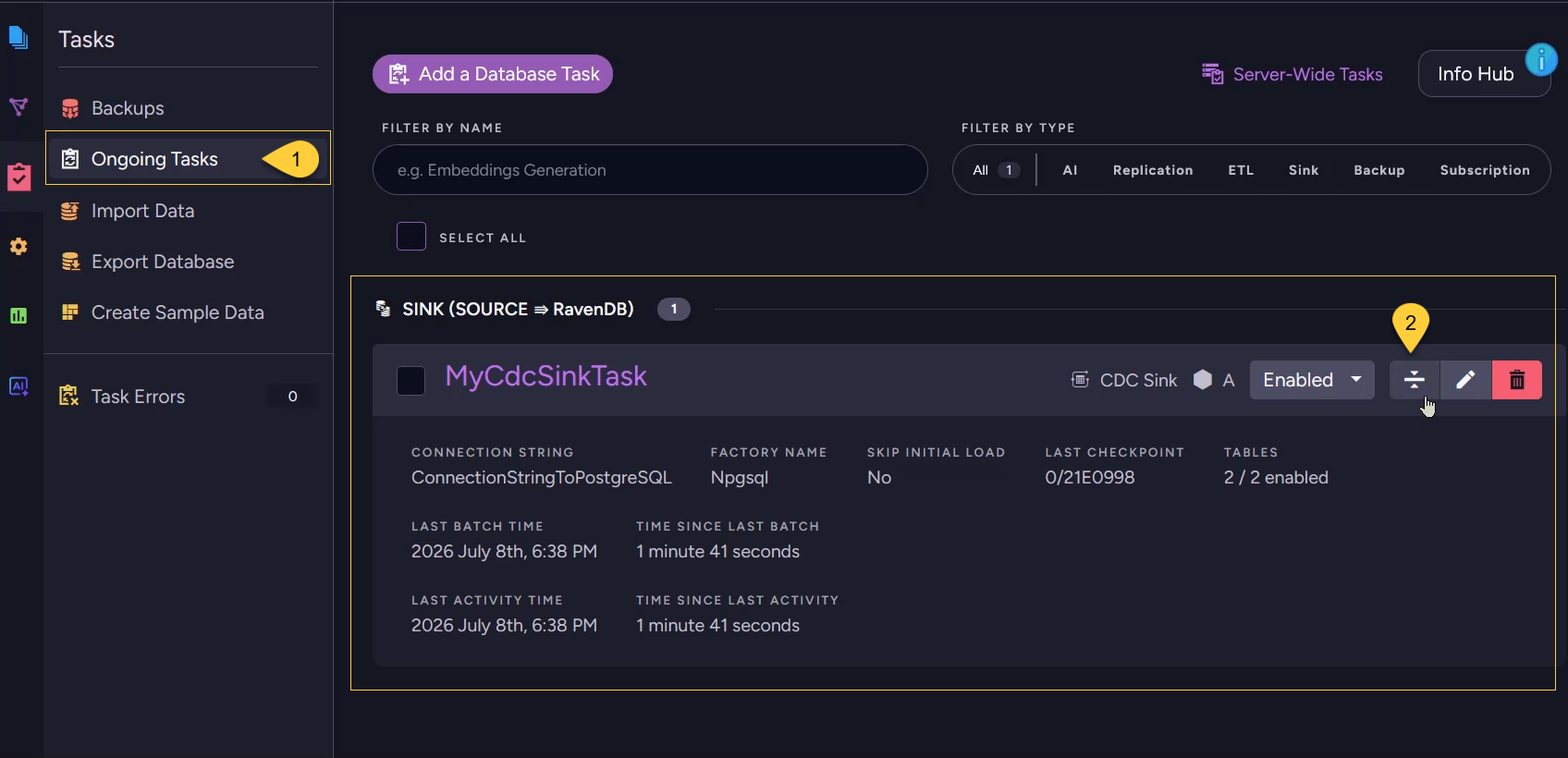
- Navigate to Databases → your database → Tasks → Ongoing Tasks.
- On the CDC Sink task row, click the details toggle to expand the task and open the detail view.
Get CDC Sink task info via REST API
CDC Sink uses the shared single-task info endpoint.
Identify the task either by ID (key) or by name (taskName), together with type=CdcSink.
| Method | Endpoint | Auth |
|---|---|---|
GET | /databases/{databaseName}/task?key={taskId}&type=CdcSink | ValidUser |
GET | /databases/{databaseName}/task?taskName={taskName}&type=CdcSink | ValidUser |