CDC Sink: Delete Task
-
Deleting a CDC Sink task:
- removes the task definition from RavenDB
- stops RavenDB from consuming new changes from the source database
-
Deleting a CDC Sink task does not delete:
- target documents already written to RavenDB
- the CDC Sink progress document (
@cdc-states/<task name>) - source-database change-capture or replication objects
-
This article shows how to delete a CDC Sink task using the Client API, Studio, or REST API,
and what source-side cleanup may still be needed. -
In this article:
Delete a CDC Sink task via Client API
Use DeleteOngoingTaskOperation with the numeric CDC Sink task ID and OngoingTaskType.CdcSink.
- Sync
- Async
store.Maintenance.Send(
    new DeleteOngoingTaskOperation(taskId, OngoingTaskType.CdcSink));
await store.Maintenance.SendAsync(
    new DeleteOngoingTaskOperation(taskId, OngoingTaskType.CdcSink));
Delete a CDC Sink task via Studio
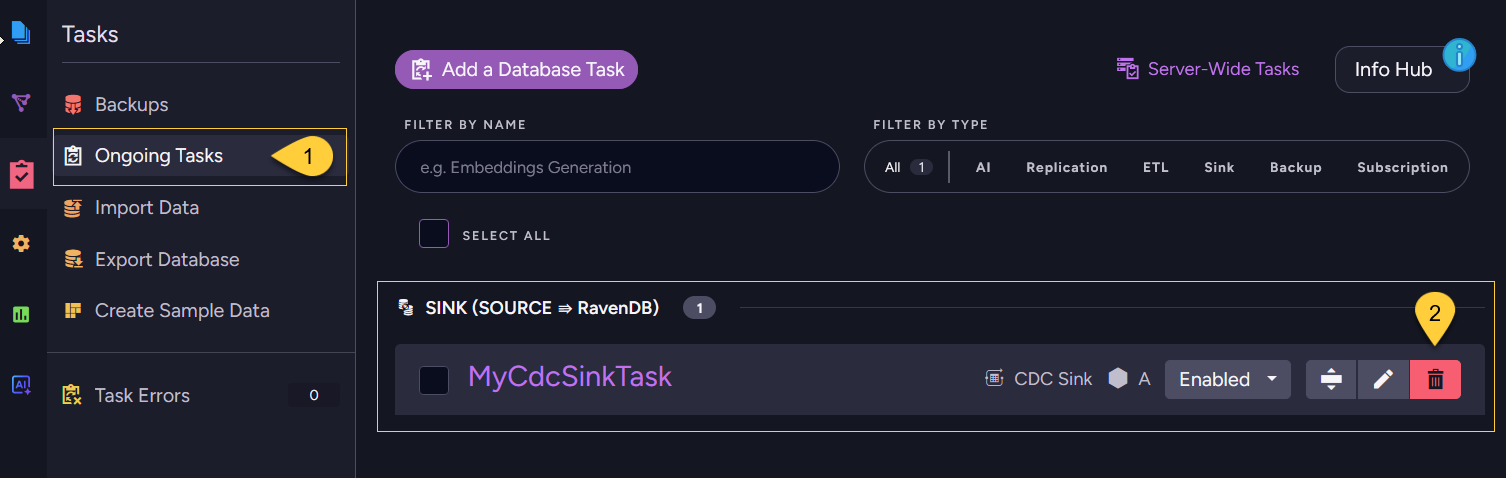
- Navigate to Databases → your database → Tasks → Ongoing Tasks.
- On the CDC Sink task, click the delete (trash) button and confirm.
Delete a CDC Sink task via REST API
To delete a CDC Sink task through REST, call the shared ongoing-task delete endpoint.
Pass the numeric task ID as id and the task type as type=CdcSink.
| Method | Endpoint | Auth |
|---|---|---|
DELETE | /databases/{databaseName}/admin/tasks?id={taskId}&type=CdcSink | DatabaseAdmin |
Clean up source-database artifacts
Deleting a CDC Sink task removes it on the RavenDB side only.
RavenDB does not connect back to the source database to remove or disable CDC, replication, or privilege-related objects there.
That cleanup must be performed by an administrator with permissions on the source database.
What remains depends on the source engine:
-
PostgreSQL (logical replication)
A replication slot and a publication are left behind. Removing the slot is the priority: while it exists, PostgreSQL retains WAL segments indefinitely and can eventually fill the disk. Drop the slot withpg_drop_replication_slot()and the publication withDROP PUBLICATION. See Cleanup and Maintenance. -
SQL Server (native CDC)
CDC stays enabled at the table (and database) level, including the capture instances, their change tables, and the CDC capture/cleanup SQL Server Agent jobs. Disable CDC on the affected tables withsys.sp_cdc_disable_tableonly if those capture instances are no longer used by any other consumer; disable CDC on the database withsys.sp_cdc_disable_dbonly if no other tables use CDC. -
MySQL / MariaDB (binlog)
Binary logging is a server-wide setting, not a per-task object, so there is usually nothing task-specific to remove.
Any dedicated replication user or granted privileges created for the task remain and can be revoked if no longer needed.