Complex Nesting with Linked Tables
-
This example shows how to combine deep embedded-table nesting with linked table references
in one CDC Sink task. -
It models a product catalog as RavenDB documents, with
productsas the root table,
nestedproduct_variantsandvariant_attributesarrays, and a linkedcategoriesdocument reference. -
For detailed instructions on creating a CDC Sink task with the Client API or Studio,
see Create a CDC Sink task. -
In this article:
Source schema
This schema uses products as the root table for Products documents.
categories is synced as a separate root table and referenced from each product,
while product_variants and variant_attributes are embedded under the product document.
variant_attributes includes product_id even though it joins directly to product_variants:
CDC Sink needs the root primary key on descendant embedded rows to locate the root document.
- SQL
CREATE TABLE categories (
    category_id SERIAL PRIMARY KEY,
    name        TEXT NOT NULL
);

CREATE TABLE products (
    product_id  SERIAL PRIMARY KEY,
    name        TEXT NOT NULL,
    category_id INT REFERENCES categories(category_id)
);

CREATE TABLE product_variants (
    variant_id  SERIAL PRIMARY KEY,
    product_id  INT NOT NULL REFERENCES products(product_id),
    sku         TEXT NOT NULL,
    price       NUMERIC(10,2)
);

CREATE TABLE variant_attributes (
    attr_id    SERIAL PRIMARY KEY,
    -- Denormalized root primary key, required for deep nesting
    product_id INT NOT NULL REFERENCES products(product_id),
    variant_id INT NOT NULL REFERENCES product_variants(variant_id),
    attr_name  TEXT NOT NULL,
    attr_value TEXT NOT NULL
);
REPLICA IDENTITY setup
-
For delete events, CDC Sink must receive the columns it uses to route the change and identify the embedded item.
-
In this schema, both embedded tables use single-column primary keys that do not include their routing columns,
so PostgreSQL's default primary-key-only replica identity is not enough. -
Instead of
REPLICA IDENTITY FULL, which includes all columns,
this example uses targeted unique indexes that cover only the required routing and primary-key columns:- SQL
-- product_variants:-- product_id locates the root Products document, variant_id identifies the embedded itemCREATE UNIQUE INDEX product_variants_replica_idxON product_variants (product_id, variant_id);ALTER TABLE product_variantsREPLICA IDENTITY USING INDEX product_variants_replica_idx;-- variant_attributes:-- product_id locates the root Products document,-- variant_id locates the parent variant,-- attr_id identifies the embedded attribute itemCREATE UNIQUE INDEX variant_attributes_replica_idxON variant_attributes (product_id, variant_id, attr_id);ALTER TABLE variant_attributesREPLICA IDENTITY USING INDEX variant_attributes_replica_idx;Learn more in REPLICA IDENTITY.
Task configuration
Multi-level embedding follows these routing rules:
- Each embedded table's
JoinColumnspoints to the primary key of its direct parent. - Every embedded row must also contain the root primary key (
product_id) so CDC Sink can locate the rootProductsdocument. - For deeper embedded tables,
JoinColumnsstill names the direct-parent key.
Here,variant_attributes.JoinColumnsisvariant_id;
product_idis present only for root-document routing and does not need to be mapped as an embedded property.
Via the Client API
Create the task with the Client API:
- csharp
var config = new CdcSinkConfiguration
{
    Name = "ProductCatalog-CDC-Sink",
    ConnectionStringName = "ConnectionStringToPostgreSQL",
    Tables =
    [
        new CdcSinkTableConfig
        {
            CollectionName = "Products",
            SourceTableSchema = "public",
            SourceTableName = "products",
            PrimaryKeyColumns = ["product_id"],
            Columns =
            [
                new CdcColumnMapping() { Column = "product_id", Name = "ProductId" },
                new CdcColumnMapping() { Column = "name",       Name = "Name" },
            ],
            // Linked table: category_id FK → document ID in Categories collection
            LinkedTables =
            [
                new CdcSinkLinkedTableConfig
                {
                    SourceTableSchema = "public",
                    SourceTableName = "categories",
                    PropertyName = "Category",
                    LinkedCollectionName = "Categories",
                    JoinColumns = ["category_id"]
                }
            ],
            EmbeddedTables =
            [
                new CdcSinkEmbeddedTableConfig
                {
                    SourceTableSchema = "public",
                    SourceTableName = "product_variants",
                    PropertyName = "Variants",
                    Type = CdcSinkRelationType.Array,
                    JoinColumns = ["product_id"],
                    PrimaryKeyColumns = ["variant_id"],
                    Columns =
                    [
                        new CdcColumnMapping() { Column = "variant_id", Name = "VariantId" },
                        new CdcColumnMapping() { Column = "sku",        Name = "Sku" },
                        new CdcColumnMapping() { Column = "price",      Name = "Price" },
                    ],
                    // Deep-nested: attributes within each variant
                    EmbeddedTables =
                    [
                        new CdcSinkEmbeddedTableConfig
                        {
                            SourceTableSchema = "public",
                            SourceTableName = "variant_attributes",
                            PropertyName = "Attributes",
                            Type = CdcSinkRelationType.Array,
                            // FK to the direct parent (product_variants) PK.
                            // The root PK (product_id) must exist as a denormalized column
                            // but is NOT listed here.
                            JoinColumns = ["variant_id"],
                            PrimaryKeyColumns = ["attr_id"],
                            Columns =
                            [
                                new CdcColumnMapping() { Column = "attr_id", Name = "AttrId" },
                                new CdcColumnMapping() { Column = "attr_name",  Name = "Name" },
                                new CdcColumnMapping() { Column = "attr_value", Name = "Value" },
                            ]
                        }
                    ]
                }
            ]
        },
        // Sync the linked target as its own root table.
        // Without this, this task writes the Category ID string
        // but does not create the referenced Categories document.
        new CdcSinkTableConfig
        {
            CollectionName = "Categories",
            SourceTableSchema = "public",
            SourceTableName = "categories",
            PrimaryKeyColumns = ["category_id"],
            Columns =
            [
                new CdcColumnMapping() { Column = "category_id", Name = "CategoryId" },
                new CdcColumnMapping() { Column = "name",        Name = "Name" },
            ]
        }
    ]
};

await store.Maintenance.SendAsync(new AddCdcSinkOperation(config));
Via Studio
In Studio, configure how the products source table maps to the Products target collection,
add categories as a linked reference, and nest product_variants and variant_attributes as embedded tables.
The left Tables tree shows the full structure: the root products table, its linked categories reference,
the embedded product_variants → variant_attributes chain, and the standalone categories root table.
First, configure the root products table:
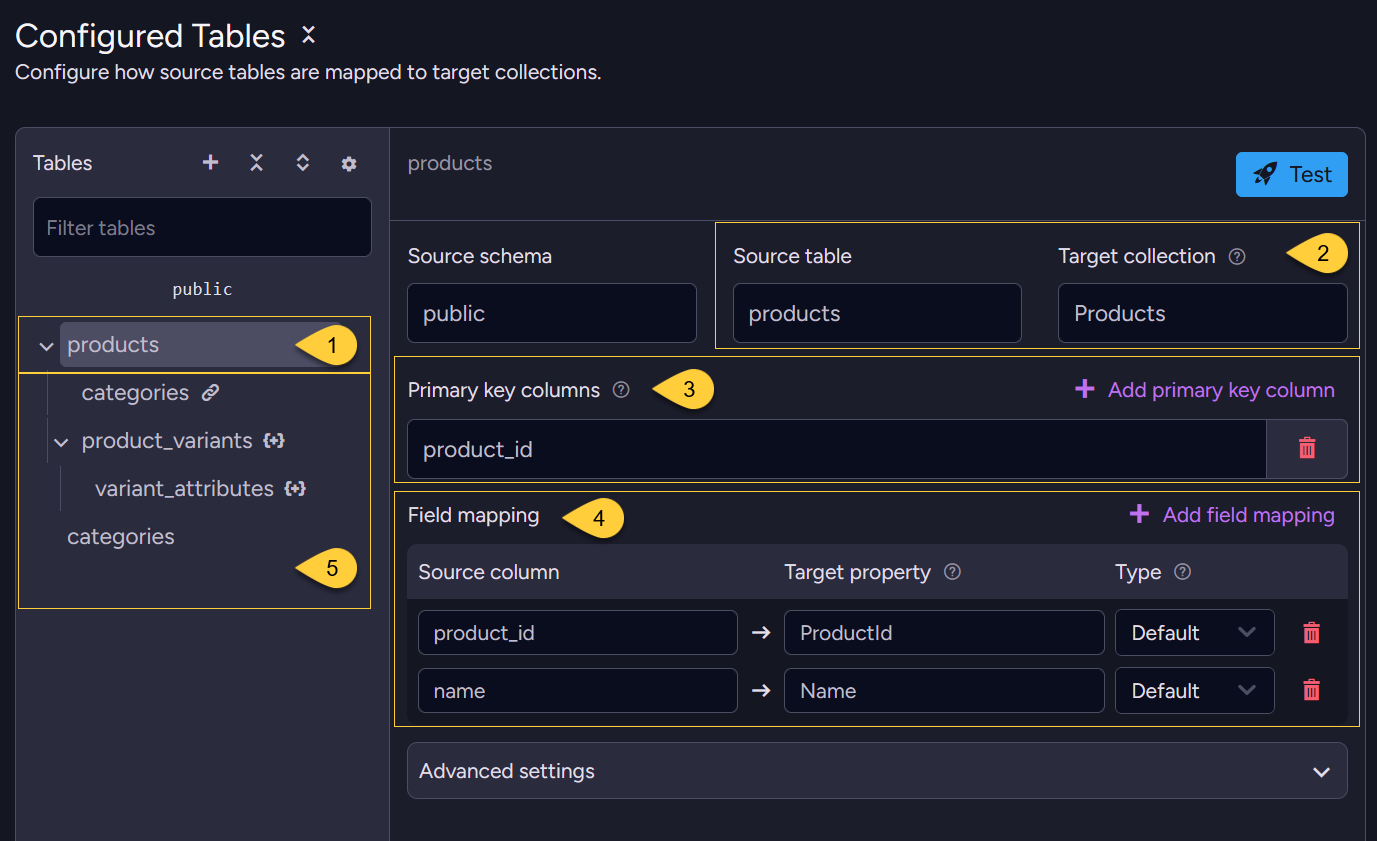
- Select the root source table to configure.
- Source table → target collection
Theproductstable maps to theProductscollection.
This is a root table, so each row becomes its own document. - Primary key columns
product_idis used to build the document ID for each product. - Field mapping
Maps each source column to its target property
(product_id→ProductId,name→Name). - Linked and embedded children
The linkedcategoriesreference and the embeddedproduct_variantstree are attached to this root table
and appear as child nodes underproductsin the Tables tree.
Then add the linked categories reference:
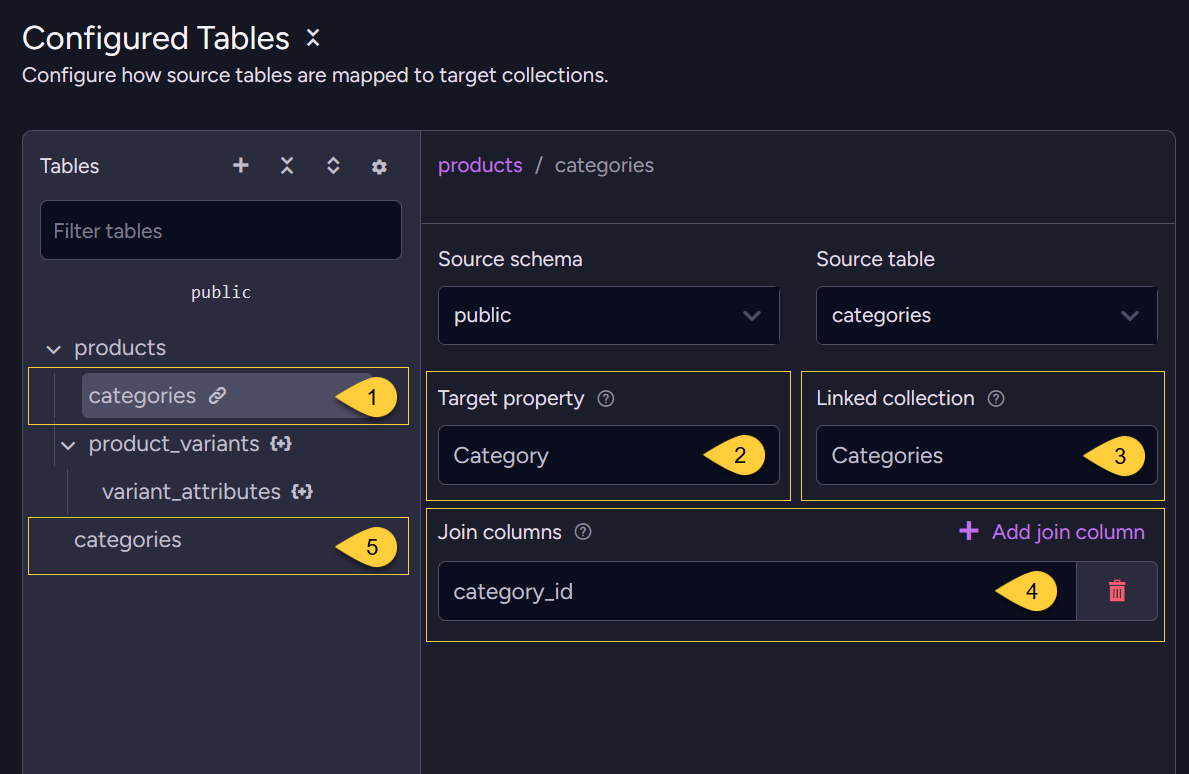
- Linked table
categoriesis added as a linked reference on theproductstable, not as an embedded table.
It stores a document ID string on the product document rather than nesting a copy of the category. - Target property
The reference is written to theCategoryproperty of each product document. - Linked collection
Categories- the reference resolves to IDs such asCategories/3. - Join columns
category_id- the foreign key on the product row used to build the linked document ID. - Referenced table as a root table
The lowercategoriesnode is configured separately as a root table, not as part of the linked reference.
This lets CDC Sink createCategories/<id>documents that theCategorylink can point to and include.
Learn more in Linked tables.
Embedded tables
-
The embedded
product_variantsandvariant_attributestables (the{+}nodes in the tree) are configured by selecting their node in the Tables tree and setting the relation type, primary key, join columns, and field mapping. -
For an example that shows the embedded-table fields in Studio, see Denormalization with Embedded Tables.
For the full configuration reference, see Embedded Tables.
Deep nesting is configured the same way
-
variant_attributesis added as an embedded table insideproduct_variants,
just asproduct_variantsis added insideproducts- one level deeper. -
The extra requirement is that descendant embedded rows carry the denormalized root primary key (
product_id) so CDC Sink can locate the root document.
Alternatively, toggle Raw config and paste the equivalent JSON:
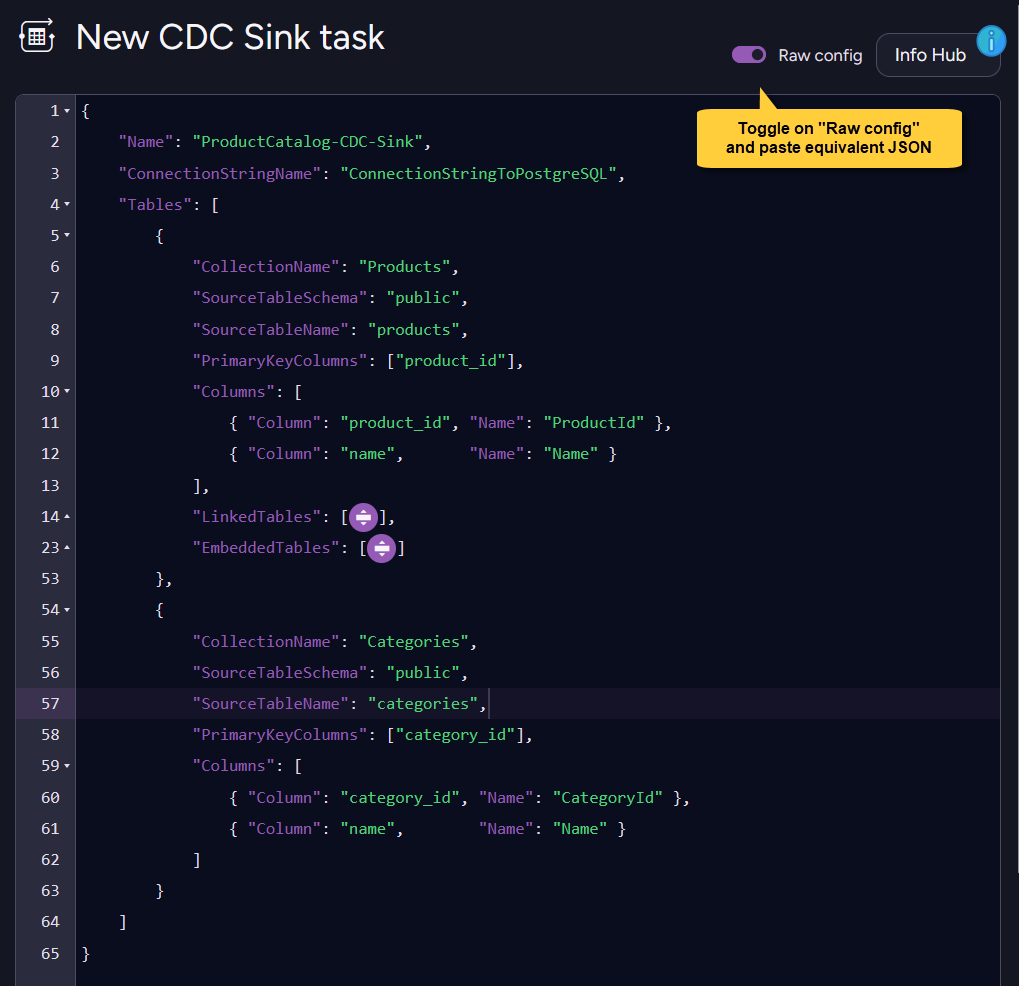
- Raw config (JSON)
{
    "Name": "ProductCatalog-CDC-Sink",
    "ConnectionStringName": "ConnectionStringToPostgreSQL",
    "Tables": [
        {
            "CollectionName": "Products",
            "SourceTableSchema": "public",
            "SourceTableName": "products",
            "PrimaryKeyColumns": ["product_id"],
            "Columns": [
                { "Column": "product_id", "Name": "ProductId" },
                { "Column": "name",       "Name": "Name" }
            ],
            "LinkedTables": [
                {
                    "SourceTableSchema": "public",
                    "SourceTableName": "categories",
                    "PropertyName": "Category",
                    "LinkedCollectionName": "Categories",
                    "JoinColumns": ["category_id"]
                }
            ],
            "EmbeddedTables": [
                {
                    "SourceTableSchema": "public",
                    "SourceTableName": "product_variants",
                    "PropertyName": "Variants",
                    "Type": "Array",
                    "JoinColumns": ["product_id"],
                    "PrimaryKeyColumns": ["variant_id"],
                    "Columns": [
                        { "Column": "variant_id", "Name": "VariantId" },
                        { "Column": "sku",        "Name": "Sku" },
                        { "Column": "price",      "Name": "Price" }
                    ],
                    "EmbeddedTables": [
                        {
                            "SourceTableSchema": "public",
                            "SourceTableName": "variant_attributes",
                            "PropertyName": "Attributes",
                            "Type": "Array",
                            "JoinColumns": ["variant_id"],
                            "PrimaryKeyColumns": ["attr_id"],
                            "Columns": [
                                { "Column": "attr_id",    "Name": "AttrId" },
                                { "Column": "attr_name",  "Name": "Name" },
                                { "Column": "attr_value", "Name": "Value" }
                            ]
                        }
                    ]
                }
            ]
        },
        {
            "CollectionName": "Categories",
            "SourceTableSchema": "public",
            "SourceTableName": "categories",
            "PrimaryKeyColumns": ["category_id"],
            "Columns": [
                { "Column": "category_id", "Name": "CategoryId" },
                { "Column": "name",        "Name": "Name" }
            ]
        }
    ]
}
Resulting documents
Given these source rows:
categories
| category_id | name |
|---|---|
| 3 | Footwear |
products
| product_id | name | category_id |
|---|---|---|
| 42 | Hiking Boot | 3 |
product_variants
| variant_id | product_id | sku | price |
|---|---|---|---|
| 101 | 42 | HB-BLK-10 | 89.99 |
| 102 | 42 | HB-BRN-11 | 89.99 |
variant_attributes
| attr_id | product_id | variant_id | attr_name | attr_value |
|---|---|---|---|---|
| 1 | 42 | 101 | Color | Black |
| 2 | 42 | 101 | Size | 10 |
| 3 | 42 | 102 | Color | Brown |
| 4 | 42 | 102 | Size | 11 |
CDC Sink creates the root RavenDB document Products/42:
- json
{
    "ProductId": 42,
    "Name": "Hiking Boot",
    "Category": "Categories/3",
    "Variants": [
        {
            "VariantId": 101,
            "Sku": "HB-BLK-10",
            "Price": 89.99,
            "Attributes": [
                { "AttrId": 1, "Name": "Color", "Value": "Black" },
                { "AttrId": 2, "Name": "Size",  "Value": "10" }
            ]
        },
        {
            "VariantId": 102,
            "Sku": "HB-BRN-11",
            "Price": 89.99,
            "Attributes": [
                { "AttrId": 3, "Name": "Color", "Value": "Brown" },
                { "AttrId": 4, "Name": "Size",  "Value": "11" }
            ]
        }
    ],
    "@metadata": { "@collection": "Products" }
}
The standalone categories root table creates Categories/3:
- json
{
    "CategoryId": 3,
    "Name": "Footwear",
    "@metadata": { "@collection": "Categories" }
}
-
The
Categoryproperty is a document ID reference, not an embedded copy of the category row. -
Because
categoriesis also configured as a root table, CDC Sink creates the referencedCategories/3document, which can be included when loading or querying products.