Cluster Observer
-
The primary goal of the Cluster Observer is to monitor the health of each database in the cluster and adjust its topology to maintain the desired Replication Factor.
-
The observer is always running on the Leader node.
-
The observer logs each decision; read the log in Studio, under the advanced-debug view's Cluster Observer Log tab.
-
In this article:
Operation flow
-
To maintain the replication factor, every newly elected Leader starts measuring the health of each node via dedicated maintenance TCP connections to all other nodes in the cluster.
-
Each node reports the current status of all its databases at intervals of 500 milliseconds (by default).
TheCluster Observerconsumes these reports every 1000 milliseconds (by default). -
Upon a node failure, the Dynamic Database Distribution sequence will take place to ensure that the replication factor does not change.
For example:
-
Let us assume a five-node cluster with servers
A,B,C,D, andE.
We create a database with a replication factor of 3 and define an ETL task. -
The newly created database will be distributed automatically to three of the cluster nodes.
Let's assume it is distributed toB,C, andE(so the database group is [B,C,E]),
and the cluster decides that nodeCis responsible for performing the ETL task. -
If node
Cgoes offline or becomes unreachable, the Cluster Observer detects the issue. Initially:- After the duration specified in the Cluster.TimeBeforeMovingToRehabInSec configuration key, the observer moves node
CtoRehabmode, allowing time for recovery. - The ETL task fails over to another available node in the Database Group.
- After the duration specified in the Cluster.TimeBeforeMovingToRehabInSec configuration key, the observer moves node
-
If node
Cremains offline beyond the period specified in the Cluster.TimeBeforeAddingReplicaInSec configuration key, the observer begins replicating the database to another node in the Database Group as a last resort.
Note:
- The Cluster Observer stores its information in memory. Therefore, when the
Leaderloses leadership, the collected reports of the Cluster Observer and its decision log are lost.
-
States flow
The observer moves the members of a database group through a lifecycle of states, visible on
Studio's Database Group view:
Member, Promotable, and Rehab.
-
When a node is added to a database group, the observer first marks the node
Promotable.
Once the node has caught up with the data of the database group and finished indexing the received data, the observer promotes the node to a fullMember. -
When a member node fails, the observer demotes the failed node to
Rehab, and, if the database's Dynamic Database Distribution option is enabled, restores the replication factor by adding another cluster node to the group as aPromotable node.
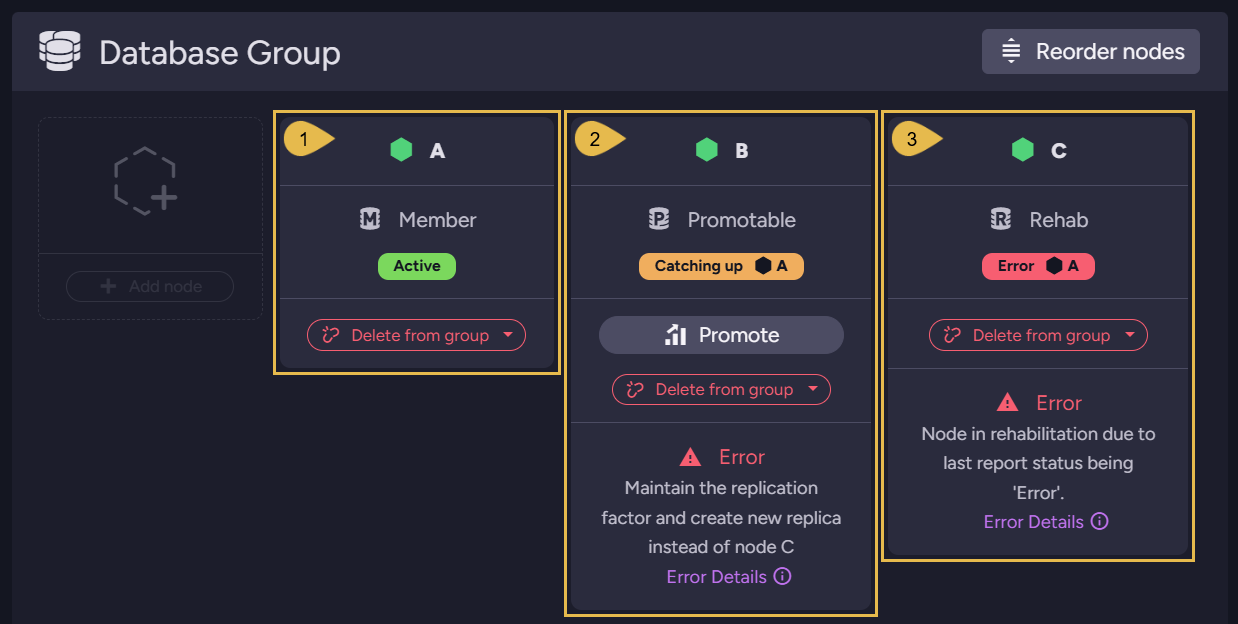
-
Node
A
A healthy group member. -
Node
B
The replacement: the observer added nodeBto the group as aPromotable node, andBis catching up with the group's data.
The message onB's card states the observer's reasoning: maintain the replication factor and create a new replica instead of nodeC. -
Node
C
The failed node, demoted toRehab; the card shows the error that tookCout of service.
Once the replacement has caught up and is promoted, the replication factor is restored and the observer removes the failed node from the group:
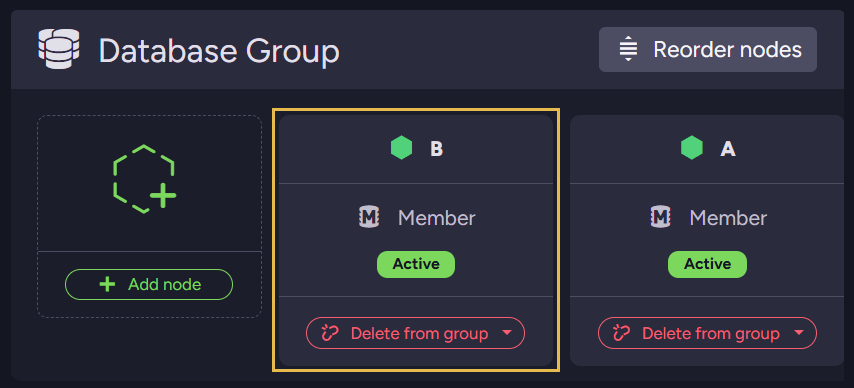
- Node
B
The replacement, now a fullMember.
NodeCis no longer part of the group; the database dataCholds is deleted only afterCreturns and has replicated to the group any documents the group lacks.
Interacting with the Cluster Observer
You can interact with the Cluster Observer using the following REST API calls:
| URL | Method | Query Params | Description |
|---|---|---|---|
/admin/cluster/observer/suspend | POST | value=[bool] | Setting false will suspend the Cluster Observer operation for the current Leader term. |
/admin/cluster/observer/decisions | GET | Fetch the log of the recent decisions made by the cluster observer. | |
/admin/cluster/maintenance-stats | GET | Fetch the latest reports of the Cluster Observer |
Studio's advanced-debug view surfaces both in its
Cluster Observer Log tab:
the Suspend cluster observer button and the decisions table.