Server-wide Custom Sorters
-
A server-wide custom sorter can be used to sort query results in all databases across your cluster.
To learn how to define and deploy a database-level custom sorter, see Database-level custom sorters. -
If a database-level custom sorter and a server-wide custom sorter have the same name,
the database-level custom sorter will be used for the query. -
Custom sorters are available only when using the Lucene indexing engine; they are not available with Corax.
To learn how to write a custom sorter, see: How to write a custom sorter. -
In this article:
Add server-wide custom sorter - via the Client API
Use PutServerWideSortersOperation to deploy one or more server-wide custom sorters.
Deploying a custom sorter with an existing name replaces the previous version.
Once deployed, you can use it to sort query results in queries made on any database in your cluster.
- Sync
- Async
// Assign the code of your custom sorter as a `string`
string mySorterCode = "<code of custom sorter>";

// Create the `SorterDefinition` object
var customSorterDefinition = new SorterDefinition
{
    // The sorter name must be the same as the sorter's class name in your code
    Name = "MyServerWideCustomSorter",

    // The code must be compilable and include all necessary using statements
    Code = mySorterCode
};

// Define the put sorters operation, pass the sorter definition
// Note: multiple sorters can be passed, see syntax below
var putSortersServerWideOp = new PutServerWideSortersOperation(customSorterDefinition);

// Execute the operation by passing it to Maintenance.Server.Send
store.Maintenance.Server.Send(putSortersServerWideOp);
// Assign the code of your custom sorter as a `string`
string mySorterCode = "<code of custom sorter>";

// Create the `SorterDefinition` object
var customSorterDefinition = new SorterDefinition
{
    // The sorter name must be the same as the sorter's class name in your code
    Name = "MyServerWideCustomSorter",

    // The code must be compilable and include all necessary using statements
    Code = mySorterCode
};

// Define the put sorters operation, pass the sorter definition
// Note: multiple sorters can be passed, see syntax below
var putSortersServerWideOp = new PutServerWideSortersOperation(customSorterDefinition);

// Execute the operation by passing it to Maintenance.Server.SendAsync
await store.Maintenance.Server.SendAsync(putSortersServerWideOp);
You can now order query results using the server-wide custom sorter on any database.
- Query
- Query_async
- DocumentQuery
- DocumentQuery_async
- RQL
List<Product> products = session
    .Query<Product>()
    .Where(x => x.UnitsInStock > 10)
     // Order by field 'UnitsInStock', pass the name of your custom sorter class
    .OrderBy(x => x.UnitsInStock, "MyServerWideCustomSorter")
    .ToList();

// Results will be sorted by the 'UnitsInStock' value
// according to the logic from 'MyServerWideCustomSorter' class
List<Product> products = await asyncSession
    .Query<Product>()
    .Where(x => x.UnitsInStock > 10)
     // Order by field 'UnitsInStock', pass the name of your custom sorter class
    .OrderBy(x => x.UnitsInStock, "MyServerWideCustomSorter")
    .ToListAsync();

// Results will be sorted by the 'UnitsInStock' value
// according to the logic from 'MyServerWideCustomSorter' class
List<Product> products = session.Advanced
    .DocumentQuery<Product>()
    .WhereGreaterThan(x => x.UnitsInStock, 10)
     // Order by field 'UnitsInStock', pass the name of your custom sorter class
    .OrderBy(x => x.UnitsInStock, "MyServerWideCustomSorter")
    .ToList();

// Results will be sorted by the 'UnitsInStock' value
// according to the logic from 'MyServerWideCustomSorter' class
List<Product> products = await asyncSession.Advanced
    .AsyncDocumentQuery<Product>()
    .WhereGreaterThan(x => x.UnitsInStock, 10)
     // Order by field 'UnitsInStock', pass the name of your custom sorter class
    .OrderBy(x => x.UnitsInStock, "MyServerWideCustomSorter")
    .ToListAsync();

// Results will be sorted by the 'UnitsInStock' value
// according to the logic from 'MyServerWideCustomSorter' class
from "Products"
where UnitsInStock > 10
order by custom(UnitsInStock, "MyServerWideCustomSorter")

// Results will be sorted by the 'UnitsInStock' value
// according to the logic from 'MyServerWideCustomSorter' class
Add server-wide custom sorter - via Studio
The server-wide custom sorters view
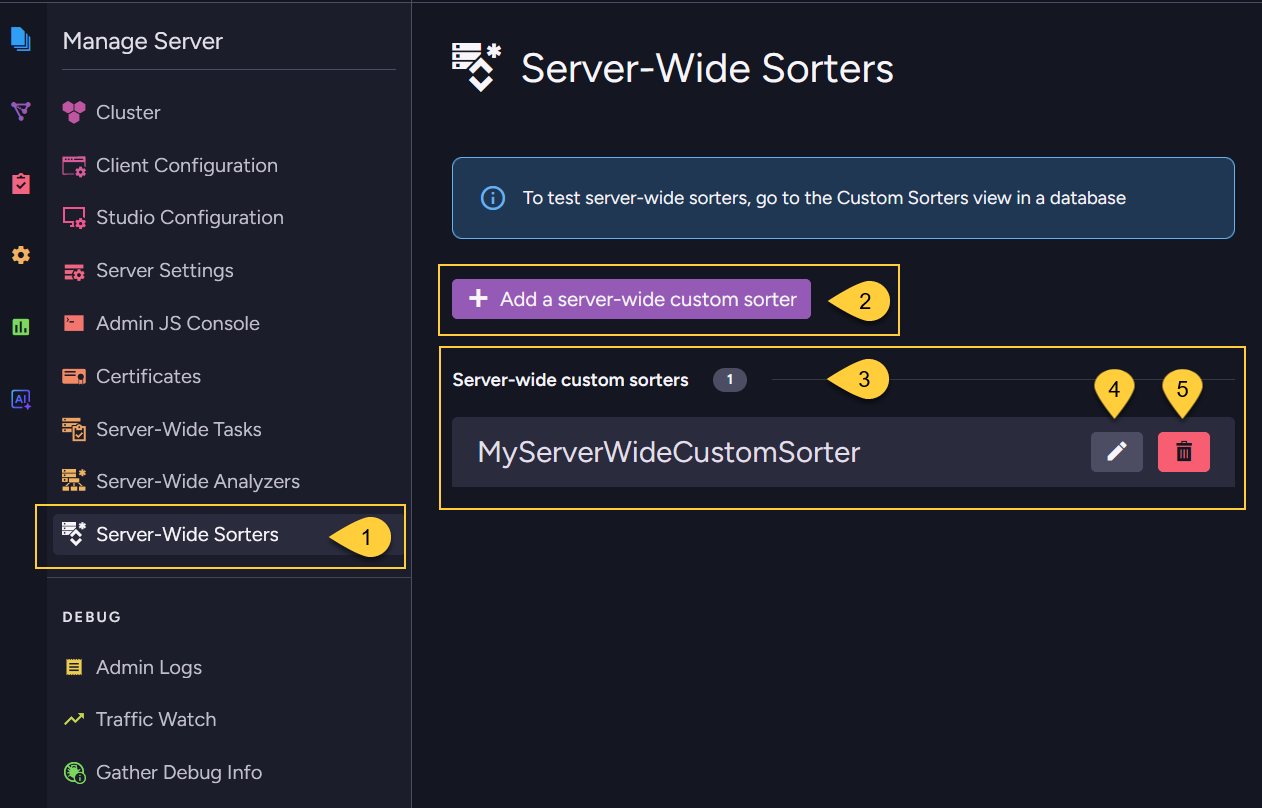
- Go to Manage Server > Server-Wide Sorters.
- Click to add a new server-wide custom sorter. See Add a server-wide custom sorter below.
- The server-wide custom sorters are listed here.
- Click to edit this server-wide custom sorter.
- Click to delete this server-wide custom sorter.
Add a server-wide custom sorter
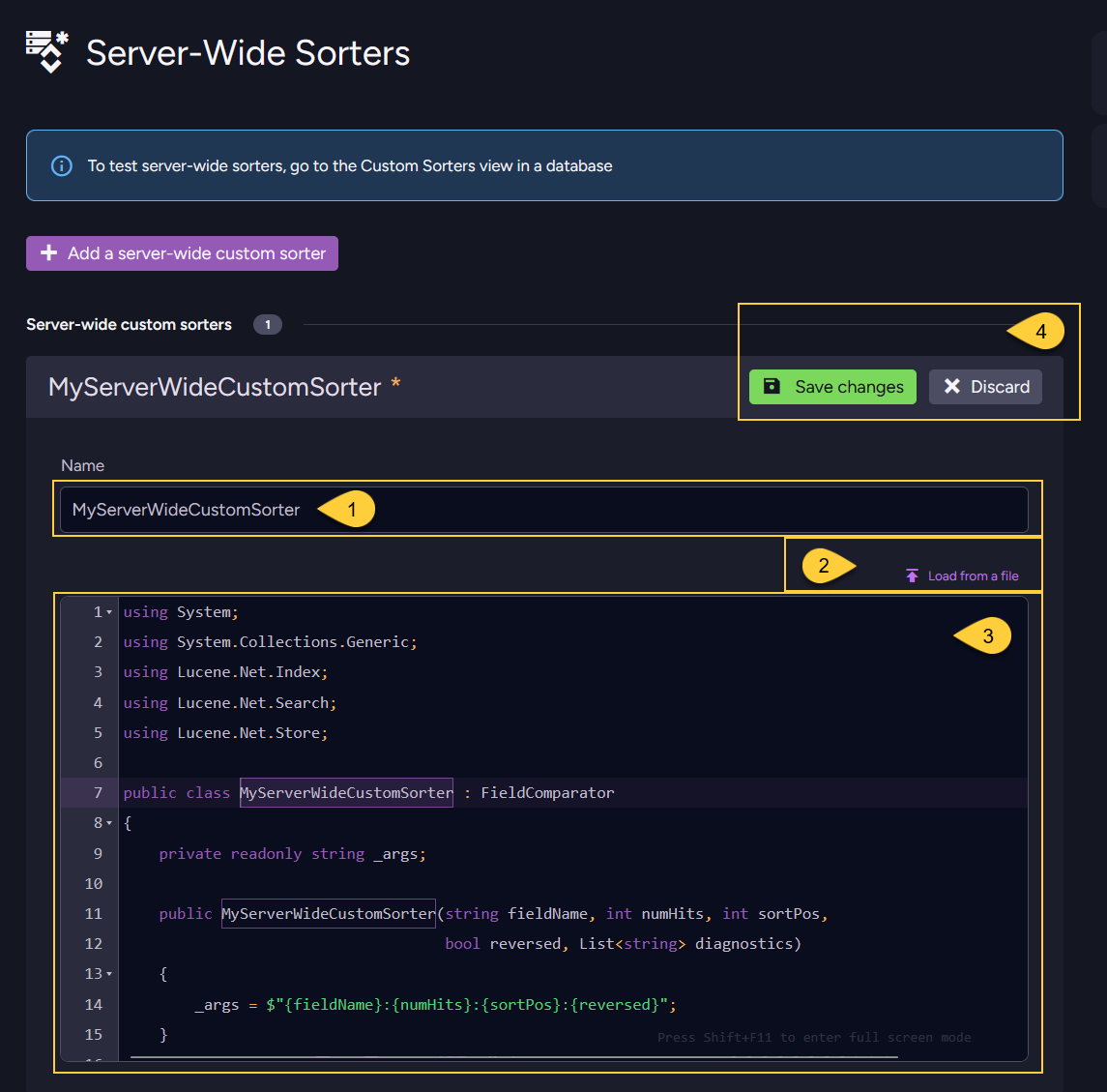
- The sorter name must be the same as the class name of your sorter.
- You can load the sorter's code from a
*.csfile. - Or, you can enter the code manually in this editor.
The sorter code must be compilable and include all necessaryusingstatements.
The sorter's class should inherit from Lucene.Net.Search.FieldComparator.
Learn more in How to write a custom sorter. - Save your server-wide sorter or discard.
Delete server-wide custom sorter
In addition to deleting a server-wide custom sorter via The server-wide custom sorters view in Studio,
you can use DeleteServerWideSorterOperation to delete a server-wide custom sorter.
Once removed, the sorter will no longer be available for ordering query results in any database in the cluster.
- Sync
- Async
// Define the delete sorter operation, pass the name of the sorter to delete
var deleteSorterOp = new DeleteServerWideSorterOperation("MyServerWideCustomSorter");

// Execute the operation by passing it to Maintenance.Server.Send
store.Maintenance.Server.Send(deleteSorterOp);
// Define the delete sorter operation, pass the name of the sorter to delete
var deleteSorterOp = new DeleteServerWideSorterOperation("MyServerWideCustomSorter");

// Execute the operation by passing it to Maintenance.Server.SendAsync
await store.Maintenance.Server.SendAsync(deleteSorterOp);
Test custom sorter
To test a server-wide sorter, go to the Custom Sorters view in a specific database and use the test option from there.
See Test custom sorter.
Syntax
PutServerWideSortersOperation
Deploys one or more custom sorters to the server-wide scope.
public PutServerWideSortersOperation(params SorterDefinition[] sortersToAdd)
| Parameter | Type | Description |
|---|---|---|
| sortersToAdd | SorterDefinition[] | One or more sorter definitions to deploy. At least one is required. |
public sealed class SorterDefinition
{
    // The sorter's name. Must match the class name in the source code.
    public string Name { get; set; }

    // The complete C# source code of the sorter, including all `using` statements.
    // Must be compilable.
    public string Code { get; set; }
}
DeleteServerWideSorterOperation
Removes a custom sorter from the server-wide scope.
public DeleteServerWideSorterOperation(string sorterName)
| Parameter | Type | Description |
|---|---|---|
| sorterName | string | The name of the sorter to remove. |