Tombstones: Studio View
-
A tombstone is the marker RavenDB keeps when a document is deleted, so the processes that rely on it (indexing, replication, ETL, and incremental backup) can handle the deletion.
-
RavenDB periodically cleans up all the tombstones that are no longer needed by any process.
-
The Tombstones view shows, for each collection, how far its tombstone cleanup has already reached,
and for each process, the number of tombstones it still has to process. -
In this article:
Studio view
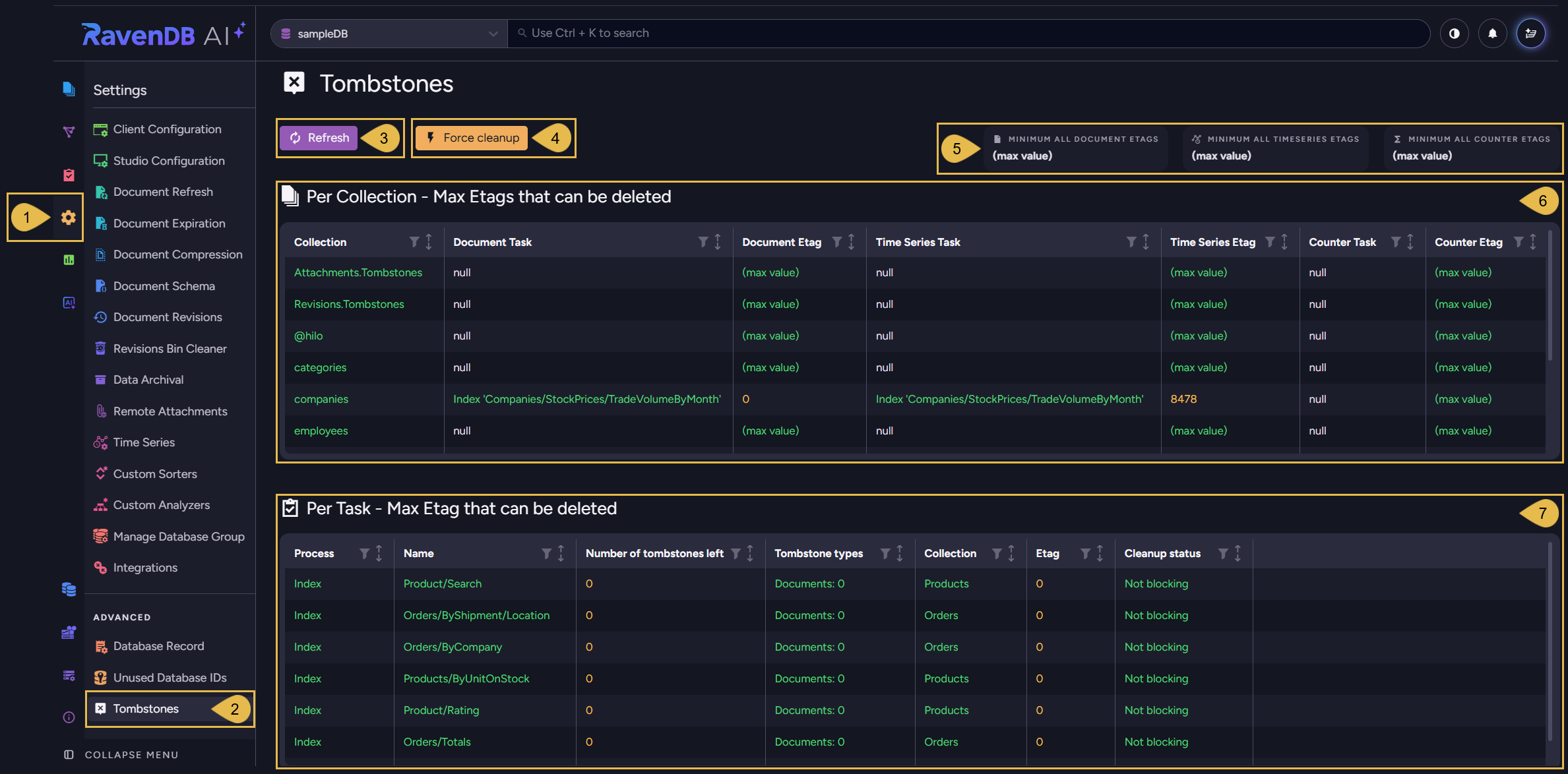
Settings > Tombstones
-
Settings
Open the Settings menu. -
Tombstones
Under the Advanced section, click to open the Tombstones view. -
Refresh
Click to reload the tombstone state shown in this view. -
Force cleanup
Click to run a cleanup immediately, instead of waiting for the next scheduled run.
A confirmation dialog opens: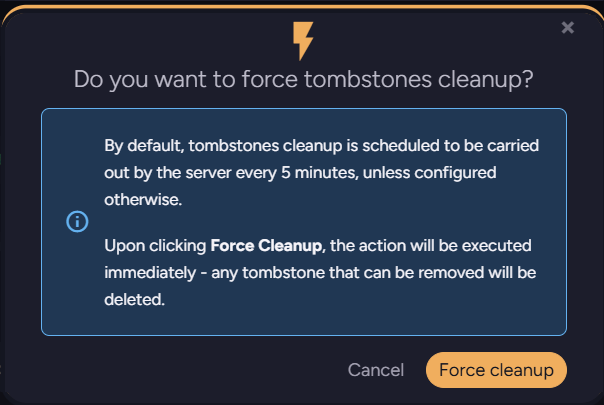
The server runs tombstone cleanup on a schedule, every 5 minutes by default,
set by Tombstones.CleanupIntervalInMin.
Clicking Force cleanup runs the cleanup immediately, removing every tombstone that can currently be removed. -
Minimum Etags
Three read-only Etag values, for document, time series, and counter tombstones.
Each shows how far cleanup has reached across the whole database.
(max value)means all the matching tombstones can be cleaned up.These values come from processes that track tombstones for all collections together, keeping a single position for the whole database: replication, incremental backup, and any ETL task or index that processes all documents.
Processes that track specific collections, such as a collection-scoped index or ETL task, are not counted here. Their limits appear in the Per Collection table.An Etag value in this view shows how far cleanup can proceed:
0- no tombstones can be removed.
a number - tombstones up to and including this Etag can be removed.
(max value)- all tombstones can be removed. -
Per Collection - Max Etags that can be deleted
For each collection, this table shows how far cleanup can proceed for document, time series, and counter tombstones, and the process that is currently setting each limit.
See Per Collection table. -
Per Task - Max Etag that can be deleted
Each process that handles tombstones has its own row.
The row shows the Etag up to which the process has let cleanup proceed, and whether it is currently blocking cleanup.
See Per Task table.
Reading the Tombstones tables
Per Collection table
The columns of the Per Collection - Max Etags that can be deleted table:
| Column | Description |
|---|---|
| Collection | The collection this row reports on. |
| Document Task | The process currently limiting cleanup of this collection's document tombstones, or null if no process limits them. |
| Document Etag | The Etag up to which this collection's document tombstones can be cleaned up. |
| Time Series Task | The process currently limiting cleanup of this collection's time series tombstones, or null if no process limits them. |
| Time Series Etag | The Etag up to which this collection's time series tombstones can be cleaned up. |
| Counter Task | The process currently limiting cleanup of this collection's counter tombstones, or null if no process limits them. |
| Counter Etag | The Etag up to which this collection's counter tombstones can be cleaned up. |
Per Task table
The columns of the Per Task - Max Etag that can be deleted table:
| Column | Description |
|---|---|
| Process | The process type: index, ETL, replication, or periodic backup. |
| Name | The name of the specific process, such as the index or task name. |
| Number of tombstones left | The number of tombstones this process has not yet processed and is therefore holding back from cleanup. |
| Tombstone types | The breakdown of the remaining tombstones by type: documents, time series, and counters. An index processes only documents, so its row shows only the documents count. |
| Collection | The collection the remaining tombstones belong to. Blank for a process that tracks the whole database rather than individual collections. |
| Etag | The Etag up to which this process has processed its tombstones, so cleanup can remove them up to this Etag. |
| Cleanup status | Blocking while the process still has tombstones left, Not blocking once none are left. |
Example: a disabled index blocking cleanup
In this example, we disabled the Orders/Totals index and then deleted nine documents from the
Orders collection.
The disabled index cannot process the resulting document tombstones, so those tombstones cannot be
cleaned up.
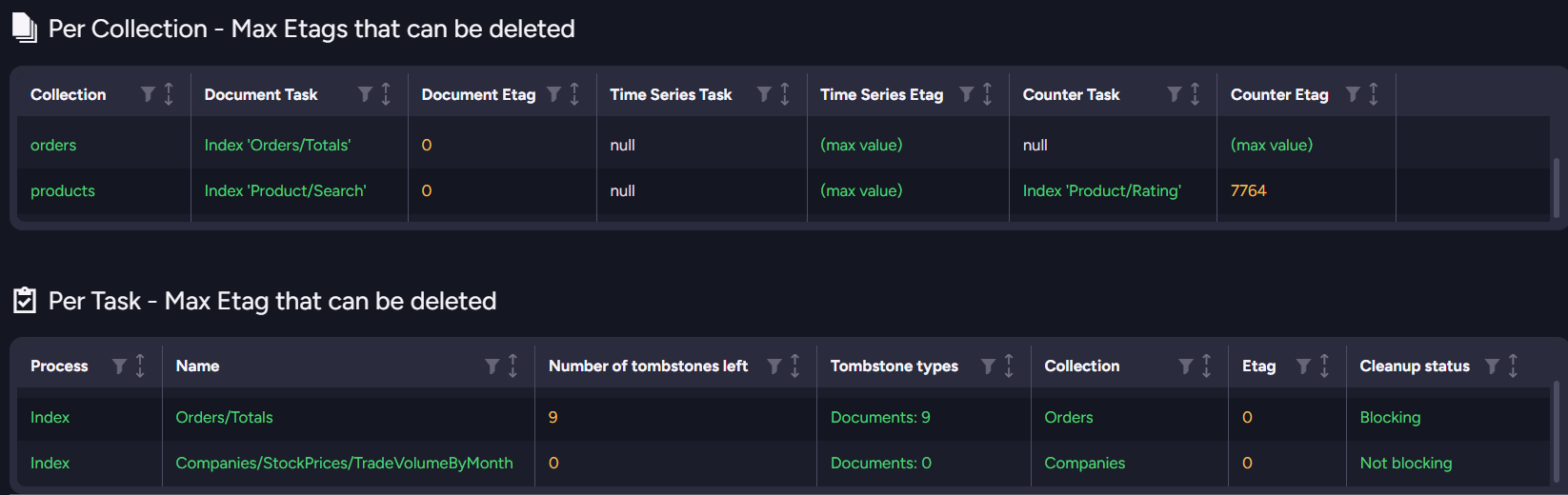
- The Per Task table shows the
Orders/Totalsindex holding nine document tombstones, at Etag0, with a Cleanup status ofBlocking. - The Per Collection table shows the
Orderscollection withOrders/Totalsas its Document Task and a Document Etag of0, indicating that none of the collection's document tombstones can be cleaned up.
The0Document Etag is the same Etag the blocking index has reached in the Per Task table.
Once re-enabled, the Orders/Totals index will process the waiting tombstones.
The tombstones will then be cleaned up, and the rows return to Not blocking.