Alerts and Notifications: Performance Hints
-
The server raises a performance hint when it detects an inefficiency you can remove, like a query that retrieves an excessive number of results or an index with a high fanout ratio.
The hint describes the detected condition and suggests a remedy. -
Hints are presented in the notification center, where you can read, dismiss, and postpone them.
-
Most hints are triggered by configurable thresholds, set by the
PerformanceHints.*configuration keys. -
In this article:
Overview
In the notification center, a performance hint is presented as follows:
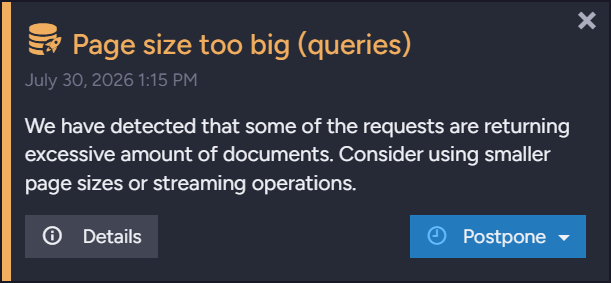
Learn in the notification center article how to work with hint cards: reading the details of recorded occurrences, dismissing, postponing, and hiding a hint permanently.
You can also track hint counts without opening the notification center:
- The databases list view shows the number of hints raised for each database.
- The cluster dashboard's Databases Notifications widget lists each database's alerts and performance hints.
- RavenDB exposes per-database hint counts to external monitoring tools, through the monitoring endpoints and over SNMP.
Performance hint reasons
The server raises performance hints for nine reasons:
Paging
The server raises a paging hint when a request returns more results than the threshold set by
the PerformanceHints.MaxNumberOfResults
configuration key
(2048 by default).
-
A separate paging hint is raised for each of the four request types: documents, queries, revisions, and compare exchange.
A paging hint's title names the request type in parentheses: the hint shown in Overview above, for example, was raised for queries, so it is titledPage size too big (queries). A hint raised for revisions would be titledPage size too big (revisions). -
Paging hints are Warnings. Their details list the recent excessive requests, with each request's action, number of results, page size, data size, time, and duration.
A query's text is recorded as well. -
To avoid this hint and the inefficiency it reports, retrieve the results in pages, or stream them.
Request latency
The server raises a request-latency hint when a query runs longer than the threshold set by
the PerformanceHints.TooLongRequestThresholdInSec
configuration key
(30 seconds by default).
-
Request-latency hints are Warnings. Their details list the recent slow queries, with each query's text, parameters, and duration.
-
To find the slow part of a recorded query, run the query with its timings included.
Slow writes
The server raises a slow-writes hint when a disk write is extremely slow: a journal write that took at least half a second, or a data flush or data sync that took at least two minutes, at a write speed of 1 MB per second or lower.
-
These operation types are explained on the IO Stats page.
-
Slow-writes hints are Info notifications. Their details list the recorded slow writes, with each write's operation type, file path, amount of data written, duration, and speed.
-
To watch the database's disk activity and locate slow operations as they happen, open the IO Stats view.
Huge documents
The server raises a huge-documents hint when a document exceeds the size threshold set by
the PerformanceHints.Documents.HugeDocumentSizeInMb
configuration key
(5 MB by default).
-
Huge-documents hints are Warnings. Their details list the recently detected huge documents, with each document's ID, size, and time.
-
To avoid this hint and the inefficiency it reports, keep documents small, e.g., by storing large binary content as attachments.
Indexing
The server raises indexing hints when an index definition causes inefficient indexing.
Three conditions raise indexing hints, each governed by its own configuration key.
-
High fanout ratio
Raised as a Warning when an index produces more index entries from a single document than the threshold set by thePerformanceHints.Indexing.MaxIndexOutputsPerDocumentconfiguration key (1024by default).
Learn more about fanout indexes and this hint in Indexing nested data. -
Source document included in the index output
Raised as a Warning when an index stores whole source documents in its entries.
Including the document in the index output is rarely intentional, and in a fanout index the document is included multiple times.
This hint is enabled by thePerformanceHints.Indexing.AlertWhenSourceDocumentIncludedInOutputconfiguration key (trueby default). -
Many
letclauses
Raised as an Info notification when a LINQ index definition contains moreletclauses than the threshold set by thePerformanceHints.Indexing.MaxDepthOfRecursionInLinqSelectconfiguration key (32by default).
Stack memory is allocated for eachletclause, so a long chain ofletclauses can consume a lot of memory.
To avoid this hint and the inefficiency it reports, simplify the index definition.
Indexing references
The server raises an indexing-references hint when the number of times an index loads the same
related document or compare-exchange value
reaches the threshold set by the
PerformanceHints.Indexing.MaxNumberOfLoadsPerReference
configuration key
(1024 by default).
-
An index loads related items using
LoadDocument()andLoadCompareExchangeValue()calls.
A high number of loads per item means many index entries depend on the item, and each update of the item triggers reindexing of every referencing document. -
Indexing-references hints are Warnings. Their details list, per index, the most-loaded references and the number of loads for each.
-
To examine the indexing impact, open the Indexing Performance view.
Slow SQL
The server raises a slow-SQL hint when a SQL statement executed by a SQL ETL task runs for longer than 3 seconds.
-
A separate hint is raised for each of a SQL ETL task's transform scripts.
The hint's title names the task and the script: the hint for a task namedOrdersToSqland a script namedOrdersScript, for example, is titledSQL ETL: 'OrdersToSql/OrdersScript'. -
Slow-SQL hints are Warnings. Their details list the most recent 500 slow statements, with each statement's text, duration, and time.
-
Slow statements often result from missing indexes on the destination tables: consider indexing the columns the statements filter by.
Replication
The server raises a replication hint when a disabled replication destination prevents the cleanup of a large number of tombstones (more than 16,384).
-
Tombstones that a replication destination has not received yet cannot be cleaned up.
While the destination's replication task is disabled, the destination receives no deletions, so tombstones accumulate in the source database. -
Replication hints are Warnings; each hint's message names the disabled destination.
-
To let the accumulated tombstones be cleaned up, re-enable the disabled replication task, or delete the task if the destination is no longer needed.
Unused capacity
The server raises an unused-capacity hint when it uses fewer CPU cores than the machine provides, e.g., when the license limits the number of cores RavenDB can use.
-
The unused-capacity hint is the only performance hint raised server-wide: its card carries the globe icon that marks server-wide notifications.
-
Unused-capacity hints are Info notifications, re-raised at most once a week while the condition persists, and dismissed automatically once the server uses all machine cores.
-
To use the machine's full capacity, assign the server more cores, e.g., by raising the license's core limit or reassigning cores among the cluster's nodes.
Configuration
-
The
PerformanceHints.*configuration keys, named in the sections above, are listed on the Configuration options page.
Most of the keys can be set both server-wide and per database; the page states each key's scope, type, and default value. -
To keep hints raised for chosen reasons from appearing in the notification center, list the reasons in the
Notifications.FilterOutconfiguration key, described in the notification center article's Configuration section.
The names that the key accepts are listed under Values for performance-hint reasons.