Get Attachments
-
This article explains how to retrieve attachments that are already stored in your database,
whether they are local or remote. Retrieval is transparent, the same code works for both storage types. -
You can:
- Get a single attachment or multiple attachments.
- Get part of an attachment (local attachments only).
- Retrieve only the attachment names, or check whether a specific attachment exists.
-
If a document's metadata references an attachment, either in local or remote storage, but the file no longer exists
(e.g., was deleted manually), then attempting to retrieve the attachment will throw a FileNotFoundException. -
Note:
Remote attachments are Not cached locally after they are downloaded.
Each retrieval will fetch the data again from the remote storage. -
In this article:
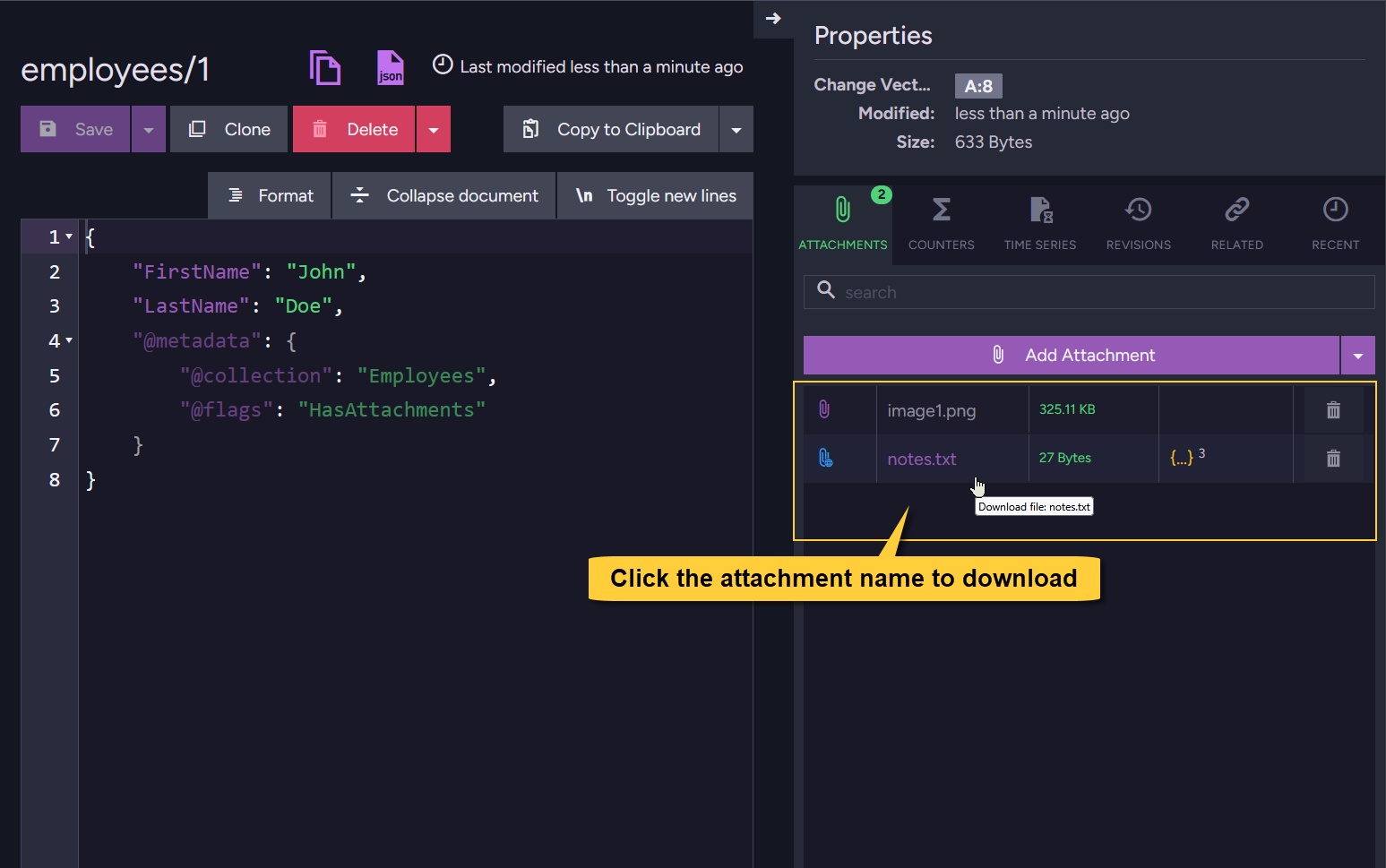
Get attachments using Studio
In Studio, open the document view. To download an attachment, simply click its name.
The file, whether stored locally or in remote storage, will be downloaded to your browser’s default download location.
Get attachments using the Client API
Get attachment details (excluding content)
-
Use the session's
GetNames()method to retrieve the attachment names and related details for a given document, excluding the attachment content. Returned entries include both local and remote attachments. -
To get the attachment content stream as well, see the other sections below, e.g. Get single attachment.
- Get_attachment_details
- Get_attachment_details_async
using (var session = store.OpenSession())
{
    // Load the document entity
    Employee employee = session.Load<Employee>("employees/1");

    // Call 'GetNames', pass the document entity
    AttachmentName[] attachmentNames = session.Advanced.Attachments.GetNames(employee);

    // Iterate over results
    foreach (AttachmentName attachmentName in attachmentNames)
    {
        // The attachment name:
        string name = attachmentName.Name;

        // Access details:
        string contentType = attachmentName.ContentType;
        string hash = attachmentName.Hash;
        long size = attachmentName.Size;
        var remoteParams = attachmentName.RemoteParameters;

        // If the attachment is stored locally, RemoteParameters will be null
        if (remoteParams != null)
        {
            // Remote attachment info:
            string identifier = remoteParams.Identifier;
            DateTime at = remoteParams.At;
        }
    }
}
using (var asyncSession = store.OpenAsyncSession())
{
    // Load the document entity
    Employee employee = await asyncSession.LoadAsync<Employee>("employees/1");

    // Call 'GetNames', pass the document entity
    AttachmentName[] attachmentNames = session.Advanced.Attachments.GetNames(employee);

    // Iterate over results
    foreach (AttachmentName attachmentName in attachmentNames)
    {
        // The attachment name:
        string name = attachmentName.Name;

        // Access details:
        string contentType = attachmentName.ContentType;
        string hash = attachmentName.Hash;
        long size = attachmentName.Size;
        var remoteParams = attachmentName.RemoteParameters;

        // If the attachment is stored locally, RemoteParameters will be null
        if (remoteParams != null)
        {
            // Remote attachment info:
            string identifier = remoteParams.Identifier;
            DateTime at = remoteParams.At;
        }
    }
}
Get single attachment from document
Get attachment - using the session
-
Use the session's
Get()method to retrieve a single attachment by name, along with its content stream and related details. You can pass either the document entity or the document ID. -
The method seamlessly retrieves attachments from both local and remote storage.
- Get_attachment
- Get_attachment_async
using (var session = store.OpenSession())
{
    // Option 1: Load the document entity
    Employee employee = session.Load<Employee>("employees/1");
    // Call 'Get', pass the document entity and the name of the attachment to retrieve
    AttachmentResult attachment = session.Advanced.Attachments.Get(employee, "notes.txt");

    // Option 2: Call 'Get' and pass the document ID directly
    // AttachmentResult attachment =
    //     session.Advanced.Attachments.Get("employees/1", "notes.txt");

    if (attachment != null)
    {
        // Access the content stream:
        var stream = attachment.Stream;

        // Optionally, decode the stream to a string (for text-based attachments)
        using (var ms = new MemoryStream())
        {
            await stream.CopyToAsync(ms);
            string decodedContent = Encoding.UTF8.GetString(ms.ToArray());
        }

        // Access attachment details:
        var details = attachment.Details;

        string name = details.Name;
        string hash = details.Hash;
        long size = details.Size;
        string contentType = details.ContentType;
        string documentId = details.DocumentId;
        string changeVector = details.ChangeVector;
        var remoteParams = details.RemoteParameters;

         // If the attachment is stored locally, remoteParams will be null
        if (remoteParams != null)
        {
            // Remote attachment info:
            string identifier = remoteParams.Identifier;
            DateTime at = remoteParams.At;
        }
    }
}
using (var asyncSession = store.OpenAsyncSession())
{
    // Option 1: Load the document entity
    Employee employee = await asyncSession.LoadAsync<Employee>("employees/1");
    // Call 'GetAsync', pass the document entity and the name of the attachment to retrieve
    AttachmentResult attachment =
        await asyncSession.Advanced.Attachments.GetAsync(employee, "notes.txt");

    // Option 2: Pass the document ID directly
    // AttachmentResult attachment =
    //     await asyncSession.Advanced.Attachments.GetAsync("employees/1", "notes.txt");

    if (attachment != null)
    {
        // Access the content stream:
        var stream = attachment.Stream;

        // Optionally, decode the stream to a string (for text-based attachments)
        using (var ms = new MemoryStream())
        {
            await stream.CopyToAsync(ms);
            string decodedContent = Encoding.UTF8.GetString(ms.ToArray());
        }

        // Access attachment details:
        var details = attachment.Details;

        string name = details.Name;
        string hash = details.Hash;
        long size = details.Size;
        string contentType = details.ContentType;
        string documentId = details.DocumentId;
        string changeVector = details.ChangeVector;
        var remoteParams = details.RemoteParameters;

         // If the attachment is stored locally, remoteParams will be null
        if (remoteParams != null)
        {
            // Remote attachment info:
            string identifier = remoteParams.Identifier;
            DateTime at = remoteParams.At;
        }
    }
}
Get attachment - using an operation
-
Use
GetAttachmentOperationto retrieve a single attachment outside of the session context.
The result includes both the content stream and related attachment details. -
The operation seamlessly retrieves attachments from both local and remote storage.
- Get_attachment
- Get_attachment_async
// Define the get attachment operation
// Specify the document ID and the attachment name.
// Use 'AttachmentType.Document' to indicate that the attachment is from the document itself
// (not from a revision).
var getAttachmentOp = new GetAttachmentOperation("employees/1", "notes.txt", AttachmentType.Document, null);

// Execute the operation by passing it to 'Operations.Send'
AttachmentResult attachment = store.Operations.Send(getAttachmentOp);

if (attachment != null)
{
    // The result includes both the content stream and attachment details
    var stream = attachment.Stream;
    var details = attachment.Details;
}
// Define the get attachment operation
// Specify the document ID and the attachment name.
// Use 'AttachmentType.Document' to indicate that the attachment is from the document itself
// (not from a revision).
var getAttachmentOp = new GetAttachmentOperation("employees/1", "notes.txt", AttachmentType.Document, null);

// Execute the operation by passing it to 'Operations.SendAsync'
AttachmentResult attachment = await store.Operations.SendAsync(getAttachmentOp);

if (attachment != null)
{
    // The result includes both the content stream and attachment details
    var stream = attachment.Stream;
    var details = attachment.Details;
}
Get single attachment from revision
Get attachment from a revision - using the session
-
Use the session’s
GetRevision()method to retrieve a single attachment from a specific document revision.
The result includes both the content stream and related attachment details. -
The method seamlessly retrieves attachments from both local and remote storage.
- Get_attachment_of_revision
- Get_attachment_of_revision_async
using (var session = store.OpenSession())
{
    // Call 'GetRevision'
    // Pass the document ID, the attachment name and the revision change vector
    AttachmentResult attachment = session.Advanced.Attachments.GetRevision(
        "employees/1", "notes.txt", changeVector: "A:8-T9HdPKqrYUism8P0z7GA1A");

    if (attachment != null)
    {
        // Access the content stream:
        var stream = attachment.Stream;

        // Access attachment details:
        var details = attachment.Details;
    }
}
using (var asyncSession = store.OpenAsyncSession())
{
    // Call 'GetRevision'
    // Pass the document ID, the attachment name and the revision change vector
    AttachmentResult attachment = await asyncSession.Advanced.Attachments.GetRevisionAsync(
        "employees/1", "notes.txt", changeVector: "A:8-T9HdPKqrYUism8P0z7GA1A");

    if (attachment != null)
    {
        // Access the content stream:
        var stream = attachment.Stream;

        // Access attachment details:
        var details = attachment.Details;
    }
}
Get attachment from a revision - using an operation
-
Use
GetAttachmentOperationto retrieve a single attachment from a document revision outside of the session context. The result includes both the content stream and related attachment details. -
The operation seamlessly retrieves attachments from both local and remote storage.
- Get_attachment_of_revision
- Get_attachment_of_revision_async
// Define the get attachment operation
// Specify the document ID and the attachment name.
// Use 'AttachmentType.Revision' to indicate that the attachment is from a revision
// and provide the revision change vector.
var getAttachmentOp = new GetAttachmentOperation("employees/1", "notes.txt",
    AttachmentType.Revision, changeVector: "A:8-T9HdPKqrYUism8P0z7GA1A");

// Execute the operation by passing it to 'Operations.Send'
AttachmentResult attachment = store.Operations.Send(getAttachmentOp);

if (attachment != null)
{
    var stream = attachment.Stream;
    var details = attachment.Details;
}
// Define the get attachment operation
// Specify the document ID and the attachment name.
// Use 'AttachmentType.Revision' to indicate that the attachment is from a revision
// and provide the revision change vector.
var getAttachmentOp = new GetAttachmentOperation("employees/1", "notes.txt",
    AttachmentType.Revision, changeVector: "A:8-T9HdPKqrYUism8P0z7GA1A");

// Execute the operation by passing it to 'Operations.SendAsync'
AttachmentResult attachment = await store.Operations.SendAsync(getAttachmentOp);

if (attachment != null)
{
    var stream = attachment.Stream;
    var details = attachment.Details;
}
Get multiple attachments
-
To retrieve multiple attachments in one call, first get the attachment names,
then build a list ofAttachmentRequestobjects and pass them to the session’sGet()method. -
The method returns attachments from both local and remote storage.
- Get_multiple_attachments
- Get_multiple_attachments_async
using (var session = store.OpenSession())
{
    // Load the document
    var emp = session.Load<Employee>("employees/1");

    // Get the list of attachment names for the document
    var attNames = session.Advanced.Attachments.GetNames(emp);

    // Build a list of 'AttachmentRequest' objects (document ID + attachment name)
    IEnumerable<AttachmentRequest> attList = attNames.Select(x =>
        new AttachmentRequest("employees/1", x.Name));

    // Retrieve multiple attachments in a single call
    IEnumerator<AttachmentEnumeratorResult> att = session.Advanced.Attachments.Get(attList);

    // Iterate through the results to access both content and details
    while (att.MoveNext())
    {
      AttachmentEnumeratorResult res = att.Current;

      // Attachment metadata (name, content type, size, hash, etc.)
      AttachmentDetails attachmentDetails = res.Details;

      // Attachment content stream
      Stream attachmentStream = res.Stream;
    }
}
using (var asyncSession = store.OpenAsyncSession())
{
    // Load the document
    var emp = await asyncSession.LoadAsync<Employee>("employees/1");

    // Get the list of attachment names for the document
    var attNames = asyncSession.Advanced.Attachments.GetNames(emp);

    // Build a list of AttachmentRequest objects (document ID + attachment name)
    IEnumerable<AttachmentRequest> attList = attNames.Select(x =>
        new AttachmentRequest("employees/1", x.Name));

    // Retrieve multiple attachments asynchronously
    IEnumerator<AttachmentEnumeratorResult> att =
        await asyncSession.Advanced.Attachments.GetAsync(attList);

    // Iterate through the results to access both content and details
    while (att.MoveNext())
    {
        AttachmentEnumeratorResult res = att.Current;

        // Attachment metadata (name, content type, size, hash, etc.)
        AttachmentDetails attachmentDetails = res.Details;

        // Attachment content stream
        Stream attachmentStream = res.Stream;
    }
}
Get partial content
-
Use
GetRange()to retrieve a specific byte range of an attachment stream. -
Getting a partial stream is supported for local attachments only.
It is NOT supported for remote attachments. -
An InvalidAttachmentRangeException will be thrown if the requested range is invalid for the file.
Get partial content - using the session
- Get_partial_content
- Get_partial_content_async
using (var session = store.OpenSession())
{
    // Option 1: Load the document entity
    Employee employee = session.Load<Employee>("employees/1");

    // Retrieve a part of the attachment (e.g. bytes 100-200)
    AttachmentResult attachmentPartial = session.Advanced.Attachments.GetRange(
        entity: employee, name: "notes.txt",  from: 100, to: 200);

    // Option 2: Call 'GetRange', pass the document ID (instead of the entity)
    // AttachmentResult attachment =
    //     AttachmentResult attachmentPartial = session.Advanced.Attachments.GetRange(
    //         documentId: "employees/1", name: "notes.txt",  from: 100, to: 200);

    if (attachmentPartial != null)
    {
        // Access the content stream:
        // Only the requested byte range is available in the stream
        var stream = attachmentPartial.Stream;

        // Access attachment details:
        var details = attachmentPartial.Details;
    }
}
using (var asyncSession = store.OpenAsyncSession())
{
    // Option 1: Load the document entity
    Employee employee = await asyncSession.LoadAsync<Employee>("employees/1");

    // Retrieve a part of the attachment (e.g. bytes 100-200)
    AttachmentResult attachmentPartial = await asyncSession.Advanced.Attachments.GetRangeAsync(
        entity: employee, name: "notes.txt", from: 100, to: 200);

    // Option 2: Call 'GetRangeAsync', pass the document ID (instead of the entity)
    // AttachmentResult attachment =
    //     await asyncSession.Advanced.Attachments.GetRangeAsync(
    //         documentId: "employees/1", name: "notes.txt", from: 100, to: 200);

    if (attachmentPartial != null)
    {
        // Access the content stream:
        // Only the requested byte range is available in the stream
        var stream = attachmentPartial.Stream;

        // Access attachment details:
        var details = attachmentPartial.Details;
    }
}
Get partial content - using an operation
- Get_partial_content
- Get_partial_content_async
// Define the get attachment operation
// Specify 'from' and 'to' to retrieve a part of the attachment (e.g. bytes 100-200)
var getAttachmentOp = new GetAttachmentOperation(documentId: "employees/1",
    name: "notes - Copy.txt", type: AttachmentType.Document, changeVector: null,
    from: 100, to: 200);

// Execute the operation by passing it to 'Operations.Send'
AttachmentResult attachment = store.Operations.Send(getAttachmentOp);

if (attachment != null)
{
    // Only the requested byte range is available in the stream
    var stream = attachment.Stream;
    var details = attachment.Details;
}
// Define the get attachment operation
// Specify 'from' and 'to' to retrieve a part of the attachment (e.g. bytes 100-200)
var getAttachmentOp = new GetAttachmentOperation(documentId: "employees/1",
    name: "notes - Copy.txt", type: AttachmentType.Document, changeVector: null,
    from: 100, to: 200);

// Execute the operation by passing it to 'Operations.SendAsync'
AttachmentResult attachment = await store.Operations.SendAsync(getAttachmentOp);

if (attachment != null)
{
    // Only the requested byte range is available in the stream
    var stream = attachment.Stream;
    var details = attachment.Details;
}
Check if an attachment exists
-
Use the session’s
Exists()method to check whether a specific attachment is listed in a document’s metadata.
This works for both local and remote attachments. -
The method checks only the document’s metadata.
It does Not verify whether the binary content actually exists in local or remote storage.
- Check_if_attachment_exist
- Check_if_attachment_exist_async
using (var session = store.OpenSession())
{
    // Check if the document metadata references an attachment named "notes.txt"
    // Call method 'Exists', pass the document ID
    bool exists = session.Advanced.Attachments.Exists("employees/1", "notes.txt");
}
using (var asyncSession = store.OpenAsyncSession())
{
    // Check if the document metadata references an attachment named "notes.txt"
    // Call method 'Exists', pass the document ID
    bool exists = await asyncSession.Advanced.Attachments.ExistsAsync(
        "employees/1", "notes.txt");
}
Syntax
Get attachment via operation
public GetAttachmentOperation(string documentId,
    string name, AttachmentType type, string changeVector, long? from, long? to)
| Parameter | Type | Description |
|---|---|---|
| documentId | string | The ID of the document from which to retrieve the attachment. |
| name | string | The name of the attachment to retrieve. |
| type | AttachmentType | Specify whether the attachment is from the current document or a document revision. |
| changeVector | string | The change vector of the revision to retrieve the attachment from. Use null when retrieving from the current document. |
| from | long | (Optional) The starting byte position (inclusive) for partial content retrieval. |
| to | long | (Optional) The ending byte position (inclusive) for partial content retrieval. |
| Return value | Description |
|---|---|
| AttachmentResult | The retrieved attachment |
Get attachment via session
// Available overloads:
// ====================

bool Exists(string documentId, string name);
Task<bool> ExistsAsync(string documentId, string name, CancellationToken token = default);

AttachmentResult Get(object entity, string name);
Task<AttachmentResult> GetAsync(object entity, string name, CancellationToken token = default);

AttachmentResult Get(string documentId, string name);
Task<AttachmentResult> GetAsync(string documentId, string name, CancellationToken token = default);

AttachmentResult GetRange(object entity, string name, long? from, long? to);
Task<AttachmentResult> GetRangeAsync(object entity, string name, long? from, long? to,
    CancellationToken token = default);

AttachmentResult GetRange(string documentId, string name, long? from, long? to);
Task<AttachmentResult> GetRangeAsync(string documentId, string name, long? from, long? to,
    CancellationToken token = default);

AttachmentResult GetRevision(string documentId, string name, string changeVector);
Task<AttachmentResult> GetRevisionAsync(string documentId, string name, string changeVector,
    CancellationToken token = default);

IEnumerator<AttachmentEnumeratorResult> Get(IEnumerable<AttachmentRequest> attachments);
Task<IEnumerator<AttachmentEnumeratorResult>> GetAsync(IEnumerable<AttachmentRequest> attachments,
    CancellationToken token = default);
| Parameter | Type | Description |
|---|---|---|
| documentId | string | The ID of the document from which to retrieve the attachment. |
| entity | string | The loaded document entity from which to retrieve the attachment. |
| name | string | The name of the attachment to retrieve (case-insensitive). |
| changeVector | string | The change vector of the revision to retrieve the attachment from. |
| from | long | (Optional) The starting byte position (inclusive) for partial content retrieval. |
| to | long | (Optional) The ending byte position (inclusive) for partial content retrieval. |
| attachments | IEnumerable<AttachmentRequest> | A list of attachment requests to retrieve multiple attachments in a single call. |
| Return value | Description |
|---|---|
AttachmentResult | An object with the retrieved attachment's details |
AttachmentResult
public class AttachmentResult
{
    public Stream Stream;
    public AttachmentDetails Details;
}

public class AttachmentDetails : AttachmentName
{
    public string ChangeVector;
    public string DocumentId;
}

public class AttachmentName
{
    public string Name;
    public string Hash;
    public string ContentType;
    public long Size;
}