Delete Attachments
-
This article explains how to delete attachments from documents in RavenDB.
-
Deleting a LOCAL attachment:
- The reference to the attachment is removed from the document’s metadata.
- The binary content is deleted from local storage only if no other documents in the database reference the exact same content.
-
Deleting a REMOTE attachment:
- Only the reference to the remote attachment is removed from the document’s metadata.
- RavenDB does not delete the binary data from the remote storage.
It is your responsibility to remove the file from the cloud provider manually.
-
When deleting a DOCUMENT:
- All LOCAL attachments referenced by the document are also deleted,
(as long as no other document references the same binary content). - REMOTE attachments are not deleted from the cloud provider - you must remove them manually.
- All LOCAL attachments referenced by the document are also deleted,
-
In this article:
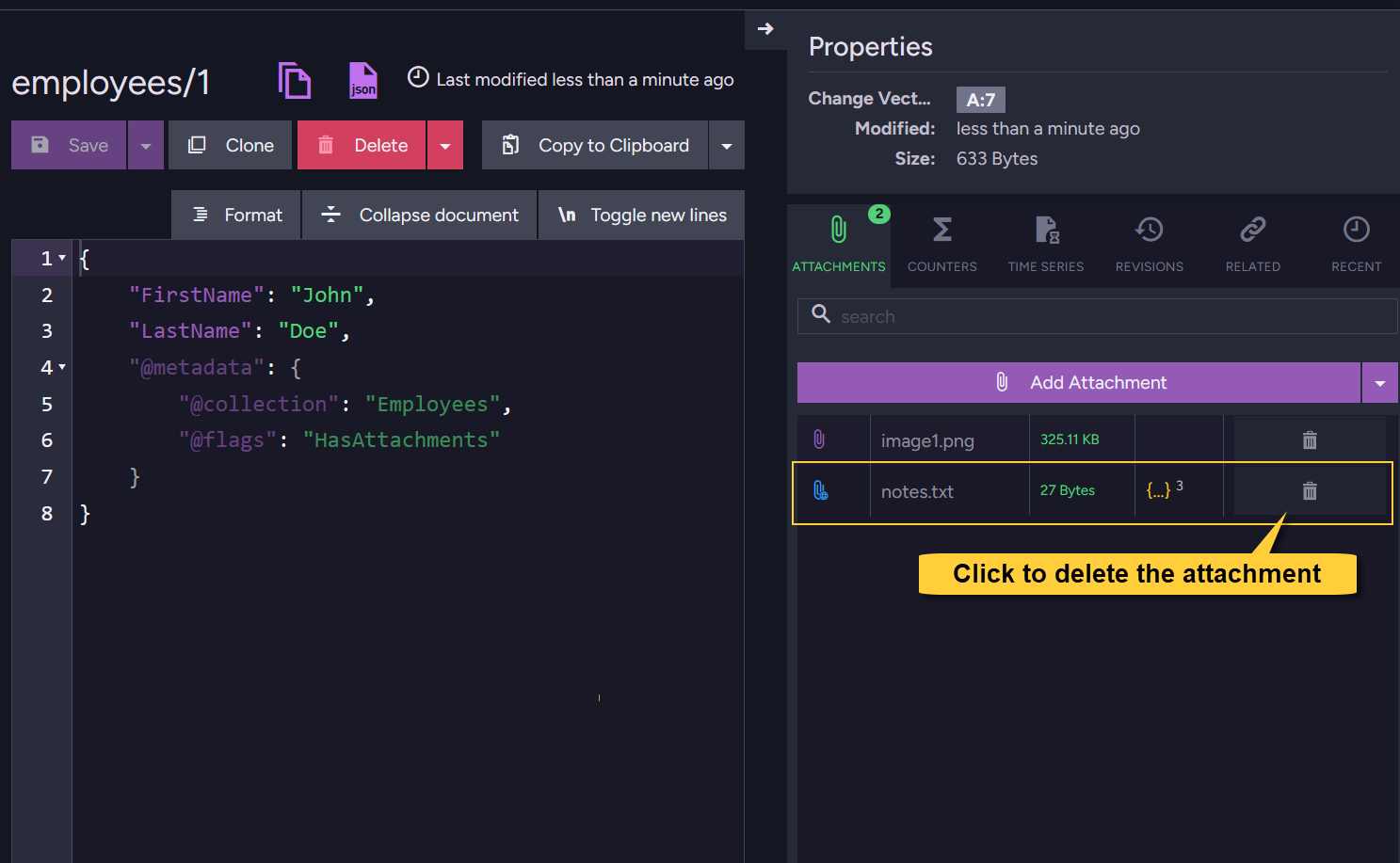
Delete attachment using Studio
In Studio, open the document view.
To delete an attachment from the document, click the trash can icon next to the attachment name.
Delete attachment using the Client API
Delete attachment - via the session
- Delete_attachment
- Delete_attachment_async
using (var session = store.OpenSession())
{
    Employee employee = session.Load<Employee>("employees/1");

    // Mark the attachment for deletion:
    // Provide the document entity and the attachment name
    session.Advanced.Attachments.Delete(employee, "image1.png");

    // Or - provide the document ID and the attachment name
    // session.Advanced.Attachments.Delete("employees/1", "image1.png");

    // The attachment is deleted when 'SaveChanges' is called
    session.SaveChanges();
}
using (var asyncSession = store.OpenAsyncSession())
{
    Employee employee = await asyncSession.LoadAsync<Employee>("employees/1");

    // Mark the attachment for deletion:
    // Provide the document entity and the attachment name
    asyncSession.Advanced.Attachments.Delete(employee, "image1.png");

     // Or - provide the document ID and the attachment name
     // asyncSession.Advanced.Attachments.Delete("employees/1", "image1.png");

    // The attachment is deleted when 'SaveChangesAsync' is called
    await asyncSession.SaveChangesAsync();
}
Delete attachment - via an operation
- Delete_attachment
- Delete_attachment_async
// Define the delete attachment operation
// Specify the document ID and the attachment name
var deleteAttachmentOp = new DeleteAttachmentOperation("employees/1", "image1.png", null);

// Execute the operation by passing it to 'Operations.Send'
store.Operations.Send(deleteAttachmentOp);
// Define the delete attachment operation
// Specify the document ID and the attachment name
var deleteAttachmentOp = new DeleteAttachmentOperation("employees/1", "image1.png", null);

// Execute the operation asynchronously by passing it to 'Operations.SendAsync'
await store.Operations.SendAsync(deleteAttachmentOp);
Delete attachment - via a patch
You can delete an attachment when patching documents using a script.
Learn about patching in: Patching single document and Patching multiple documents.
- Delete_attachment_patch
- Delete_attachment_patch_async
// Define the patch request
var patchRequest = new PatchRequest
{
    // Define a script that deletes the attachment
    Script = "attachments(this, args.name).delete();",
    Values =
    {
        { "name", "image1.png" }
    }
};

// Execute the patch operation
store.Operations.Send(new PatchOperation("employees/1", null, patchRequest));
// Define the patch request
var patchRequest = new PatchRequest
{
    // Define a script that deletes the attachment
    Script = "attachments(this, args.name).delete();",
    Values =
    {
        { "name", "image1.png" }
    }
};

// Execute the patch operation asynchronously
await store.Operations.SendAsync(new PatchOperation("employees/1", null, patchRequest));
Syntax
Delete attachment via operation
public DeleteAttachmentOperation(string documentId, string name, string changeVector = null)
| Parameter | Type | Description |
|---|---|---|
| documentId | string | The ID of the document from which to delete the attachment. |
| name | string | The name of the attachment to delete. |
| changeVector | string | The document's change vector used for concurrency control. If set to null, no concurrency check will be performed and the attachment will be deleted regardless of the document's current state. |
Delete attachment via session
// Available overloads:
// ====================

void Delete(object entity, string name);
void Delete(string documentId, string name);
| Parameter | Type | Description |
|---|---|---|
| documentId | string | The ID of the document from which to delete the attachment. |
| entity | object | The document entity from which to delete the attachment. |
| name | string | The name of the attachment to delete. |
Delete attachment via patch script
attachments(document, attachmentName).delete()
| Parameter | Type | Description |
|---|---|---|
| document | object | The document entity (use this for the current document being patched). |
| attachmentName | string | The name of the attachment to delete. |
See JavaScript engine for the full list of JavaScript methods available in RavenDB.