Data subscriptions: Overview
-
A data subscription is a server-side task that selects documents by a defined query.
The subscription sends the selected documents in batches to consuming clients (workers) that process the documents. -
The server sends a batch, the worker processes and acknowledges it, and only then does the server send the next batch.
-
The server keeps track of the batches the worker has acknowledged, so a worker that stops and reconnects to the subscription continues after the last acknowledged batch instead of starting over.
-
In this article:
What is a data subscription
A data subscription is an ongoing task that runs on the server and selects documents for clients (workers) to process.
The subscription's query defines the documents the server sends to workers that use the subscription.
You can shape the query to filter documents, project specific document fields, or include related data.
A worker connects to the subscription, receives a batch of documents, and runs your processing code over the batch. Processing time depends on your code. When the worker finishes processing a batch, it acknowledges the batch to the server, and the server then sends the next batch to the worker.
Two definitions shape every subscription:
- The subscription definition, set when the subscription is created, determines the documents the server sends to the worker and their shape.
- The worker options, set when a worker connects to the subscription, determine the batch size, the processing logic, and how the worker interacts with other workers of the same subscription.
To get started, create a data subscription using the Client API or Studio, and consume it using a worker.
Data subscriptions are also supported on sharded databases, where documents from all shards are processed in a single subscription stream.
What data subscriptions are for
You can use a data subscription to process documents in your application, either continuously as documents are
added or modified (e.g., to send a confirmation email for each new order) or as a one-time job over a whole collection
(e.g., to check every order against a new validation rule).
The server keeps track of the batches the worker has acknowledged, so your application does not need to track the
processed documents itself.
How documents are processed
Processing order and re-sending
The server sends documents to the worker in batches, ordered by each document's Etag, which reflects the order in which the documents were last modified. The server persists the progress only after the worker has processed and acknowledged the whole batch.
Because the server sends documents in Etag order, a document the worker has already acknowledged is not sent again, except in these cases:
- The document was modified after the server sent it.
- The document belongs to a batch the worker received but did not acknowledge.
- The subscription was reassigned to another node, for example after a node failure. The new node cannot always locate the exact same starting point, so some documents may be processed again.
Plan for at-least-once delivery. Make your processing idempotent, so reprocessing a document that the server sends again has no unintended effect.
Progress persistence and failover
The server persists each subscription's progress. This lets a subscription pause and resume, avoid missing documents, and continue on another node after a failure:
- Because the progress is stored on the server, you can pause the subscription and later resume it from the last acknowledged point.
- No documents are missed even when a failure occurs, whether on the client, in the connection, or elsewhere.
- The progress is stored at the cluster level, so it is available on all database nodes. If the responsible node goes down, the subscription can continue on another node.
The server uses change vectors to track progress, so when a subscription fails over to another node, processing resumes close to the last acknowledged point rather than starting over.
How the worker communicates with the server
A worker communicates with its subscription over a long-lived TCP connection, using a dedicated protocol. Each successful batch goes through these stages:
- The server sends a batch of documents to the worker.
- The worker processes the batch and sends an acknowledgment to the server.
- The server persists the acknowledgment and notifies the worker that it is ready to send the next batch.
The server also uses the connection to tell whether a worker is active. The connection is kept alive and monitored with heartbeat messages. If the connection breaks, processing of the current batch restarts.
The diagram below traces the full lifecycle of a subscription connection, from the worker's connection request through the processing and acknowledgment of each batch:
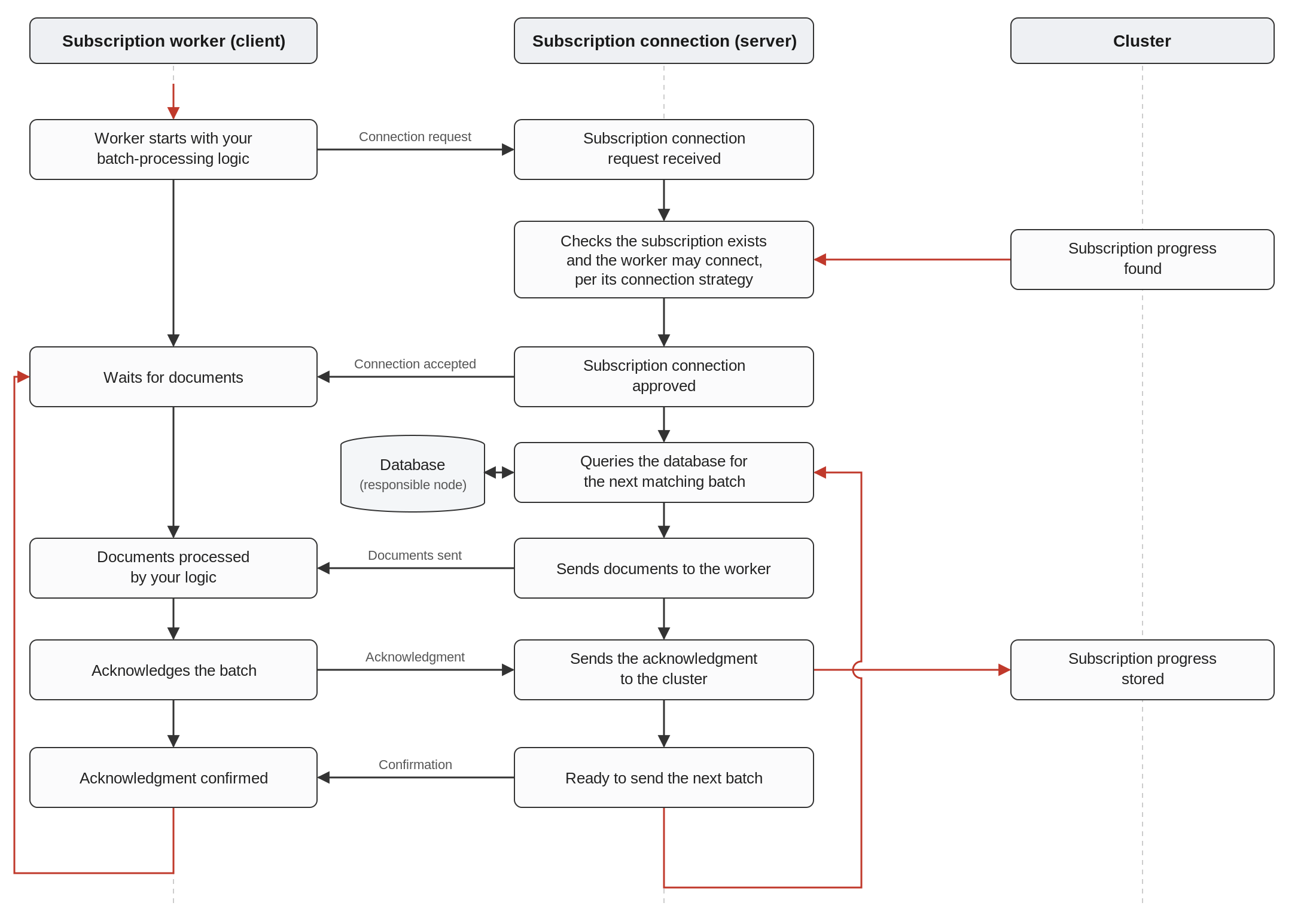
When the node responsible for the subscription goes down, the subscription can continue on another node. If your license includes highly available tasks, the cluster reassigns the subscription to another node automatically. Otherwise, the subscription resumes on its original node once that node is back online.
What the worker receives
You can set these options while creating a subscription:
-
Filtering
Select only the documents that match a condition (e.g., orders shipped to a specific country).
Filtering documents -
Projections
Instead of full documents, workers can receive only selected fields or computed values.
Projections
Projecting fields
Projecting from a related document -
Includes
Related documents, counters, and time series can be included in the batches, so workers do not need to request this data from the server.
Including documents
Including counters
Including time series -
Revisions
Subscribe to document revisions rather than to the documents themselves.
Workers then receive each revision together with the revision that preceded it, and can act on the changes between the two revisions.
Revisions support -
Archived documents
Subscriptions can send their workers only non-archived documents (the default), both non-archived and archived documents, or only archived documents (e.g., to copy archived orders to an external storage system).
Archived documents
Consuming and managing the subscription
You can consume and manage a subscription using these options and operations:
-
Worker strategies
Control how a worker connects to a subscription that another worker is already consuming: connect only if free, take over from the current worker, or wait for the current worker to disconnect.
Worker strategies -
Concurrent subscriptions
Let multiple workers consume the same subscription at once and divide the processing load between them to speed it up.
Concurrent subscriptions -
Maintenance operations
You can list, update, enable, disable, and delete subscriptions, and drop their active connections.
Maintenance operations -
Monitoring
Watch a running subscription's status, connected clients, and performance in Studio.
Monitoring -
Configuration
Set server-wide or per-database defaults, such as how archived documents are handled and the maximum number of subscription connections a database allows at the same time.
Configuration
Security considerations
Two things shape a subscription's security: who is allowed to manage and consume it, and what its query exposes to a consumer.
-
Access control
Unlike most ongoing tasks, which require database admin clearance to manage, a data subscription can be created, updated, and deleted by any client with Read/Write access to the database, and consumed by any client with Read Only access. There is no permission specific to the subscription itself. -
Connection security
On a secure server, a worker authenticates with a client certificate, and its connection to the server is encrypted like any other client connection. -
Data exposure
Because a subscription's filter, projection, and includes run on the server, a consumer receives whatever the query exposes: not only the matching documents but also any related documents and counters the query loads alongside them. Define the query to expose only the data its consumers are meant to see.
Usage example
The following example creates a subscription for orders shipped to the UK, using the
CreateAsync method.
The subscription is kept on the server until you explicitly delete it.
public async Task CreateSubscription(IDocumentStore store)
{
    // Create the subscription and give it a name
    await store.Subscriptions.CreateAsync(new SubscriptionCreationOptions<Order>
    {
        Name = "OrdersShippedToUK",

        // The subscription will send every Order shipped to the UK
        Filter = order => order.ShipTo.Country == "UK"
    });
}
To process the orders, pass the subscription's name to
GetSubscriptionWorker to create a worker,
and run the worker using the worker's Run method.
You can run the worker any number of times (e.g., each time your application starts).
Each time the worker runs, processing continues where it left off.
public async Task ProcessOrders(IDocumentStore store, CancellationToken cancellationToken)
{
    // Create a worker on the client, passing it the name of the subscription to connect to
    SubscriptionWorker<Order> worker =
        store.Subscriptions.GetSubscriptionWorker<Order>("OrdersShippedToUK");

    // Run the worker and process each batch of documents the subscription sends
    await worker.Run(batch =>
    {
        foreach (var item in batch.Items)
        {
            Console.WriteLine($"Order {item.Result.Id} will be shipped via {item.Result.ShipVia}");
        }
    }, cancellationToken);
}