Periodic server-wide backup tasks
-
Use a server-wide backup task to define a backup configuration once and have RavenDB automatically apply it to all your databases as per-database backup tasks.
-
This article explains how to create and manage the parent server-wide backup configuration and its derived database tasks.
For detailed guidance on backup configuration options (such as backup types, scope, scheduling, storage, retention policy, and encryption), see the periodic database-backup task article. -
In this article:
-
Creating and managing server-wide backup tasks using the client API
Overview
A server-wide backup task is a backup configuration template that is automatically applied to all your databases as per-database backup tasks.
- An individual database backup task will also be automatically added to any database created after defining a server-wide backup task.
- When creating the task, you can exclude specific databases from the backup, so that the configuration will only be applied to the databases you want to back up.
Each derived database task is a persistent scheduled entity that runs backup operations on the schedule defined by the parent server-wide task.
- You can access each derived task to check its latest and next scheduled backups, or to trigger an immediate database backup.
- The derived tasks continue to share the configuration defined by the server-wide template.
- Modifying the configuration or excluding databases from the backup can only be done through the parent server-wide task.
- Deleting the server-wide task will remove all derived tasks.
A backup operation is the actual execution of a backup.
It starts, runs, and completes (or fails).
Once a backup operation is running, you can delay or abort it, e.g., to free up system resources.
For example:
- You create a server-wide backup task named
NightlyBackupthat defines a full backup each night at midnight. - The server automatically applies your configuration as per-database backup tasks, naming each derived task
Server Wide Backup, NightlyBackup. - Each derived database task executes a backup operation every midnight.
Creating and managing server-wide backup tasks using the client API
Creating a server-wide backup task
To create a server-wide backup task:
-
Define a backup configuration using a
ServerWideBackupConfigurationinstance.ServerWideBackupConfigurationinherits from PeriodicBackupConfiguration, which defines all configuration options used by both server-wide and regular database backup tasks.
See the periodic database backup task article for guidance about these options.ServerWideBackupConfigurationadds the following server-wide-specific property:ExcludedDatabases- A list of databases to exclude from the server-wide backup.
-
Pass your populated instance to
PutServerWideBackupConfigurationOperationto register the server-wide task, create the derived database tasks, and schedule the backup routine for each database. -
Example:
var serverWideBackupConfiguration = new ServerWideBackupConfiguration{// Task is enabledDisabled = false,// Task nameName = "FullAndIncrementalBackup",// Create a logical backupBackupType = BackupType.Backup,// Run a full backup every 6 hoursFullBackupFrequency = "0 */6 * * *",// Run an incremental backup every 20 minutesIncrementalBackupFrequency = "*/20 * * * *",// Keep backups locallyLocalSettings = new LocalSettings{FolderPath = backupPath},// Also upload backups to AzureAzureSettings = new AzureSettings{// Use your Azure credentials here},// Keep backups for 7 daysRetentionPolicy = new RetentionPolicy{Disabled = false,MinimumBackupAgeToKeep = TimeSpan.FromDays(7)},// Encrypt backups using a user-provided Base64 keyBackupEncryptionSettings = new BackupEncryptionSettings{EncryptionMode = EncryptionMode.UseProvidedKey,Key = "OI7Vll7DroXdUORtc6Uo64wdAk1W0Db9ExXXgcg5IUs="},// Exclude the Customers database from the server-wide backupExcludedDatabases = new[]{"Customers"}};// Create the server-wide taskvar result = await store.Maintenance.Server.SendAsync(new PutServerWideBackupConfigurationOperation(serverWideBackupConfiguration));
Getting a derived backup task status
To retrieve the status of a derived database task after its last run, use GetPeriodicBackupStatusOperation with the task ID.
- If you do not have the task ID, you can get it using
GetOngoingTaskInfoOperationwith the names of the task and its database. - The retrieved status reflects the most recent completed backup run, whether it was scheduled or triggered manually.
- The status includes the number of backups performed by the task, and details about the last backup such as the backup timestamp, duration, destination path, and error information (if any).
See GetPeriodicBackupStatusOperation syntax
Example:
// Database name
var databaseName = "Products";

// Server-wide task name
var serverWideTaskName = "FullAndIncrementalBackup";

// Pass the server-wide task name to get the derived task name
var derivedTaskName =
    PutServerWideBackupConfigurationCommand.GetTaskName(serverWideTaskName);

// Pass the derived task name to get the derived task info
var derivedTask = await store.Maintenance.ForDatabase(databaseName).SendAsync(
    new GetOngoingTaskInfoOperation(derivedTaskName, OngoingTaskType.Backup))
    as OngoingTaskBackup;

// Ensure the derived task exists for the chosen database
if (derivedTask == null)
{
    throw new InvalidOperationException(
        $"The server-wide periodic backup task '{derivedTaskName}' " +
        $"is not found in database '{databaseName}'.");
}

// Get the backup status for this database's derived task
var statusResult = await store.Maintenance.ForDatabase(databaseName).SendAsync(
    new GetPeriodicBackupStatusOperation(derivedTask.TaskId));

var status = statusResult.Status;

// Status is null if no backup has run yet
if (status == null)
{
    // No backup has been executed yet for this task
    return;
}

// Check for errors in the last backup run
if (status.Error != null)
{
    string errorMessage = status.Error.Exception;
    DateTime errorTime = status.Error.At;
}

// Access last backup details
bool wasFull = status.IsFull;
long? lastEtag = status.LastEtag;
long? durationMs = status.DurationInMs;
DateTime? lastFullBackup = status.LastFullBackup;
DateTime? lastIncrementalBackup = status.LastIncrementalBackup;

// Access backup destination details
 string? localBackupDir = status.LocalBackup?.BackupDirectory;
Updating a server-wide backup task
To update an existing backup task:
- Retrieve the server-wide task configuration that you want to update.
- Use
GetServerWideBackupConfigurationOperationto retrieve a single configuration by name, - Or use
GetServerWideBackupConfigurationsOperationto retrieve all existing configurations and select the one you want by a property of your choice.
- Use
- Modify the configuration without changing the existing
TaskId. - Use
PutServerWideBackupConfigurationOperationto apply the modified configuration.
Example:
- Retrieve a single configuration
- Retrieve all configurations and select one
// Retrieve existing configuration by name
var existing = await store.Maintenance.Server.SendAsync(
    new GetServerWideBackupConfigurationOperation("FullAndIncrementalBackup"));

// Ensure the task exists
Assert.NotNull(existing);

// Update by modifying the retrieved instance
existing.FullBackupFrequency = "0 */7 * * *";
existing.IncrementalBackupFrequency = "*/20 * * * *";

// Send update
await store.Maintenance.Server.SendAsync(
    new PutServerWideBackupConfigurationOperation(existing));
// Retrieve all server-wide backup configurations
var serverWideBackups = await store.Maintenance.Server.SendAsync(
new GetServerWideBackupConfigurationsOperation());

// Select a configuration by a property (FullBackupFrequency in this example)
var existing = serverWideBackups.FirstOrDefault(x => x.FullBackupFrequency == "0 */7 * * *");

Assert.NotNull(existing);

// Update by modifying the retrieved instance (keeping the TaskId unchanged)
existing.FullBackupFrequency = "0 */8 * * *";
existing.IncrementalBackupFrequency = "*/30 * * * *";

// Send update
await store.Maintenance.Server.SendAsync(
    new PutServerWideBackupConfigurationOperation(existing));
Deleting a server-wide backup task
To delete a server-wide backup task and remove all its derived database tasks:
- Use
DeleteServerWideTaskOperationand pass the name of the server-wide backup task you want to delete.
Example:
// Delete a server-wide backup task by name
await store.Maintenance.Server.SendAsync(
    new DeleteServerWideTaskOperation("FullAndIncrementalBackup", OngoingTaskType.Backup));
Managing backup operations
After defining a server-wide task, its derived database tasks start executing backup operations as scheduled.
For any derived database task, you can:
- Trigger the immediate execution of a backup operation, outside of its task schedule.
- Delay a backup operation that the task has already started.
- Abort a backup operation that the task has already started.
Triggering an immediate backup operation
To back up a database immediately using a derived database task:
- Pass
PutServerWideBackupConfigurationCommand.GetTaskNamethe server-wide task name,
to get the derived task name. - Pass
GetOngoingTaskInfoOperationthe derived task name,
to get the derived task info. - Pass
StartBackupOperationthe derived task ID,
to trigger an immediate backup.
Example:
// Database name
var databaseName = "Products";

// Server-wide task name
var serverWideTaskName = "DailyBackup";

// Pass the server-wide task name to get the derived task name
var derivedTaskName = PutServerWideBackupConfigurationCommand.GetTaskName(serverWideTaskName);

// Pass the derived task name to get the derived task info
var derivedDatabaseTask = await store.Maintenance.ForDatabase(databaseName).SendAsync(
    new GetOngoingTaskInfoOperation(derivedTaskName, OngoingTaskType.Backup)) as OngoingTaskBackup;

// Ensure the derived task exists for the chosen database
if (derivedDatabaseTask == null)
{
    throw new InvalidOperationException($"The server-wide periodic backup task '{derivedTaskName}' " +
        $"is not found in database '{databaseName}'.");
}

// Get the TaskId of the derived task
long derivedDatabaseTaskId = derivedDatabaseTask.TaskId;

// Decide whether to run full or incremental backup
bool isFullBackup = true;

// Create backup immediately for the chosen database
Operation<StartBackupOperationResult> backupOperation = await store.Maintenance.ForDatabase(databaseName).SendAsync(
    new StartBackupOperation(isFullBackup, derivedDatabaseTaskId));
StartBackupOperation:
public StartBackupOperation(bool isFullBackup, long taskId)
| Parameter | Type | Description |
|---|---|---|
| isFullBackup | bool | true - create a full backupfalse - create an incremental backup |
| taskId | long | The ID of the periodic backup task to use when creating the backup. |
Delaying a running backup operation
To delay the execution of a currently running backup operation:
- Pass
PutServerWideBackupConfigurationCommand.GetTaskNamethe server-wide task name,
to get the derived task name. - Pass
GetOngoingTaskInfoOperationthe derived task name,
to get the derived task info. - Ensure that the derived task exists on the chosen database (not
null),
and there is a running backup operation (OnGoingBackupis notnull). - Pass
DelayBackupOperationthe operation ID and the delay duration to delay the backup operation.
Example:
// The database name
var databaseName = "Products";

// Pass the server-wide task name to get the derived task name
var derivedTaskName = PutServerWideBackupConfigurationCommand.GetTaskName(serverWideTaskName);

// Pass the derived task name to get the derived task info
var derivedTask = await store.Maintenance.ForDatabase(databaseName).SendAsync(
    new GetOngoingTaskInfoOperation(derivedTaskName, OngoingTaskType.Backup)) as OngoingTaskBackup;

// Ensure the derived task exists
if (derivedTask == null)
{
    throw new InvalidOperationException($"The server-wide periodic backup task '{derivedTaskName}' " +
        $"is not found in database '{databaseName}'.");
}

// Ensure there is a running backup operation
if (derivedTask.OnGoingBackup == null)
{
    throw new InvalidOperationException("No running backup operation to delay.");
}

// Delay duration
var delayDuration = TimeSpan.FromHours(1);

// Delay the running backup operation
await store.Maintenance.ForDatabase(databaseName).SendAsync(new DelayBackupOperation(
    derivedTask.OnGoingBackup.RunningBackupTaskId,
    delayDuration));
Aborting a running backup operation
-
To abort a periodic backup that was started by its derived task as scheduled:
- Pass
PutServerWideBackupConfigurationCommand.GetTaskNamethe server-wide task name,
to get the derived task name. - Pass
GetOngoingTaskInfoOperationthe derived task name,
to get the derived task info. - Ensure that the derived task exists on the chosen database (not
null),
and there is a running backup operation (OnGoingBackupis notnull). - Pass
KillOperationCommandthe operation ID to abort the backup operation.
Example:
var databaseName = "Products";// Pass the server-wide task name to get the derived task namevar derivedTaskName = PutServerWideBackupConfigurationCommand.GetTaskName(serverWideTaskName);// Pass the derived task name to get the derived task infovar derivedTask = await store.Maintenance.ForDatabase(databaseName).SendAsync(new GetOngoingTaskInfoOperation(derivedTaskName, OngoingTaskType.Backup)) as OngoingTaskBackup;// Ensure the derived task existsif (derivedTask == null){throw new InvalidOperationException($"The server-wide periodic backup task '{derivedTaskName}' " +$"is not found in database '{databaseName}'.");}// Ensure there is a running backup operationif (derivedTask.OnGoingBackup == null){throw new InvalidOperationException("No running backup operation to abort.");}// Abort the backup by killing the running operationawait store.Commands(databaseName).ExecuteAsync(new KillOperationCommand(derivedTask.OnGoingBackup.RunningBackupTaskId)); - Pass
-
To abort a backup that was triggered manually using
StartBackupOperation:- Extract the backup operation ID from the result returned by
StartBackupOperation. - Use the backup operation ID to abort the operation.
- Also extract and use the responsible node tag to ensure that the operation is aborted on the correct cluster node.
Example:
// Database namevar databaseName = "Products";// Server-wide task namevar serverWideTaskName = "DailyBackup";// Pass the server-wide task name to get the derived task namevar derivedTaskName = PutServerWideBackupConfigurationCommand.GetTaskName(serverWideTaskName);// Pass the derived task name to get the derived task infovar derivedDatabaseTask = await store.Maintenance.ForDatabase(databaseName).SendAsync(new GetOngoingTaskInfoOperation(derivedTaskName, OngoingTaskType.Backup)) as OngoingTaskBackup;// Ensure the derived task exists for the chosen databaseif (derivedDatabaseTask == null){throw new InvalidOperationException($"The server-wide periodic backup task '{derivedTaskName}' " +$"is not found in database '{databaseName}'.");}// Get the TaskId of the derived tasklong derivedDatabaseTaskId = derivedDatabaseTask.TaskId;// Decide whether to run full or incremental backupbool isFullBackup = true;// Create backup immediately for the chosen databaseOperation<StartBackupOperationResult> backupOperation = await store.Maintenance.ForDatabase(databaseName).SendAsync(new StartBackupOperation(isFullBackup, derivedDatabaseTaskId));// Kill the running operation by id, routed to the owning nodelong backupOperationId = backupOperation.Id;string nodeTag = backupOperation.NodeTag;await store.Commands(databaseName).ExecuteAsync(new KillOperationCommand(backupOperationId, nodeTag)); - Extract the backup operation ID from the result returned by
Note that after aborting the backup operation, you may need to manually clean up:
- Partial local files, left while creating the backup.
- Partial or temporary remote uploads.
Syntax
Methods
Server-wide task management
- PutServerWideBackupConfigurationOperation
- GetServerWideBackupConfigurationOperation
Creates or updates a server-wide periodic backup task.
public PutServerWideBackupConfigurationOperation(ServerWideBackupConfiguration configuration)
Usage:
PutServerWideBackupConfigurationResponse result = await store.Maintenance.Server.SendAsync(
    new PutServerWideBackupConfigurationOperation(configuration));
| Parameter | Type | Description |
|---|---|---|
| configuration | ServerWideBackupConfiguration | The server-wide backup configuration to create or update. To update an existing task, retrieve the current configuration first (keeping its TaskId unchanged). |
| Return value | |
|---|---|
PutServerWideBackupConfigurationResponse | Contains Name (string) - the name of the created or updated server-wide task,and RaftCommandIndex (long). |
Retrieves a single server-wide backup configuration by name.
public GetServerWideBackupConfigurationOperation(string name)
Usage:
ServerWideBackupConfiguration config = await store.Maintenance.Server.SendAsync(
    new GetServerWideBackupConfigurationOperation(name));
| Parameter | Type | Description |
|---|---|---|
| name | string | The name of the server-wide backup task to retrieve. |
| Return value | |
|---|---|
ServerWideBackupConfiguration | The server-wide backup configuration, or null if no task with the given name exists. |
- GetServerWideBackupConfigurationsOperation
- DeleteServerWideTaskOperation
Retrieves all server-wide backup configurations.
public GetServerWideBackupConfigurationsOperation()
Usage:
ServerWideBackupConfiguration[] configs = await store.Maintenance.Server.SendAsync(
    new GetServerWideBackupConfigurationsOperation());
| Return value | |
|---|---|
ServerWideBackupConfiguration[] | An array of all server-wide backup configurations.null if no server-wide backup tasks exist. |
Deletes a server-wide task by name, removing all its derived database tasks.
public DeleteServerWideTaskOperation(string name, OngoingTaskType type)
Usage:
await store.Maintenance.Server.SendAsync(
    new DeleteServerWideTaskOperation(name, OngoingTaskType.Backup));
| Parameter | Type | Description |
|---|---|---|
| name | string | The name of the server-wide task to delete. |
| type | OngoingTaskType | The type of the ongoing task. Use OngoingTaskType.Backup for backup tasks. |
Operations
For syntax details on the operations used in the examples above to trigger, delay, and abort backup operations (StartBackupOperation, DelayBackupOperation, KillOperationCommand), see the database backup operations syntax.
Classes
Backup configuration classes
- ServerWideBackupConfiguration
- PeriodicBackupConfiguration
- BackupConfiguration
Server-wide backup configuration
class ServerWideBackupConfiguration : PeriodicBackupConfiguration, IServerWideTask
{
    string[] ExcludedDatabases
}
| Property | Type | Description |
|---|---|---|
| ExcludedDatabases | string[] | The list of databases excluded from the server-wide backup. |
Periodic backup configuration
class PeriodicBackupConfiguration : BackupConfiguration
{
    string Name
    long TaskId
    bool Disabled
    string MentorNode
    bool PinToMentorNode
    RetentionPolicy RetentionPolicy
    DateTime? CreatedAt
    string FullBackupFrequency
    string IncrementalBackupFrequency
}
| Property | Type | Description |
|---|---|---|
| Name | string | The name of the periodic backup task. |
| TaskId | long | The unique identifier for the backup task. |
| Disabled | bool | Indicates whether the backup task is disabled. |
| MentorNode | string | The mentor node responsible for executing the backup task. When set for a server-wide backup task, this node is applied to all derived database tasks. If this node is not in the database group of a specific database, the cluster will automatically assign a node from that database's group as the responsible node for that database's derived task. |
| PinToMentorNode | bool | Determines if the backup task should always run on the mentor node. |
| RetentionPolicy | RetentionPolicy | The retention policy associated with the backup task. |
| CreatedAt | DateTime? | The timestamp when the backup task was created. |
| FullBackupFrequency | string | Frequency of full backup jobs in cron format. |
| IncrementalBackupFrequency | string | Frequency of incremental backup jobs in cron format. If set to null, incremental backup will be disabled. |
Backup configuration
class BackupConfiguration
{
    BackupType BackupType
    BackupUploadMode BackupUploadMode
    SnapshotSettings SnapshotSettings
    BackupEncryptionSettings BackupEncryptionSettings
    int? MaxReadOpsPerSecond
    LocalSettings LocalSettings
    S3Settings S3Settings
    GlacierSettings GlacierSettings
    AzureSettings AzureSettings
    FtpSettings FtpSettings
    GoogleCloudSettings GoogleCloudSettings
}
| Property | Type | Description |
|---|---|---|
| BackupType | BackupType | Backup type (snapshot or logical backup) |
| BackupUploadMode | BackupUploadMode | Upload mode (via local storage or directly to destination) |
| SnapshotSettings | SnapshotSettings | Snapshot settings |
| BackupEncryptionSettings | BackupEncryptionSettings | Encryption settings |
| MaxReadOpsPerSecond | int? | Maximum number of read operations per second allowed during backup. |
| LocalSettings | LocalSettings | Local storage settings |
| S3Settings | S3Settings | Amazon S3 backup settings |
| GlacierSettings | GlacierSettings | Amazon Glacier backup settings |
| AzureSettings | AzureSettings | Azure backup settings |
| FtpSettings | FtpSettings | FTP-based backup settings |
| GoogleCloudSettings | GoogleCloudSettings | Google Cloud backup settings |
For syntax details on all configuration classes, enums, and backup destination settings used in the properties above, see the database backup syntax.
Creating and managing server-wide backup tasks via Studio
Creating a server-wide backup task
To create a periodic server-wide backup task:
-
Open:
Manage server>Server-wide tasks>Add a server-wide task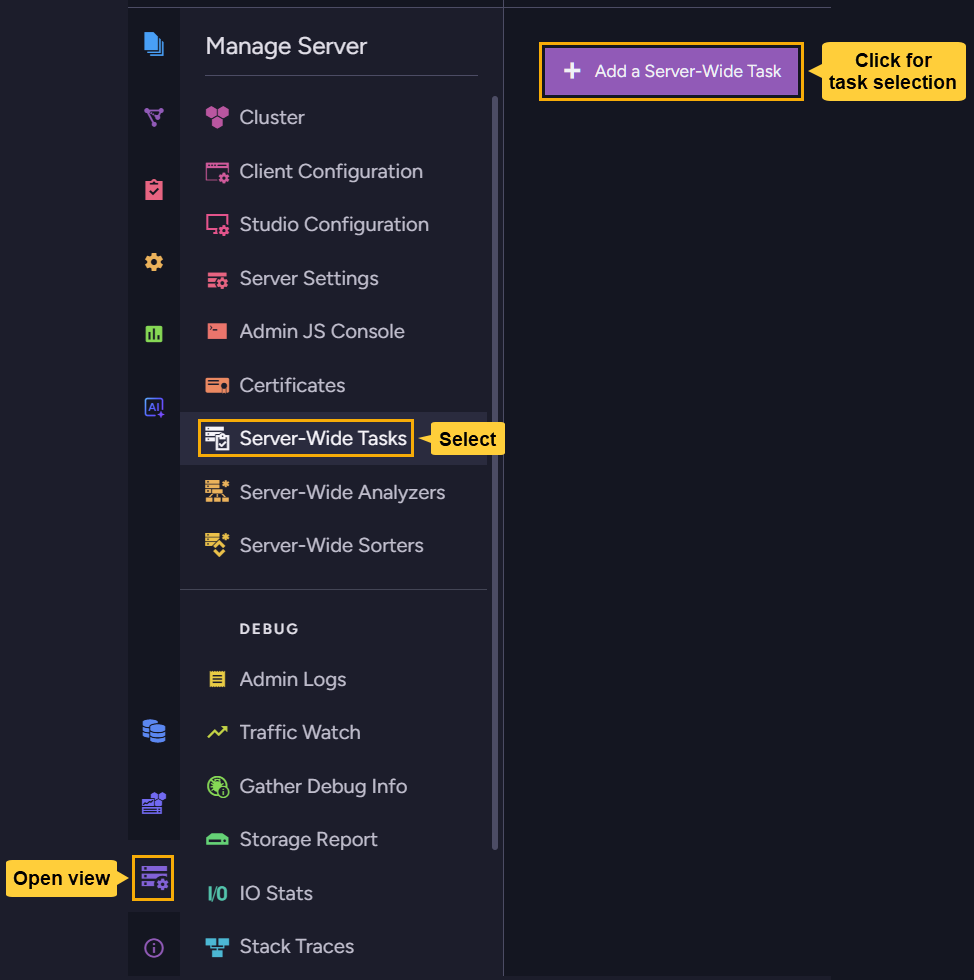
-
Pick
Server-wide periodic backupto create your task.
-
Define the backup configuration as explained in the periodic database-backup task article
and exclude any database that you do not want to schedule backups for.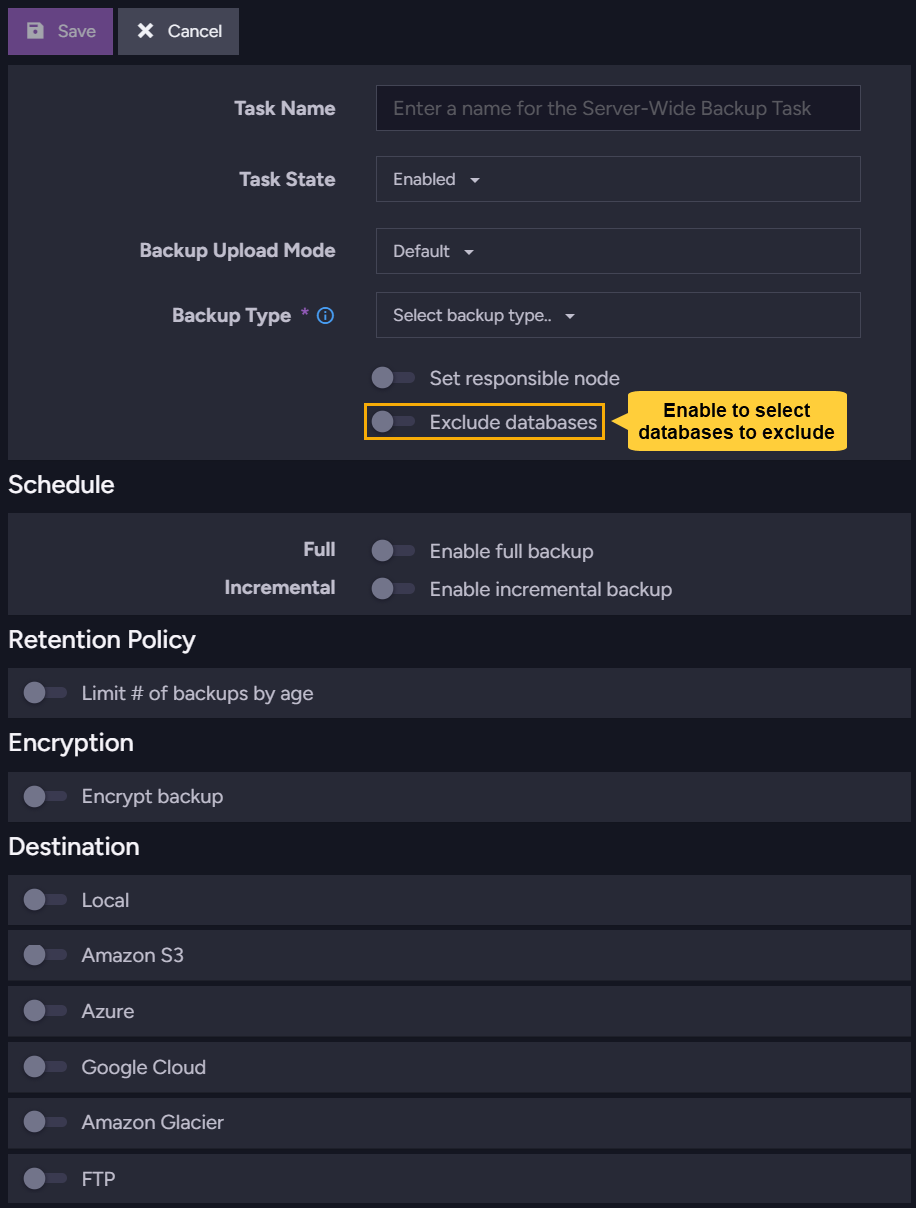
-
Exclude databases
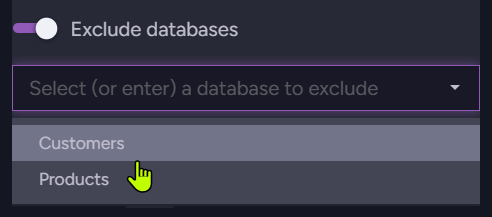
By default, the server will create a derived database backup task and schedule a backup routine for all databases on the server.
To exclude databases from the backup, enable the Exclude databases option and select the databases you want to exclude. -
Set responsible node
You can select a cluster node to be responsible for all derived database backup tasks.
If no node is selected, the responsible node for each derived task is assigned automatically by the cluster.If you select a responsible node for all databases, and this node is not in the database group of a specific database, the cluster will automatically assign a node from that database's group as the responsible node for that database's derived task.
-
Backups storage
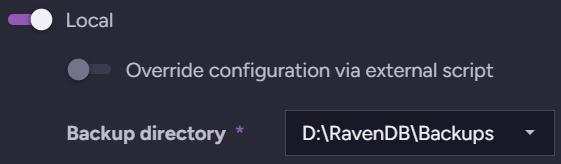
Define a root storage location for backups created by all derived database tasks.
Each database task will automatically store its backups in a subfolder named after the database, under the root storage location.e.g.,
- for a local folder, define
D:\RavenBackupsas the root storage location.
Backups for a database namedProductswill be stored inD:\RavenBackups\Products. - for an FTP destination, define
ftp://myserver.com/backupsas the root storage location.
Backups for a database namedProductswill be sent toftp://myserver.com/backups/Products. - For an
S3destination, defineravendb/backupsas the root storage location.
Backups for a database namedProductswill be sent toravendb/backups/Products.
- for a local folder, define
-
Encryption settings
-
When the database is unencrypted:
- Snapshots are always unencrypted.
- Logical backups are handled according to the server-wide task encryption settings:
- Disable encryption to produce unencrypted backups.
- Enable encryption and provide an encryption key to encrypt the backups.
-
When the database is encrypted:
Snapshots and logical backups are both always encrypted using the database key.Note that logical backups behave differently in this respect when created by a server-wide task vs a regular database backup task.
See the server-wide encryption section in the overview for additional details.
-
-
-
Save the server-wide task.

Save to store the task and create the derived database tasks,
or Cancel to discard the server-wide configuration.
Managing server-wide tasks
Managing the parent server-wide task
To manage a saved server-wide task, open the Manage server view and select Server-wide tasks.
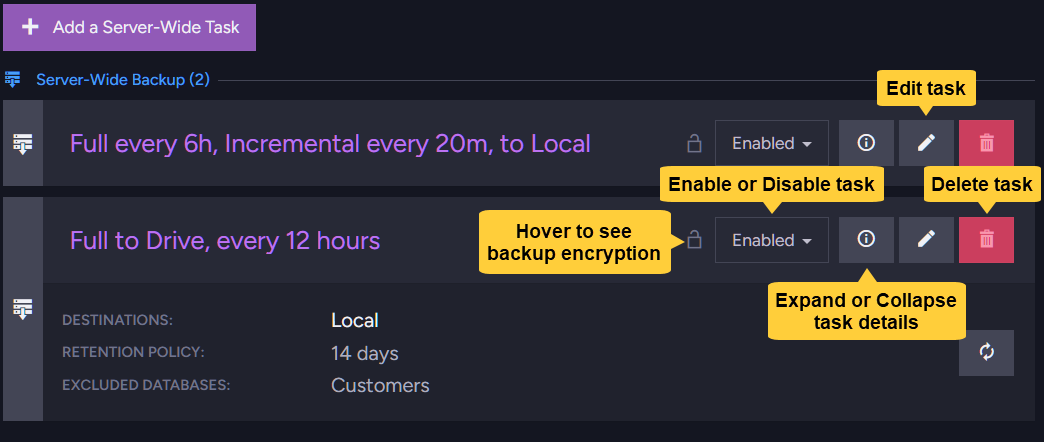
You can:
- Edit tasks.
- Enable or disable tasks and all their derived database tasks.
- Delete tasks and all their derived database tasks.
- View task details, including -
- Whether backups are encrypted.
- Where backups are stored.
- The retention period for stored backups.
- Which databases are excluded from the backup.
Managing derived database tasks
To manage a database backup task derived from a server-wide task:
-
Select a database from the Databases view.
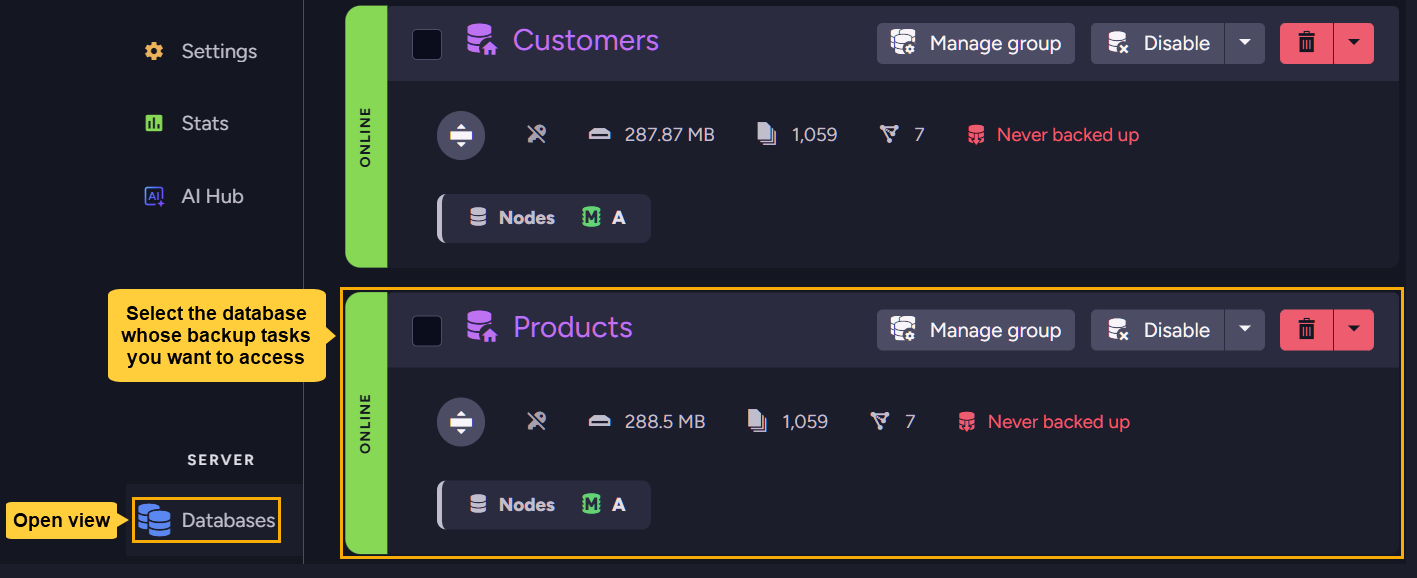
-
Open the Tasks view and select Backups.
The names of backup tasks derived from a server-wide configuration are automatically given a Server Wide Backup prefix.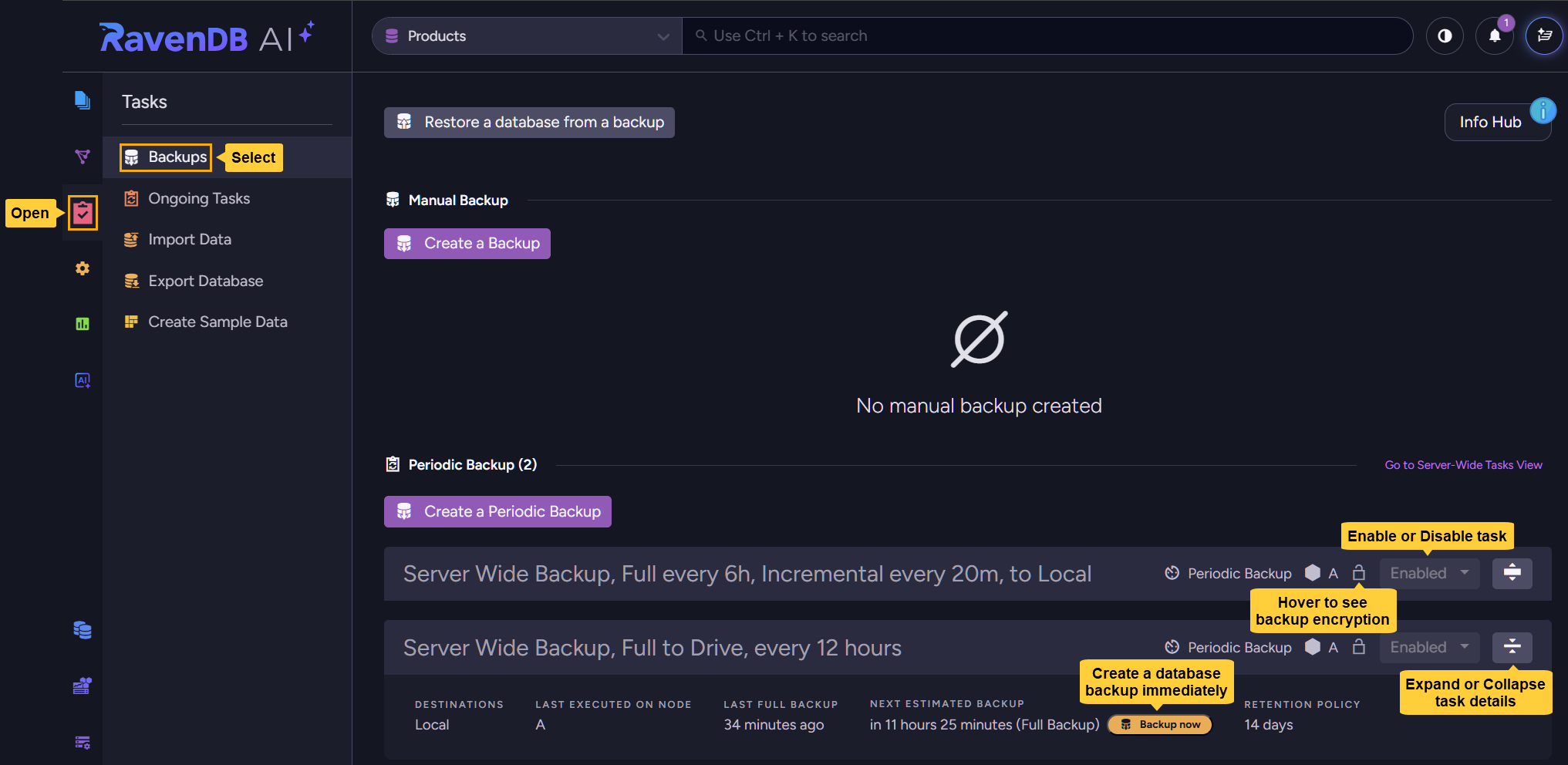
You can:
- Enable or disable the database task.
- Create a backup immediately for this database.
- View task details, including:
- The node responsible for the backup task.
- The node where the task was last executed.
- Whether backups are encrypted.
- Where backups are stored.
- Last and next scheduled backups.
- The retention period for stored backups.
Editing and deleting the task are available only from the parent server-wide task.
Running a backup operation immediately
You can trigger the immediate creation of a backup for the database, without waiting for the next scheduled backup.
- Expand the task details bar as seen above, and click Backup now.
- You will be given the option to create a full or an incremental backup immediately, based on the server-wide task configuration.

Delaying or aborting a running backup operation
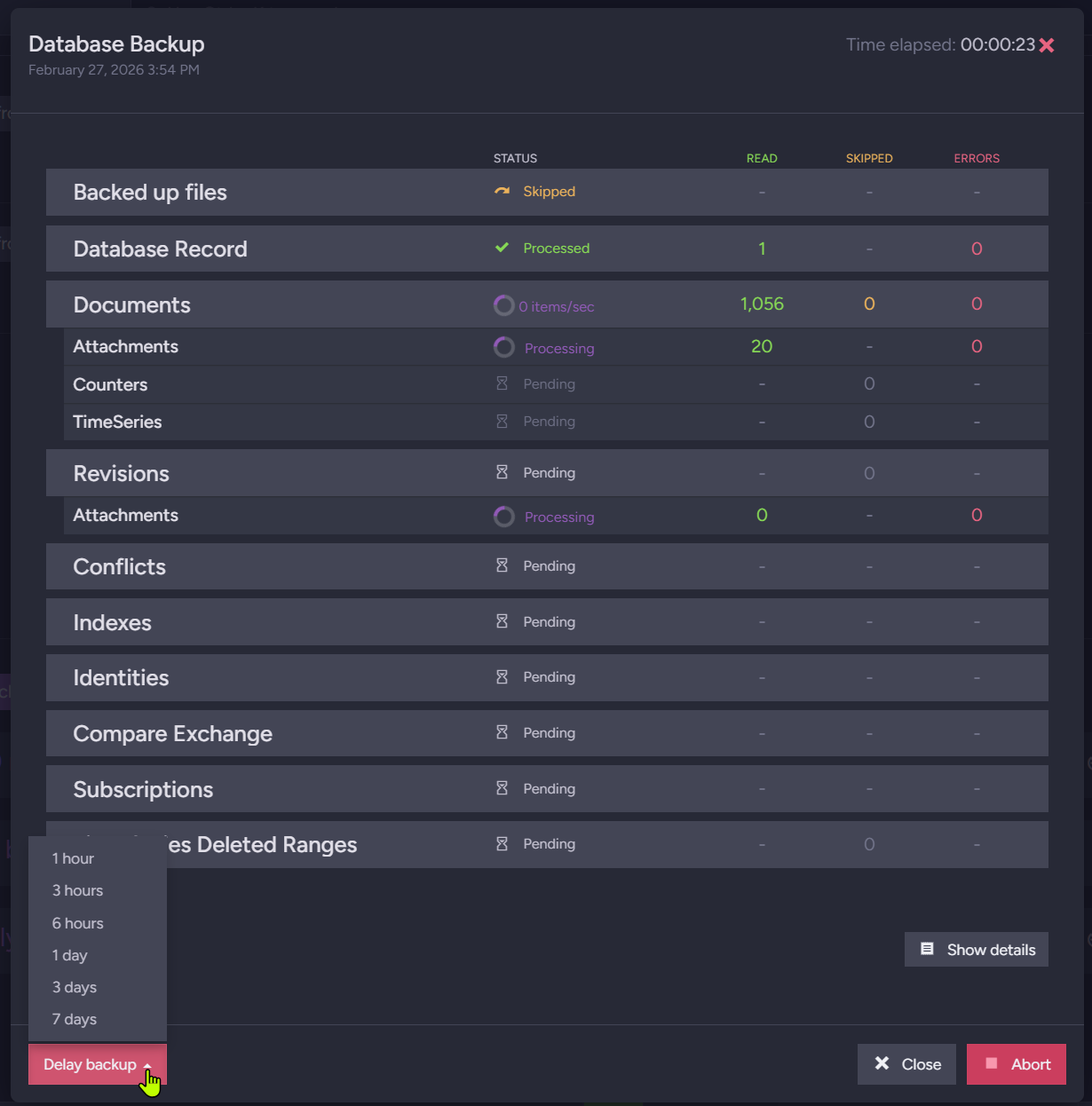
To delay or abort a running backup operation (e.g., when a backup takes longer than expected or you need to free up server resources), open the notifications center and find the notification added for the running backup operation.
-
To abort the operation, click the notification's Abort button.
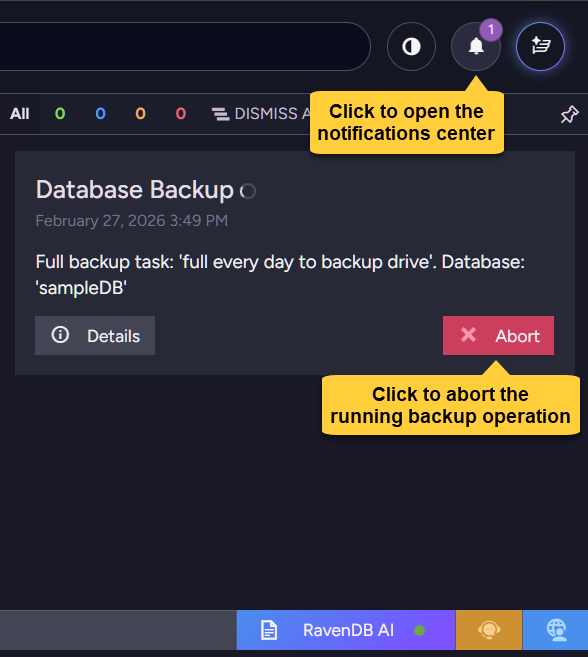
-
To delay the operation:
- Click the notification's Details button.

- When the operation details view opens, click the Delay backup button at the bottom and select the delay duration. The backup operation will resume when the set period elapses.
- Click the notification's Details button.