Connection String to Google AI
-
This article explains how to define a connection string to the Google AI service,
enabling RavenDB to use Google AI models for Embeddings generation tasks, Gen AI tasks, and AI agents. -
This configuration is not compatible with Vertex AI endpoints or credentials.
-
The Studio and Client API examples below define a per-database AI connection string.
To define the same provider configuration at the cluster level, see Add a server-wide connection string. -
In this article:
Define the connection string - from Studio
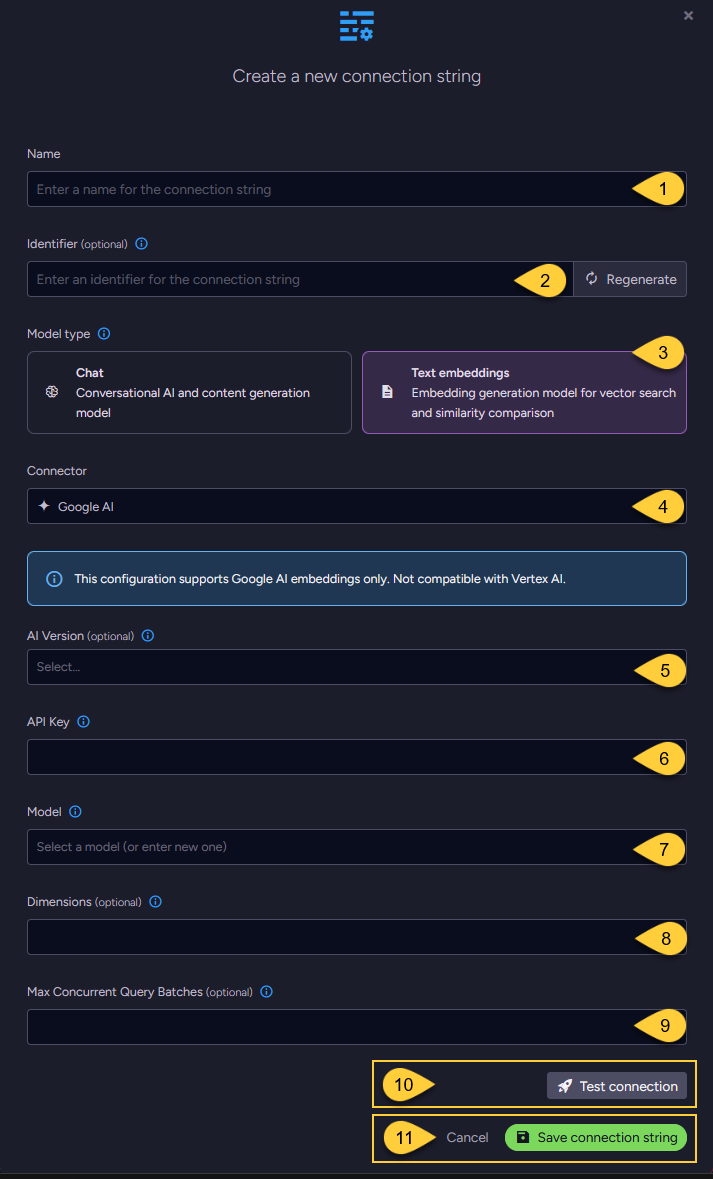
Configuring a text embedding model
-
Name
Enter a name for this connection string. -
Identifier (optional)
Enter an identifier for this connection string.
Learn more about the identifier in the connection string identifier section. -
Model Type
Select "Text Embeddings". -
Connector
Select Google AI from the dropdown menu. -
AI Version (optional)
- Select the Google AI API version to use.
- If not specified,
V1_Betais used. Learn more in API versions explained.
-
API key
Enter the API key used to authenticate requests to Google's AI services. -
Model
Select or enter the Google AI text embedding model to use. -
Dimensions (optional)
- Specify the number of dimensions for the output embeddings.
- If not specified, the model's default dimensionality is used.
-
Max concurrent query batches: (optional)
- When making vector search queries, the content of the search terms must also be converted to embeddings to compare them against the stored vectors.
Requests to generate such query embeddings via the AI provider are sent in batches. - This parameter defines the maximum number of these batches that can be processed concurrently.
You can set a default value using the Ai.Embeddings.MaxConcurrentBatches configuration key.
- When making vector search queries, the content of the search terms must also be converted to embeddings to compare them against the stored vectors.
-
Click Test Connection to confirm the connection string is set up correctly.
-
Click Save to store the connection string or Cancel to discard changes.
Configuring a chat model
-
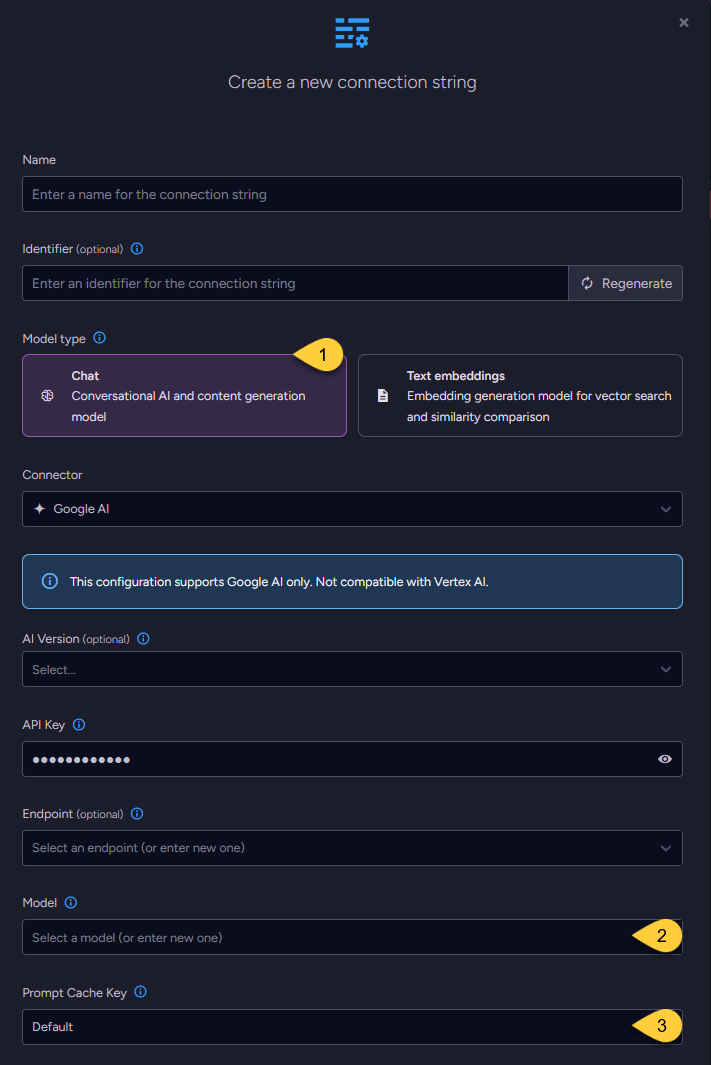
When configuring a chat model, the UI displays the same base fields as those used for text embedding models,
including the connection string Name, optional Identifier, AI Version, API Key, Endpoint, and Model name. -
One additional setting is specific to chat models: Prompt Cache Key.
-
Model Type
Select "Chat". -
Model
Enter the name of the Google AI model to use for chat completions. -
Prompt Cache Key (optional)
-
Controls whether RavenDB includes the
prompt_cache_keyfield in chat completion requests sent to the AI provider when using AI Agents. -
When enabled (set to True), RavenDB sends the Conversation's document ID in the
prompt_cache_keyfield with each request. This can help the AI provider identify requests that belong to the same conversation and reuse a previously cached prompt prefix (system prompt + prior messages). -
Why this helps:
AI providers typically process requests on many servers. Without a cache key, consecutive requests from the same conversation may be handled by different servers, each reprocessing the entire conversation from scratch. With the cache key, the provider can route the request to the same machine that handled the previous turn, where the computed prefix is likely still in memory. The provider then only needs to process the new messages, reducing latency and cost. -
The full conversation content is still sent with every request. The cache key is only a provider-side optimization hint. RavenDB does not control the provider's caching behavior.
-
Options:
Default-False(Disabled for Google AI).True- Always send the cache key.False- Never send the cache key.
Set to False if your provider does not support the field and returns errors instead of ignoring it.
-
Define the connection string - from the Client API
- Connection_string_for_text_embedding_model
- Connection_string_for_chat_model
using (var store = new DocumentStore())
{
    // Define the connection string to Google AI
    var connectionString = new AiConnectionString
    {
        // Connection string name & identifier
        Name = "ConnectionStringToGoogleAI",
        Identifier = "identifier-to-the-connection-string", // optional

        // Model type
        ModelType = AiModelType.TextEmbeddings,

        // Google AI connection settings
        GoogleSettings = new GoogleSettings(
            apiKey: "your-api-key",
            model: "text-embedding-004",
            aiVersion: GoogleAIVersion.V1)
    };

    // Optionally, override the default maximum number of query embedding batches
    // that can be processed concurrently
    connectionString.GoogleSettings.EmbeddingsMaxConcurrentBatches = 10;

    // Deploy the connection string to the server
    var operation =
        new PutConnectionStringOperation<AiConnectionString>(connectionString);
    var putConnectionStringResult = store.Maintenance.Send(operation);
}
using (var store = new DocumentStore())
{
    // Define the connection string to Google AI
    var connectionString = new AiConnectionString
    {
        // Connection string name & identifier
        Name = "ConnectionStringToGoogleAI",
        Identifier = "identifier-to-the-connection-string", // optional

        // Model type
        ModelType = AiModelType.TextEmbeddings,

        // Google AI connection settings
        GoogleSettings = new GoogleSettings(
            apiKey: "your-api-key",
            model: "text-embedding-004",
            aiVersion: GoogleAIVersion.V1)
    };

    // Optionally, enable or disable prompt prefix caching
    connectionString.GoogleSettings.EnablePromptCache = true;

    // Deploy the connection string to the server
    var operation =
        new PutConnectionStringOperation<AiConnectionString>(connectionString);
    var putConnectionStringResult = store.Maintenance.Send(operation);
}
Syntax
public class AiConnectionString
{
    public string Name { get; set; }
    public string Identifier { get; set; }
    public AiModelType ModelType { get; set; }
    public GoogleSettings GoogleSettings { get; set; }
}

public class GoogleSettings : AbstractAiSettings
{
    public string ApiKey { get; set; }
    public string Model { get; set; }
    public GoogleAIVersion? AiVersion { get; set; }

    // Relevant only for TEXT EMBEDDING models:
    // Specifies the number of dimensions in the generated embedding vectors.
    public int? Dimensions { get; set; }

    // Relevant only for CHAT models:
    // Controls whether the 'prompt_cache_key' field is included in chat completion requests.
    // When enabled, the conversation's document ID is sent as the cache key to the AI provider.
    // Default: disabled (false) for Google AI
    public bool? EnablePromptCache { get; set; } // optional
}

public enum GoogleAIVersion
{
    V1, // Represents the "v1" version of the Google AI API
    V1_Beta // Represents the "v1beta" version of the Google AI API
}

public class AbstractAiSettings
{
    public int? EmbeddingsMaxConcurrentBatches { get; set; }
}