Connection String to Anthropic
-
This article explains how to define a connection string to Anthropic's Claude API,
enabling RavenDB to use Claude models for Gen AI tasks and AI agents. -
Anthropic connection strings support chat models only and cannot be used for embeddings generation tasks.
-
The Studio and Client API examples below define a per-database AI connection string.
To define the same provider configuration at the cluster level, see Add a server-wide connection string. -
In this article:
Define the connection string - from Studio
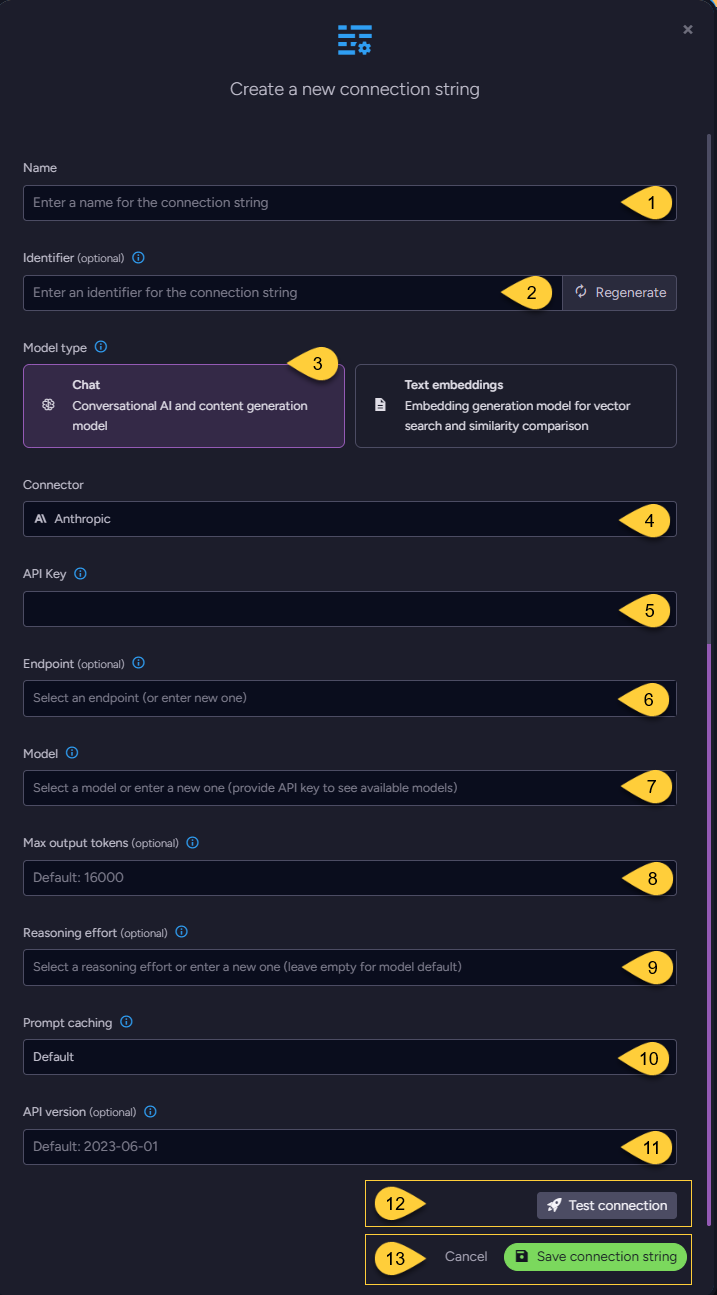
-
Name
Enter a name for this connection string. -
Identifier (optional)
Learn more about the identifier in the connection string identifier section. -
Model Type
Select "Chat".
Anthropic is not listed as a connector when "Text Embeddings" is selected. -
Connector
Select Anthropic from the dropdown menu. -
API key
Enter the Anthropic API key used to authenticate requests.
RavenDB sends the key in thex-api-keyrequest header. -
Endpoint (optional)
- The base URL of the Claude API.
If not set,https://api.anthropic.com/v1/is used.
If set tohttps://api.anthropic.com, RavenDB adds thev1/path automatically. - Any other URL is used as is, so it must include the path under which the Messages API is served
(e.g., when using a proxy or gateway).
RavenDB sends chat requests to<endpoint>/messages.
- The base URL of the Claude API.
-
Model
Select or enter the Claude model to use, e.g.,claude-sonnet-5-5.
After you enter an API key, the dropdown lists the models available to that key. -
Max output tokens (optional)
- The maximum number of tokens the model can generate in a single response.
RavenDB sends this value to Anthropic in themax_tokensfield of the API request.
Thinking tokens count toward this limit. - If not set,
16000is used. The value must be a positive integer. - See Token limits and errors.
- The maximum number of tokens the model can generate in a single response.
-
Reasoning effort (optional)
- Turns on adaptive thinking and sets how much reasoning the model does before answering.
RavenDB sendsthinking: { "type": "adaptive" }and the selected effort level inoutput_config.effort. - Select
low,medium,high,xhigh, ormax, or enter another value supported by the model. - The selected model must support adaptive thinking and the requested effort level; otherwise, Anthropic rejects the request. Supported levels vary by model. Check Anthropic's documentation for the model you use.
- RavenDB trims the value and converts it to lowercase, but does not validate it.
This allows new Anthropic effort levels to be used without waiting for a RavenDB release. - If not set, RavenDB sends no thinking or effort configuration, and the model applies its own defaults.
- Thinking content is not included in the answer.
Thinking tokens are reported inReasoningTokens(see Token usage) and count towardMaxOutputTokens.
- Turns on adaptive thinking and sets how much reasoning the model does before answering.
-
Prompt caching (optional)
-
When caching applies, RavenDB adds Anthropic's top-level
cache_controlfield ({ "type": "ephemeral" }) to the request, allowing Anthropic to cache the prompt prefix and reuse it in later requests. -
Anthropic bills a cache write above the normal input-token price and a cache read well below it.
Caching therefore pays off only when the same prompt prefix is sent again within the cache lifetime:- In an AI agent conversation, every turn resends the system prompt and the prior messages.
- In a GenAI task, the prompt is resent only when the model calls a tool (e.g., a query tool) and RavenDB sends the tool result back. A GenAI task without tools sends each document once, so caching would only add the cost of the cache write.
-
Caching is controlled by
EnablePromptCache.
The Studio options correspond to the following values:EnablePromptCacheAI agents GenAI tasks with tools GenAI tasks without tools null(Studio: Default)Enabled Enabled Disabled true(Studio: True)Enabled Enabled Enabled false(Studio: False)Disabled Disabled Disabled -
RavenDB does not control Anthropic's caching behavior, such as the cache lifetime or the minimum prompt length that can be cached. Cache reads and writes are reported as described in Token usage.
-
-
API version (optional)
The Anthropic API version, sent in theanthropic-versionrequest header.
If not set,2023-06-01is used. -
Click Test Connection to confirm the connection string is set up correctly.
-
Click Save to store the connection string or Cancel to discard changes.
Define the connection string - from the Client API
using (var store = new DocumentStore
{
    // Replace the server URL and database name with your own values.
    Urls = new[] { "https://your-ravendb-server" },
    Database = "YourDatabase"
}.Initialize())
{
    // Define the connection string to Anthropic
    var connectionString = new AiConnectionString
    {
        // Connection string Name & Identifier
        Name = "ConnectionStringToAnthropic",
        Identifier = "identifier-to-the-connection-string", // optional

        // Model type
        // Anthropic supports chat models only
        ModelType = AiModelType.Chat,

        // Anthropic connection settings
        AnthropicSettings = new AnthropicSettings
        {
            ApiKey = "your-api-key",

            // Name of the Claude model to use
            Model = "claude-sonnet-5-5",

            // Optionally, raise the output-token cap (default: 16000)
            MaxOutputTokens = 32000,

            // Optionally, turn on adaptive thinking with the given effort level.
            // The model must support adaptive thinking and this effort level.
            ReasoningEffort = "medium"

            // Endpoint, EnablePromptCache, and ApiVersion are not set,
            // so their defaults apply.
        }
    };

    // Deploy the connection string to the server
    var putConnectionStringOp =
        new PutConnectionStringOperation<AiConnectionString>(connectionString);
    var putConnectionStringResult = store.Maintenance.Send(putConnectionStringOp);
}
Syntax
public class AiConnectionString
{
    public string Name { get; set; }
    public string Identifier { get; set; }
    public AiModelType ModelType { get; set; } // Must be AiModelType.Chat for Anthropic
    public AnthropicSettings AnthropicSettings { get; set; }
}

public sealed class AnthropicSettings : AbstractAiSettings
{
    public AnthropicSettings();
    public AnthropicSettings(string apiKey, string model, string endpoint = null,
        int? maxOutputTokens = null, string reasoningEffort = null);

    public string ApiKey { get; set; }
    public string Model { get; set; }
    public string Endpoint { get; set; }         // optional
    public int? MaxOutputTokens { get; set; }    // optional
    public string ReasoningEffort { get; set; }  // optional
    public bool? EnablePromptCache { get; set; } // optional
    public string ApiVersion { get; set; }       // optional
}
| Property | Type | Required | Description |
|---|---|---|---|
| ApiKey | string | Yes | The Anthropic API key, sent in the x-api-key request header. |
| Model | string | Yes | The Claude model ID, e.g., claude-sonnet-5-5. |
| Endpoint | string | No | The base URL of the Claude API. Default: https://api.anthropic.com/v1/.When set to https://api.anthropic.com, v1/ is added automatically. Any other URL is used as is. |
| MaxOutputTokens | int? | No | The maximum number of tokens per response, sent as max_tokens. Thinking tokens count toward this limit.Default: 16000. Must be positive. |
| ReasoningEffort | string | No | Enables adaptive thinking and sets the effort level. Not sent when null or whitespace.See Reasoning effort. |
| EnablePromptCache | bool? | No | Controls prompt caching for AI agents and GenAI tasks. Default: null (Studio: Default).See Prompt caching. |
| ApiVersion | string | No | The Anthropic API version, sent in the anthropic-version request header.Default: 2023-06-01. |
-
Set
ModelTypetoAiModelType.Chat.
RavenDB rejects the connection string ifModelTypeis set toAiModelType.TextEmbeddings. -
AnthropicSettingshas noTemperaturesetting; RavenDB does not sendtemperatureto Anthropic. -
EmbeddingsMaxConcurrentBatches, inherited fromAbstractAiSettings, has no effect, since Anthropic is not used for embeddings.
Anthropic-specific behavior
Tools and output schemas
A tool's parameters schema defines the arguments the model can pass to that tool.
An output schema defines the structure of the model's final answer.
-
RavenDB sends every tool to Anthropic in strict mode (
strict: true).
Strict mode constrains the arguments generated for each tool call to the tool's parameters schema. -
In the JSON schema for a tool's parameters, each object must include
"additionalProperties": false.
This allows only the properties declared for that object.-
Schemas that RavenDB generates from a parameters sample object already meet this requirement.
-
For a hand-written
ParametersSchema, RavenDB addsadditionalProperties: falseto the root (outermost) object if it is missing. If the root object's schema explicitly sets"additionalProperties": true, RavenDB preserves that value and Anthropic rejects the request. Include"additionalProperties": falsein every nested object; otherwise, Anthropic rejects the request.In the following example,
customeris the nested object. Its schema setsadditionalProperties: false,
and RavenDB adds this property to the root object before sending the schema to Anthropic:{"type": "object","properties": {"customer": {"type": "object","properties": {"id": { "type": "string" }},"required": ["id"],"additionalProperties": false}},"required": ["customer"]}
-
-
Anthropic allows at most 20 strict tools per request.
All tools sent with a request count toward this limit: query tools, action tools, and sub-agents, plus the built-inRetrieveAttachmenttool, which RavenDB adds when attachments are stored on the conversation document so the model can re-read them. -
Both tool parameters schemas and output schemas must follow Anthropic's JSON Schema limitations.
Anthropic rejects requests whose schemas use unsupported features, such as the numeric constraintminimumor the string constraintmaxLength. Limits on optional parameters and parameters that allow multiple types apply across the tool and output schemas in the request. -
Learn more about agent tools in Query tools, Action tools, and Sub-agents as tools.
Token usage
RavenDB represents token-usage statistics using the AiUsage class.
The following table shows how RavenDB populates its properties from the token counts reported by Anthropic.
AiUsage property | Anthropic usage fields |
|---|---|
PromptTokens | input_tokens + cache_read_input_tokens + cache_creation_input_tokens |
CompletionTokens | output_tokens |
TotalTokens | PromptTokens + CompletionTokens |
CachedTokens | cache_read_input_tokens (cache reads only) |
ReasoningTokens | output_tokens_details.thinking_tokens (thinking tokens) |
Cache writes are included in PromptTokens, but are not reported separately.
Token limits and errors
A model's context window limits the total number of tokens in the input and generated response.
RavenDB handles Anthropic token limits as follows:
| Situation | Result | What to do |
|---|---|---|
| The input exceeds the model's context window. Anthropic rejects the request with HTTP 400 prompt is too long. | RavenDB throws TooManyTokensException. | Shorten the input or the conversation history, e.g., with chat trimming. |
The response reaches MaxOutputTokens( stop_reason: max_tokens). | RavenDB returns a truncated text answer or throws TooManyTokensException.See Returning truncated text below. | Increase MaxOutputTokens. |
| The input and generated response together reach the model's context limit. ( stop_reason: model_context_window_exceeded). | RavenDB returns a truncated text answer or throws TooManyTokensException.See Returning truncated text below. | Shorten the input or the conversation history. |
Returning truncated text
When generation stops because of an output or context limit,
RavenDB returns a truncated text answer without throwing an exception only when all of the following apply:
- No output schema is specified.
- The response contains some text.
- The response contains no tool calls.
Other Anthropic responses that RavenDB maps to specific exceptions:
-
Refusal (
stop_reason:refusal):
RavenDB throwsRefusedToAnswerException. -
HTTP 429 with a valid
Retry-Afterheader:
RavenDB throwsRateLimitException, withRetryAfterset from the header.- In an AI agent conversation, the exception reaches your code; RavenDB does not retry the request.
Retry after theRetryAfterdelay. - For a GenAI task, the RavenDB server retries automatically after the delay specified by Anthropic's
Retry-Afterheader. It temporarily limits the task to one concurrent request to the model.
- In an AI agent conversation, the exception reaches your code; RavenDB does not retry the request.
-
HTTP 429 without a valid
Retry-Afterheader
(e.g., when the organization reaches its usage tier's monthly spend cap):
RavenDB throwsInsufficientQuotaExceptionrather than treating the response as a temporary rate limit. -
A rate-limit error during a streamed AI agent response
(anerrorevent whoseerror.typeisrate_limit_error):
RavenDB throwsInsufficientQuotaException. Handle the exception in your application.
RavenDB does not automatically retry the request, and no retry delay is provided.