Vector Search using a Static Index
-
This article explains how to perform a vector search using a static Map index.
Prior to this article, it is recommended to get familiar with the Vector search using a dynamic query article. -
A static index allows you to define a vector index-field,
enabling you to execute vector searches while leveraging the advantages of RavenDB's indexes. -
The vector search feature is only supported by indexes that use the Corax search engine.
-
Vector fields are not supported in Map-Reduce indexes.
See Combining vector search with Map-Reduce indexes for a workaround that uses two separate indexes. -
In this article:
Indexing a vector field - Overview
Defining a vector field in a static index
-
From the Client API:
LoadVector():
When indexing text-embeddings generated by RavenDB's Embeddings generation tasks,
use theLoadVector()method in your index definition.
The embeddings can be loaded either from the document currently being indexed or from a related document.
Examples are available in:
Indexing text-embeddings generated by tasks - from current document
Indexing text-embeddings generated by tasks - from related documentCreateVector():
When indexing your own data (textual or numerical) that was Not generated by the Embeddings generation tasks,
use theCreateVector()method in your index definition.
An example is available in Indexing raw text. -
From the Studio:
See Configure the vector field in the Studio.
The source data types that can be used for vector search are detailed in Data types for vector search.
Parameters defined in the index definition
The following params can be defined for the vector index-field in the index definition:
Source embedding type -
RavenDB supports performing vector search on TEXTUAL values or NUMERICAL arrays.
This param specifies the embedding format of the source data to be indexed.
Options include Text, Single, Int8, or Binary.
Destination embedding type -
Specify the quantization format for the embeddings that will be generated.
Read more about quantization in Quantization options.
Dimensions -
For numerical input only - define the size of the array from your source document.
-
If this param is Not provided -
the size will be determined by the first document indexed and will apply to all subsequent documents. -
Ensure the dimensionality of these numerical arrays (i.e., their length) is consistent across all source documents for the indexed field. An index error will occur if a source document has a different dimension for the indexed field.
Number of edges -
Specify the number of edges that will be created for a vector during indexing.
If not specified, the default value is taken from the following configuration key: Indexing.Corax.VectorSearch.DefaultNumberOfEdges.
Number of candidates for indexing time -
The number of candidates (potential neighboring vectors) that RavenDB evaluates during vector indexing.
If not specified, the default value is taken from the following configuration key: Indexing.Corax.VectorSearch.DefaultNumberOfCandidatesForIndexing.
(Note, this param differs from the number of candidates for query time).
Behavior during indexing
-
Raw textual input:
When indexing raw textual input from your documents, RavenDB generates embedding vectors using the built-in
bge-micro-v2 sentence-transformer model, which are then indexed. -
Pre-made text-embeddings input:
When indexing embeddings that are pre-generated from your documents' raw text by RavenDB's
Embeddings generation tasks, RavenDB indexes them without additional transformation, unless quantization is applied. -
Raw numerical input:
When indexing pre-made numerical arrays that are already in vector format but were Not generated by these tasks,
such as numerical arrays you created externally, RavenDB indexes them without additional transformation,
unless quantization is applied.
The embeddings are indexed on the server using the HNSW algorithm.
This algorithm organizes embeddings into a high-dimensional graph structure,
enabling efficient retrieval of Approximate Nearest Neighbors (ANN) during queries.
Learn how parallel HNSW graph construction can affect result repeatability in What affects vector search results.
Parameters used at query time
Minimum similarity -
You can specify the minimum similarity to use when searching for related vectors. Can be a value between 0.0f and 1.0f.
A value closer to 1.0f requires higher similarity between vectors, while a value closer to 0.0f allows for less similarity.
If not specified, the default value is taken from the following configuration key: Indexing.Corax.VectorSearch.DefaultMinimumSimilarity.
Number of candidates at query time -
You can specify the maximum number of vectors that RavenDB will return from a graph search.
The number of the resulting documents that correspond to these vectors may be:
-
lower than the number of candidates - when multiple vectors originated from the same document.
-
higher than the number of candidates - when the same vector is shared between multiple documents.
If not specified, the default value is taken from the following configuration key: Indexing.Corax.VectorSearch.DefaultNumberOfCandidatesForQuerying.
Search method -
You can specify the search method at query time:
-
Approximate Nearest-Neighbor search (Default):
Search for related vectors in an approximate manner, providing faster results. -
Exact search:
Perform a thorough scan of the vectors to find the actual closest vectors,
offering better accuracy but at a higher computational cost.
To ensure consistent comparisons -
the search term is transformed into an embedding vector using the same method as the vector index-field.
Search results -
The server will search for the most similar vectors in the indexed vector space, taking into account all the parameters described.
The documents that correspond to the resulting vectors are then returned to the client.
By default, the resulting documents will be ordered by their score.
You can modify this behavior using the Indexing.Corax.VectorSearch.OrderByScoreAutomatically configuration key.
In addition, you can apply any of the 'order by' methods to your query, as explained in sort query results.
Vector behavior when documents are deleted
-
RavenDB's implementation of the HNSW graph is append-only.
-
When all documents associated with a specific vector are deleted, the vector itself is Not physically removed but is soft-deleted. This means the vector is marked as deleted and will no longer appear in query results.
Currently, compaction is not supported.
Indexing vector data - TEXT
Indexing raw text
The index in this example indexes data from raw text.
For an index that indexes pre-made text-embeddings see this example below.
The following index defines a vector field named VectorfromText.
It indexes embeddings generated from the raw textual data in the Name field of all Product documents.
- LINQ_index
- JS_index
- IndexDefinition
public class Products_ByVector_Text :
  AbstractIndexCreationTask<Product, Products_ByVector_Text.IndexEntry>
{
  public class IndexEntry()
  {
      // This index-field will hold the embeddings that will be generated
      // from the TEXT in the documents
      public object VectorFromText { get; set; }
  }

  public Products_ByVector_Text()
  {
      Map = products => from product in products
          select new IndexEntry
          {
              // Call 'CreateVector' to create a VECTOR FIELD.
              // Pass the document field containing the text
              // from which the embeddings will be generated.
              VectorFromText = CreateVector(product.Name)
          };

      // You can customize the vector field using EITHER of the following syntaxes:
      // ==========================================================================

      // Customize using VectorOptions:
      VectorIndexes.Add(x => x.VectorFromText,
          new VectorOptions()
          {
              // Define the source embedding type
              SourceEmbeddingType = VectorEmbeddingType.Text,

              // Define the quantization for the destination embedding
              DestinationEmbeddingType = VectorEmbeddingType.Single,

              // Optionally, set the number of edges
              NumberOfEdges = 20,

              // Optionally, set the number of candidates
              NumberOfCandidatesForIndexing = 20
          });

      // OR - Customize using builder:
      Vector(x=>x.VectorFromText,
          builder => builder
              .SourceEmbedding(VectorEmbeddingType.Text)
              .DestinationEmbedding(VectorEmbeddingType.Single)
              .NumberOfEdges(20)
              .NumberOfCandidates(20));

      // The index MUST use the Corax search engine
      SearchEngineType = Raven.Client.Documents.Indexes.SearchEngineType.Corax;
  }
}
public class Products_ByVector_Text_JS : AbstractJavaScriptIndexCreationTask
{
  public Products_ByVector_Text_JS()
  {
      Maps = new HashSet<string>()
      {
          @"map('Products', function (product) {
                 return {
                     VectorFromText: createVector(product.Name)
                 };
          })"
      };

      Fields = new();
      Fields.Add("VectorFromText", new IndexFieldOptions()
      {
          Vector = new VectorOptions()
          {
              SourceEmbeddingType = VectorEmbeddingType.Text,
              DestinationEmbeddingType = VectorEmbeddingType.Single,
              NumberOfEdges = 20,
              NumberOfCandidatesForIndexing = 20
          }
      });

      SearchEngineType = Raven.Client.Documents.Indexes.SearchEngineType.Corax;
  }
}
var indexDefinition = new IndexDefinition
{
  Name = "Products/ByVector/Text",

  Maps = new HashSet<string>
  {
      @"
        from product in docs.Products
        select new
        {
            VectorFromText = CreateVector(product.Name)
        }"
  },

  Fields = new Dictionary<string, IndexFieldOptions>()
  {
      {
          "VectorFromText",
          new IndexFieldOptions()
          {
              Vector = new VectorOptions()
              {
                  SourceEmbeddingType = VectorEmbeddingType.Text,
                  DestinationEmbeddingType = VectorEmbeddingType.Single,
                  NumberOfEdges = 20,
                  NumberOfCandidatesForIndexing = 20
              }
          }
      }
  },

  Configuration = new IndexConfiguration()
  {
      ["Indexing.Static.SearchEngineType"] = "Corax"
  }
};

store.Maintenance.Send(new PutIndexesOperation(indexDefinition));
Execute a vector search using the index:
Results will include Product documents where the Name field is similar to the search term "italian food".
- Query
- Query_async
- DocumentQuery
- DocumentQuery_async
- RawQuery
- RawQuery_async
- RQL
var similarProducts = session
  .Query<Products_ByVector_Text.IndexEntry, Products_ByVector_Text>()
   // Perform a vector search
   // Call the 'VectorSearch' method
  .VectorSearch(
      field => field
           // Call 'WithField'
           // Specify the index-field in which to search for similar values
          .WithField(x => x.VectorFromText),
      searchTerm => searchTerm
           // Call 'ByText'
           // Provide the term for the similarity comparison
          .ByText("italian food"),
      // Optionally, specify the minimum similarity value
      minimumSimilarity: 0.82f,
      // Optionally, specify the number candidates for querying
      numberOfCandidates: 20,
      // Optionally, specify whether the vector search should use the 'exact search method'
      isExact: true)
   // Waiting for not-stale results is not mandatory
   // but will assure results are not stale
  .Customize(x => x.WaitForNonStaleResults())
  .OfType<Product>()
  .ToList();
var similarProducts = await asyncSession
  .Query<Products_ByVector_Text.IndexEntry, Products_ByVector_Text>()
  .VectorSearch(
      field => field
          .WithField(x => x.VectorFromText),
      searchTerm => searchTerm
          .ByText("italian food"), 0.82f, 20, isExact: true)
  .Customize(x => x.WaitForNonStaleResults())
  .OfType<Product>()
  .ToListAsync();
var similarProducts = session.Advanced
  .DocumentQuery<Products_ByVector_Text.IndexEntry, Products_ByVector_Text>()
  .VectorSearch(
      field => field
          .WithField(x => x.VectorFromText),
      searchTerm => searchTerm
          .ByText("italian food"), 0.82f, 20, isExact: true)
  .WaitForNonStaleResults()
  .OfType<Product>()
  .ToList();
var similarProducts = await asyncSession.Advanced
  .AsyncDocumentQuery<Products_ByVector_Text.IndexEntry, Products_ByVector_Text>()
  .VectorSearch(
      field => field
          .WithField(x => x.VectorFromText),
      searchTerm => searchTerm
          .ByText("italian food"),
      0.82f, 20, isExact: true)
  .WaitForNonStaleResults()
  .OfType<Product>()
  .ToListAsync();
var similarProducts = session.Advanced
  .RawQuery<Product>(@"
      from index 'Products/ByVector/Text'
      // Optionally, wrap the 'vector.search' query with 'exact()' to perform an exact search
      where exact(vector.search(VectorFromText, $searchTerm, 0.82, 20))")
  .AddParameter("searchTerm", "italian food")
  .WaitForNonStaleResults()
  .ToList();
var similarProducts = await asyncSession.Advanced
  .AsyncRawQuery<Product>(@"
      from index 'Products/ByVector/Text'
      // Optionally, wrap the 'vector.search' query with 'exact()' to perform an exact search
      where exact(vector.search(VectorFromText, $searchTerm, 0.82, 20))")
  .AddParameter("searchTerm", "italian food")
  .WaitForNonStaleResults()
  .ToListAsync();
from index "Products/ByVector/Text"
// Optionally, wrap the 'vector.search' query with 'exact()' to perform an exact search
where exact(vector.search(VectorFromText, $searchTerm, 0.82, 20))
{ "searchTerm" : "italian food" }
Indexing text-embeddings generated by tasks - from current document
The index in this example defines a vector field named VectorFromTextEmbeddings.
It indexes text-embeddings that were generated by this
embedding generation task.
- LINQ_index
- JS_index
- IndexDefinition
public class Categories_ByPreMadeTextEmbeddings :
  AbstractIndexCreationTask<Category, Categories_ByPreMadeTextEmbeddings.IndexEntry>
{
  public class IndexEntry()
  {
      // This index-field will hold the text embeddings
      // that were generated by the Embeddings Generation Task
      public object VectorFromTextEmbeddings { get; set; }
  }

  public Categories_ByPreMadeTextEmbeddings()
  {
      Map = categories => from category in categories
          select new IndexEntry
          {
              // Call 'LoadVector' to create a VECTOR FIELD. Pass:
              // * The document field name to be indexed (as a string)
              // * The identifier of the task that generated the embeddings
              //   for the 'Name' field
              VectorFromTextEmbeddings = LoadVector("Name", "id-for-task-open-ai")
          };

      VectorIndexes.Add(x => x.VectorFromTextEmbeddings,
          new VectorOptions()
          {
             // Vector options can be customized
             // in the same way as the above index example.
          });

      // The index MUST use the Corax search engine
      SearchEngineType = Raven.Client.Documents.Indexes.SearchEngineType.Corax;
  }
}
public class Categories_ByPreMadeTextEmbeddings_JS : AbstractJavaScriptIndexCreationTask
{
  public Categories_ByPreMadeTextEmbeddings_JS()
  {
      Maps = new HashSet<string>()
      {
          @"map('Categories', function (category) {
                 return {
                     VectorFromTextEmbeddings:
                         loadVector('Name', 'id-for-task-open-ai')
                 };
          })"
      };

      Fields = new();
      Fields.Add("VectorFromTextEmbeddings", new IndexFieldOptions()
      {
          Vector = new VectorOptions()
          {
              // Vector options can be customized
              // in the same way as the above index example.
          }
      });

      SearchEngineType = Raven.Client.Documents.Indexes.SearchEngineType.Corax;
  }
}
var indexDefinition = new IndexDefinition
{
  Name = "Categories/ByPreMadeTextEmbeddings",
  Maps = new HashSet<string>
  {
      @"
        from category in docs.Categories
        select new
        {
            VectorFromTextEmbeddings = LoadVector(""Name"", ""id-for-task-open-ai"")
        }"
  },

  Fields = new Dictionary<string, IndexFieldOptions>()
  {
      {
          "VectorFromTextEmbeddings",
          new IndexFieldOptions()
          {
              Vector = new VectorOptions()
              {
                  // Vector options can be customized
                  // in the same way as the above index example.
              }
          }
      }
  },

  Configuration = new IndexConfiguration()
  {
      ["Indexing.Static.SearchEngineType"] = "Corax"
  }
};

store.Maintenance.Send(new PutIndexesOperation(indexDefinition));
Execute a vector search using the index:
Results will include Category documents where the Name field is similar to the search term "candy".
- Query
- Query_async
- DocumentQuery
- DocumentQuery_async
- RawQuery
- RawQuery_async
- RQL
var similarCategories = session
  .Query<Categories_ByPreMadeTextEmbeddings.IndexEntry, Categories_ByPreMadeTextEmbeddings>()
  // Perform a vector search
  // Call the 'VectorSearch' method
  .VectorSearch(
      field => field
          // Call 'WithField'
          // Specify the index-field in which to search for similar values
          .WithField(x => x.VectorFromTextEmbeddings),
      searchTerm => searchTerm
          // Call 'ByText'
          // Provide the search term for the similarity comparison
          .ByText("candy"),
      // Optionally, specify the minimum similarity value
      minimumSimilarity: 0.75f,
      // Optionally, specify the number of candidates for querying
      numberOfCandidates: 20,
      // Optionally, specify whether the vector search should use the 'exact search method'
      isExact: true)
  // Waiting for not-stale results is not mandatory
  // but will assure results are not stale
  .Customize(x => x.WaitForNonStaleResults())
  .OfType<Category>()
  .ToList();
var similarCategories = await asyncSession
  .Query<Categories_ByPreMadeTextEmbeddings.IndexEntry, Categories_ByPreMadeTextEmbeddings>()
  .VectorSearch(
      field => field
          .WithField(x => x.VectorFromTextEmbeddings),
      searchTerm => searchTerm
          .ByText("candy"), 0.75f, 20, isExact: true)
  .Customize(x => x.WaitForNonStaleResults())
  .OfType<Category>()
  .ToListAsync();
var similarCategories = session.Advanced
  .DocumentQuery<Categories_ByPreMadeTextEmbeddings.IndexEntry, Categories_ByPreMadeTextEmbeddings>()
  .VectorSearch(
      field => field
          .WithField(x => x.VectorFromTextEmbeddings),
      searchTerm => searchTerm
          .ByText("candy"), 0.75f, 20, isExact: true)
  .WaitForNonStaleResults()
  .OfType<Category>()
  .ToList();
var similarCategories = await asyncSession.Advanced
  .AsyncDocumentQuery<Categories_ByPreMadeTextEmbeddings.IndexEntry, Categories_ByPreMadeTextEmbeddings>()
  .VectorSearch(
      field => field
          .WithField(x => x.VectorFromTextEmbeddings),
      searchTerm => searchTerm
          .ByText("candy"),
      0.75f, 20, isExact: true)
  .WaitForNonStaleResults()
  .OfType<Category>()
  .ToListAsync();
var similarCategories = session.Advanced
  .RawQuery<Category>(@"
      from index 'Categories/ByPreMadeTextEmbeddings'
      // Optionally, wrap the 'vector.search' query with 'exact()' to perform an exact search
      where exact(vector.search(VectorFromTextEmbeddings, $searchTerm, 0.75, 20))")
  .AddParameter("searchTerm", "candy")
  .WaitForNonStaleResults()
  .ToList();
var similarCategories = await asyncSession.Advanced
  .AsyncRawQuery<Category>(@"
      from index 'Categories/ByPreMadeTextEmbeddings'
      // Optionally, wrap the 'vector.search' query with 'exact()' to perform an exact search
      where exact(vector.search(VectorFromTextEmbeddings, $searchTerm, 0.75, 20))")
  .AddParameter("searchTerm", "candy")
  .WaitForNonStaleResults()
  .ToListAsync();
from index "Categories/ByPreMadeTextEmbeddings"
// Optionally, wrap the 'vector.search' query with 'exact()' to perform an exact search
where exact(vector.search(VectorFromTextEmbeddings, $p0, 0.75, 20))
{ "p0": "candy" }
Indexing text-embeddings generated by tasks - from related document
The previous example
indexed pre-made embeddings that were generated from the document currently being indexed.
However, you can also index pre-made embeddings that were generated from a related document.
The index in this example is defined on the Products collection,
but the embeddings it indexes were generated from the related Category documents:
- Each Product document references a category via its
Categoryfield (e.g.,categories/1-A). - An embeddings generation task
is defined on the Categories collection and generates embeddings
from each category'sNamefield. - For each product,
LoadVectoruses the product'sCategoryvalue to load the embeddings generated
for the related category'sNamefield.
This way, instead of searching products by their own content,
the index lets you find products whose category is semantically similar to a search term.
- LINQ_index
- JS_index
- IndexDefinition
public class Products_ByCategoryVector :
    AbstractIndexCreationTask<Product, Products_ByCategoryVector.IndexEntry>
{
    public class IndexEntry()
    {
        // This index-field will hold the text embeddings that were generated
        // by the Embeddings Generation Task for the RELATED Category document
        public object CategoryVectorFromTextEmbeddings { get; set; }
    }

    public Products_ByCategoryVector()
    {
        Map = products => from product in products
            select new IndexEntry
            {
                // Call 'LoadVector' to create a VECTOR FIELD. Pass:
                // * The field path in the related document for which the task generated embeddings
                // * The identifier of the task that generated the embeddings
                // * The ID of the RELATED source document
                //
                // In this LoadVector overload, the related document's collection is inferred
                // from the generic type parameter <Category>.
                CategoryVectorFromTextEmbeddings =
                    LoadVector<Category>("Name", "id-for-task-open-ai", product.Category)
            };

        VectorIndexes.Add(x => x.CategoryVectorFromTextEmbeddings,
            new VectorOptions()
            {
               // Vector options can be customized
               // in the same way as the above index examples.
            });

        // The index MUST use the Corax search engine
        SearchEngineType = Raven.Client.Documents.Indexes.SearchEngineType.Corax;
    }
}
public class Products_ByCategoryVector_JS : AbstractJavaScriptIndexCreationTask
{
    public Products_ByCategoryVector_JS()
    {
        Maps = new HashSet<string>()
        {
            @"map('Products', function (product) {
                   return {
                       CategoryVectorFromTextEmbeddings:
                           // JS indexes have no generic overload, so pass the
                           // related source collection as a string literal in the last argument.
                           // RavenDB uses it when compiling the index
                           // to track the @embeddings/Categories collection.
                           loadVector('Name', 'id-for-task-open-ai', product.Category, 'Categories')
                   };
            })"
        };

        Fields = new();
        Fields.Add("CategoryVectorFromTextEmbeddings", new IndexFieldOptions()
        {
            Vector = new VectorOptions()
            {
                // Vector options can be customized
                // in the same way as the above index examples.
            }
        });

        SearchEngineType = Raven.Client.Documents.Indexes.SearchEngineType.Corax;
    }
}
var indexDefinition = new IndexDefinition
{
    Name = "Products/ByCategoryVector",
    Maps = new HashSet<string>
    {
        @"
          from product in docs.Products
          select new
          {
              // String-based index definitions have no generic overload,
              // so pass the related source collection as a string literal in the last argument.
              // RavenDB uses it when compiling the index
              // to track @embeddings/Categories collection.
              CategoryVectorFromTextEmbeddings =
                  LoadVector(""Name"", ""id-for-task-open-ai"", product.Category, ""Categories"")
          }"
    },

    Fields = new Dictionary<string, IndexFieldOptions>()
    {
        {
            "CategoryVectorFromTextEmbeddings",
            new IndexFieldOptions()
            {
                Vector = new VectorOptions()
                {
                    // Vector options can be customized
                    // in the same way as the above index examples.
                }
            }
        }
    },

    Configuration = new IndexConfiguration()
    {
        ["Indexing.Static.SearchEngineType"] = "Corax"
    }
};

store.Maintenance.Send(new PutIndexesOperation(indexDefinition));
Tracking changes to related embeddings
-
The index tracks the related source's embeddings collection for the related source collection
(@embeddings/Categoriesin this example).When the embeddings document for a referenced category changes, the affected index entries are automatically re-indexed. This can happen, for example, when the category's
Nameis modified and the embeddings generation task regenerates its embeddings. -
If a product references a category whose embedding has Not been generated yet,
the vector field is indexed asnullfor that product (no error is raised). -
A single index can load embeddings from multiple sources -
e.g., from the currently-indexed document AND from one or more related collections.
Execute a vector search using the index:
Results will include Product documents whose related category Name is similar to the search term "soft drinks".
- Query
- Query_async
- DocumentQuery
- DocumentQuery_async
- RawQuery
- RawQuery_async
- RQL
var relatedProducts = session
    .Query<Products_ByCategoryVector.IndexEntry, Products_ByCategoryVector>()
    // Perform a vector search
    // Call the 'VectorSearch' method
    .VectorSearch(
        field => field
            // Call 'WithField'
            // Specify the index-field in which to search for similar values
            .WithField(x => x.CategoryVectorFromTextEmbeddings),
        searchTerm => searchTerm
            // Call 'ByText'
            // Provide the search term for the similarity comparison
            .ByText("soft drinks"),
        // Optionally, specify the minimum similarity value
        minimumSimilarity: 0.75f,
        // Optionally, specify the number of candidates for querying
        numberOfCandidates: 20)
    .Customize(x => x.WaitForNonStaleResults())
    .OfType<Product>()
    .ToList();
var relatedProducts = await asyncSession
    .Query<Products_ByCategoryVector.IndexEntry, Products_ByCategoryVector>()
    .VectorSearch(
        field => field
            .WithField(x => x.CategoryVectorFromTextEmbeddings),
        searchTerm => searchTerm
            .ByText("soft drinks"), 0.75f, 20)
    .Customize(x => x.WaitForNonStaleResults())
    .OfType<Product>()
    .ToListAsync();
var relatedProducts = session.Advanced
    .DocumentQuery<Products_ByCategoryVector.IndexEntry, Products_ByCategoryVector>()
    .VectorSearch(
        field => field
            .WithField(x => x.CategoryVectorFromTextEmbeddings),
        searchTerm => searchTerm
            .ByText("soft drinks"), 0.75f, 20)
    .WaitForNonStaleResults()
    .OfType<Product>()
    .ToList();
var relatedProducts = await asyncSession.Advanced
    .AsyncDocumentQuery<Products_ByCategoryVector.IndexEntry, Products_ByCategoryVector>()
    .VectorSearch(
        field => field
            .WithField(x => x.CategoryVectorFromTextEmbeddings),
        searchTerm => searchTerm
            .ByText("soft drinks"),
        0.75f, 20)
    .WaitForNonStaleResults()
    .OfType<Product>()
    .ToListAsync();
var relatedProducts = session.Advanced
    .RawQuery<Product>(@"
        from index 'Products/ByCategoryVector'
        where vector.search(CategoryVectorFromTextEmbeddings, $searchTerm, 0.75, 20)")
    .AddParameter("searchTerm", "soft drinks")
    .WaitForNonStaleResults()
    .ToList();
var relatedProducts = await asyncSession.Advanced
    .AsyncRawQuery<Product>(@"
        from index 'Products/ByCategoryVector'
        where vector.search(CategoryVectorFromTextEmbeddings, $searchTerm, 0.75, 20)")
    .AddParameter("searchTerm", "soft drinks")
    .WaitForNonStaleResults()
    .ToListAsync();
from index "Products/ByCategoryVector"
where vector.search(CategoryVectorFromTextEmbeddings, $searchTerm, 0.75, 20)
{ "searchTerm" : "soft drinks" }
Indexing vector data - NUMERICAL
-
RavenDB’s Embedding generation tasks are typically used to generate vector embeddings from TEXTUAL data stored in your documents. These embeddings are then stored in dedicated collections.
-
However, you are not limited to using these built-in tasks. You can generate your own NUMERICAL embeddings - from any source (e.g., text, image, audio, etc.) - using a suitable multimodal model, and store them:
- as numerical arrays in your documents’ properties, or
- as attachments associated with your documents.
-
This numerical data can be indexed in a vector field in a static-index.
Once indexed, you can query the vector field using either of the following:-
Query using a numerical embedding (direct vector):
You provide a numerical array as the search term, and RavenDB compares it directly against the indexed embeddings. See Indexing numerical data and querying using numeric input. -
Query using a text input:
You provide a text string as the search term and specify an existing Embedding generation task that will convert this text into a vector embedding. This will work only if:- the vector field you're querying contains numerical embeddings that were created using the same model as the one configured in the specified task, and
- that task exists in your database (i.e., its identifier is still available).
In this case, RavenDB uses the task to transform the search term into an embedding, then compares it to the vector data that you had previously indexed yourself. To improve performance, the generated embedding is cached, so repeated queries with the same search term don’t require re-computation.
This hybrid approach allows you to index custom embeddings (e.g., externally generated image vectors) while still benefiting from RavenDB’s ability to perform semantic text search, as long as the same model was used for both.
See Indexing numerical data and querying using text input.
-
-
The examples in this section use the sample data provided in the dynamic query article.
Indexing numerical data and querying using numeric input
The following index defines a vector field named VectorFromSingle.
It indexes embeddings generated from the numerical data in the TagsEmbeddedAsSingle field of all Movie documents.
The raw numerical data in the source documents is in 32-bit floating-point format.
- LINQ_index
- JS_index
- IndexDefinition
public class Movies_ByVector_Single :
  AbstractIndexCreationTask<Movie, Movies_ByVector_Single.IndexEntry>
{
  public class IndexEntry()
  {
      // This index-field will hold the embeddings that will be generated
      // from the NUMERICAL content in the documents.
      public object VectorFromSingle { get; set; }
  }

  public Movies_ByVector_Single()
  {
      Map = movies => from movie in movies
          select new IndexEntry
          {
              // Call 'CreateVector' to create a VECTOR FIELD.
              // Pass the document field containing the array (32-bit floating-point values)
              // from which the embeddings will be generated.
              VectorFromSingle = CreateVector(movie.TagsEmbeddedAsSingle)
          };

      // EITHER - Customize the vector field using VectorOptions:
      VectorIndexes.Add(x => x.VectorFromSingle,
          new VectorOptions()
          {
              // Define the source embedding type
              SourceEmbeddingType = VectorEmbeddingType.Single,

              // Define the quantization for the destination embedding
              DestinationEmbeddingType = VectorEmbeddingType.Single,

              // It is recommended to configure the number of dimensions
              // which is the size of the arrays that will be indexed.
              Dimensions = 2,

              // Optionally, set the number of edges and candidates
              NumberOfEdges = 20,
              NumberOfCandidatesForIndexing = 20
          });

      // OR - Customize the vector field using builder:
      Vector(x => x.VectorFromSingle,
          builder => builder
              .SourceEmbedding(VectorEmbeddingType.Single)
              .DestinationEmbedding(VectorEmbeddingType.Single)
              .Dimensions(2)
              .NumberOfEdges(20)
              .NumberOfCandidates(20));

      // The index MUST use the Corax search engine
      SearchEngineType = Raven.Client.Documents.Indexes.SearchEngineType.Corax;
  }
}
public class Movies_ByVector_Single_JS : AbstractJavaScriptIndexCreationTask
{
  public Movies_ByVector_Single_JS()
  {
      Maps = new HashSet<string>()
      {
          @"map('Movies', function (movie) {
                 return {
                     VectorFromSingle: createVector(movie.TagsEmbeddedAsSingle)
                 };
          })"
      };

      Fields = new();
      Fields.Add("VectorFromSingle", new IndexFieldOptions()
      {
          Vector = new VectorOptions()
          {
              SourceEmbeddingType = VectorEmbeddingType.Single,
              DestinationEmbeddingType = VectorEmbeddingType.Single,
              Dimensions = 2,
              NumberOfEdges = 20,
              NumberOfCandidatesForIndexing = 20
          }
      });

      SearchEngineType = Raven.Client.Documents.Indexes.SearchEngineType.Corax;
  }
}
var indexDefinition = new IndexDefinition
{
  Name = "Movies/ByVector/Single",

  Maps = new HashSet<string>
  {
      @"
        from movie in docs.Movies
        select new
        {
            VectorFromSingle = CreateVector(movie.TagsEmbeddedAsSingle)
        }"
  },

  Fields = new Dictionary<string, IndexFieldOptions>()
  {
      {
          "VectorFromSingle",
          new IndexFieldOptions()
          {
              Vector = new VectorOptions()
              {
                  SourceEmbeddingType = VectorEmbeddingType.Single,
                  DestinationEmbeddingType = VectorEmbeddingType.Single,
                  Dimensions = 2,
                  NumberOfEdges = 20,
                  NumberOfCandidatesForIndexing = 20
              }
          }
      }
  },

  Configuration = new IndexConfiguration()
  {
      ["Indexing.Static.SearchEngineType"] = "Corax"
  }
};

store.Maintenance.Send(new PutIndexesOperation(indexDefinition));
Execute a vector search using the index:
(Provide a vector as the search term to the ByEmbedding method)
- Query
- Query_async
- DocumentQuery
- DocumentQuery_async
- RawQuery
- RawQuery_async
- RQL
var similarMovies = session
  .Query<Movies_ByVector_Single.IndexEntry, Movies_ByVector_Single>()
   // Perform a vector search
   // Call the 'VectorSearch' method
  .VectorSearch(
      field => field
           // Call 'WithField'
           // Specify the index-field in which to search for similar values
          .WithField(x => x.VectorFromSingle),
      queryVector => queryVector
           // Call 'ByEmbedding'
           // Provide the vector for the similarity comparison
          .ByEmbedding(
               new RavenVector<float>(new float[] { 6.599999904632568f, 7.699999809265137f })))
  .Customize(x => x.WaitForNonStaleResults())
  .OfType<Movie>()
  .ToList();
var similarMovies = await asyncSession
  .Query<Movies_ByVector_Single.IndexEntry, Movies_ByVector_Single>()
  .VectorSearch(
      field => field
          .WithField(x => x.VectorFromSingle),
      queryVector => queryVector
          .ByEmbedding(
              new RavenVector<float>(new float[] { 6.599999904632568f, 7.699999809265137f })))
  .Customize(x => x.WaitForNonStaleResults())
  .OfType<Movie>()
  .ToListAsync();
var similarMovies = session.Advanced
  .DocumentQuery<Movies_ByVector_Single.IndexEntry, Movies_ByVector_Single>()
  .VectorSearch(
      field => field
          .WithField(x => x.VectorFromSingle),
      queryVector => queryVector
          .ByEmbedding(
              new RavenVector<float>(new float[] { 6.599999904632568f, 7.699999809265137f })))
  .WaitForNonStaleResults()
  .OfType<Movie>()
  .ToList();
var similarMovies = await asyncSession.Advanced
  .AsyncDocumentQuery<Movies_ByVector_Single.IndexEntry, Movies_ByVector_Single>()
  .VectorSearch(
      field => field
          .WithField(x => x.VectorFromSingle),
      queryVector => queryVector
          .ByEmbedding(
              new RavenVector<float>(new float[] { 6.599999904632568f, 7.699999809265137f })))
  .WaitForNonStaleResults()
  .OfType<Movie>()
  .ToListAsync();
var similarMovies = session.Advanced
  .RawQuery<Movie>(@"
      from index 'Movies/ByVector/Single'
      where vector.search(VectorFromSingle, $queryVector)")
  .AddParameter("queryVector", new RavenVector<float>(new float[]
   {
       6.599999904632568f, 7.699999809265137f
   }))
  .WaitForNonStaleResults()
  .ToList();
var similarMovies = await asyncSession.Advanced
  .AsyncRawQuery<Movie>(@"
      from index 'Movies/ByVector/Single'
      where vector.search(VectorFromSingle, $queryVector)")
  .AddParameter("queryVector", new RavenVector<float>(new float[]
   {
       6.599999904632568f, 7.699999809265137f
   }))
  .WaitForNonStaleResults()
  .ToListAsync();
from index "Movies/ByVector/Single"
where vector.search(VectorFromSingle, $queryVector)
{ "queryVector" : { "@vector" : [6.599999904632568, 7.699999809265137] }}
The following index defines a vector field named VectorFromInt8Arrays.
It indexes embeddings generated from the numerical arrays in the TagsEmbeddedAsInt8 field of all Movie documents.
The raw numerical data in the source documents is in Int8 (8-bit integers) format.
- LINQ_index
- JS_index
- IndexDefinition
public class Movies_ByVector_Int8 :
  AbstractIndexCreationTask<Movie, Movies_ByVector_Int8.IndexEntry>
{
  public class IndexEntry()
  {
      // This index-field will hold the embeddings that will be generated
      // from the NUMERICAL content in the documents.
      public object VectorFromInt8Arrays { get; set; }
  }

  public Movies_ByVector_Int8()
  {
      Map = movies => from movie in movies
          select new IndexEntry
          {
              // Call 'CreateVector' to create a VECTOR FIELD.
              // Pass the document field containing the arrays (8-bit integer values)
              // from which the embeddings will be generated.
              VectorFromInt8Arrays = CreateVector(movie.TagsEmbeddedAsInt8)
          };

      // EITHER - Customize the vector field using VectorOptions:
      VectorIndexes.Add(x => x.VectorFromInt8Arrays,
          new VectorOptions()
          {
              // Define the source embedding type
              SourceEmbeddingType = VectorEmbeddingType.Int8,

              // Define the quantization for the destination embedding
              DestinationEmbeddingType = VectorEmbeddingType.Int8,

              // It is recommended to configure the number of dimensions
              // which is the size of the arrays that will be indexed.
              Dimensions = 2,

              // Optionally, set the number of edges and candidates
              NumberOfEdges = 20,
              NumberOfCandidatesForIndexing = 20
          });

      // OR - Customize the vector field using builder:
      Vector(x => x.VectorFromInt8Arrays,
          builder => builder
              .SourceEmbedding(VectorEmbeddingType.Int8)
              .DestinationEmbedding(VectorEmbeddingType.Int8)
              .Dimensions(2)
              .NumberOfEdges(20)
              .NumberOfCandidates(20));

      // The index MUST use the Corax search engine
      SearchEngineType = Raven.Client.Documents.Indexes.SearchEngineType.Corax;
  }
}
public class Movies_ByVector_Int8_JS : AbstractJavaScriptIndexCreationTask
{
  public Movies_ByVector_Int8_JS()
  {
      Maps = new HashSet<string>()
      {
          @"map('Movies', function (movie) {
                 return {
                     VectorFromInt8Arrays: createVector(movie.TagsEmbeddedAsInt8)
                 };
          })"
      };

      Fields = new();
      Fields.Add("VectorFromInt8Arrays", new IndexFieldOptions()
      {
          Vector = new VectorOptions()
          {
              SourceEmbeddingType = VectorEmbeddingType.Int8,
              DestinationEmbeddingType = VectorEmbeddingType.Int8,
              Dimensions = 2,
              NumberOfEdges = 20,
              NumberOfCandidatesForIndexing = 20
          }
      });

      SearchEngineType = Raven.Client.Documents.Indexes.SearchEngineType.Corax;
  }
}
var indexDefinition = new IndexDefinition
{
  Name = "Movies/ByVector/Int8",

  Maps = new HashSet<string>
  {
      @"
        from movie in docs.Movies
        select new
        {
            VectorFromInt8Arrays = CreateVector(movie.TagsEmbeddedAsInt8)
        }"
  },

  Fields = new Dictionary<string, IndexFieldOptions>()
  {
      {
          "VectorFromInt8Arrays",
          new IndexFieldOptions()
          {
              Vector = new VectorOptions()
              {
                  SourceEmbeddingType = VectorEmbeddingType.Int8,
                  DestinationEmbeddingType = VectorEmbeddingType.Int8,
                  Dimensions = 2,
                  NumberOfEdges = 20,
                  NumberOfCandidatesForIndexing = 20
              }
          }
      }
  },

  Configuration = new IndexConfiguration()
  {
      ["Indexing.Static.SearchEngineType"] = "Corax"
  }
};

store.Maintenance.Send(new PutIndexesOperation(indexDefinition));
Execute a vector search using the index:
(Provide a vector as the search term to the ByEmbedding method)
- Query
- Query_async
- DocumentQuery
- DocumentQuery_async
- RawQuery
- RawQuery_async
- RQL
var similarMovies = session
  .Query<Movies_ByVector_Int8.IndexEntry, Movies_ByVector_Int8>()
   // Perform a vector search
   // Call the 'VectorSearch' method
  .VectorSearch(
      field => field
           // Call 'WithField'
           // Specify the index-field in which to search for similar values
          .WithField(x => x.VectorFromInt8Arrays),
      queryVector => queryVector
           // Call 'ByEmbedding'
           // Provide the vector for the similarity comparison
           // (Note: provide a single vector)
          .ByEmbedding(
              // The provided vector MUST be in the same format as was stored in your document
              // Call 'VectorQuantizer.ToInt8' to transform the rawData to the Int8 format
              VectorQuantizer.ToInt8(new float[] { 0.1f, 0.2f })))
  .Customize(x => x.WaitForNonStaleResults())
  .OfType<Movie>()
  .ToList();
var similarMovies = await asyncSession
  .Query<Movies_ByVector_Int8.IndexEntry, Movies_ByVector_Int8>()
  .VectorSearch(
      field => field
          .WithField(x => x.VectorFromInt8Arrays),
      queryVector => queryVector
          .ByEmbedding(
              VectorQuantizer.ToInt8(new float[] { 0.1f, 0.2f })))
  .Customize(x => x.WaitForNonStaleResults())
  .OfType<Movie>()
  .ToListAsync();
var similarMovies = session.Advanced
  .DocumentQuery<Movies_ByVector_Int8.IndexEntry, Movies_ByVector_Int8>()
  .VectorSearch(
      field => field
          .WithField(x => x.VectorFromInt8Arrays),
      queryVector => queryVector
          .ByEmbedding(
              VectorQuantizer.ToInt8(new float[] { 0.1f, 0.2f })))
  .WaitForNonStaleResults()
  .OfType<Movie>()
  .ToList();
var similarMovies = await asyncSession.Advanced
  .AsyncDocumentQuery<Movies_ByVector_Int8.IndexEntry, Movies_ByVector_Int8>()
  .VectorSearch(
      field => field
          .WithField(x => x.VectorFromInt8Arrays),
      queryVector => queryVector
          .ByEmbedding(
              VectorQuantizer.ToInt8(new float[] { 0.1f, 0.2f })))
  .WaitForNonStaleResults()
  .OfType<Movie>()
  .ToListAsync();
var similarMovies = session.Advanced
  .RawQuery<Movie>(@"
      from index 'Movies/ByVector/Int8'
      where vector.search(VectorFromInt8Arrays, $queryVector)")
  .AddParameter("queryVector", VectorQuantizer.ToInt8(new float[] { 0.1f, 0.2f }))
  .WaitForNonStaleResults()
  .ToList();
var similarMovies = await asyncSession.Advanced
  .AsyncRawQuery<Movie>(@"
      from index 'Movies/ByVector/Int8'
      where vector.search(VectorFromInt8Arrays, $queryVector)")
  .AddParameter("queryVector", VectorQuantizer.ToInt8(new float[] { 0.1f, 0.2f }))
  .WaitForNonStaleResults()
  .ToListAsync();
from index "Movies/ByVector/Int8"
where vector.search(VectorFromInt8Arrays, $queryVector)
{ "queryVector" : [64, 127, -51, -52, 76, 62] }
Indexing numerical data and querying using text input
The following index defines a vector field named VectorFromPhoto.
It indexes embeddings generated from the numerical data in the MoviePhotoEmbedding field of all Movie documents.
- LINQ_index
- JS_index
- IndexDefinition
public class Movies_ByVectorFromPhoto :
    AbstractIndexCreationTask<Movie, Movies_ByVectorFromPhoto.IndexEntry>
{
    public class IndexEntry()
    {
        // This index-field will hold the embeddings that will be generated
        // from the NUMERICAL content in the documents.
        public object VectorFromPhoto { get; set; }
    }

    public Movies_ByVectorFromPhoto()
    {
        Map = movies => from movie in movies
            select new IndexEntry
            {
                // Call 'CreateVector' to create a VECTOR FIELD.
                // Pass the document field containing the array
                // from which the embeddings will be generated.
                VectorFromPhoto = CreateVector(movie.MoviePhotoEmbedding)
            };

        // Customize the vector field:
        Vector(x => x.VectorFromPhoto,
            builder => builder
                .SourceEmbedding(VectorEmbeddingType.Single)
                .DestinationEmbedding(VectorEmbeddingType.Single)
                 // Dimensions should match the embedding size, 6 is only for our simple example...
                .Dimensions(6));

        // The index MUST use the Corax search engine
        SearchEngineType = Raven.Client.Documents.Indexes.SearchEngineType.Corax;
    }
}
public class Movies_ByVectorFromPhoto_JS : AbstractJavaScriptIndexCreationTask
{
    public Movies_ByVectorFromPhoto_JS()
    {
        Maps = new HashSet<string>()
        {
            @"map('Movies', function (movie) {
                   return {
                       VectorFromPhoto: createVector(movie.MoviePhotoEmbedding)
                   };
            })"
        };

        Fields = new();
        Fields.Add("VectorFromPhoto", new IndexFieldOptions()
        {
            Vector = new VectorOptions()
            {
                SourceEmbeddingType = VectorEmbeddingType.Single,
                DestinationEmbeddingType = VectorEmbeddingType.Single,
                Dimensions = 6, // using 6 only for this simple example
            }
        });

        SearchEngineType = Raven.Client.Documents.Indexes.SearchEngineType.Corax;
    }
}
var indexDefinition = new IndexDefinition
{
    Name = "Movies/ByVectorFromPhoto",

    Maps = new HashSet<string>
    {
        @"
          from movie in docs.Movies
          select new
          {
              VectorFromPhoto = CreateVector(movie.MoviePhotoEmbedding)
          }"
    },

    Fields = new Dictionary<string, IndexFieldOptions>()
    {
        {
            "VectorFromPhoto",
            new IndexFieldOptions()
            {
                Vector = new VectorOptions()
                {
                    SourceEmbeddingType = VectorEmbeddingType.Single,
                    DestinationEmbeddingType = VectorEmbeddingType.Single,
                    Dimensions = 6, // using 6 only for this simple example
                }
            }
        }
    },

    Configuration = new IndexConfiguration()
    {
        ["Indexing.Static.SearchEngineType"] = "Corax"
    }
};

store.Maintenance.Send(new PutIndexesOperation(indexDefinition));
Execute a vector search using the index:
-
Pass a textual search term to the
ByTextmethod,
along with the ID of the embedding generation task that will convert the text into an embedding. -
The query is only meaningful if the vector field being searched contains numerical embeddings
generated using the same model as the one configured in the specified task. -
If the specified task ID is not found, RavenDB will throw an
InvalidQueryException.
To avoid this error, you can verify that the specified embeddings generation task exists before issuing the query.
See Get embeddings generation task details to learn how to check which tasks are defined and what their identifiers are.
- Query
- Query_async
- DocumentQuery
- DocumentQuery_async
- RawQuery
- RawQuery_async
- RQL
// Query for movies with images related to 'NASA'
var similarMovies = session
    .Query<Movies_ByVectorFromPhoto.IndexEntry, Movies_ByVectorFromPhoto>()
    // Perform a vector search
    // Call the 'VectorSearch' method
    .VectorSearch(
        field => field
            // Call 'WithField'
            // Specify the index field that stores the image embeddings
            .WithField(x => x.VectorFromPhoto),
        queryVector => queryVector
            // Call 'ByText'
            // Provide a textual description to be embedded by the same multimodal model
            // used for the MoviePhotoEmbedding field
            .ByText("NASA", "id-of-embedding-generation-task"),
        // As with any other vector search query, you can optionally specify
        // 'minimumSimilarity', 'numberOfCandidates', and 'isExact'
        minimumSimilarity: 0.85f)
    .Customize(x => x.WaitForNonStaleResults())
    .OfType<Movie>()
    .ToList();
var similarMovies = await asyncSession
    .Query<Movies_ByVectorFromPhoto.IndexEntry, Movies_ByVectorFromPhoto>()
    .VectorSearch(
        field => field.WithField(x => x.VectorFromPhoto),
        queryVector => queryVector.ByText("NASA", "id-of-embedding-generation-task"),
     minimumSimilarity: 0.85f)
    .Customize(x => x.WaitForNonStaleResults())
    .OfType<Movie>()
    .ToListAsync();
var similarMovies = session.Advanced
    .DocumentQuery<Movies_ByVectorFromPhoto.IndexEntry, Movies_ByVectorFromPhoto>()
    .VectorSearch(
         field => field.WithField(x => x.VectorFromPhoto),
         queryVector => queryVector.ByText("NASA", "id-of-embedding-generation-task"), 0.85f)
    .WaitForNonStaleResults()
    .OfType<Movie>()
    .ToList();
var similarMovies = await asyncSession.Advanced
    .AsyncDocumentQuery<Movies_ByVectorFromPhoto.IndexEntry, Movies_ByVectorFromPhoto>()
    .VectorSearch(
        "VectorFromPhoto",
        queryVector => queryVector.ByText("NASA", "id-of-embedding-generation-task"), 0.85f)
    .WaitForNonStaleResults()
    .OfType<Movie>()
    .ToListAsync();
var similarMovies = session
    .Advanced
    .RawQuery<Movie>(@"
        from index 'Movies/ByVectorFromPhoto'
        where vector.search(VectorFromPhoto, embedding.text($searchTerm, ai.task($embeddingTaskId)), 0.85, null)
    ")
    .AddParameter("searchTerm", "NASA")
    .AddParameter("embeddingTaskId", "id-of-embedding-generation-task")
    .ToList();
var similarMovies = await asyncSession
    .Advanced
    .RawQuery<Movie>(@"
        from index 'Movies/ByVectorFromPhoto'
        where vector.search(VectorFromPhoto, embedding.text($searchTerm, ai.task($embeddingTaskId)), 0.85, null)
    ")
    .AddParameter("searchTerm", "NASA")
    .AddParameter("embeddingTaskId", "id-of-embedding-generation-task")
    .ToListAsync();
from index 'Movies/ByVectorFromPhoto'
where vector.search(VectorFromPhoto, embedding.text($searchTerm, ai.task($embeddingTaskId)), 0.85, null)
{ "searchTerm" : "NASA", "embeddingTaskId" : "id-of-embedding-generation-task" }
Indexing multiple field types
An index can define multiple types of index-fields. In this example, the index includes:
A 'regular' field, a 'vector' field, and a field configured for full-text search.
This allows you to query across all fields using various predicates.
- LINQ_index
- JS_index
- IndexDefinition
public class Products_ByMultipleFields :
  AbstractIndexCreationTask<Product, Products_ByMultipleFields.IndexEntry>
{
  public class IndexEntry()
  {
      // An index-field for 'regular' data
      public decimal PricePerUnit { get; set; }

      // An index-field for 'full-text' search
      public string Name { get; set; }

      // An index-field for 'vector' search
      public object VectorFromText { get; set; }
  }

  public Products_ByMultipleFields()
  {
      Map = products => from product in products
          select new IndexEntry
          {
              PricePerUnit = product.PricePerUnit,
              Name = product.Name,
              VectorFromText = CreateVector(product.Name)
          };

      // Configure the index-field 'Name' for FTS:
      Index(x => x.Name, FieldIndexing.Search);

      // Note:
      // Default values will be used for the VECTOR FIELD if not customized here.

      // The index MUST use the Corax search engine
      SearchEngineType = Raven.Client.Documents.Indexes.SearchEngineType.Corax;
  }
}
public class Products_ByMultipleFields_JS : AbstractJavaScriptIndexCreationTask
{
  public Products_ByMultipleFields_JS()
  {
      Maps = new HashSet<string>()
      {
          @"map('Products', function (product) {
                 return {
                     PricePerUnit: product.PricePerUnit,
                     Name: product.Name,
                     VectorFromText: createVector(product.Name)
                 };
          })"
      };

      Fields = new();
      Fields.Add("Name", new IndexFieldOptions()
      {
          Indexing = FieldIndexing.Search
      });

      SearchEngineType = Raven.Client.Documents.Indexes.SearchEngineType.Corax;
  }
}
var indexDefinition = new IndexDefinition
{
  Name = "Products/ByMultipleFields",
  Maps = new HashSet<string>
  {
      @"
        from product in docs.Products
        select new
        {
            PricePerUnit = product.PricePerUnit,
            Name = product.Name,
            VectorFromText  = CreateVector(product.Name)
        }"
  },

  Fields = new Dictionary<string, IndexFieldOptions>()
  {
      {
          "Name",
          new IndexFieldOptions()
          {
              Indexing = FieldIndexing.Search
          }
      }
  },

  Configuration = new IndexConfiguration()
  {
      ["Indexing.Static.SearchEngineType"] = "Corax"
  }
};

store.Maintenance.Send(new PutIndexesOperation(indexDefinition));
Execute a query that combines predicates across all index-field types:
- DocumentQuery
- DocumentQuery_async
- RawQuery
- RawQuery_async
- RQL
var results = session.Advanced
  .DocumentQuery<Products_ByMultipleFields.IndexEntry, Products_ByMultipleFields>()
   // Perform a regular search
  .WhereGreaterThan(x => x.PricePerUnit, 200)
  .OrElse()
   // Perform a full-text search
  .Search(x => x.Name, "Alice")
  .OrElse()
   // Perform a vector search
  .VectorSearch(
      field => field
          .WithField(x => x.VectorFromText),
      searchTerm => searchTerm
          .ByText("italian food"),
      minimumSimilarity: 0.8f)
  .WaitForNonStaleResults()
  .OfType<Product>()
  .ToList();
var results = await asyncSession.Advanced
  .AsyncDocumentQuery<Products_ByMultipleFields.IndexEntry, Products_ByMultipleFields>()
  .WhereGreaterThan(x => x.PricePerUnit, 200)
  .OrElse()
  .Search(x => x.Name, "Alice")
  .OrElse()
  .VectorSearch(
      field => field
          .WithField(x => x.VectorFromText),
      searchTerm => searchTerm
          .ByText("italian food"),
      minimumSimilarity: 0.8f)
  .WaitForNonStaleResults()
  .OfType<Product>()
  .ToListAsync();
var results = session.Advanced
  .RawQuery<Product>(@"
      from index 'Products/ByMultipleFields'
      where PricePerUnit > $minPrice
      or search(Name, $searchTerm1)
      or vector.search(VectorFromText, $searchTerm2, 0.8)")
  .AddParameter("minPrice", 200)
  .AddParameter("searchTerm1", "Alice")
  .AddParameter("searchTerm2", "italian food")
  .WaitForNonStaleResults()
  .ToList();
var results = await asyncSession.Advanced
  .AsyncRawQuery<Product>(@"
      from index 'Products/ByMultipleFields'
      where PricePerUnit > $minPrice
      or search(Name, $searchTerm1)
      or vector.search(VectorFromText, $searchTerm2, 0.8)")
  .AddParameter("minPrice", 200)
  .AddParameter("searchTerm1", "Alice")
  .AddParameter("searchTerm2", "italian food")
  .WaitForNonStaleResults()
  .ToListAsync();
from index "Products/ByMultipleFields"
where PricePerUnit > $minPrice
or search(Name, $searchTerm1)
or vector.search(VectorFromText, $searchTerm2, 0.8)
{ "minPrice" : 200, "searchTerm1" : "Alice", "searchTerm2": "italian food" }
-
Multiple vector searches:
You can combine multiple vector search statements in a single query using logical operators.
An example is available in: Combining multiple vector searches in the same query. -
Vector search with filtering:
You can also combine vector search with filtering conditions on regular (non-vector) fields in the same query.
Learn more in Querying vector fields and regular data in the same query.
Querying the static index for similar documents
-
Similar to querying for similar documents using a dynamic query,
you can query a static-index for similar documents by specifying a document ID in the vector search. -
The following example queries the static-index defined in this example above. The document for which we want to find similar documents is specified by the document ID passed to the
ForDocumentmethod. -
RavenDB retrieves the embedding that was indexed for the queried field in the specified document and uses it as the query vector for the similarity comparison.
-
The results will include documents whose indexed embeddings are most similar to the one stored in the referenced document’s index-entry.
- Query
- Query_async
- DocumentQuery
- DocumentQuery_async
- RawQuery
- RawQuery_async
- RQL
var similarProducts = session
  .Query<Products_ByVector_Text.IndexEntry, Products_ByVector_Text>()
  // Perform a vector search
  // Call the 'VectorSearch' method
  .VectorSearch(
      field => field
          // Call 'WithField'
          // Specify the index-field in which to search for similar values
          .WithField(x => x.VectorFromText),
      embedding => embedding
          // Call 'ForDocument'
          // Provide the document ID for which you want to find similar documents.
          // The embedding stored in the index for the specified document
          // will be used as the "query vector".
          .ForDocument("Products/7-A"),
      // Optionally, specify the minimum similarity value
      minimumSimilarity: 0.82f)
  .Customize(x => x.WaitForNonStaleResults())
  .OfType<Product>()
  .ToList();
var similarCategories = await asyncSession
  .Query<Products_ByVector_Text.IndexEntry, Products_ByVector_Text>()
  .VectorSearch(
      field => field
          .WithField(x => x.VectorFromText),
      embedding => embedding
          .ForDocument("Products/7-A"),
      minimumSimilarity: 0.82f)
  .Customize(x => x.WaitForNonStaleResults())
  .OfType<Category>()
  .ToListAsync();
var similarProducts = session.Advanced
  .DocumentQuery<Products_ByVector_Text.IndexEntry, Products_ByVector_Text>()
  .VectorSearch(
      field => field
          .WithField(x => x.VectorFromText),
      embedding => embedding
          .ForDocument("Products/7-A"),
      minimumSimilarity: 0.82f)
  .WaitForNonStaleResults()
  .OfType<Product>()
  .ToList();
var similarProducts = await asyncSession.Advanced
  .AsyncDocumentQuery<Products_ByVector_Text.IndexEntry, Products_ByVector_Text>()
  .VectorSearch(
      field => field
          .WithField(x => x.VectorFromText),
      embedding => embedding
          .ForDocument("Products/7-A"),
      minimumSimilarity: 0.82f)
  .WaitForNonStaleResults()
  .OfType<Product>()
  .ToListAsync();
var similarProducts = session.Advanced
  .RawQuery<Product>(@"
      from index 'Products/ByVector/Text'
      // Pass a document ID to the 'forDoc' method to find similar documents
      where vector.search(VectorFromText, embedding.forDoc($documentID), 0.82)")
  .AddParameter("$documentID", "Products/7-A")
  .WaitForNonStaleResults()
  .ToList();
var similarProducts = await asyncSession.Advanced
  .AsyncRawQuery<Product>(@"
      from index 'Products/ByVector/Text'
      // Pass a document ID to the 'forDoc' method to find similar documents
      where vector.search(VectorFromText, embedding.forDoc($documentID), 0.82)")
  .AddParameter("$documentID", "Products/7-A")
  .WaitForNonStaleResults()
  .ToListAsync();
from index "Products/ByVector/Text"
// Pass a document ID to the 'forDoc' method to find similar documents
where vector.search(VectorFromText, embedding.forDoc($documentID), 0.82)
{"documentID" : "Products/7-A"}
Running the above example on RavenDB’s sample data returns the following documents that have similar content in their Name field: (Note: the results include the referenced document itself, Products/7-A)
// ID: products/7-A  ... Name: "Uncle Bob's Organic Dried Pears"
// ID: products/51-A ... Name: "Manjimup Dried Apples"
// ID: products/6-A  ... Name: "Grandma's Boysenberry Spread"
Configure the vector field in the Studio
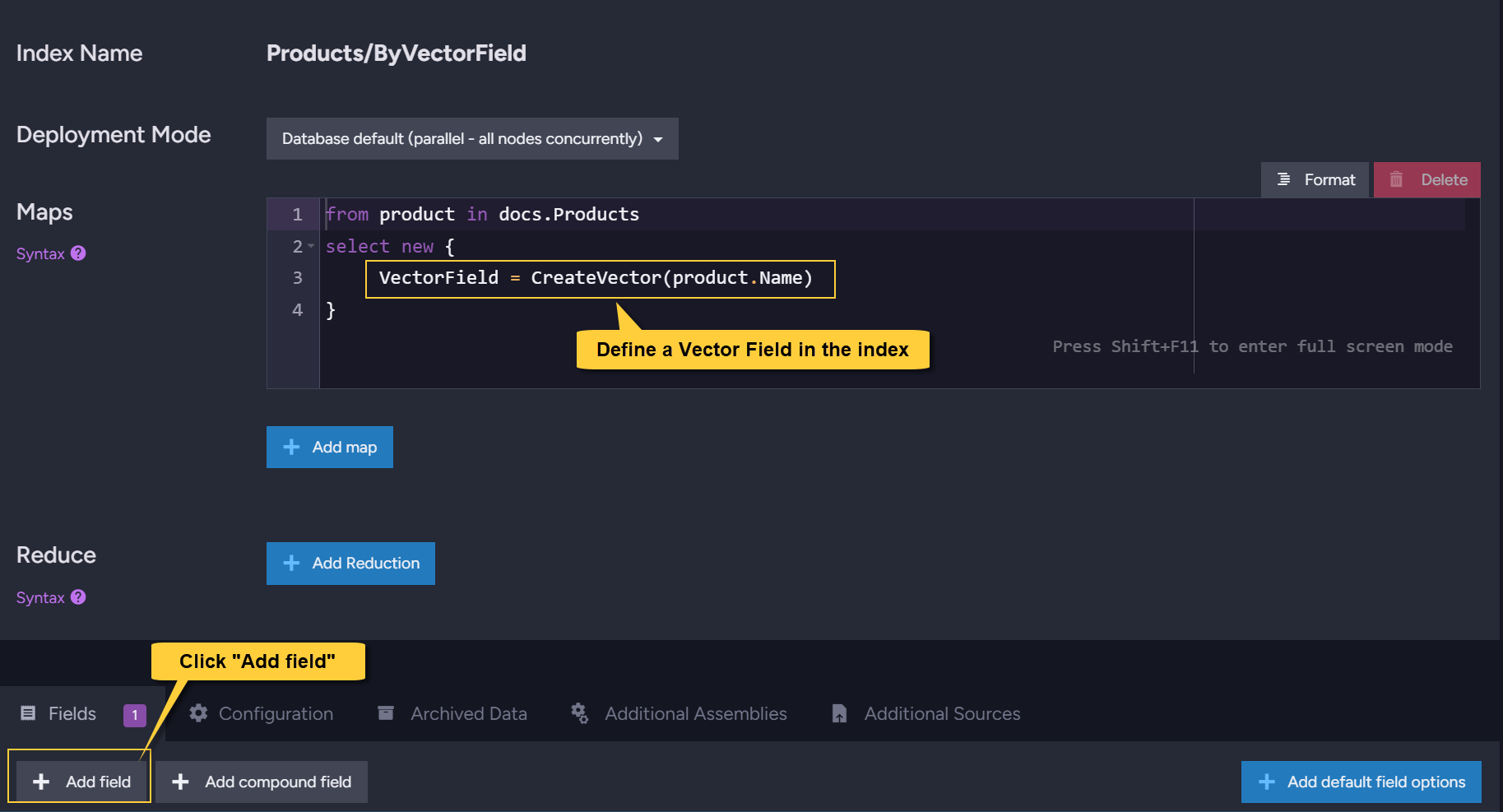
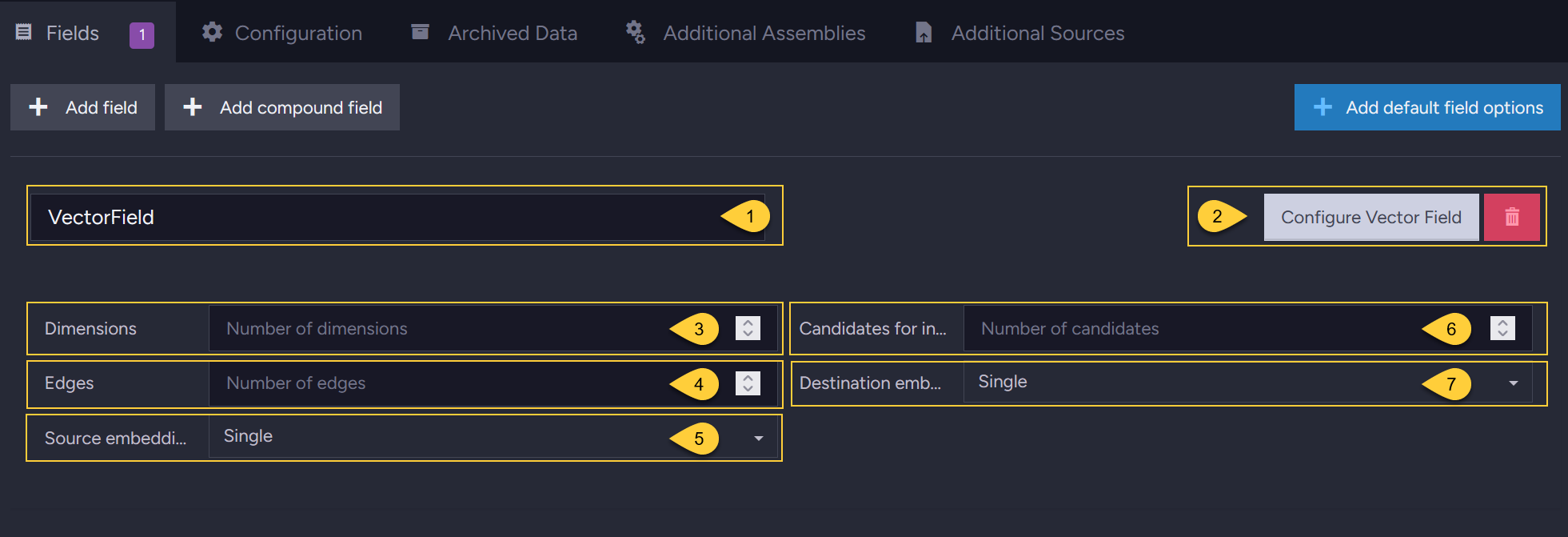
- Vector field name
Enter the name of the vector field to customize. - Configure Vector Field
Click this button to customize the field. - Dimensions
For numerical input only - define the size of the array from your source document. - Edges
The number of edges that will be created for a vector during indexing. - Source embedding type
The format of the source embeddings (Text, Single, Int8, or Binary). - Candidates for indexing
The number of candidates (potential neighboring vectors) that RavenDB evaluates during vector indexing. - Destination embedding type
The quantization format for the embeddings that will be generated (Text, Single, Int8, or Binary).
Combining vector search with Map-Reduce indexes
Vectorized fields are currently not supported by Map-Reduce indexes.
If you need to perform vector searches on aggregated data, you can use a two-index workaround.
This involves generating artificial documents with a Map-Reduce index, and then applying a standard Map index to those documents to perform the vector search.
1. Create a Map-Reduce index (without vector fields)
This Map-Reduce index acts solely as a document generator.
Enable the Output reduce results to collection feature
so the reduce output is saved as artificial documents in your database.
-
Do not include pre-made embeddings in the Map phase:
Vector embeddings are massive arrays of data. Because of how RavenDB processes and groups data during the reduction phase, carrying these large arrays through the Map-Reduce pipeline will severely inflate your index storage size. -
Propagate lightweight data instead:
Include only the minimal data needed to create the vectorized field later
(for example, the document IDs required forLoadVector). -
Disable field indexing:
Since this Map-Reduce index acts only as a document generator and will not be queried directly,
set the indexing behavior for all fields toNo(e.g.,FieldIndexing.Noin code, or No in the Studio field options).
This prevents unnecessary background work, saving significant disk space and CPU resources.
See Disabling indexing for index-field.
2. Create a Map index on the artificial collection
Create a standard Map index on the artificial collection produced by the first index.
Because these are now regular documents, you can freely define vector fields and use all vector search APIs on this index to fulfill your query needs.
Syntax
The following methods are used inside a static-index definition to create a vector index-field.
For the query-time API (VectorSearch), see the Syntax section in the dynamic-query article.
CreateVector:
Use CreateVector to index your own data (textual or numerical) that was Not generated by an embeddings generation task.
// Generate embeddings from textual data
// (RavenDB generates the embeddings using the built-in model)
public object CreateVector(string value);
public object CreateVector(IEnumerable<string> value);

// Index a single pre-made numerical embedding (Single / Int8 / Binary)
public object CreateVector(IEnumerable<float> value);
public object CreateVector(IEnumerable<sbyte> value);
public object CreateVector(IEnumerable<byte> value);

// Index multiple pre-made numerical embeddings
public object CreateVector(IEnumerable<IEnumerable<float>> value);
public object CreateVector(IEnumerable<IEnumerable<sbyte>> value);
public object CreateVector(IEnumerable<IEnumerable<byte>> value);

// Generate embeddings from attachment(s)
public object CreateVector(Stream value);
public object CreateVector(IEnumerable<Stream> values);
| Parameter | Type | Description |
|---|---|---|
| value | string IEnumerable<string> | Textual source data. RavenDB generates the embeddings from the text using the built-in model. |
| value | IEnumerable<float> IEnumerable<sbyte> IEnumerable<byte> | A single pre-made numerical embedding array (Single / Int8 / Binary). Indexed as-is, unless quantization is applied. |
| value | IEnumerable<IEnumerable<float>> IEnumerable<IEnumerable<sbyte>> IEnumerable<IEnumerable<byte>> | Multiple pre-made numerical embedding arrays. |
| value / values | Stream IEnumerable<Stream> | Source data taken from attachment(s). |
LoadVector:
Use LoadVector to index text-embeddings that were generated by an embeddings generation task.
// Load embeddings generated for the document currently being indexed
public object LoadVector(
    string path,
    string embeddingsGenerationTaskIdentifier);

// Load embeddings generated for a RELATED document.
// The related document's collection is inferred from the generic type parameter.
public object LoadVector<TEmbeddingsSourceDocument>(
    string path,
    string embeddingsGenerationTaskIdentifier,
    string embeddingsSourceDocumentId);

// Load embeddings generated for a RELATED document.
// The related document's collection is provided explicitly.
// (Use this overload in JavaScript indexes and string-based index definitions,
//  where the generic overload is not available.)
public object LoadVector(
    string path,
    string embeddingsGenerationTaskIdentifier,
    string embeddingsSourceDocumentId,
    string embeddingsSourceDocumentCollectionName);
For JavaScript indexes, use loadVector:
loadVector(path, embeddingsGenerationTaskIdentifier)
loadVector(path, embeddingsGenerationTaskIdentifier, embeddingsSourceDocumentId, embeddingsSourceDocumentCollectionName)
| Parameter | Type | Description |
|---|---|---|
| path | string | The document field (path) for which the embeddings generation task created the embeddings. |
| embeddingsGenerationTaskIdentifier | string | The identifier of the embeddings generation task that generated the embeddings. |
| embeddingsSourceDocumentId | string | The ID of the related document whose embeddings will be loaded. When using the first overload (this parameter is omitted), the embeddings of the currently-indexed document are loaded. |
| embeddingsSourceDocumentCollectionName | string | The collection of the related source document. Required in the untyped overload (and in JavaScript / string-based index definitions). Used to track the related embeddings so that the index re-indexes when they change. |
TEmbeddingsSourceDocument (generic) | Type | The type of the related source document. Its collection is inferred from this type, so it does not need to be passed explicitly. |