Sharding: Querying
-
A sharded database supports the same querying features as a non-sharded database,
so queries written for a non-sharded database can usually be used without modification. -
Some querying features are not yet implemented. Others, such as filter, behave a little differently in a sharded database. These cases are described below.
-
In this article:
Querying a sharded database
-
From a user's point of view, querying a sharded RavenDB database is similar to querying a non-sharded database:
the query syntax is the same, and the results are returned in the same format. -
To allow this, the database performs the following steps when a client sends a query to a sharded database:
- The query is received by a RavenDB server that was appointed as an Orchestrator.
The orchestrator mediates all communication between the client and the database shards. - The orchestrator distributes the query to the shards.
- Each shard runs the query over its own data, using its own indexes.
Once the data is retrieved, the shard transfers it to the orchestrator. - The orchestrator combines the data it receives from all shards into a single dataset and may perform additional operations on it. For example, when querying a Map-Reduce index, each shard returns results that were already reduced locally. After receiving all shard results, the orchestrator reduces the full dataset once again.
- Finally, the orchestrator returns the combined dataset to the client.
- The query is received by a RavenDB server that was appointed as an Orchestrator.
-
The client remains unaware that it communicated with a sharded database.
Note, however, that this process is more costly than the simpler retrieval performed by a non-sharded database.
Sharding is therefore recommended only when the database has grown to substantial size and complexity.
Learn more in When should sharding be used.
Querying selected shards
-
A query is normally executed over all shards. However, you can also query only selected shards.
Querying a specific shard directly avoids unnecessary orchestrator requests to other shards.
This can be useful, for example, when documents are intentionally stored on the same shard using Anchoring documents. -
You can query specific shards in either of the following ways:
- Using a pre-defined sharding prefix, as explained in: Querying selected shards by prefix.
- Using a document ID, as explained below.
-
To query specific shards using a document ID, use method
ShardContexttogether withByDocumentIdorByDocumentIds. RavenDB passes the document ID provided in the ByDocumentId/s methods to a hashing algorithm, which determines the bucket ID and therefore the shard to query.
Learn about the hashing method and bucket population in How documents are distributed among shards. -
The document ID parameter is not required to be one of the documents you are querying for;
it is used only to determine the target shard to query. See the following examples:
Query a selected shard:
Query only the shard containing document companies/1:
- Query
- Query_async
- DocumentQuery
- DocumentQuery_async
- RQL
// Query for 'User' documents from a specific shard:
// =================================================
var userDocuments = session.Query<User>()
     // Call 'ShardContext' to select which shard to query
     // RavenDB will query only the shard containing document "companies/1"
    .Customize(x => x.ShardContext(s => s.ByDocumentId("companies/1")))
     // The query predicate
    .Where(x => x.Name == "Joe")
    .ToList();

// Variable 'userDocuments' will include all documents of type 'User'
// that match the query predicate and reside on the shard containing document 'companies/1'.

// Query for ALL documents from a specific shard:
// ==============================================
var allDocuments = session.Query<object>() // query with <object>
    .Customize(x => x.ShardContext(s => s.ByDocumentId("companies/1")))
    .ToList();

// Variable 'allDocuments' will include ALL documents
// that reside on the shard containing document 'companies/1'.
// Query for 'User' documents from a specific shard:
// =================================================
var userDocuments = await asyncSession.Query<User>()
     // Call 'ShardContext' to select which shard to query
    .Customize(x => x.ShardContext(s => s.ByDocumentId("companies/1")))
     // The query predicate
    .Where(x => x.Name == "Joe")
    .ToListAsync();

// Query for ALL documents from a specific shard:
// ==============================================
var allDocuments = await asyncSession.Query<object>()
    .Customize(x => x.ShardContext(s => s.ByDocumentId("companies/1")))
    .ToListAsync();
// Query for 'User' documents from a specific shard:
// =================================================
var userDocuments = session.Advanced.DocumentQuery<User>()
    // Call 'ShardContext' to select which shard to query
    .ShardContext(s => s.ByDocumentId("companies/1"))
    // The query predicate
    .Where(x => x.Name == "Joe")
    .ToList();

// Query for ALL documents from a specific shard:
// ==============================================
var allDocuments = session.Advanced.DocumentQuery<object>()
    .ShardContext(s => s.ByDocumentId("companies/1"))
    .ToList();
// Query for 'User' documents from a specific shard:
// =================================================
var userDocuments = await asyncSession.Advanced.AsyncDocumentQuery<User>()
    // Call 'ShardContext' to select which shard to query
    .ShardContext(s => s.ByDocumentId("companies/1"))
    // The query predicate
    .WhereEquals(x => x.Name, "Joe")
    .ToListAsync();

// Query for ALL documents from a specific shard:
// ==============================================
var allDocuments = await asyncSession.Advanced.AsyncDocumentQuery<object>()
    .ShardContext(s => s.ByDocumentId("companies/1"))
    .ToListAsync();
// Query for 'User' documents from a specific shard:
// ================================================
from "Users"
where Name == "Joe"
{ "__shardContext": "companies/1" }

// Query for ALL documents from a specific shard:
// ==============================================
from @all_docs
where Name == "Joe"
{ "__shardContext": "companies/1" }
Query selected shards:
Query only the shards containing documents companies/2 and companies/3:
- Query
- Query_async
- DocumentQuery
- DocumentQuery_async
- RQL
// Query for 'User' documents from the specified shards:
// =====================================================
var userDocuments = session.Query<User>()
     // Call 'ShardContext' to select which shards to query
     // RavenDB will query only the shards containing documents "companies/2" & "companies/3"
    .Customize(x => x.ShardContext(s => s.ByDocumentIds(new[] { "companies/2", "companies/3" })))
     // The query predicate
    .Where(x => x.Name == "Joe")
    .ToList();

// Variable 'userDocuments' will include all documents of type 'User' that match the query predicate
// and reside on either the shard containing document 'companies/2'
// or the shard containing document 'companies/3'.

// To get ALL documents from the designated shards instead of just 'User' documents,
// query with `session.Query<object>`.
// Query for 'User' documents from the specified shards:
// =====================================================
var userDocuments = await asyncSession.Query<User>()
     // Call 'ShardContext' to select which shards to query
    .Customize(x => x.ShardContext(s => s.ByDocumentIds(new[] { "companies/2", "companies/3" })))
     // The query predicate
    .Where(x => x.Name == "Joe")
    .ToListAsync();
// Query for 'User' documents from the specified shards:
// =====================================================
var userDocuments = session.Advanced.DocumentQuery<User>()
     // Call 'ShardContext' to select which shards to query
    .ShardContext(s => s.ByDocumentIds(new[] {"companies/2", "companies/3"}))
     // The query predicate
    .Where(x => x.Name == "Joe")
    .ToList();
// Query for 'User' documents from the specified shards:
// =====================================================
var userDocuments = await asyncSession.Advanced.AsyncDocumentQuery<User>()
     // Call 'ShardContext' to select which shards to query
    .ShardContext(s => s.ByDocumentIds(new[] {"companies/2", "companies/3"}))
     // The query predicate
    .WhereEquals(x => x.Name, "Joe")
    .ToListAsync();
// Query for 'User' documents from the specified shards:
// =====================================================
from "Users"
where Name == "Joe"
{ "__shardContext" : ["companies/2", "companies/3"] }

// Query for ALL documents from the specified shards:
// ==================================================
from @all_docs
where Name == "Joe"
{ "__shardContext" : ["companies/2", "companies/3"] }
Including items in a query
-
Including items in a query will work even if the included item resides on another shard.
-
If the requested item is not located on the queried shard, the orchestrator will fetch it from the shard where it is located. Note that this process incurs an additional request to the shard that hosts the included item.
-
Although includes are supported in regular sharded queries,
they are not supported when query results are streamed.
Learn more in Streaming query results.
Paging query results
From the client's point of view, paging is performed similarly in sharded and non-sharded databases,
and the same API is used to define page size and retrieve selected pages.
Under the hood, however, paging in a sharded database involves additional overhead because the orchestrator must retrieve the relevant results from each shard and sort them before returning the requested page to the client.
For example, let's compare what happens when the 8th page is loaded (with a page size of 100) from a non-sharded and a sharded database:
- Query
- DocumentQuery
- Index
IList<Product> results = session
    .Query<Product, Products_ByUnitsInStock>()
    .Statistics(out QueryStatistics stats) // fill query statistics
    .Where(x => x.UnitsInStock > 10)
    .Skip(700) // skip the first 7 pages (700 results)
    .Take(100) // get pages 701-800
    .ToList();

long totalResults = stats.TotalResults;
IList<Product> results = session
    .Advanced
    .DocumentQuery<Product, Products_ByUnitsInStock>()
    .Statistics(out QueryStatistics stats) // fill query statistics
    .WhereGreaterThan(x => x.UnitsInStock, 10)
    .Skip(700) // skip the first 7 pages (700 results)
    .Take(100) // get pages 701-800
    .ToList();

long totalResults = stats.TotalResults;
public class Products_ByUnitsInStock : AbstractIndexCreationTask<Product>
{
    public Products_ByUnitsInStock()
    {
        Map = products => from product in products
                          select new
                          {
                              UnitsInStock = product.UnitsInStock
                          };
    }
}
-
When the database is Not sharded the server would:
- Skip the first 7 pages.
- Return page 8 to the client (results 701 to 800).
-
When the database is Sharded the orchestrator would:
- Retrieve 8 pages (sorted by modification order) from each shard.
- Sort the retrieved results (in a 3-shard database, for example, the orchestrator would sort up to 2400 results).
- Skip the first 7 pages in the merged result set.
- Hand page 8 to the client (results 701 to 800).
The shards sort the results by modification order before sending them to the orchestrator.
For example, if a shard needs to send 800 results to the orchestrator,
the first result will be the most recently modified document, and the last result will be the earliest document modified.
Streaming query results
Streaming query results is supported in a sharded database for both Map index queries and Map-Reduce index queries.
Both static index queries and dynamic queries (auto-indexes) are supported.
How streaming Map-Reduce results in a sharded database work:
- The orchestrator sends the query to all shards.
- The shard results are streamed in
reduce-keyorder from each shard.
(Thereduce-keyis the field specified in the group by clause). - The orchestrator merges the shard streams by reduce-key.
- Results that belong to the same reduce-key are collected and re-reduced on the orchestrator.
- If the query uses
filter, the filter is applied to the final reduced result. - If the query projects the results, the projection is applied before the result is streamed to the client.
Limitations when streaming query results in a sharded database:
-
When streaming query results in a sharded database,
includeandloadare not supported.
Attempting to use them will throw a NotSupportedInShardingException.- Dynamic_query_with_include
- Dynamic_query_with_load
// Define a query that 'includes' a related document in the resultsIRawDocumentQuery<Order> query = session.Advanced.RawQuery<Order>(@"from 'Orders' as oinclude o.Company");// Stream the query results// This will throw NotSupportedInShardingException// 'include' is not supported when streaming a sharded queryusing (IEnumerator<StreamResult<Order>> stream = session.Advanced.Stream(query)){while (stream.MoveNext()){StreamResult<Order> result = stream.Current;// Process result...}}// Define a query with 'load' that retrieves data from a related documentIRawDocumentQuery<Order> query = session.Advanced.RawQuery<Order>(@"from 'Orders' as oload o.Company as cselect { Company : c.Name }");// Stream the query results// This will throw NotSupportedInShardingException// 'load' is not supported when streaming a sharded queryusing (IEnumerator<StreamResult<Order>> stream = session.Advanced.Stream(query)){while (stream.MoveNext()){StreamResult<Order> result = stream.Current;// Process result...}} -
When streaming Map-Reduce results in a sharded database,
order byis supported only on the reduce-key fields.
If order by uses a field that is not part of the reduce-key, RavenDB will throw a NotSupportedInShardingException.
For example, if the query groups by Company, then ordering by Company is supported, but ordering by a computed aggregation field such as Count, Total, or Sum is not supported.- Supported_query
- Not_supported_query
- Index_OrdersByCompany
// SUPPORTED: order by the reduce-key field 'Company'// ==================================================IRawDocumentQuery<OrdersByCompany.IndexEntry> query1 = session.Advanced.RawQuery<OrdersByCompany.IndexEntry>(@"from index 'OrdersByCompany'order by Company");using (IEnumerator<StreamResult<OrdersByCompany.IndexEntry>> stream =session.Advanced.Stream(query1)){while (stream.MoveNext()){StreamResult<OrdersByCompany.IndexEntry> result = stream.Current;// Process result...}}// NOT SUPPORTED: order by the aggregation field 'Total'// ====================================================// This will throw NotSupportedInShardingException// 'order by' in a Map-Reduce streaming query must use a reduce-key fieldIRawDocumentQuery<OrdersByCompany.IndexEntry> query2 = session.Advanced.RawQuery<OrdersByCompany.IndexEntry>(@"from index 'OrdersByCompany'order by Total");using (IEnumerator<StreamResult<OrdersByCompany.IndexEntry>> stream =session.Advanced.Stream(query2)){while (stream.MoveNext()){StreamResult<OrdersByCompany.IndexEntry> result = stream.Current;// Process result...}}// Map-Reduce index definitionpublic class OrdersByCompany : AbstractIndexCreationTask<Order, OrdersByCompany.IndexEntry>{public class IndexEntry{// The group-by field (the reduce-key)public string Company { get; set; }// Computation fieldspublic int Count { get; set; }public float Total { get; set; }}public OrdersByCompany(){Map = orders => from order in ordersselect new IndexEntry{Company = order.Company,Count = 1,Total = order.Lines.Sum(l => l.PricePerUnit * l.Quantity)};Reduce = results => from result in resultsgroup result by result.Companyinto gselect new IndexEntry{Company = g.Key,Count = g.Sum(x => x.Count),Total = g.Sum(x => x.Total)};}}
Filtering query results
Data can be filtered using the where and filter keywords on both non-sharded and sharded databases.
However, in a sharded database,
when filtering results from a Map-Reduce index query or a dynamic aggregation query, these commands behave differently.
This is because each shard sees only its own partial results until the shard results are gathered and re-reduced on the orchestrator.
These differences are explained below.
where
where is RavenDB's basic filtering command.
The server uses it to retrieve only items that match the specified conditions.
-
NON-SHARDED database:
When querying a map-reduce index or a dynamic aggregation query with thewherecondition,
the filtering is applied to the entire database.For example, to find only the most successful products, you can run a query such as:
// Query a Map-Reduce index, filter on the computed field 'TotalSales'// Retrieve only products that were sold at least 5000 timesfrom index 'Products/Sales'where TotalSales >= 5000 -
SHARDED database:
When querying a map-reduce index or a dynamic aggregation query with thewherecondition,
the filtering is applied per-shard, on each shard's local data.This creates the following problem:
- Each shard evaluates the
wherecondition using only the data stored on that shard. - If a product was sold 4000 times on each shard, the query shown above will filter it out on every shard — even though its total sales across the database far exceed 5000.
- To address this, use the filter keyword instead,
whose behavior on sharded databases is designed for exactly this case. - Note: using
wheredoes not cause this problem when filtering on aGroupByfield (the reduce-key),
and is actually the recommended approach in that case.
Learn more inwherevsfilterrecommendations below.
- Each shard evaluates the
filter
The filter command scans data that has already been retrieved from the database by the server
before the results are sent to the client.
-
NON-SHARDED database:
When a query includes afilterclause, it is mainly used as an exploration query: an additional filtering layer that scans the entire retrieved dataset without creating an index that would then need to be maintained.Exploration queries are typically one-time operations and should be used cautiously,
because scanning the entire retrieved dataset may consume significant resources. -
SHARDED database:
The behavior offilteron a sharded database depends on whether the query is a Map-Reduce query
(a static Map-Reduce index query or a dynamicgroup byquery) or not.-
Non-Map-Reduce queries (static map index or dynamic auto-map query):
The query is sent to each shard as-is, and each shard applies thefilterclause locally to its own results.
This is the same behavior as on a non-sharded database. -
Map-Reduce queries:
- The
filterclause is omitted from the query sent to the shards,
regardless of which fields the filter references. - All matching data is retrieved from the shards to the orchestrator, gathered, and re-reduced.
- The
filterclause is then executed on the orchestrator over the combined result set.
For example, the following query will return all products that were sold at least 5000 times,
regardless of how those sales are distributed across the shards:// Query a Map-Reduce index, filter on the computed field 'TotalSales'// Retrieve only products that were sold at least 5000 timesfrom index 'Products/Sales'filter TotalSales >= 5000On the downside,
a large volume of data may be transferred from the shards to the orchestrator and then scanned by the filter condition. Applyingwherebeforefiltercan reduce the volume retrieved from the shards (when it makes sense as part of the query).On the upside,
this mechanism allows filtering on computed fields after results from all shards have been gathered,
as in a non-sharded database. - The
-
Summary across all scenarios
| Scenario | filter behavior |
|---|---|
| Non-sharded database (All query types) | The filter clause is applied on the server after the data has been retrieved from the database, before the results are sent to the client. |
| Sharded database (Non-Map-Reduce query) | The query is sent to each shard as-is, and each shard applies the filter clause locally to its own results. |
| Sharded database (Map-Reduce query) | The filter clause is removed from the queries sent to the shards.The shard results are gathered and re-reduced on the orchestrator, and the filter clause is then applied to the combined result set. |
where vs filter recommendations
Because filter (unless combined with where) can cause RavenDB to retrieve and scan a substantial amount of data,
use filter cautiously and restrict its scope whenever possible.
-
Prefer
whereoverfilterwhen filtering on aGroupByfield (the reduce-key).
Each shard already holds the correct value for this field, so filtering can be applied at the shard level without transferring extra data to the orchestrator. -
Prefer
filteroverwherewhen filtering on a computed aggregation field (e.g.,Sum,Count,Total).
Only the orchestrator sees the combined totals across shards, so filtering must be applied there to produce correct results. -
Combine
whereandfilterwhen possible.
Usewherefirst to narrow the dataset transferred from the shards, then applyfilteron the orchestrator.
For example:from index 'Products/Sales'where Category = 'categories/7-A' // apply 'where' first to narrow the datasetfilter TotalSales >= 5000 // then 'filter' on the computed field -
Set a limit on
filterwhen possible to bound how much data the orchestrator scans.
Loading a document within a projection
In a sharded database, loading a document inside a projection is not supported in queries against a Map-Reduce index or in dynamic aggregation (group by) queries.
Attempting to do so throws a NotSupportedInShardingException.
Loading inside a projection is supported for collection queries and for Map index queries,
provided that the loaded document resides on the same shard the document being projected.
| Projection Type | Can Load | Condition |
|---|---|---|
| Collection query projection | ✅ Yes | The loaded document must reside on the same shard |
| Map index projection | ✅ Yes | The loaded document must reside on the same shard |
| Map-Reduce index projection | ❌ No | — |
Dynamic aggregation (group by) projection | ❌ No | — |
Example
Given the following Map-Reduce index:
public class Orders_ByCompany : AbstractIndexCreationTask<Order, Orders_ByCompany.IndexEntry>
{
    public class IndexEntry
    {
        public string Company { get; set; }
        public int Count { get; set; }
        public float Total { get; set; }
    }

    public Orders_ByCompany()
    {
        Map = orders => from order in orders
                        select new IndexEntry
                        {
                            Company = order.Company,
                            Count = 1,
                            Total = order.Lines.Sum(l => (l.Quantity * l.PricePerUnit) * (1 - l.Discount))
                        };

        Reduce = results => from result in results
                            group result by result.Company
                            into g
                            select new IndexEntry
                            {
                                Company = g.Key,
                                Count = g.Sum(x => x.Count),
                                Total = g.Sum(x => x.Total)
                            };
    }
}
The following query projects the CompanyName field from the loaded Company document.
On a sharded database, this query will throw NotSupportedInShardingException.
// On a sharded database, this query throws a `NotSupportedInShardingException`
from index 'Orders/ByCompany'
load Company as c
select {
    CompanyName: c.Name,
    Count: Count
}
order by and limit in a Map-Reduce query
When a Map-Reduce index is queried in a sharded database, each shard first returns its locally reduced results to the orchestrator, which then merges and re-reduces them to produce the final result set.
Because of this two-stage process, order by and limit may behave differently than they do in a non-sharded database.
This depends on whether limit is used, and on which field order by is applied to.
The following rules apply only to Map-Reduce queries, whether they are static Map-Reduce index queries or dynamic auto-Map-Reduce (group by) queries.
For Map index queries, order by and limit behave as they do on a non-sharded database.
The examples below use this Map-Reduce index:
public class Users_ByCity : AbstractIndexCreationTask<User, Users_ByCity.IndexEntry>
{
    public class IndexEntry
    {
        // The Group-by field (reduce key)
        public string City { get; set; }

        // The computed field
        public int Sum { get; set; }
    }

    public Users_ByCity()
    {
        Map = users => from user in users
                       select new IndexEntry
                       {
                           City = user.City,
                           Sum = 1
                       };

        Reduce = results => from result in results
                            group result by result.City
                            into g
                            select new IndexEntry
                            {
                                City = g.Key,
                                Sum = g.Sum(x => x.Sum)
                            };
    }
}
order by without limit
When the query orders the results but does not limit their number,
ALL matching results are retrieved from all shards, just as in a non-sharded database.
- Query
- RQL
var queryResult = session.Query<Users_ByCity.IndexEntry, Users_ByCity>()
    .OrderBy(x => x.City)
    .ToList();
from index "Users/ByCity"
order by City
limit without OrderBy
When the query uses limit but does not specify order by,
the orchestrator internally adds an order by on the group by fields (the reduce-key fields, City in this example) before sending the query to the shards.
This is done because applying a limit without a consistent ordering can otherwise return incorrect results in a sharded Map-Reduce query.
When paging (using skip), the orchestrator adjusts the limit sent to each shard to skip + take.
- Query
- RQL
var queryResult = session.Query<Users_ByCity.IndexEntry, Users_ByCity>()
    .Take(5)
    .ToList();
from index "Users/ByCity"
limit 5
limit with OrderBy on a reduce-key field
When order by is applied to a group by field (the reduce-key field, City in this example) AND the query uses limit,
the limit is applied on each shard as results are retrieved.
Each shard returns at most the requested number of results (the limit) in the requested order,
and the orchestrator merges them.
When paging (using skip), the orchestrator adjusts the limit sent to each shard to skip + take.
- Query
- RQL
var queryResult = session.Query<Users_ByCity.IndexEntry, Users_ByCity>()
    .OrderBy(x => x.City) // order by on the reduce-key field 'City'
    .Take(3) // applied per-shard as results are retrieved
    .ToList();
from index "Users/ByCity"
order by City
limit 3
limit with OrderBy on a non-reduce-key field
When order by is applied to a computed reduce value (e.g., Sum, Count, Total) rather than to a reduce-key field,
the limit cannot be applied on each shard because the computed value for any group is known only after results from all shards are merged and re-reduced.
In this case, the query sent to the shards is rewritten to omit both order by and limit.
ALL matching results are retrieved from all shards, re-reduced, sorted, and only then is the requested page returned.
- Query
- RQL
var queryResult = session.Query<Users_ByCity.IndexEntry, Users_ByCity>()
    .OrderBy(x => x.Sum) // order by a computed field (not a reduce-key field)
    .Take(3) // applied on the orchestrator after re-reduction
    .ToList();
from index "Users/ByCity"
order by Sum
limit 3
Retrieving all results from all shards - either because no limit is set, or because limit is combined with OrderBy on a computed field -
may transfer a large amount of data and increase memory, CPU, and bandwidth usage.
Timing queries
-
The duration of queries and query parts (e.g. optimization or execution time) can be measured using API or Studio.
-
In a sharded database, the timings for each part will be provided per shard.
-
Timing is disabled by default, to avoid the measuring overhead.
It can be enabled per query by addinginclude timings()to an RQL query or callingTimings()in your query code, as explained in include query timings. -
To view the query timings in the Studio, open the Query View,
run an RQL query withinclude timings(), and open the Timings tab.
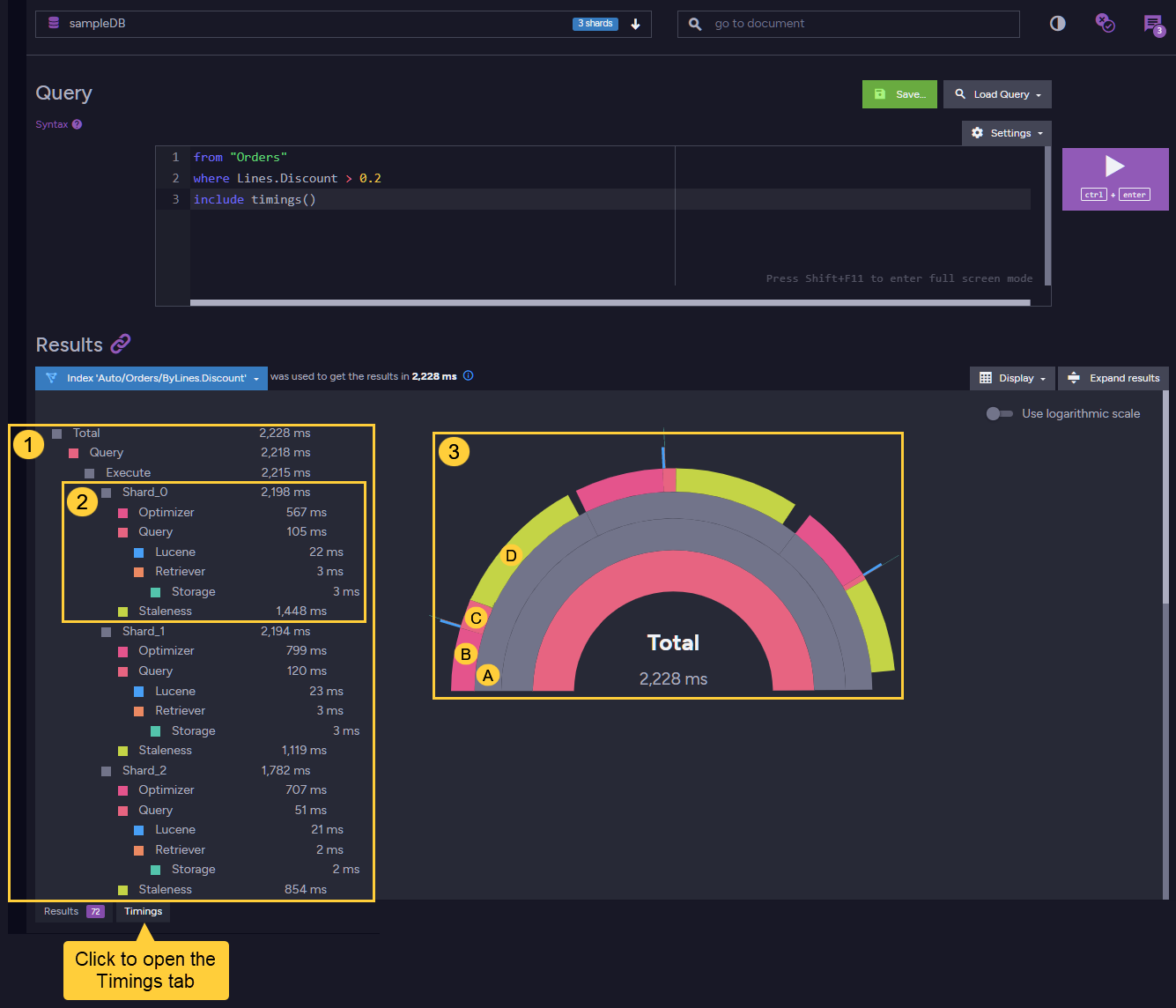
- Textual view of query parts and their duration.
Point the mouse cursor at captions to display timing properties in the graphical view on the right. - Per-shard Timings
- Graphical View
Point the mouse cursor at graph sections to display query parts duration:
A. Shard #0 overall query time
B. Shard #0 optimization period
C. Shard #0 query period
D. Shard #0 staleness period
Unsupported querying features
Querying features that are not supported or not yet implemented in sharded databases include:
-
Loading a document that resides on another shard
A query can only load a document if it resides on the same shard.
Loading a document that resides on a different shard will return null instead of the loaded document. -
Querying with a limit is not supported in patch/delete by query operations
Attempting to set a limit when executing PatchByQueryOperation or DeleteByQueryOperation
will throw aNotSupportedInShardingException. -
Loading a document within a Map-Reduce projection
Read more about this topic in Loading a document within a projection above. -
Ordering streamed Map-Reduce results by non-reduce-key fields
Read more about this topic in Streaming query results above. -
Includes and loads are not supported in sharded streaming queries
Read more about this topic in Streaming query results above. -
Querying for similar documents with MoreLikeThis
MoreLikeThis is not supported in a sharded database. -
Highlighting search results
Highlighting search results is not supported in a sharded database. -
Intersect queries on the server-side
Intersection is not supported in a sharded database. -
Order by distance
OrderByDistance is not supported for map-reduce indexes in sharded databases.
Only supported for regular (map) indexes in a sharded database. -
Order by score
OrderByScore is not supported in a sharded database.