---
title: "Query by Facets"
url: "https://docs.ravendb.net/6.2/indexes/querying/faceted-search"
version: "6.2"
language: "nodejs"
---
# Query by Facets
> Client language: Node.js. Also available for [C#](https://docs.ravendb.net/6.2/indexes/querying/faceted-search.md), [Java](https://docs.ravendb.net/6.2/indexes/querying/faceted-search.java.md), [Python](https://docs.ravendb.net/6.2/indexes/querying/faceted-search.python.md), [PHP](https://docs.ravendb.net/6.2/indexes/querying/faceted-search.php.md).
>
> RavenDB publishes an official agent skill for coding assistants at https://docs.ravendb.net/skills/ravendb/SKILL.md (also installable with `npx skills add ravendb/skills`). The skill describes itself as: "Read this before writing any RavenDB query, client call or /databases/ request. Covers server setup, document modelling, the Node.js, .NET and Python clients, RQL, indexes, vector search and AI agents. Code written from recall tends to run and return the wrong rows, because RQL resembles SQL and the clients take field names as plain strings."
> **Note**
>
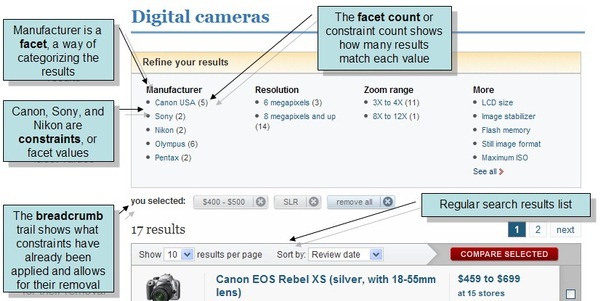
> - A **Faceted Search** provides an efficient way to explore and navigate through large datasets or search results.
>
> - Multiple filters (facets) are applied to narrow down the search results according to different attributes or categories.
>
> 
>
> - In this page
> - [Define an index](#define-an-index)
> - [Facets - Basics](#facets---basics)
> - [Facets - Options](#facets---options)
> - [Facets - Aggregations](#facets---aggregations)
> - [Storing facets definition in a document](#storing-facets-definition-in-a-document)
> - [Syntax](#syntax)
## Define an index
- To make a faceted search, **a static-index must be defined** for the fields you want to query and apply facets on.
- The examples in this article will be based on the following Class, Index, and Sample Data:
### Class
```javascript
class Camera {
constructor(
manufacturer = '',
cost = 0,
megaPixels = 0,
maxFocalLength = 0,
unitsInStock = 0
) {
Object.assign(this, {
manufacturer,
cost,
megaPixels,
maxFocalLength,
unitsInStock
});
}
}
```
### Index
```javascript
class Cameras_ByFeatures extends AbstractJavaScriptIndexCreationTask {
constructor () {
super();
this.map("Cameras", camera => {
return {
brand: camera.manufacturer,
price: camera.cost,
megaPixels: camera.megaPixels,
maxFocalLength: camera.maxFocalLength,
unitsInStock: camera.unitsInStock
};
});
}
}
```
### Sample\_data
```javascript
// Creating sample data for the examples in this article:
// ======================================================
const bulkInsert = store.bulkInsert();
const cameras = [
new Camera("Sony", 100, 20.1, 200, 10),
new Camera("Sony", 200, 29, 250, 15),
new Camera("Nikon", 120, 22.3, 300, 2),
new Camera("Nikon", 180, 32, 300, 5),
new Camera("Nikon", 220, 40, 300, 20),
new Camera("Canon", 200, 30.4, 400, 30),
new Camera("Olympus", 250, 32.5, 600, 4),
new Camera("Olympus", 390, 40, 600, 6),
new Camera("Fuji", 410, 45, 700, 1),
new Camera("Fuji", 590, 45, 700, 5),
new Camera("Fuji", 650, 61, 800, 17),
new Camera("Fuji", 850, 102, 800, 19)
];
for (const camera of cameras) {
await bulkInsert.store(camera);
}
await bulkInsert.finish();
```
## Facets - Basics
> **Note**
>
> **Facets definition**:
>
> - Define a list of facets by which to aggregate the data.
>
> - There are two **Facet types**:
> - `Facet` - returns a count for each unique term found in the specified index-field.
> - `RangeFacet` - returns a count per range within the specified index-field.
>
> ```javascript
> // Define a Facet:
> // ===============
> const brandFacet = new Facet();
> // Specify the index-field for which to get count of documents per unique ITEM
> // e.g. get the number of Camera documents for each unique brand
> brandFacet.fieldName = "brand";
> // Set a display name for this field in the results (optional)
> brandFacet.displayFieldName = "Camera Brand";
>
> // Define a RangeFacet:
> // ====================
> const priceRangeFacet = new RangeFacet();
> // Specify ranges within an index-field in order to get count per RANGE
> // e.g. get the number of Camera documents that cost below 200, between 200 & 400, etc...
> priceRangeFacet.ranges = [
> "price < 200",
> "price >= 200 and price < 400",
> "price >= 400 and price < 600",
> "price >= 600 and price < 800",
> "price >= 800"
> ];
> // Set a display name for this field in the results (optional)
> priceRangeFacet.displayFieldName = "Camera Price";
>
> const facets = [brandFacet, priceRangeFacet];
> ```
> **Note**
>
> **Query the index for facets results**:
>
> - Query the index to get the aggregated facets information.
>
> - Either:
>
> - Pass the facets definition from above directly to the query
>
> - Or - construct a facet using a builder with the Fluent API option, as shown below.
>
> ### Query
>
> ```javascript
> const results = await session
> // Query the index
> .query({ indexName: "Cameras/ByFeatures" })
> // Call 'aggregateBy' to aggregate the data by facets
> // Pass the defined facets from above
> .aggregateBy(...facets)
> .execute();
> ```
>
> ### Query\_FluentAPI
>
> ```javascript
> // Define the index-field (e.g. 'price') that will be used by the range-facet in the query below
> const range = RangeBuilder.forPath("price");
>
> const results = await session
> .query({ indexName: "Cameras/ByFeatures" })
> // Call 'aggregateBy' to aggregate the data by facets
> // Use a builder as follows:
> .aggregateBy(builder => builder
> // Specify the index-field (e.g. 'brand') for which to get count per unique ITEM
> .byField("brand"))
> // Set a display name for the field in the results (optional)
> .withDisplayName("Camera Brand"))
> // Call 'andAggregateBy' to aggregate the data by also by range-facets
> // Use a builder as follows:
> .andAggregateBy(builder => builder
> .byRanges(
> // Specify the ranges within index field 'price' in order to get count per RANGE
> range.isLessThan(200),
> range.isGreaterThanOrEqualTo(200).isLessThan(400),
> range.isGreaterThanOrEqualTo(400).isLessThan(600),
> range.isGreaterThanOrEqualTo(600).isLessThan(800),
> range.isGreaterThanOrEqualTo(800))
> // Set a display name for the field in the results (optional)
> .withDisplayName("Camera Brand"))
> .execute();
> ```
>
> ### RawQuery
>
> ```javascript
> const results = await session.advanced
> // Query the index
> // Provide the RQL string to the rawQuery method
> .rawQuery(`from index "Cameras/ByFeatures"
> select
> facet(brand) as "Camera Brand",
> facet(price < 200,
> price >= 200 and price < 400,
> price >= 400 and price < 600,
> price >= 600 and price < 800,
> price >= 800) as "Camera Price"`)
> // Execute the query
> .executeAggregation();
> ```
>
> ### RQL
>
> ```sql
> from index "Cameras/ByFeatures"
> select
> facet(brand) as "Camera Brand",
> facet(price < 200,
> price >= 200 and price < 400,
> price >= 400 and price < 600,
> price >= 600 and price < 800,
> price >= 800) as "Camera Price"
> ```
> **Note**
>
> **Query results**:
>
> - **Query results** are Not the collection documents, they are of type `FacetResultObject`
> which is the facets results per index-field specified.
>
> - Using the sample data from this article, the resulting aggregations will be:
>
> ```javascript
> // The resulting aggregations per display name will contain:
> // =========================================================
>
> // For the "Camera Brand" Facet:
> // "canon" - Count: 1
> // "fuji" - Count: 4
> // "nikon" - Count: 3
> // "olympus" - Count: 2
> // "sony" - Count: 2
>
> // For the "Camera Price" Ranges:
> // "Price < 200" - Count: 3
> // "Price >= 200.0 and Price < 400.0" - Count: 5
> // "Price >= 400.0 and Price < 600.0" - Count: 2
> // "Price >= 600.0 and Price < 800.0" - Count: 1
> // "Price >= 800.0" - Count: 1
> ```
>
> ```javascript
> // Get facets results for index-field 'brand' using the display name specified:
> // ============================================================================
> const brandFacets = results["Camera Brand"];
> const numberOfBrands = brandFacets.values.length; // 5 unique brands
>
> // Get the aggregated facet value for a specific Brand:
> let facetValue = brandFacets.values[0];
> // The brand name is available in the 'range' property
> // Note: value is lower-case since the default RavenDB analyzer was used by the index
> assert.equal(facetValue.range, "canon");
> // Number of documents for 'Canon' is available in the 'count' property
> assert.equal(facetValue.count, 1);
>
> // Get facets results for index-field 'price' using the display name specified:
> // ============================================================================
> const priceFacets = results["Camera Price"];
> const numberOfRanges = priceFacets.values.length; // 5 different ranges
>
> // Get the aggregated facet value for a specific Range:
> facetValue = priceFacets.values[0];
> assert.equal(facetValue.range, "price < 200"); // The range string
> assert.equalfacetValue.count, 3); // Number of documents in this range
> ```
> **Info**
>
> **Query further**:
>
> - Typically, after presenting users with the initial facets results which show the available options,
> users can select specific categories to explore further.
>
> - For example, if the user selects Fuji and Nikon,
> then your next query can include a filter to focus only on those selected brands.
>
> ```javascript
> const filteredResults = await session
> .query({ indexName: "Cameras/ByFeatures" })
> // Limit query results to the selected brands:
> .whereIn("brand", ["Fuji", "Nikon"])
> .aggregateBy(...facets)
> .execute();
> ```
## Facets - Options
> **Note**
>
> **Facets definition**:
>
> - **Options** are available only for the `Facet` type.
>
> - Available options:
>
> - `start` - The position from which to send items (how many to skip).
> - `pageSize` - Number of items to return.
> - `includeRemainingTerms` - Show summary of items that didn't make it into the requested pageSize.
> - `termSortMode` - Set the sort order on the resulting items.
>
> ```javascript
> // Define a Facet:
> // ===============
> const facet = new Facet();
>
> // Specify the index-field for which to get count of documents per unique ITEM
> facet.fieldName = "brand";
>
> // Set some facet options
> // E.g.: Return top 3 brands with most items count
> const facetOptions = new FacetOptions();
> facetOptions.pageSize = 3;
> facetOptions.termSortMode = "CountDesc";
>
> facet.options = facetOptions;
> ```
> **Note**
>
> **Query the index for facets results**:
>
> ### Query
>
> ```javascript
> const results = await session
> // Query the index
> .query({ indexName: "Cameras/ByFeatures" })
> // Call 'aggregateBy' to aggregate the data by facets
> // Pass the defined facet from above
> .aggregateBy(facet)
> .execute();
> ```
>
> ### Query\_FluentAPI
>
> ```javascript
> // Set facet options to use in the following query
> // E.g.: Return top 3 brands with most items count
> const facetOptions = new FacetOptions();
> facetOptions.pageSize = 3;
> facetOptions.termSortMode = "CountDesc";
>
> const results = await session
> //Query the index
> .query({ indexName: "Cameras/ByFeatures" })
> // Call 'aggregateBy' to aggregate the data by facets
> // Use a builder as follows:
> .aggregateBy(builder => builder
> // Specify the index-field (e.g. 'brand') for which to get count per unique ITEM
> .byField("brand")
> // Call 'withOptions', pass the facets options
> .withOptions(facetOptions))
> .execute();
> ```
>
> ### RawQuery
>
> ```javascript
> const results = await session.advanced
> // Query the index
> // Provide the RQL string to the rawQuery method
> .rawQuery(`from index "Cameras/ByFeatures"
> select facet(brand, $p0)`)
> // Add the facet options to the "p0" parameter
> .addParameter("p0", { "termSortMode": "CountDesc", "pageSize": 3 })
> // Execute the query
> .executeAggregation();
> ```
>
> ### RQL
>
> ```sql
> from index "Cameras/ByFeatures"
> select facet(brand, $p0)
> {"p0": { "termSortMode": "CountDesc", "pageSize": 3 }}
> ```
> **Note**
>
> **Query results**:
>
> ```javascript
> // The resulting items will contain:
> // =================================
>
> // For the "brand" Facet:
> // "fuji" - Count: 4
> // "nikon" - Count: 3
> // "olympus" - Count: 2
>
> // As requested, only 3 unique items are returned, ordered by documents count descending:
> ```
>
> ```javascript
> // Get facets results for index-field 'brand':
> // ===========================================
> const brandFacets = results["brand"];
> const numberOfBrands = brandFacets.values.length; // 3 brands
>
> // Get the aggregated facet value for a specific Brand:
> const facetValue = brandFacets.values[0];
> // The brand name is available in the 'range' property
> // Note: value is lower-case since the default RavenDB analyzer was used by the index
> assert.equal(facetValue.range, "fuji");
> // Number of documents for 'Fuji' is available in the 'count' property
> assert.equal(facetValue.count, 4);
> ```
## Facets - Aggregations
> **Note**
>
> **Facets definition**:
>
> - Aggregation of data is available for an index-field per unique Facet or Range item.
> For example:
> - Get the total number of unitsInStock per Brand
> - Get the highest megaPixels value for documents that cost between 200 & 400
>
> - The following aggregation operations are available:
> - Sum
> - Average
> - Min
> - Max
>
> - Multiple operations can be added on each facet, for multiple fields.
>
> ```javascript
> // Define a Facet:
> // ===============
> const facet = new Facet();
> facet.fieldName = "brand";
>
> // Define the index-fields to aggregate:
> const unitsInStockAggregationField = new FacetAggregationField();
> unitsInStockAggregationField.name = "unitsInStock";
>
> const priceAggregationField = new FacetAggregationField();
> priceAggregationField.name = "price";
>
> const megaPixelsAggregationField = new FacetAggregationField();
> megaPixelsAggregationField.name = "megaPixels";
>
> const maxFocalLengthAggregationField = new FacetAggregationField();
> maxFocalLengthAggregationField.name = "maxFocalLength";
>
> // Define the aggregation operations:
> facet.aggregations.set("Sum", [unitsInStockAggregationField]);
> facet.aggregations.set("Average", [priceAggregationField]);
> facet.aggregations.set("Min", [priceAggregationField]);
> facet.aggregations.set("Max", [megaPixelsAggregationField, maxFocalLengthAggregationField]);
>
> // Define a RangeFacet:
> // ====================
> const rangeFacet = new RangeFacet();
> rangeFacet.ranges = [
> "price < 200",
> "price >= 200 and price < 400",
> "price >= 400 and price < 600",
> "price >= 600 and price < 800",
> "price >= 800"
> ];
>
> // Define the aggregation operations:
> rangeFacet.aggregations.set("Sum", [unitsInStockAggregationField]);
> rangeFacet.aggregations.set("Average", [priceAggregationField]);
> rangeFacet.aggregations.set("Min", [priceAggregationField]);
> rangeFacet.aggregations.set("Max", [megaPixelsAggregationField, maxFocalLengthAggregationField]);
>
> const facetsWithAggregations = [facet, rangeFacet];
> ```
> **Note**
>
> **Query the index for facets results**:
>
> ### Query
>
> ```javascript
> const results = await session
> // Query the index
> .query({ indexName: "Cameras/ByFeatures" })
> // Call 'aggregateBy' to aggregate the data by facets
> // Pass the defined facet from above
> .aggregateBy(...facetsWithAggregations)
> .execute();
> ```
>
> ### Query\_FluentAPI
>
> ```javascript
> // Define the index-field (e.g. 'price') that will be used by the range-facet in the query below
> const range = RangeBuilder.forPath("price");
>
> const results = await session
> .query({ indexName: "Cameras/ByFeatures" })
> // Call 'aggregateBy' to aggregate the data by facets
> // Use a builder as follows:
> .aggregateBy(builder => builder
> // Specify the index-field (e.g. 'brand') for which to get count per unique ITEM
> .byField("brand")
> // Specify the aggregations per the brand facet:
> .sumOn("unitsInStock")
> .averageOn("price")
> .minOn("price")
> .maxOn("megaPixesls")
> .maxOn("maxFocalLength"))
> // Call 'andAggregateBy' to aggregate the data by also by range-facets
> // Use a builder as follows:
> .andAggregateBy(builder => builder
> .byRanges(
> // Specify the ranges within index field 'price' in order to get count per RANGE
> range.isLessThan(200),
> range.isGreaterThanOrEqualTo(200).isLessThan(400),
> range.isGreaterThanOrEqualTo(400).isLessThan(600),
> range.isGreaterThanOrEqualTo(600).isLessThan(800),
> range.isGreaterThanOrEqualTo(800))
> // Specify the aggregations per the price range:
> .sumOn("unitsInStock")
> .averageOn("price")
> .minOn("price")
> .maxOn("megaPixesls")
> .maxOn("maxFocalLength"))
> .execute();
> ```
>
> ### RawQuery
>
> ```javascript
> const results = await session.advanced
> // Query the index
> // Provide the RQL string to the rawQuery method
> .rawQuery(`from index "Cameras/ByFeatures"
> select
> facet(brand,
> sum(unitsInStock),
> avg(price),
> min(price),
> max(megaPixels),
> max(maxFocalLength)),
> facet(price < $p0,
> price >= $p1 and price < $p2,
> price >= $p3 and price < $p4,
> price >= $p5 and price < $p6,
> price >= $p7,
> sum(unitsInStock),
> avg(price),
> min(price),
> max(megaPixels),
> max(maxFocalLength))`)
> // Add the parameters' values
> .addParameter("p0", 200)
> .addParameter("p1", 200)
> .addParameter("p2", 400)
> .addParameter("p3", 400)
> .addParameter("p4", 600)
> .addParameter("p5", 600)
> .addParameter("p6", 800)
> .addParameter("p7", 800)
> // Execute the query
> .executeAggregation();
> ```
>
> ### RQL
>
> ```sql
> from index "Cameras/ByFeatures"
> select
> facet(brand,
> sum(unitsInStock),
> avg(price),
> min(price),
> max(megaPixels),
> max(maxFocalLength)),
> facet(price < 200,
> price >= 200 and price < 400,
> price >= 400 and price < 600,
> price >= 600 and price < 800,
> price >= 800,
> sum(unitsInStock),
> avg(price),
> min(price),
> max(megaPixels),
> max(maxFocalLength))
> ```
> **Note**
>
> **Query results**:
>
> ```javascript
> // The resulting items will contain (Showing partial results):
> // ===========================================================
>
> // For the "brand" Facet:
> // "canon" Count:1, Sum: 30, Name: unitsInStock
> // "canon" Count:1, Min: 200, Average: 200, Name: price
> // "canon" Count:1, Max: 30.4, Name: megaPixels
> // "canon" Count:1, Max: 400, Name: maxFocalLength
> //
> // "fuji" Count:4, Sum: 42, Name: unitsInStock
> // "fuji" Count:4, Min: 410, Name: price
> // "fuji" Count:4, Max: 102, Name: megaPixels
> // "fuji" Count:4, Max: 800, Name: maxFocalLength
> //
> // etc.....
>
> // For the "price" Ranges:
> // "Price < 200" Count:3, Sum: 17, Name: unitsInStock
> // "Price < 200" Count:3, Min: 100, Average: 133.33, Name: price
> // "Price < 200" Count:3, Max: 32, Name: megaPixels
> // "Price < 200" Count:3, Max: 300, Name: maxFocalLength
> //
> // "Price < 200 and Price > 400" Count:5, Sum: 75, Name: unitsInStock
> // "Price < 200 and Price > 400" Count:5, Min: 200, Average: 252, Name: price
> // "Price < 200 and Price > 400" Count:5, Max: 40, Name: megaPixels
> // "Price < 200 and Price > 400" Count:5, Max: 600, Name: maxFocalLength
> //
> // etc.....
> ```
>
> ```javascript
> // Get results for the 'brand' Facets:
> // ==========================================
> const brandFacets = results["brand"];
>
> // Get the aggregated facet value for a specific brand:
> let facetValue = brandFacets.values[0];
> // The brand name is available in the 'range' property:
> assert.equal(facetValue.range, "canon");
> // The index-field on which aggregation was done is in the 'name' property:
> assert.equal(facetValue.name, "unitsInStock");
> // The requested aggregation result:
> assert.equal(facetValue.sum, 30);
>
> // Get results for the 'price' RangeFacets:
> // =======================================
> const priceRangeFacets = results["price"];
>
> // Get the aggregated facet value for a specific Brand:
> facetValue = priceRangeFacets.values[0];
> // The range string is available in the 'range' property:
> assert.equal(facetValue.range, "price < 200");
> // The index-field on which aggregation was done is in the 'name' property:
> assert.equal(facetValue.name, "unitsInStock");
> // The requested aggregation result:
> assert.equal(facetValue.sum, 17);
> ```
## Storing facets definition in a document
> **Note**
>
> **Define and store facets in a document**:
>
> - The facets definitions can be stored in a document.
>
> - That document can then be used by a faceted search query.
>
> ```javascript
> // Create a FacetSetup object:
> // ===========================
> const facetSetup = new FacetSetup();
>
> // Provide the ID of the document in which the facet setup will be stored.
> // This is optional -
> // if not provided then the session will assign an ID for the stored document.
> facetSetup.id = "customDocumentID";
>
> // Define Facets and RangeFacets to query by:
> const facet = new Facet();
> facet.fieldName = 'brand';
>
> facetSetup.facets = [facet];
>
> const rangeFacet = new RangeFacet();
> rangeFacet.ranges = [
> "megaPixels < 20",
> "megaPixels >= 20 and megaPixels < 30",
> "megaPixels >= 30 and megaPixels < 50",
> "megaPixels >= 50"
> ];
>
> facetSetup.rangeFacets = [rangeFacet];
>
> // Store the facet setup document and save changes:
> // ================================================
> await session.store(facetSetup);
> await session.saveChanges();
>
> // The document will be stored under the 'FacetSetups' collection
> ```
> **Note**
>
> **Query using facets from document**:
>
> ### Query
>
> ```javascript
> const results = await session
> // Query the index
> .query({ indexName: "Cameras/ByFeatures" })
> // Call 'aggregateUsing'
> // Pass the ID of the document that contains your facets setup
> .aggregateUsing("customDocumentID")
> .execute();
> ```
>
> ### RawQuery
>
> ```javascript
> const results = await session.advanced
> // Query the index
> // Provide the RQL string to the rawQuery method
> .rawQuery(`from index "Cameras/ByFeatures"
> select facet(id("customDocumentID"))`)
> // Execute the query
> .executeAggregation();
> ```
>
> ### RQL
>
> ```sql
> from index "Cameras/ByFeatures"
> select facet(id("customDocumentID"))
> ```
## Syntax
```javascript
// Aggregate data by Facets:
aggregateBy(facet);
aggregateBy(...facet);
aggregateBy(action);
// Aditional aggregation for another Facet/RangeFacet (use with fluent API)
andAggregateBy(facet);
andAggregateBy(builder);
// Aggregate data by Facets stored in a document
aggregateUsing(facetSetupDocumentId);
```
| Parameter | Type | Description |
| - | - | - |
| **facet** | `FacetBase` | `FacetBase` implementation defining the facet and its options.
Either `Facet` or `RangeFacet`. |
| **...facet** | `FacetBase[]` | List containing `FacetBase` implementations. |
| **action** / **builder** | `(builder) => void` | Builder with a fluent API that constructs a `FacetBase` instance. |
| **facetSetupDocumentId** | `string` | ID of a document containing `FacetSetup`. |
### Facet
```javascript
class Facet {
fieldName;
}
```
### RangeFacet
```javascript
class RangeFacet {
ranges;
}
```
### FacetBase
```javascript
class FacetBase {
displayFieldName;
options;
aggregations; // "None" | "Max" | "Min" | "Average" | "Sum"
}
```
**builder methods**:
```javascript
byField(fieldName);
byRanges(range, ...ranges);
withDisplayName(displayName);
withOptions(options);
sumOn(path);
sumOn(path, displayName);
minOn(path);
minOn(path, displayName);
maxOn(path);
maxOn(path, displayName);
averageOn(path);
averageOn(path, displayName);
```
| Parameter | Type | Description |
| - | - | - |
| **fieldName** | `string` | The index-field to use for the facet |
| **path** | `string` | The index-field to use for the facet (`byRanges`, `byField`) or for the aggregation (`sumOn`, `minOn`, `maxOn`, `averageOn`) |
| **displayName** | `string` | If set, results of a facet will be returned under this name |
| **options** | `FacetOptions` | Non-default options to use in the facet definition |
**Options**:
```javascript
class FacetOptions {
termSortMode;
includeRemainingTerms;
start;
pageSize;
}
```
| Option | Type | Description |
| - | - | - |
| **termSortMode** | `FacetTermSortMode` | Set the sort order on the resulting items
(`ValueAsc` (Default), `ValueDesc`, `CountAsc`, `CountDesc`) |
| **start** | `number` | The position from which to send items (how many to skip) |
| **pageSize** | `number` | Number of items to return |
| **includeRemainingTerms** | `boolean` | Indicates if remaining terms that didn't make it into the requested PageSize should be included in results |
## See also
- [Query Overview](https://docs.ravendb.net/6.2/client-api/session/querying/how-to-query.nodejs.md)
- [How to Perform a Faceted Search](https://docs.ravendb.net/6.2/client-api/session/querying/how-to-perform-a-faceted-search.nodejs.md)