---
title: "Query by Facets"
url: "https://docs.ravendb.net/6.2/indexes/querying/faceted-search"
version: "6.2"
language: "java"
---
# Query by Facets
> Client language: Java. Also available for [C#](https://docs.ravendb.net/6.2/indexes/querying/faceted-search.md), [Python](https://docs.ravendb.net/6.2/indexes/querying/faceted-search.python.md), [PHP](https://docs.ravendb.net/6.2/indexes/querying/faceted-search.php.md), [Node.js](https://docs.ravendb.net/6.2/indexes/querying/faceted-search.nodejs.md).
>
> RavenDB publishes an official agent skill for coding assistants at https://docs.ravendb.net/skills/ravendb/SKILL.md (also installable with `npx skills add ravendb/skills`). The skill describes itself as: "Read this before writing any RavenDB query, client call or /databases/ request. Covers server setup, document modelling, the Node.js, .NET and Python clients, RQL, indexes, vector search and AI agents. Code written from recall tends to run and return the wrong rows, because RQL resembles SQL and the clients take field names as plain strings."
When displaying a large amount of data, paging is often used to make viewing the data manageable.
It's also useful to give some context of the entire data-set and a easy way to drill-down into
particular categories. The common approach to doing this is a "faceted search", as shown in the
image below. **Note** how the count of each category within the current search is across the top.
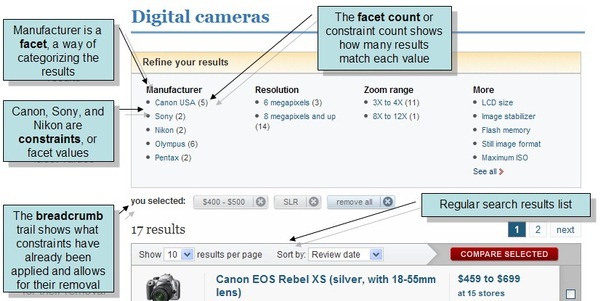
\
Let's start with defining a document like this:
```java
public class Camera {
private Date dateOfListing;
private String model;
private double cost;
private int zoom;
private double megapixels;
private boolean imageStabilizer;
private String manufacturer;
public Date getDateOfListing() {
return dateOfListing;
}
public void setDateOfListing(Date dateOfListing) {
this.dateOfListing = dateOfListing;
}
public String getModel() {
return model;
}
public void setModel(String model) {
this.model = model;
}
public double getCost() {
return cost;
}
public void setCost(double cost) {
this.cost = cost;
}
public int getZoom() {
return zoom;
}
public void setZoom(int zoom) {
this.zoom = zoom;
}
public double getMegapixels() {
return megapixels;
}
public void setMegapixels(double megapixels) {
this.megapixels = megapixels;
}
public boolean isImageStabilizer() {
return imageStabilizer;
}
public void setImageStabilizer(boolean imageStabilizer) {
this.imageStabilizer = imageStabilizer;
}
public String getManufacturer() {
return manufacturer;
}
public void setManufacturer(String manufacturer) {
this.manufacturer = manufacturer;
}
}
```
## Step 1
Create an index to work against.
```java
public class Cameras_ByManufacturerModelCostDateOfListingAndMegapixels extends AbstractIndexCreationTask {
public Cameras_ByManufacturerModelCostDateOfListingAndMegapixels() {
map = "from camera in docs.Cameras " +
"select new {" +
" camera.manufacturer," +
" camera.model," +
" camera.cost," +
" camera.dateOfListing," +
" camera.megapixels" +
"} ";
}
}
```
## Step 2
Setup your facet definitions:
```java
Facet facet1 = new Facet();
facet1.setFieldName("manufacturer");
RangeFacet facet2 = new RangeFacet();
facet2.setRanges(Arrays.asList(
"cost <= 200",
"cost between 200 and 400",
"cost between 400 and 600",
"cost between 600 and 800",
"cost >= 800"
));
RangeFacet facet3 = new RangeFacet();
facet3.setRanges(Arrays.asList(
"megapixels < 3",
"megapixels between 3 and 7",
"megapixels between 7 and 10",
"megapixels >= 10"
));
List facets = Arrays.asList(facet1);
List rangeFacets = Arrays.asList(facet2, facet3);
```
This tells RavenDB that you would like to get the following facets:
- For the **manufacturer** field, look at the documents and return a count for each unique Term found.
- For the **cost** field, return the count of the following ranges:
- cost < 200.0
- 200.0 <= cost < 400.0
- 400.0 <= cost < 600.0
- 600.0 <= cost < 800.0
- cost >= 800.0
- For the **megapixels** field, return the count of the following ranges:
- megapixels <= 3.0
- 3.0 <= megapixels < 7.0
- 7.0 <= megapixels < 10.0
- megapixels >= 10.0
## Step 3
You can write the following code to get back the data below:
### Query
```java
Map facetResults = session
.query(Camera.class, Cameras_ByManufacturerModelCostDateOfListingAndMegapixels.class)
.whereBetween("cost", 100, 300)
.aggregateBy(facets)
.execute();
```
### Facets
```java
Facet facet1 = new Facet();
facet1.setFieldName("manufacturer");
RangeFacet facet2 = new RangeFacet();
facet2.setRanges(Arrays.asList(
"cost <= 200",
"cost between 200 and 400",
"cost between 400 and 600",
"cost between 600 and 800",
"cost >= 800"
));
RangeFacet facet3 = new RangeFacet();
facet3.setRanges(Arrays.asList(
"megapixels < 3",
"megapixels between 3 and 7",
"megapixels between 7 and 10",
"megapixels >= 10"
));
List facets = Arrays.asList(facet1);
List rangeFacets = Arrays.asList(facet2, facet3);
```
### RQL
```sql
from index 'Cameras/ByManufacturerModelCostDateOfListingAndMegapixels'
where cost between 100 and 300
select facet(manufacturer), facet(cost <= 200, cost between 200 and 400, cost between 400 and 600, cost between 600 and 800, cost >= 800), facet(megapixels <= 3, megapixels between 3 and 7, megapixels between 7 and 10, megapixels >= 10)
```
This data represents the sample faceted data that satisfies the above query:
```json
[
{
"Name": "manufacturer",
"Values": [
{
"Count": 1,
"Range": "canon"
},
{
"Count": 2,
"Range": "jessops"
},
{
"Count": 1,
"Range": "nikon"
},
{
"Count": 1,
"Range": "phillips"
},
{
"Count": 3,
"Range": "sony"
}
]
},
{
"Name": "cost",
"Values": [
{
"Count": 6,
"Range": "cost <= 200"
},
{
"Count": 2,
"Range": "cost between 200 and 400"
},
{
"Count": 0,
"Range": "cost between 400 and 600"
},
{
"Count": 0,
"Range": "cost between 600 and 800"
},
{
"Count": 0,
"Range": "cost >= 800"
}
]
},
{
"Name": "megapixels",
"Values": [
{
"Count": 0,
"Range": "megapixels <= 3"
},
{
"Count": 6,
"Range": "megapixels between 3 and 7"
},
{
"Count": 1,
"Range": "megapixels between 7 and 10"
},
{
"Count": 1,
"Range": "megapixels >= 10"
}
]
}
]
```
### Storing Facets
If you do not have to change your facets dynamically, you can store your facets as a `FacetSetup` document and pass the document ID instead of the list each time:
```java
FacetSetup facetSetup = new FacetSetup();
facetSetup.setFacets(facets);
facetSetup.setRangeFacets(rangeFacets);
session.store(facetSetup, "facets/CameraFacets");
```
#### Query
```java
Map facetResults = session
.query(Camera.class, Cameras_ByManufacturerModelCostDateOfListingAndMegapixels.class)
.whereBetween("cost", 100, 300)
.aggregateUsing("facets/CameraFacets")
.execute();
```
#### Facets
```java
Facet facet1 = new Facet();
facet1.setFieldName("manufacturer");
RangeFacet facet2 = new RangeFacet();
facet2.setRanges(Arrays.asList(
"cost <= 200",
"cost between 200 and 400",
"cost between 400 and 600",
"cost between 600 and 800",
"cost >= 800"
));
RangeFacet facet3 = new RangeFacet();
facet3.setRanges(Arrays.asList(
"megapixels < 3",
"megapixels between 3 and 7",
"megapixels between 7 and 10",
"megapixels >= 10"
));
List facets = Arrays.asList(facet1);
List rangeFacets = Arrays.asList(facet2, facet3);
```
#### RQL
```sql
from index 'Cameras/ByManufacturerModelCostDateOfListingAndMegapixels'
where cost between 100 and 300
select facet(id('facets/CameraFacets'))
```
### Stale Results
The faceted search does not take into account a staleness of an index. You can wait for non stale results by customizing your query with the `waitForNonStaleResults` method.
### Fluent API
As an alternative for creating a list of facets and passing it to the `aggregateBy` method, RavenDB also exposes a dynamic API where you can create your facets using a builder. You can read more about those methods in our dedicated Client API article [here](https://docs.ravendb.net/6.2/client-api/session/querying/how-to-perform-a-faceted-search.java.md).
## See also
- [Query Overview](https://docs.ravendb.net/6.2/client-api/session/querying/how-to-query.md)
- [How to Perform a Faceted Search](https://docs.ravendb.net/6.2/client-api/session/querying/how-to-perform-a-faceted-search.java.md)