---
title: "Revert Documents to Specific Time"
description: "You can revert the database to its state at a specified point in time*"
url: "https://docs.ravendb.net/6.2/document-extensions/revisions/revert-documents-to-revisions/revert-documents-to-specific-time"
version: "6.2"
---
# Revert Documents to Specific Time
> RavenDB publishes an official agent skill for coding assistants at https://docs.ravendb.net/skills/ravendb/SKILL.md (also installable with `npx skills add ravendb/skills`). The skill describes itself as: "Read this before writing any RavenDB query, client call or /databases/ request. Covers server setup, document modelling, the Node.js, .NET and Python clients, RQL, indexes, vector search and AI agents. Code written from recall tends to run and return the wrong rows, because RQL resembles SQL and the clients take field names as plain strings."
> **Note**
>
> - You can **revert the database to its state at a specified point in time**
> by reverting documents to their revisions as they were at that time.
>
> - You can choose whether to revert documents from specific collections
> or revert documents from all collections as explained below.
>
> - To revert a single document (or multiple documents) to a specific revision,
> see [Revert documents to specific revisions](https://docs.ravendb.net/6.2/document-extensions/revisions/revert-documents-to-revisions/revert-documents-to-specific-revisions.md).
>
> - Being able to restore the database to a previous state can simplify auditing, enhance understanding of changes made over time,
> and facilitate instant recovery without the need to search and retrieve a stored backup.
>
> - In this article:
> - [The revisions settings view](#the-revisions-settings-view)
> - [Revert documents](#revert-documents)
> - [Point in time](#point-in-time)
> - [Time Window](#time-window)
> - [Content reverted](#content-reverted)
## The revisions settings view {#the-revisions-settings-view}
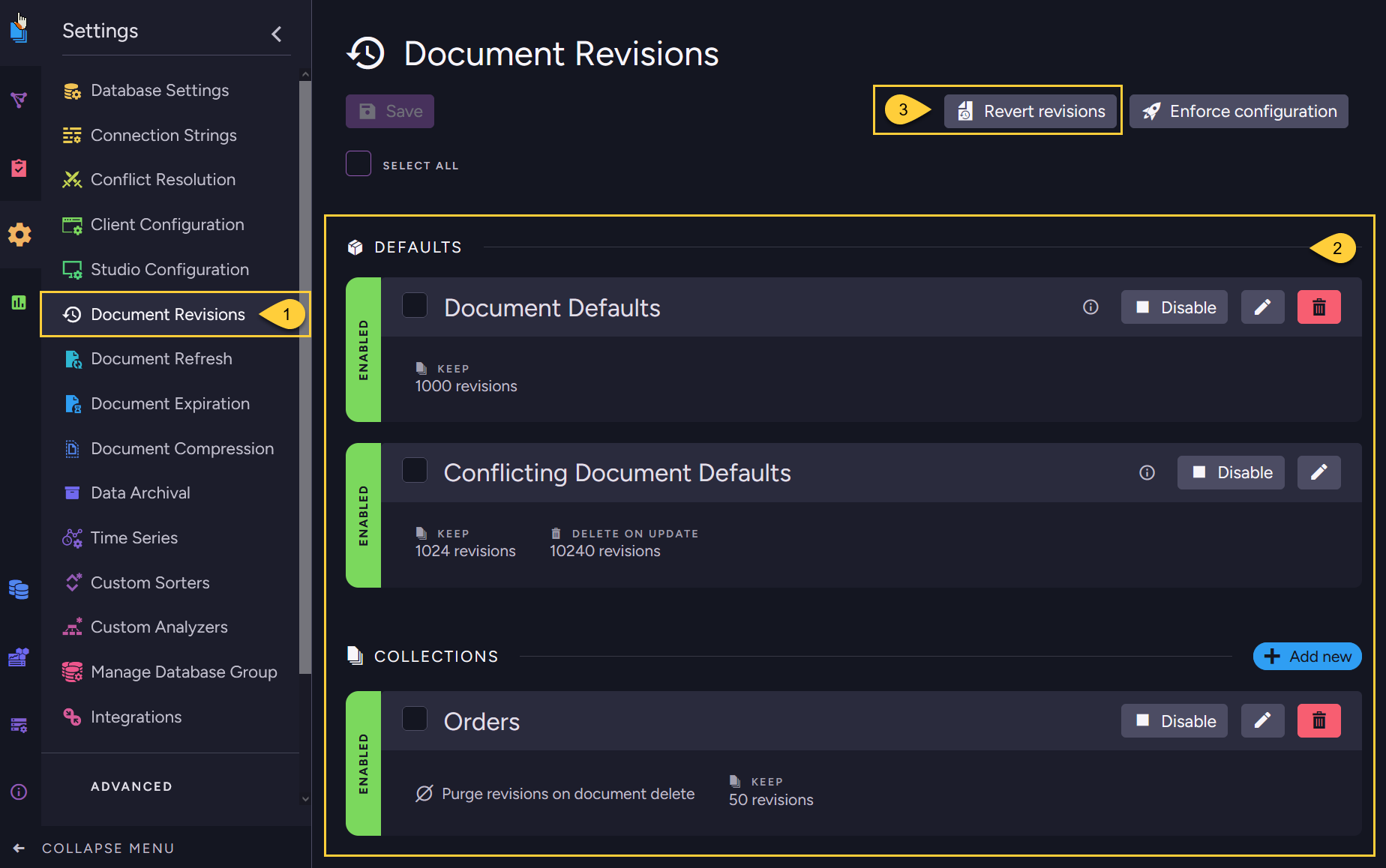
1. **The revisions settings view**:
In the Studio, go to *Settings > Document Revisions*. From this view you can:
- [Set](https://docs.ravendb.net/6.2/studio/database/settings/document-revisions.md#revisions-configuration) revision configurations
- [Enforce](https://docs.ravendb.net/6.2/studio/database/settings/document-revisions.md#enforce-configuration) revision configurations
- [Revert](#revert-documents) documents to revisions
2. **Revision configurations**:
- The ability to revert documents to their past revisions depends on revisions being created.
- When no default configuration or collection-specific configurations are defined and enabled,
no revisions will be created for any document.
- Make sure that a configuration that suits your needs is defined.
3. **Revert documents**:
Click the *Revert Revisions* button to revert documents from all or selected collections to a specified point in time.
Learn more [below](#revert-documents).
## Revert documents {#revert-documents}
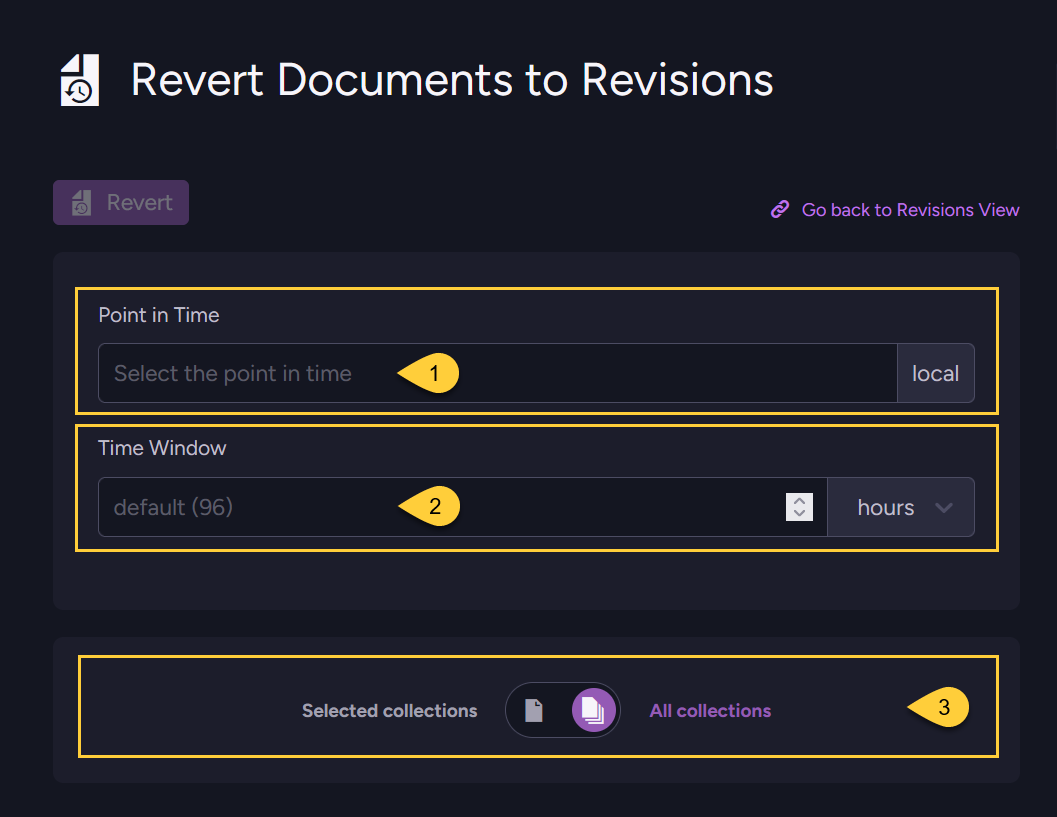
1. Enter the **Point in Time** to which you would like to revert the documents. Learn more [below](#point-in-time).
2. Enter the **Time Window**. Learn more [below](#time-window).
3. Revert **All collections** in the database, or toggle to select **Specific collections** to revert.
---
### Point in time
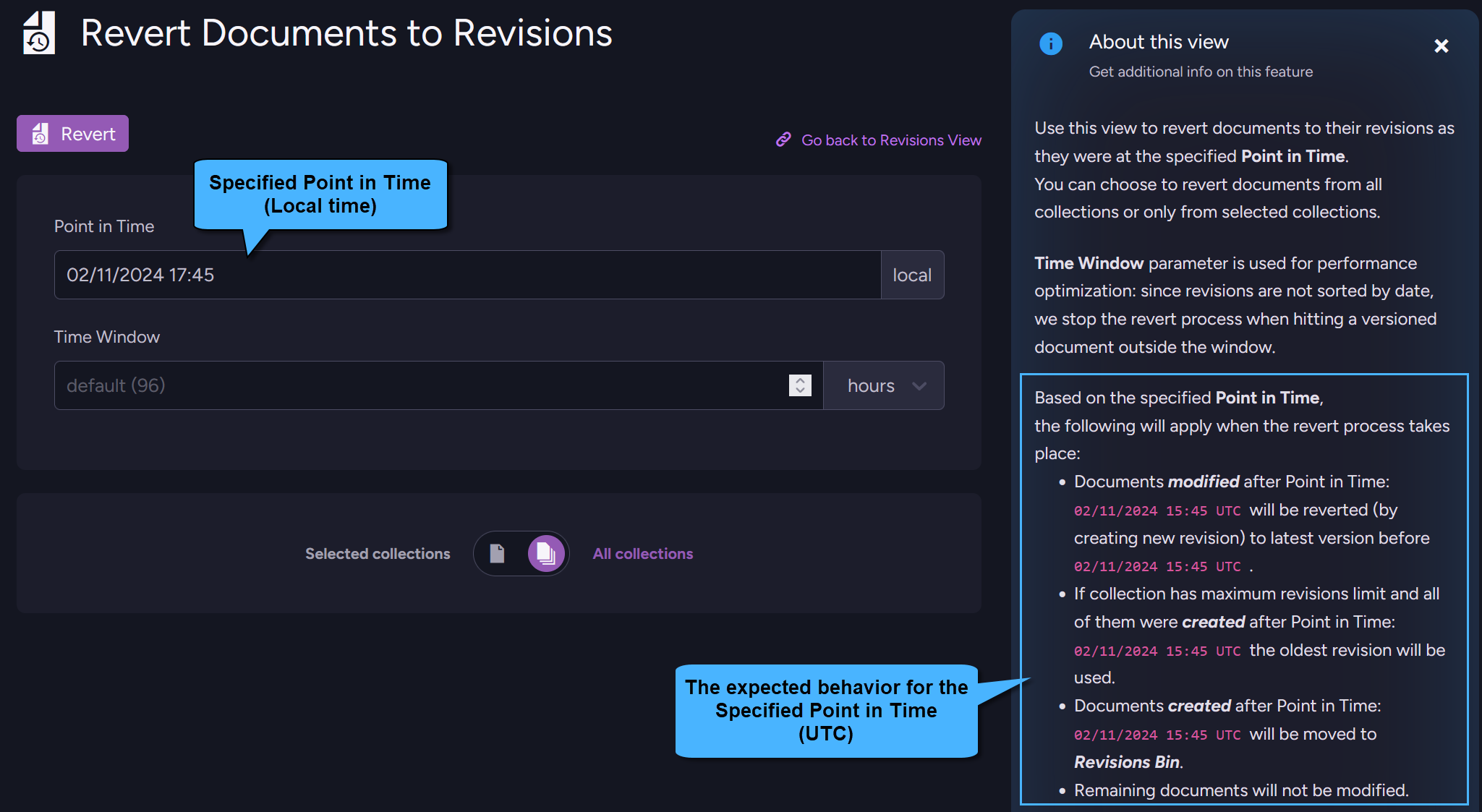
- Select or enter the point in time (LOCAL) to revert documents to.
The information text on the right will display the expected behavior in [UTC](https://en.wikipedia.org/wiki/Coordinated_Universal_Time).
- When the revert process is executed:
> **Note**
>
> Documents created **AFTER** the specified Point in Time will be **moved to the Revision Bin**.
> **Note**
>
> Documents created **BEFORE** this time and that were modified after this time:
>
> - Any of these documents that own revisions will be **reverted**
> to the revision created at the specified Point in Time or to the latest revision preceding this time.
>
> - When [setting a limit](https://docs.ravendb.net/6.2/studio/database/settings/document-revisions.md#limit-revisions) on the number of revisions that are kept (by number or by age)
> then only the most recent revisions are kept for the document.
> If all of these revisions were created AFTER the Point in Time then the oldest revision will be
> the one we revert to, even though that revision is newer than the specified time.
> By doing so we make sure that all the documents that existed before the specified Point in Time
> still exist after the revert process.
> **Note**
>
> Documents created **BEFORE** this time that were Not modified after this Time are **not reverted**.
---
### Time window
- Revisions are ordered in the *revisions storage* by their change-vector, and Not by creation time.
- When reverting the database (or selected collections) to some previous date,
RavenDB will iterate through the revisions, starting from the most recent revision,
and search for revisions that should be restored.
For each revision found - its matching document will be reverted to that revision.
- To avoid conducting unnecessarily long searches or revert to revisions that are too old
RavenDB sets a limit to this search.
The search will stop once we hit a revision that was created prior to: `Point in Time - Time Window`
- The default Time Window value is 96 hours (4 days).
> **Note**
>
> **Example**:
>
> - **Point in Time** to revert to: `15.2.2023 02:00`
> Documents will be reverted to their latest revision that was created prior to this Point in Time.
>
> - **Time Window**: `4 days`
> We will stop searching the revisions once we hit a revision with creation time prior to:
> `11.2.2023 02:00`
>
> - **Sample revisions**:
> - The list below contains revisions of all documents, it is not just revisions of a single document.
> - The revisions are Not ordered by creation time, the order is set by their change-vector.
>
> | Revision | Creation time | |
> | - | - | - |
> | 1) `Users/1` | 20.2.2023 01:00 | |
> | 2) `Users/5` | 19.2.2023 01:00 | |
> | 3) `Users/3` | 14.2.2023 01:00 | => Document Users/3 stays with this revision content |
> | 4) `Users/4` | 17.2.2023 01:00 | => Document Users/4 will be moved to Revisions Bin |
> | 5) `Users/1` | 18.2.2023 01:00 | |
> | 6) `Users/1` | 13.2.2023 01:00 | => Document Users/1 will be reverted to this revision |
> | 7) `Users/5` | 11.2.2023 01:00 | => Document Users/5 will be reverted to this revision +
STOP the search for more Users/5 revisions |
> | 8) `Users/5` | 11.2.2023 03:00 | |
> | 9) `Users/9` | 10.2.2023 01:00 | => Document Users/9 will Not be reverted to this revision +
STOP the search in this list |
> | 10) `Users/6` | 11.2.2023 01:00 | |
> | . . . | | |
>
> - (line 1)
> We iterate on the revisions starting from `Users/1` revision created on `20.2.2023 01:00`.
> We search for a relevant revision for document `Users/1` by iterating on all `Users/1` revisions.
> The revision that will be restored for `Users/1` is the one from `13.2.2023 01:00` (line 6)
> since it is the latest one prior to `15.2.2023 02:00`.
>
> - (line 2)
> Next, we search for a relevant revision for document `Users/5` by iterating on all `Users/5` revisions,
> and we reach line 7.
> Here the search for `Users/5` revisions will STOP since this revision was created prior to `11.2.2023 02:00`.
> We will revert the document to this revision since it is the latest one prior to `15.2.2023 02:00`.
> The following revision for `Users/5` from `11.2.2023 03:00` (line 8) is Not restored.
>
> - (line 3)
> Next, document `Users/3` is Not modified, since it wasn't modified after `15.2.2023 02:00`.
>
> - (line 4)
> Next, `Users/4` has NO revisions prior to `15.2.2023 02:00`,
> which means it was created AFTER this Point in Time,
> so this document is moved to the Revisions Bin.
>
> - (line 9)
> Next, we reach `Users/9` revision created on `10.2.2023 01:00`, which is PRIOR to `11.2.2023 02:00`.
> The search on this list will now STOP.
> No further revisions will be taken into account, not even `Users/6` revision created on `11.2.2023 01:00`.
---
### Content reverted
> **Info**
>
> - When reverting a document to one of its revisions, RavenDB actually creates a new revision for the document.
> The content of this new revision is a copy of the historical revision content, and it becomes the current version of the document.
>
> - Database items other than documents, such as ongoing tasks, indexes, and compare-exchange,
> are Not reverted by this process.
>
> - Document extensions:
> - **Time series**
> Time series data is Not reverted. Learn more [here](https://docs.ravendb.net/6.2/document-extensions/revisions/revisions-and-other-features.md#reverted-data-1).
> - **Attachments**
> When a document is reverted to a revision that owns attachments,
> the attachments are restored to their state when the revision was created.
> - **Counters**
> When a document is reverted to a revision that owns counters,
> the counters are restored to functionality along with their values from that revision.