Include Revisions
-
Document revisions can be included in results when:
- Making a query (
Session.Query/Session.Advanced.RawQuery) - Loading a document (
Session.Load) from the server
- Making a query (
-
The revisions to include can be specified by:
- Creation time - use this to include a single revision
- Change vector - use this to include one or more revisions
-
In this article:
Overview
Why include revisions:
-
Including revisions may be useful, for example, when an auditing application loads or queries for a document.
The document's past revisions can be included with the document to make the document's history available for instant inspection. -
Once revisions are loaded into the session, accessing them requires no additional trips to the server.
Getting a revision that was included with the document will retrieve it directly from the session.
This also holds true when attempting to include revisions but none are found.
Including by creation time:
-
When specifying a creation time, only a SINGLE revision can be included per document.
To include MULTIPLE revisions, use change vectors instead. -
You can pass local time or UTC, either way the server will convert it to UTC.
-
If the provided time matches the creation time of a document revision, this revision will be included.
-
If no exact match is found, then the first revision that precedes the specified time will be returned.
Including by change vector:
-
Unlike using creation time, which limits you to a single revision,
including by change vector allows you to include one or more revisions per document. -
Each time a document is modified, its Change Vector is updated.
-
When a revision is created,
the revision's change vector is the change vector of the document at the time of the revision's creation. -
To include SINGLE or MULTIPLE document revisions by their change vectors:
-
When modifying the document, store its updated change vector in a property in the document.
This can be done by patching the document from the Client API or from the Studio. -
Specify the path to this property when including the revisions, see examples below.
-
For example:
Each time an employee's contract document is modified (e.g. when their salary is raised),
you can add the current change vector of the document to a dedicated property in the document.
Whenever the time comes to re-evaluate an employee's terms and their contract is loaded,
its past revisions can be easily included with it by their change vectors.
-
Include revisions when Loading
Include a revision by creation time:
- Load_sync
- Load_async
// The revision creation time
// For example - looking for a revision from last month
var creationTime = DateTime.Now.AddMonths(-1);

// Load a document and include its revision from the specified time
var order = session.Load<Order>("orders/1-A", builder => builder
    // * Pass the revision creation time to 'IncludeRevisions'.
    //   The revision will be 'loaded' to the session along with the document.
    // * If no revision was created at this exact time,
    //   then the first revision preceding it will be included.
    .IncludeRevisions(creationTime));

// Get the revision by creation time - it will be retrieved from the SESSION
// No additional trip to the server is made.
var revision = session
    .Advanced.Revisions.Get<Order>("orders/1-A", creationTime);
// The revision creation time
// For example - looking for a revision from last month
var creationTime = DateTime.Now.AddMonths(-1);

// Load a document and include its revision from the specified time
var order = await asyncSession.LoadAsync<Order>("orders/1-A", builder => builder
    // * Pass the revision creation time to 'IncludeRevisions'.
    //   The revision will be 'loaded' to the session along with the document.
    // * If no revision was created at this exact time,
    //   then the first revision preceding it will be included.
    .IncludeRevisions(creationTime));

// Get the revision by creation time - it will be retrieved from the SESSION
// No additional trip to the server is made.
var revision = await asyncSession
    .Advanced.Revisions.GetAsync<Order>("orders/1-A", creationTime);
Include revisions by change vector:
- Load_sync
- Load_async
- Sample_document
// Load a document:
var contract = session.Load<Contract>("contracts/1-A", builder => builder

     // To include a SINGLE revision,
     // pass the path to the document property that contains the revision change vector.
    .IncludeRevisions(x => x.RevisionChangeVector) // Include a single revision

     // To include MULTIPLE revisions,
     // pass the path to the document property that contains the list of change vectors.
    .IncludeRevisions(x => x.RevisionChangeVectors)); // Include multiple revisions

     // The revision(s) will be 'loaded' to the session along with the document.

// Get the revision(s) by change vectors - it will be retrieved from the SESSION
// No additional trip to the server is made
var revision = session
    .Advanced.Revisions.Get<Contract>(contract.RevisionChangeVector);
var revisions = session
    .Advanced.Revisions.Get<Contract>(contract.RevisionChangeVectors);
// Load a document:
var contract = await asyncSession.LoadAsync<Contract>("contracts/1-A",builder => builder

     // To include a SINGLE revision,
     // pass the path to the document property that contains the revision change vector.
    .IncludeRevisions(x => x.RevisionChangeVector) // Include a single revision

     // To include MULTIPLE revisions,
     // pass the path to the document property that contains the list of change vectors.
    .IncludeRevisions(x => x.RevisionChangeVectors)); // Include multiple revisions

     // The revision(s) will be 'loaded' to the session along with the document.

// Get the revision(s) by change vectors - it will be retrieved from the SESSION
// No additional trip to the server is made
var revision = await asyncSession
    .Advanced.Revisions.GetAsync<Contract>(contract.RevisionChangeVector);
var revisions = await asyncSession
    .Advanced.Revisions.GetAsync<Contract>(contract.RevisionChangeVectors);
// Sample Contract document
private class Contract
{
    public string Id { get; set; }
    public string Name { get; set; }

    // A property that will hold a single change vector
    public string RevisionChangeVector { get; set; }

    // A property that will hold a list of change vectors
    public List<string> RevisionChangeVectors { get; set; }
}
Include revisions when Querying - High-level query
Include revisions by creation time:
- Query_sync
- Query_async
- RQL
// The revision creation time
// For example - looking for revisions from last month
var creationTime = DateTime.Now.AddMonths(-1);

// Query for documents:
var orderDocuments = session.Query<Order>()
    .Where(x => x.ShipTo.Country == "Canada")
     // * Pass the revision creation time to 'IncludeRevisions'
     // * If no revision was created at this exact time,
     //   then the first revision preceding it will be included.
    .Include(builder => builder.IncludeRevisions(creationTime))
    .ToList();

     // For each document in the query results,
     // the matching revision will be 'loaded' to the session along with the document.

// When getting a revision by its creation time for a document from the query results,
// the revision will be retrieved from the SESSION - no additional trip to the server is made.
var revision = session
    .Advanced.Revisions.Get<Order>(orderDocuments[0].Id, creationTime);
// The revision creation time
// For example - looking for revisions from last month
var creationTime = DateTime.Now.AddMonths(-1);

// Query for documents:
var orderDocuments = await asyncSession.Query<Order>()
    .Where(x => x.ShipTo.Country == "Canada")
     // * Pass the revision creation time to 'IncludeRevisions'
     // * If no revision was created at this exact time,
     //   then the first revision preceding it will be included.
    .Include(builder => builder.IncludeRevisions(creationTime))
    .ToListAsync();

     // For each document in the query results,
     // the matching revision will be 'loaded' to the session along with the document.

// When getting a revision by its creation time for a document from the query results,
// the revision will be retrieved from the SESSION - no additional trip to the server is made.
var revision = await asyncSession
    .Advanced.Revisions.GetAsync<Order>(orderDocuments[0].Id, creationTime);
from "Orders"
where ShipTo.Country = $p0
include revisions('2026-02-23T07:40:54.2513729Z')
{"p0":"Canada"}
Include revisions by change vector:
- Query_sync
- Query_async
- RQL
- Sample_document
// Query for documents:
var orderDocuments = session.Query<Contract>()
    .Include(builder => builder

         // To include a SINGLE revision,
         // Pass the path to the document property that contains the revision change vector.
        .IncludeRevisions(x => x.RevisionChangeVector)

         // To include MULTIPLE revisions,
         // pass the path to the document property that contains the list of change vectors.
        .IncludeRevisions(x => x.RevisionChangeVectors))

    .ToList();

     // For each document in the query results,
     // the matching revision will be 'loaded' to the session along with the document.

// When getting the revision(s) by change vectors for documents from the query results,
// they will be retrieved from the SESSION - no additional trips to the server are made.
var revision = session.
    Advanced.Revisions.Get<Contract>(orderDocuments[0].RevisionChangeVector);
var revisions = session
    .Advanced.Revisions.Get<Contract>(orderDocuments[0].RevisionChangeVectors);
// Query for documents:
var orderDocuments = await asyncSession.Query<Contract>()
    .Include(builder => builder

         // To include a SINGLE revision,
         // Pass the path to the document property that contains the revision change vector.
        .IncludeRevisions(x => x.RevisionChangeVector)

         // To include MULTIPLE revisions,
         // pass the path to the document property that contains the list of change vectors.
        .IncludeRevisions(x => x.RevisionChangeVectors))

    .ToListAsync();

     // For each document in the query results,
     // the matching revision will be 'loaded' to the session along with the document.

// When getting the revision(s) by change vectors for documents from the query results,
// they will be retrieved from the SESSION - no additional trips to the server are made.
var revision = await asyncSession.
    Advanced.Revisions.GetAsync<Contract>(orderDocuments[0].RevisionChangeVector);
var revisions = await asyncSession
    .Advanced.Revisions.GetAsync<Contract>(orderDocuments[0].RevisionChangeVectors);
from "Contracts"
include revisions('RevisionChangeVector'), revisions('RevisionChangeVectors')
// Sample Contract document
private class Contract
{
    public string Id { get; set; }
    public string Name { get; set; }

    // A property that will hold a single change vector
    public string RevisionChangeVector { get; set; }

    // A property that will hold a list of change vectors
    public List<string> RevisionChangeVectors { get; set; }
}
Include revisions when Querying - Raw query
-
Use
include revisionsin your RQL when making a raw query. -
Pass either the revision creation time or the path to the document property containing the change vector(s),
RavenDB will figure out the parameter type passed and include the revisions accordingly. -
Aliases (e.g.
from Users as U) are Not supported by raw queries that include revisions.
Include revisions by Time:
- Query_sync
- Query_async
- RQL
// The revision creation time
// For example - looking for revisions from last month
var creationTime = DateTime.Now.AddMonths(-1);

// Query for documents with Raw Query:
var orderDocuments = session.Advanced
     // Use 'include revisions' in the RQL
    .RawQuery<Order>("from Orders include revisions($p0)")
     // Pass the revision creation time
    .AddParameter("p0", creationTime)
     // For each document in the query results,
     // the matching revision will be 'loaded' to the session along with the document
    .ToList();

// Get a revision by its creation time for a document from the query results
// It will be retrieved from the SESSION - no additional trip to the server is made
var revision = session
    .Advanced.Revisions.Get<Order>(orderDocuments[0].Id, creationTime);
// The revision creation time
// For example - looking for revisions from last month
var creationTime = DateTime.Now.AddMonths(-1);

// Query for documents with Raw Query:
var orderDocuments = await asyncSession.Advanced
    // Use 'include revisions' in the RQL
    .AsyncRawQuery<Order>("from Orders include revisions($p0)")
    // Pass the revision creation time
    .AddParameter("p0", creationTime)
    // For each document in the query results,
    // the matching revision will be 'loaded' to the session along with the document
    .ToListAsync();

// Get a revision by its creation time for a document from the query results
// It will be retrieved from the SESSION - no additional trip to the server is made
var revision = await asyncSession
    .Advanced.Revisions.GetAsync<Order>(orderDocuments[0].Id, creationTime);
from "Orders"
include revisions('2026-02-23T07:40:54.2513729Z')
Include revisions by Change Vector:
- Query_sync
- Query_async
- RQL
- Sample_document
// Query for documents with Raw Query:
var orderDocuments = session.Advanced
     // Use 'include revisions' in the RQL
    .RawQuery<Contract>("from Contracts include revisions($p0, $p1)")
     // Pass the path to the document properties containing the change vectors
    .AddParameter("p0", "RevisionChangeVector")  // Include a single revision
    .AddParameter("p1", "RevisionChangeVectors") // Include multiple revisions
     // For each document in the query results,
     // the matching revisions will be 'loaded' to the session along with the document
    .ToList();

// Get the revision(s) by change vectors - it will be retrieved from the SESSION
// No additional trip to the server is made
var revision = session.
    Advanced.Revisions.Get<Contract>(orderDocuments[0].RevisionChangeVector);
var revisions = session
    .Advanced.Revisions.Get<Contract>(orderDocuments[0].RevisionChangeVectors);
// Query for documents with Raw Query:
var orderDocuments = await asyncSession.Advanced
    // Use 'include revisions' in the RQL
    .AsyncRawQuery<Contract>("from Contracts include revisions($p0, $p1)")
    // Pass the path to the document properties containing the change vectors
    .AddParameter("p0", "RevisionChangeVector")  // Include a single revision
    .AddParameter("p1", "RevisionChangeVectors") // Include multiple revisions
    // For each document in the query results,
    // the matching revisions will be 'loaded' to the session along with the document
    .ToListAsync();

// Get the revision(s) by change vectors - it will be retrieved from the SESSION
// No additional trip to the server is made
var revision = await asyncSession.
    Advanced.Revisions.GetAsync<Contract>(orderDocuments[0].RevisionChangeVector);
var revisions = await asyncSession
    .Advanced.Revisions.GetAsync<Contract>(orderDocuments[0].RevisionChangeVectors);
from "Contracts"
include revisions('RevisionChangeVector'), revisions('RevisionChangeVectors')
// Sample Contract document
private class Contract
{
    public string Id { get; set; }
    public string Name { get; set; }

    // A property that will hold a single change vector
    public string RevisionChangeVector { get; set; }

    // A property that will hold a list of change vectors
    public List<string> RevisionChangeVectors { get; set; }
}
View included revisions in Studio
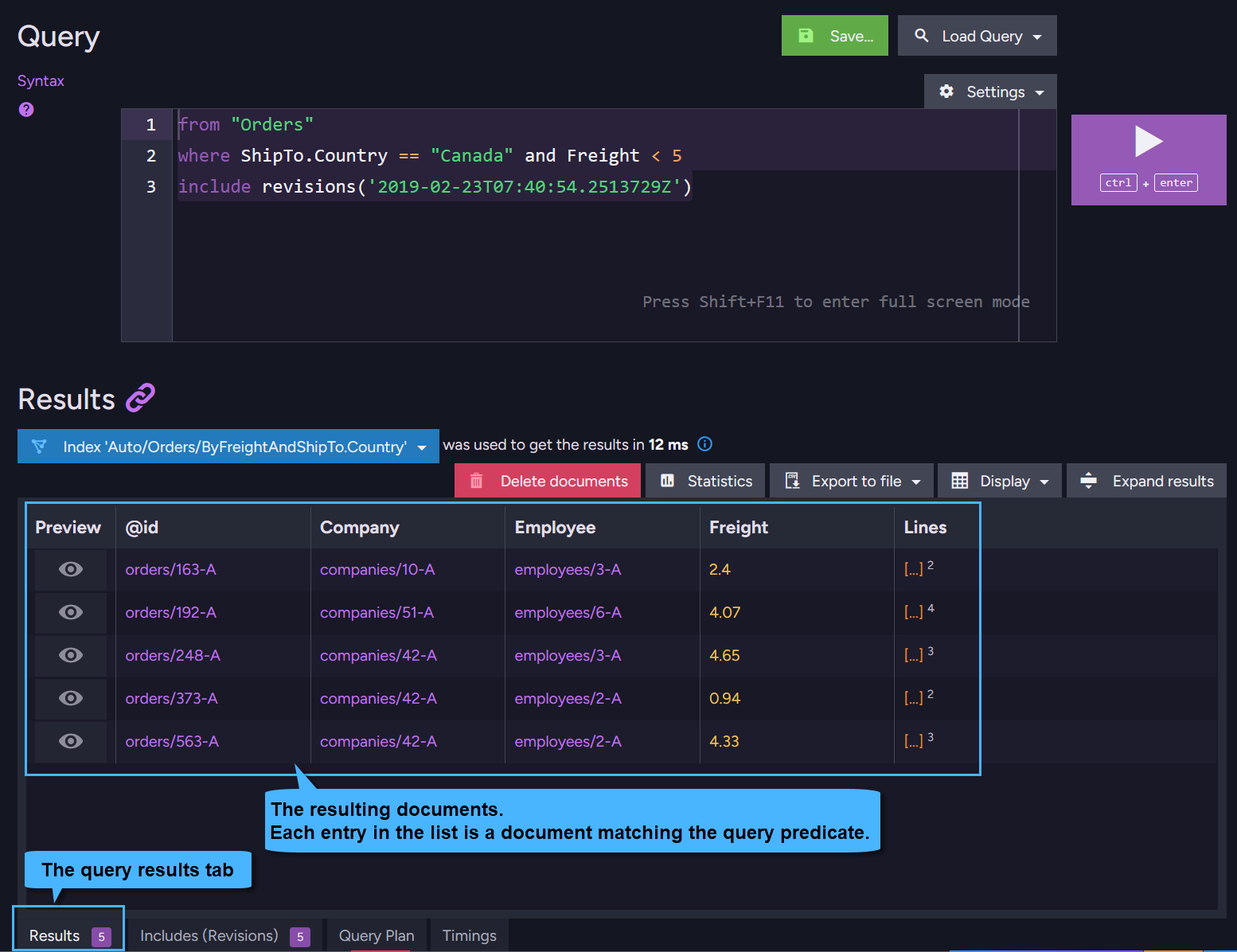
Included revisions can be viewed in the Studio's Query View.
Run a query that includes revisions, for example:
from "Orders"
where ShipTo.Country == "Canada" and Freight < 5
include revisions('2019-02-23T07:40:54.2513729Z')
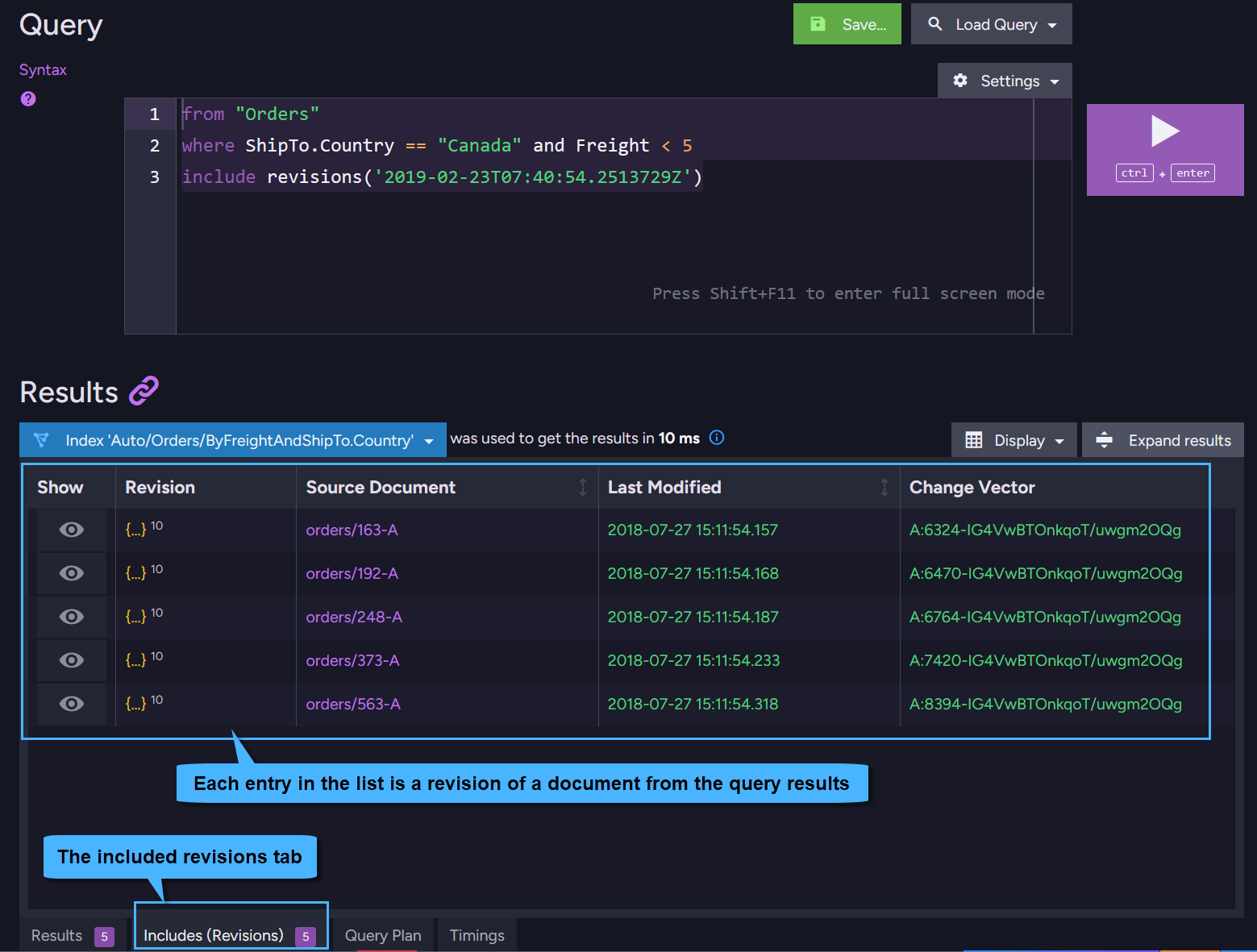
The included revisions will be listed in a dedicated Revisions Tab under the query results.
The resulting documents:
The included revisions:
Patching the revision change vector
-
When including revisions by change vector rather than by creation time,
you need to specify the path to a document property that contains the revision change vector(s). -
The example below shows how to retrieve a revision's change vector and patch it into a document property
so that it can later be used to include that revision.
- Sync
- Async
- Sample_document
using (var session = store.OpenSession())
{
    // Get the revisions' metadata for document 'contracts/1-A'
    List<IMetadataDictionary> contractRevisionsMetadata =
        session.Advanced.Revisions.GetMetadataFor("contracts/1-A");

    // Get a change vector from the metadata
    string changeVector =
        contractRevisionsMetadata.First().GetString(Constants.Documents.Metadata.ChangeVector);

    // Patch the document - add the revision change vector to a specific document property
    session.Advanced
        .Patch<Contract, string>("contracts/1-A", x => x.RevisionChangeVector, changeVector);

    // Save your changes
    session.SaveChanges();
}
using (var asyncSession = store.OpenAsyncSession())
{
    // Get the revisions' metadata for document 'contracts/1-A'
    List<IMetadataDictionary> contractRevisionsMetadata =
        await asyncSession.Advanced.Revisions.GetMetadataForAsync("contracts/1-A");

    // Get a change vector from the metadata
    string changeVector =
        contractRevisionsMetadata.First().GetString(Constants.Documents.Metadata.ChangeVector);

    // Patch the document - add the revision change vector to a specific document property
    asyncSession.Advanced
        .Patch<Contract, string>("contracts/1-A", x => x.RevisionChangeVector, changeVector);

    // Save your changes
    await asyncSession.SaveChangesAsync();
}
// Sample Contract document
private class Contract
{
    public string Id { get; set; }
    public string Name { get; set; }

    // A property that will hold a single change vector
    public string RevisionChangeVector { get; set; }

    // A property that will hold a list of change vectors
    public List<string> RevisionChangeVectors { get; set; }
}
Syntax
// Include a SINGLE revision by Time
TBuilder IncludeRevisions(DateTime before);

// Include a SINGLE revision by change vector
TBuilder IncludeRevisions(Expression<Func<T, string>> path);

// Include an ARRAY of revisions by change vectors
TBuilder IncludeRevisions(Expression<Func<T, IEnumerable<string>>> path);
| Parameter | Type | Description |
|---|---|---|
| before | DateTime | Creation time of the revision to be included. Pass local time or UTC. The server will convert the param to UTC. If no revision was created at this time then the first revision that precedes it is returned. |
| path | Expression<Func<T, string>> | The path to the document property that contains a single change vector of the revision to be included. |
| path | Expression<Func<T, IEnumerable<string>>> | The path to the document property that contains an array of change vectors of the revisions to be included. |
| Return value | |
|---|---|
TBuilder | When loading a document: A builder object that is used to build the include part in the Load request. When querying for a document: A builder object that is used to build the include part in the Query RQL expression. Can be used in chaining. |