---
title: "Query for Suggestions"
url: "https://docs.ravendb.net/6.2/client-api/session/querying/how-to-work-with-suggestions"
version: "6.2"
language: "nodejs"
---
# Query for Suggestions
> Client language: Node.js. Also available for [Java](https://docs.ravendb.net/6.2/client-api/session/querying/how-to-work-with-suggestions.java.md), [C#](https://docs.ravendb.net/6.2/client-api/session/querying/how-to-work-with-suggestions.md), [Python](https://docs.ravendb.net/6.2/client-api/session/querying/how-to-work-with-suggestions.python.md), [PHP](https://docs.ravendb.net/6.2/client-api/session/querying/how-to-work-with-suggestions.php.md).
>
> RavenDB publishes an official agent skill for coding assistants at https://docs.ravendb.net/skills/ravendb/SKILL.md (also installable with `npx skills add ravendb/skills`). The skill describes itself as: "Read this before writing any RavenDB query, client call or /databases/ request. Covers server setup, document modelling, the Node.js, .NET and Python clients, RQL, indexes, vector search and AI agents. Code written from recall tends to run and return the wrong rows, because RQL resembles SQL and the clients take field names as plain strings."
> **Note**
>
> - Given a string term, the Suggestion feature will offer **similar terms** from your data.
>
> - Word similarities are found using string distance algorithms.
>
> - Examples in this article demonstrate getting suggestions with a **dynamic-query**.
> For getting suggestions with an **index-query** see [query for suggestions with index](https://docs.ravendb.net/6.2/indexes/querying/suggestions.nodejs.md).
>
> - In this page:
>
> - Overview:
> - [What are terms](#what-are-terms)
> - [When to use suggestions](#when-to-use-suggestions)
>
> - Examples:
> - [Suggest terms - for single term](#suggest-terms---for-single-term)
> - [Suggest terms - for multiple terms](#suggest-terms---for-multiple-terms)
> - [Suggest terms - for multiple fields](#suggest-terms---for-multiple-fields)
> - [Suggest terms - customize options and display name](#suggest-terms---customize-options-and-display-name)
>
> - [The auto-index terms in Studio](#the-auto-index-terms-in-studio)
>
> - [Syntax](#syntax)
## What are terms
- All queries in RavenDB use an index - learn more about that [here](https://docs.ravendb.net/6.2/client-api/session/querying/how-to-query.nodejs.md#queries-always-provide-results-using-an-index).
Whether making a dynamic query which generates an auto-index or using a static index,
the data from your documents is 'broken' into **terms** that are kept in the index.
- This tokenization process (what terms will be generated) depends on the analyzer used,
various analyzers differ in the way they split the text stream. Learn more in [Analyzers](https://docs.ravendb.net/6.2/indexes/using-analyzers.nodejs.md).
- The terms can then be queried to retrieve matching documents that contain them.
## When to use suggestions
Querying for suggestions is useful in the following scenarios:
- **When query has no results**:
- When searching for documents that match some condition on a given string term,
if the term is misspelled then you will Not get any results.
You can then ask RavenDB to suggest similar terms that do exist in the index.
- The suggested terms can then be used in a new query to retrieve matching documents,
or simply presented to the user asking what they meant to query.
- **When looking for alternative terms**:
- When simply searching for additional alternative terms for a term that does exist.
> **Warning**
>
> The resulting suggested terms will Not include the term for which you search,
> they will only contain the similar terms.
## Suggest terms - for single term
Consider this example:
Based on the **Northwind sample data**, the following query has no resulting documents,
as no document in the Products collection contains the term `chaig` in its `Name` field.
```javascript
// This dynamic query on the 'Products' collection has NO resulting documents
const products = await session
.query({ collection: "Products" })
.whereEquals("Name", "Chai")
.all();
```
- Executing the above query will generate the auto-index `Auto/Products/ByName`.
This auto-index will contain a list of all available terms from the document field `Name`.
The generated terms are visible in the Studio - see image [below](#the-auto-index-terms-in-studio).
- If you suspect that the term `chaig` in the query criteria is written incorrectly,
you can ask RavenDB to suggest **existing terms** that are similar to `chaig`, as follows:.
### Query
```javascript
// Query for suggested terms for single term:
// ==========================================
const suggestions = await session
// Make a dynamic query on collection 'Products'
.query({ collection: "Products" })
// Call 'suggestUsing'
.suggestUsing(x => x
// Request to get terms from field 'Name' that are similar to 'chaig'
.byField("Name", "chaig"))
.execute();
```
### RQL
```sql
// Query for terms from field 'Name' that are similar to 'chaig'
from "Products"
select suggest(Name, "chaig")
```
```javascript
// The resulting suggested terms:
// ==============================
console.log("Suggested terms in field 'Name' that are similar to 'chaig':");
suggestions["Name"].suggestions.forEach(suggestedTerm => {
console.log("\t" + suggestedTerm);
});
// Suggested terms in field 'Name' that are similar to 'chaig':
// chai
// chang
```
## Suggest terms - for multiple terms
### Query
```javascript
// Query for suggested terms for multiple terms:
// =============================================
const suggestions = await session
// Make a dynamic query on collection 'Products'
.query({ collection: "Products" })
// Call 'suggestUsing'
.suggestUsing(x => x
// Request to get terms from field 'Name' that are similar to 'chaig' OR 'tof'
.byField("Name", ["chaig", "tof"]))
.execute();
```
### RQL
```sql
// Query for terms from field 'Name' that are similar to 'chaig' OR 'tof'
from "Products" select suggest(Name, $p0)
{ "p0" : ["chaig", "tof"] }
```
```javascript
// The resulting suggested terms:
// ==============================
// Suggested terms in field 'Name' that are similar to 'chaig' OR to 'tof':
// chai
// chang
// tofu
```
## Suggest terms - for multiple fields
### Query
```javascript
// Query for suggested terms in multiple fields:
// =============================================
const suggestions = await session
// Make a dynamic query on collection 'Companies'
.query({ collection: "Companies" })
// Call 'suggestUsing' to get suggestions for terms that are
// similar to 'chop-soy china' in first document field (e.g. 'Name')
.suggestUsing(x => x
.byField("Name", "chop-soy china"))
// Call 'AndSuggestUsing' to get suggestions for terms that are
// similar to 'maria larson' in an additional field (e.g. 'Contact.Name')
.andSuggestUsing(x => x
.byField("Contact.Name", "maria larson"))
.execute();
```
### RQL
```sql
// Query for suggested terms from field 'Name' and field 'Contact.Name'
from "Companies"
select suggest(Name, "chop-soy china"), suggest(Contact.Name, "maria larson")
```
```javascript
// The resulting suggested terms:
// ==============================
// Suggested terms in field 'Name' that is similar to 'chop-soy china':
// chop-suey chinese
// Suggested terms in field 'Contact.Name' that are similar to 'maria larson':
// maria larsson
// marie bertrand
// aria cruz
// paula wilson
// maria anders
```
## Suggest terms - customize options and display name
### Query
```javascript
// Query for suggested terms - customize options and display name:
// ===============================================================
const suggestions = await session
// Make a dynamic query on collection 'Products'
.query({ collection: "Products" })
// Call 'suggestUsing'
.suggestUsing(x => x
.byField("Name", "chaig")
// Customize suggestions options
.withOptions({
accuracy: 0.4,
pageSize: 5,
distance: "JaroWinkler",
sortMode: "Popularity"
})
// Customize display name for results
.withDisplayName("SomeCustomName"))
.execute();
```
### RQL
```sql
// Query for suggested terms - customize options and display name
from "Products"
select suggest(
Name,
'chaig',
'{ "Accuracy" : 0.4, "PageSize" : 5, "Distance" : "JaroWinkler", "SortMode" : "Popularity" }'
) as "SomeCustomName"
```
```javascript
// The resulting suggested terms:
// ==============================
console.log("Suggested terms:");
// Results are available under the custom name entry
suggestions["SomeCustomName"].suggestions.forEach(suggestedTerm => {
console.log("\t" + suggestedTerm);
});
// Suggested terms:
// chai
// chang
// chartreuse verte
```
## The auto-index terms in Studio
Based on the Northwind sample data, these are the terms generated for index `Auto/Products/ByName`:
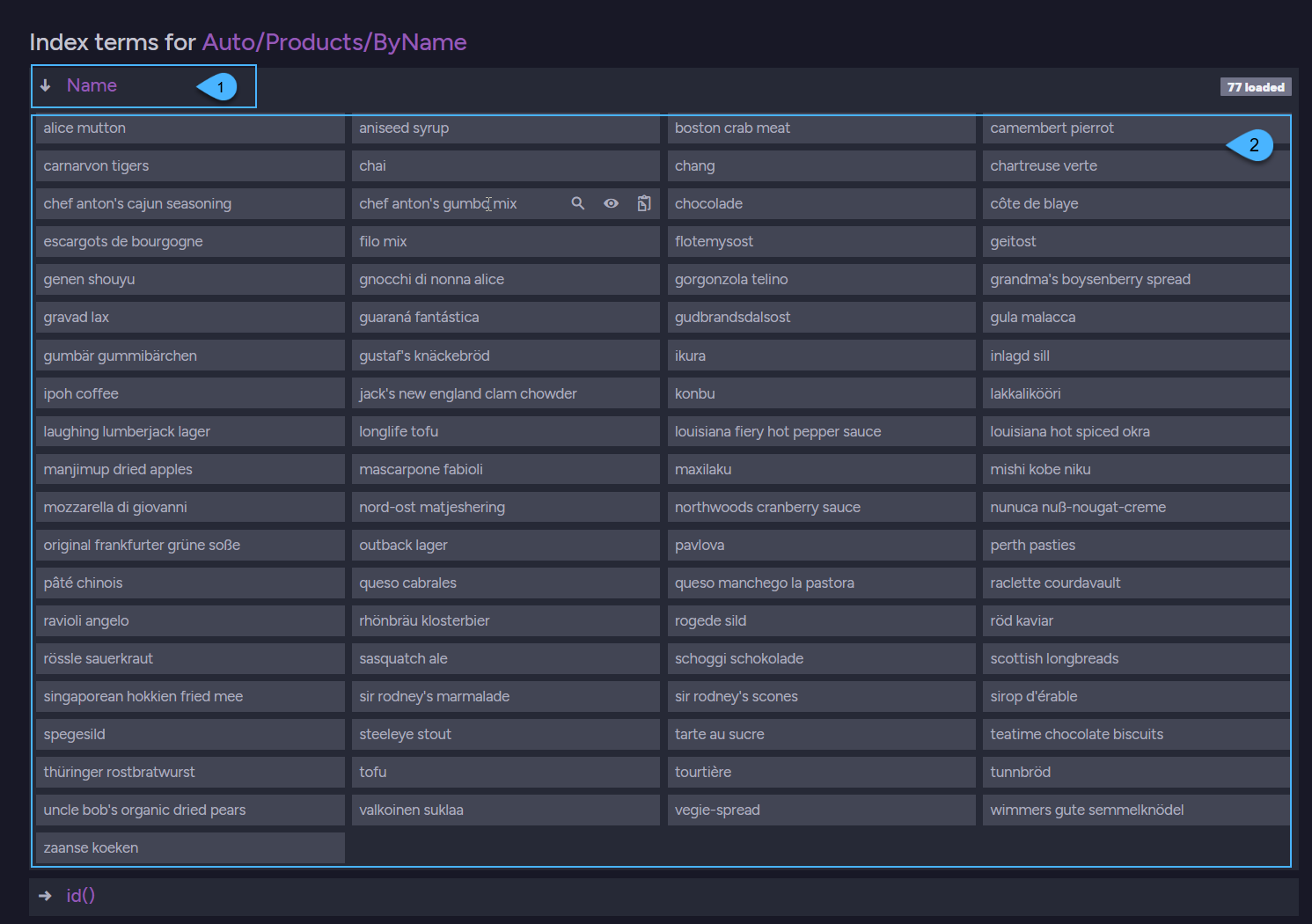
1. **The field name** - derived from the document field that was used in the dynamic-query.
In this example the field name is `Name`.
2. **The terms** generated from the data that the Products collection documents have in their `Name` field.
## Syntax
**Suggest using**:
```javascript
// Requesting suggestions for term(s) in a field:
suggestUsing(action);
// Requesting suggestions for term(s) in another field in the same query:
andSuggestUsing(action);
```
| Parameter | Type | Description |
| - | - | - |
| **action** | `(builder) => void` | Builder function with a fluent API that constructs a `SuggestionBase` instance. |
**Builder operations**:
```javascript
byField(fieldName, term);
byField(fieldName, terms);
withDisplayName(displayName);
withOptions(options);
```
| Parameter | Type | Description |
| - | - | - |
| **fieldName** | `string` | The index field in which to search for similar terms |
| **term** | `string` | The term for which to get suggested similar terms |
| **terms** | `string[]` | List of terms for which to get suggested similar terms |
| **displayName** | `string` | A custom name for the suggestions result (optional). |
| **options** | `object` | Non-default suggestion options to use in the operation (optional).
See available options below. |
**Suggestions options**:
| Option | Type | Description |
| - | - | - |
| **pageSize** | `number` | - Maximum number of suggested terms that will be returned.
- Default is 15
|
| **distance** | `string` | - String distance algorithm to use.
None / Levenshtein / JaroWinkler / NGram- Default is Levenshtein.
|
| **accuracy** | `number` | - Suggestion accuracy.
- Default is 0.5
|
| **sortMode** | `string` | - Indicates the order by which results are returned.
None / Popularity- Default is Popularity.
|
## See also
- [Querying: Basics](https://docs.ravendb.net/6.2/indexes/querying/query-index.nodejs.md)
- [How to Query](https://docs.ravendb.net/6.2/client-api/session/querying/how-to-query.nodejs.md)
- [Query for suggestions with index](https://docs.ravendb.net/6.2/indexes/querying/suggestions.nodejs.md)