---
title: "Include Query Timings"
url: "https://docs.ravendb.net/6.2/client-api/session/querying/debugging/query-timings"
version: "6.2"
language: "nodejs"
---
# Include Query Timings
> Client language: Node.js. Also available for [C#](https://docs.ravendb.net/6.2/client-api/session/querying/debugging/query-timings.md), [Java](https://docs.ravendb.net/6.2/client-api/session/querying/debugging/query-timings.java.md), [Python](https://docs.ravendb.net/6.2/client-api/session/querying/debugging/query-timings.python.md), [PHP](https://docs.ravendb.net/6.2/client-api/session/querying/debugging/query-timings.php.md).
>
> RavenDB publishes an official agent skill for coding assistants at https://docs.ravendb.net/skills/ravendb/SKILL.md (also installable with `npx skills add ravendb/skills`). The skill describes itself as: "Read this before writing any RavenDB query, client call or /databases/ request. Covers server setup, document modelling, the Node.js, .NET and Python clients, RQL, indexes, vector search and AI agents. Code written from recall tends to run and return the wrong rows, because RQL resembles SQL and the clients take field names as plain strings."
> **Note**
>
> - When making a query,
> you can request to get detailed stats of the time spent by RavenDB on each part of the query.
> E.g. duration of search, loading documents, transforming results, total duration, etc.
>
> - By default, the timings stats are Not included in the query results, to avoid the measuring overhead.
>
> - **To include the query timings** in the query results:
> add a call to `timings()` in your query code, or add `include timings()` to an RQL query.
> See examples below.
>
> - In this page:
> - [Include timings in a query](#include-timings-in-a-query)
> - [View timings](#view-timings)
> - [Syntax](#syntax)
> - [Timings in a sharded database](#timings-in-a-sharded-database)
## Include timings in a query
### Query
```javascript
// Define an object that will receive the timings results
let timingsResults;
const results = await session.query({ collection: "Products" })
// Call timings, pass a callback function
// Output param 'timingsResults' will be filled with the timings details when query returns
.timings(t => timingsResults = t)
// Define query criteria
// i.e. search for docs containing Syrup -or- Lager in their Name field
.search("Name", "Syrup Lager")
// Execute the query
.all();
// Get total query duration:
// =========================
const totalQueryDuration = timingsResults.durationInMs;
// Get specific parts duration:
// ============================
const optimizerDuration = timingsResults.timings.optimizer.durationInMs;
// or: timingsResults.timings["optimizer"].durationInMs;
const luceneDuration = timingsResults.timings.query.timings.lucene.durationInMs;
// or: timingsResults.timings["query"].timings.["lucene"].durationInMs;
```
### RQL
```sql
from "Products"
where search(Name, "Syrup") or search(Name, "Lager")
include timings()
```
## View timings
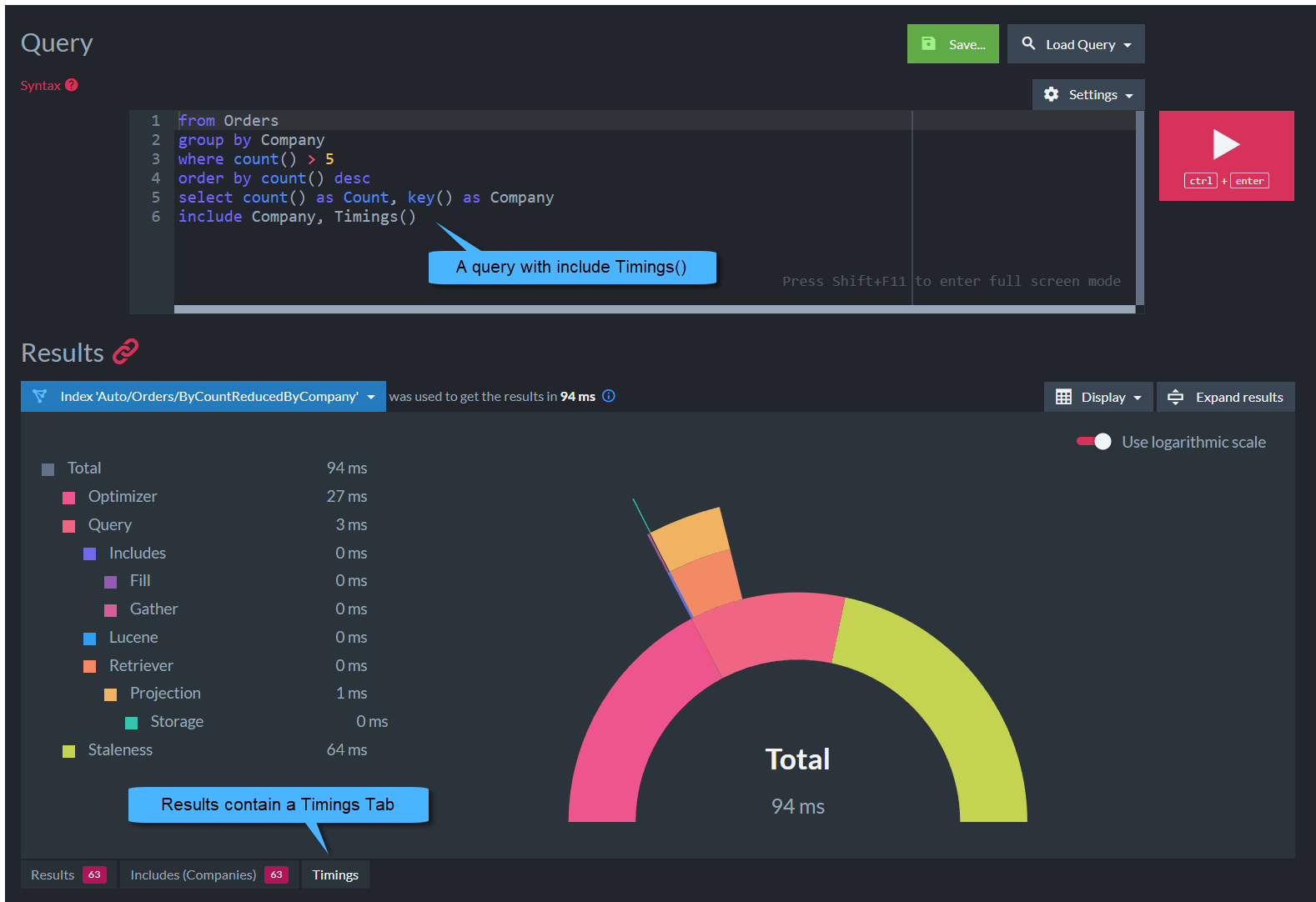
- The detailed timings can be viewed from the [Query view](https://docs.ravendb.net/6.2/studio/database/queries/query-view.md) in the Studio.
- Running an RQL query with `include timings()` will show an additional **Timings Tab**
with a graphical representation of the time spent in each query part.
## Syntax
```javascript
query.timings(timingsCallback)
```
| Parameter | Type | Description |
| - | - | - |
| **timingsCallback** | `(timingsCallback) => void` | \\- A callback function with an output parameter.\
\- The parameter passed to the callback will be filled with the `QueryTimings` object when query returns.\
\
|
| `QueryTimings` | | |
| - | - | - |
| **durationInMs** | `number` | Total duration |
| **timings** | `Record` | Dictionary with `QueryTimings` info per time part |
## Timings in a sharded database
- In a sharded database, timings for each part are provided **per shard**.
- Learn more in [timings in a sharded database](https://docs.ravendb.net/6.2/sharding/querying.md#timing-queries).