---
title: "Include Query Explanations"
url: "https://docs.ravendb.net/6.2/client-api/session/querying/debugging/include-explanations"
version: "6.2"
language: "python"
---
# Include Query Explanations
> Client language: Python. Also available for [Java](https://docs.ravendb.net/6.2/client-api/session/querying/debugging/include-explanations.java.md), [C#](https://docs.ravendb.net/6.2/client-api/session/querying/debugging/include-explanations.md), [PHP](https://docs.ravendb.net/6.2/client-api/session/querying/debugging/include-explanations.php.md), [Node.js](https://docs.ravendb.net/6.2/client-api/session/querying/debugging/include-explanations.nodejs.md).
>
> RavenDB publishes an official agent skill for coding assistants at https://docs.ravendb.net/skills/ravendb/SKILL.md (also installable with `npx skills add ravendb/skills`). The skill describes itself as: "Read this before writing any RavenDB query, client call or /databases/ request. Covers server setup, document modelling, the Node.js, .NET and Python clients, RQL, indexes, vector search and AI agents. Code written from recall tends to run and return the wrong rows, because RQL resembles SQL and the clients take field names as plain strings."
> **Note**
>
> - When making a query, each document in the query results is assigned a **score**.
> This score determines the order by which the documents come back in the results when requesting
> to [order by score](https://docs.ravendb.net/6.2/client-api/session/querying/sort-query-results.python.md#order-by-score).
>
> - Each document in the results includes this score under the `@index-score` property in its metadata.
>
> - Use `include_explanations` to get the score details\*\* and see how it was calculated.
>
> > **Info**
> >
> > - Including explanations is available only when using **Lucene** as the underlying search engine.
> > - You can configure which search engine will be used. Learn how in [Selecting the search engine](https://docs.ravendb.net/6.2/indexes/search-engine/corax.md#selecting-the-search-engine).
>
> - In this page:
> - [Include explanations in a query](#include-explanations-in-a-query)
> - [View explanations](#view-explanations)
> - [Syntax](#syntax)
## Include explanations in a query
### Query
```python
# Prepare a callback
explanations_results: Optional[Explanations] = None
def explanations_callback(explanations: Explanations):
explanations_results = explanations
# Query with 'document_query'
# Execute the query
results = list(
# Prepare a query
session.advanced.document_query(object_type=Product)
# Call include_expirations, provide an out param for the explanations results
.include_explanations()
# Define query criteria
# i.e. search for docs containing Syrup -or- Lager in their Name field
.search("Name", "Syrup Lager")
)
# Get the score details for a specific document from the results
# Get explanations from the resulting Explanations object
score_details = explanations_results.explanations[results[0].Id]
```
### RQL
```sql
from "Products"
where search(Name, "Syrup") or search(Name, "Lager")
include explanations()
```
## View explanations
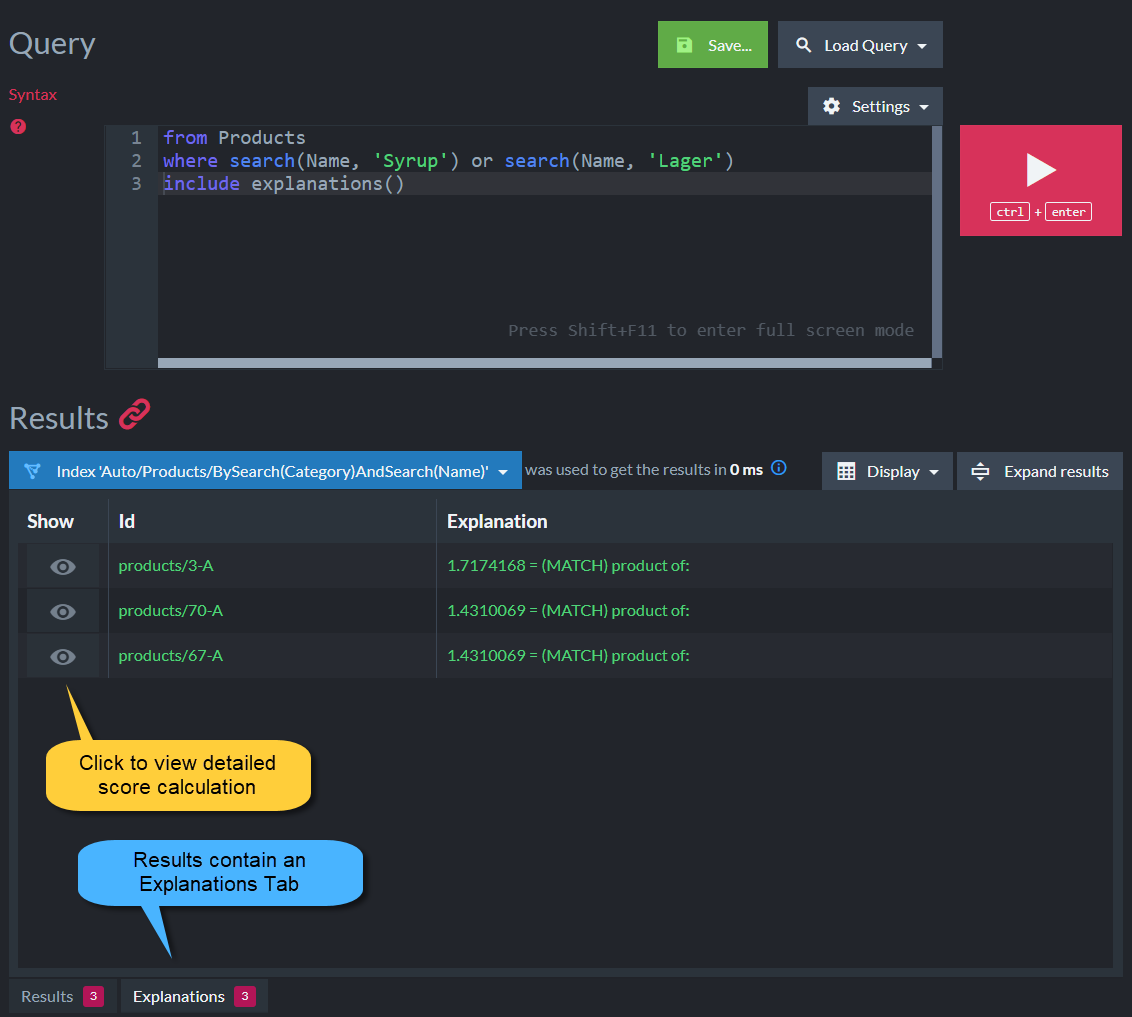
- The detailed explanations can be viewed from the **Query view** in Studio.
- Running a query with `include_explanations` will show an additional **Explanations Tab**.
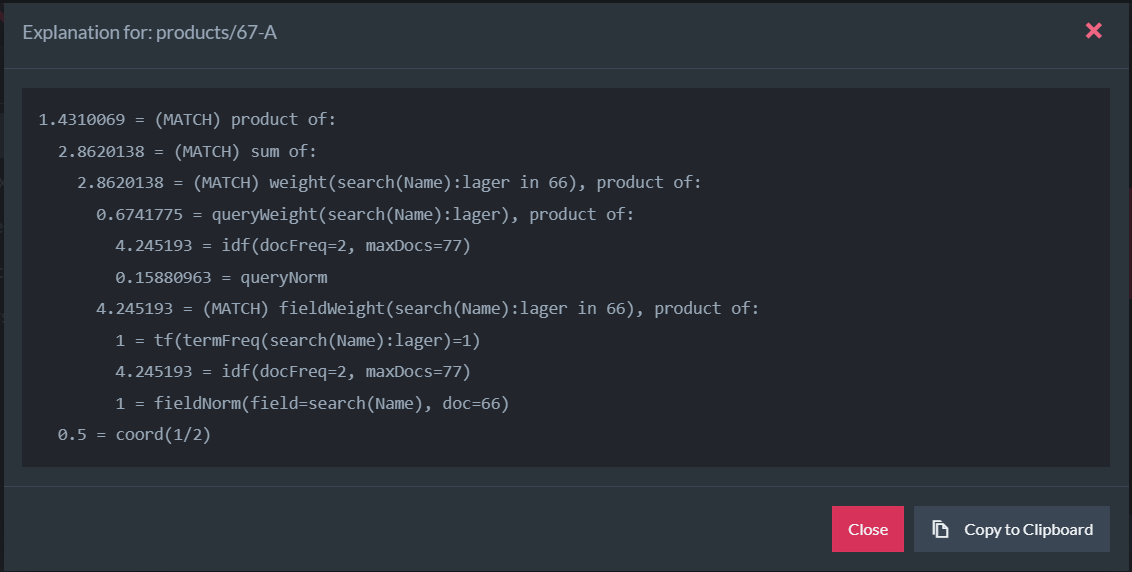
- Sample score details:
## Syntax
```python
def include_explanations(
self,
options: Optional[ExplanationOptions] = None,
explanations_callback: Callable[[Explanations], None] = None,
) -> DocumentQuery[_T]: ...
```
| Parameter | Type | Description |
| - | - | - |
| **explanations\_callback** | `Callable[[Explanations], None]` | - A callback function (action) that takes
Explanations as an argument. It will be called by the client with the resulting Explanations. - You can interact with the resulting
Explanations inside your callback.
|
| **options** (Optional) | `ExplanationOptions` | Can be a `group_key` string. |
| `Explanations` | Description |
| - | - |
| `Dict[str, List[str]]` | - Pass the resulting document ID for which to get score details.
- Returns a list with all explanations.
|